
NetWare Pure IP on DOS
It is fair to say that Novell struggled with moving from the IPX protocol to TCP/IP. Of course a big part of the problem was that IPX worked extremely well on LANs and IP brought absolutely no advantages for basic file sharing, only additional complexity. Specifically in DOS environments, a major disadvantage of TCP/IP was that it is far more complex to implement and therefore consumes significantly more memory.
But in many corporate and government networks, there was a strong push towards TCP/IP from the early 1990s, greatly accelerating in the mid-1990s when the Internet started becoming popular and very soon, indispensable. TCP/IP support became a requirement which Novell (or Microsoft for that matter) could not stop. And once TCP/IP had a foot in the door, there was understandable pressure to get rid of other protocols.
Novell’s first serious attempt at a solution wasNetWare/IP (1993), or NWIP for short. NWIP was an add-on product for NetWare 3.x and later came bundled with NetWare 4.x. The trouble with NWIP was that it was relatively difficult to set up and manage, and heavily relied on DNS.
With NetWare 5.0 (1998), Novell implemented a different solution, often called Pure IP. The design of Pure IP was closer to IPX and usedSLP (Service Location Protocol) to let clients automatically find the nearest server, just like classic NetWare did. Clients still needed some way to configure their IP address but by then, DHCP was widespread and unlike NetWare/IP, Pure IP did not need any specialDHCP options.
When Novell ported their networking services to Linux in OES, Pure IP was the only option. While “proper” NetWare offered IPX support until the end, OES never did and Pure IP was the only game in town.

Note that Linux did support IPX in the past, and there were IPX-based NetWare clients and evenservers.
For migrating existing IPX and NetWare/IP networks to Pure IP, Novell offeredIPX Compatibility Mode Driver (CMD) which acted as a bridge between IPX and Pure IP networks. Of course CMD required NetWare and did not run on Linux-based OES.
Continue reading→Wait here. No, wait here!
While working on a hobby project, I set up an OS/2 MCP2 (Convenience Package 2 for OS/2 Warp 4) virtual machine with a debug kernel and an expectation that I’d reboot the VM a lot. I was disturbed to find that there was a consistent 30-second delay on boot while setting up networking, which accounted for something like two thirds of the VM’s boot-up time.
At first I thought maybe the DHCP client was being silly, or perhaps there could be a bug in the NIC emulation. Upon closer look, it turned out that the delay was happening in theMPTSTART.CMD script, which looks like this:
@ECHO OFF
IF NOT EXIST C:\MPTN\BIN\SETUP.CMD GOTO NBSETUP
INETWAIT 1>NUL
IF ERRORLEVEL 1 GOTO END
CALL C:\MPTN\BIN\SETUP.CMD
:NBSETUP
IF NOT EXIST C:\MPTN\BIN\NBSETUP.CMD GOTO END
CALL C:\MPTN\BIN\NBSETUP.CMD
:END
The referencedSETUP.CMD script does exist on the system, andNBSETUP.CMD does not. The 30-second delay was occurring in the somewhat mysteriousINETWAIT command.
The OS/2 Display Driver Zoo
I have recently explored (again) the possibility of writing a high-res display driver for virtualized OS/2. But I ran (again) into a dizzying array of possible solutions, each with its own advantages and a good deal of drawbacks.
OS/2 display drivers underwent something of a rapid evolution in the 1992-1996 timeframe. The OS/2 Warp 4 DDK comes with no fewer than four significantly different display driver code bases, which reflect this evolution.
Warning: This article is long! It contains notes from research into the evolution of OS/2 display drivers, DDK sample code, and accompanying documentation. Much of the article is something of a signpost, showing where to find what.
OS/2 1.x
In the days of OS/2 1.x, things were simple. Display drivers were 16-bit, written in assembler (out of necessity more than anything else), and there was only one driver model. The drivers for OS/2 Presentation manager (PM, code name Winthorn) were circa 1987 cloned from Windows 2.x display drivers, since the inner workings (bitmaps, patterns, brushes, fonts, ROPs, and all that jazz) were very similar. Like Windows drivers, OS/2 display drivers worked by “compiling” (dynamically constructing) code to implement various drawing functions.

OS/2 1.1 (1988) supported device driver interface (DDI) version 1.0, being the first Presentation Manager release. The interface resembled Windows 2.x and was just as ugly.
In OS/2 1.x, the Presentation Manager shell (PMSHELL.EXE) directly linked against the display driver, which had to be named DISPLAY.DLL–much like in Windows 3.x and earlier the display driver had to be called DISPLAY.DRV.
Continue reading→Messy Mastering
Large companies like IBM, Microsoft, or Novell typically had a well defined process for releasing software on floppies. More often than not, files were not directly copied onto a physical floppy; instead, a tool was used to create an image of a floppy disk from distribution files, and the image was then sent off for mass duplication.
Quite often, timestamps of files were set to a predefined value when creating the image. That practice is probably as old as timestamps in the FAT file system. PC DOS 1.0 kept track of the date when a file was modified, but not the time of day. PC DOS 1.0 has all non-system files set to a 08/04/1981 date, although it istheoretically possible that this was a result of normal file manipulation.

With PC DOS 1.1, there is no ambiguity. The timestamps of all files are set to 12:00:00 on 05/07/1982. Floppy disks are not nearly fast enough to write all those files within two seconds (the FAT timestamp resolution), even in the extremely unlikely case that someone sat there waiting until exactly noon to start the operation. It is a given that IBM artificially set the timestamps of all files to match, and that was before the PC was even a year old.
It is notable that Novell followed a different strategy and strictly kept the original timestamps of shipping files. It was common that different releases had some files with matching timestamps and some files different. One could be reasonably confident that two files with the same name and timestamp were in fact identical. That was not always the case with IBM or Microsoft, where two files with different timestamps were often identical. And in rare cases, two different versions of a file were distributed with the same timestamp, arguably completely defeating the purpose of timestamps.
Continue reading→8×19 Text Mode Font Origins
I was recently made aware of something that I had noticed before, but never paid much attention to. Consider this screenshot of a BIOS POST screen:
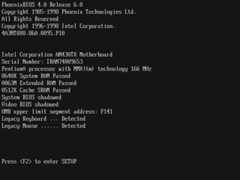
VGA text modes usually use 720×400 resolution and 8×16 fonts (expanded to 9×16). The above screenshot uses 640×480 resolution (VGA graphics), but it is with a high degree a certainty a text mode, using a custom 8×19 font. The BIOS is a Phoenix BIOS 4.0 Release 6.0, running on an Intel Anchorage (AN430TX) board.
For the sake of clarity: The screenshot was taken by digitizing the analog VGA output of a physical AN430TX board with an integrated ATI Rage 3D graphics chip. The VGA connector was plugged into a Lantronix Spider KVM, which was used to save the screenshot. It is not a screenshot of an emulated system.
Some of the earliest examples of boards with an 8×19 font werereportedly Intel Anchorage AN430TX (see above) and Intel Atlanta AL430LX (one of the first AGP-capable boards), both released in 1997. These were probably the first boards using Phoenix BIOS after Intel had been using AMI BIOS for several years, a fact which may or may not be relevant.
Continue reading→More than Two Hard Disks in DOS
Investigating the rather odd behavior of theMicrosoft OS/2 1.21 disk driver led me toCompaq and their EXTDISK.SYS driver. While experimenting with various setups, I realized that DOS versions older than 5.0 do not support more than two hard disks exposed by the system’s BIOS, and will in fact quite likely hang early during boot-up if there are “too many” hard disks.
This seems to have been one of the many things that “everyone knew” back in the day, similar to the fact that DOS versions older than 3.3 mayhang while booting from disks with significantly more than 17 sectors per track.
As was the case with the “too many sectors per track” problem, the issue with “too many hard disks” was missed for years simply because no one had a PC with more than two hard disks. This was a technical rather than architectural limitation. While the IBM PC/XT and PC/AT BIOS implementations were limited to two hard disks, the INT 13h interface as such was not.
In the days of full-height 5¼” drives, it simply was not feasible to install more than two hard disks into a PC, especially when a 5¼” floppy drive was also required. Even the big IBM PS/2 Model 80 (1987) with a tower case could only house two full-height 5¼” drives. There might also be trouble with the power supply, as the PC hard disks of the time were not designed for staggered spin-up and a standard AT power supply might have trouble spinning up four drives at the same time.
Sure, there were half-height hard disks, but who wanted four drives in the first place? People who needed to maximize the storage capacity… and the most obvious way to do that was buying a large capacity drive, which in the 1980s was inevitably a full-height 5¼” monster. Like my1988-model 650 MB ESDI drive, for example.
Yes, there were solutions like the NetWare DCB which supported many drives, but those were only usable by NetWare and did not expose the drives via INT 13h.
Two things happened circa 1988. One was Compaq releasing the Deskpro 386/25 with an expansion unit option, a system which supported up to four hard AT-style disks (that is, the expansion unit housed up to two ESDI drives accessible via the PC/AT hard disk style programming interface, which may be called WD1003 or WD1010 or several other things). The other development was Adaptec releasing the AHA-1540/1542 SCSI HBA, and there were perhaps other SCSI vendors as well.
Continue reading→Learn Something Old Every Day, Part XVII: DHCP and ARP Don’t Mix in WSA SMP
I just spent an inordinate amount of time debugging a VM running OS/2 Warp Server Advanced SMP (WSA SMP). The VM was working fine (except for sometimes hanging very early during boot, a known issue with the SMP kernel), but TCP/IP networking justwould not work.
It’s not that networking did not work–using LAN Server with NETBEUI (that is, NetBIOS Frames protocol) worked fine. So I started digging deeper. I soon realized that Warp Server was unable to resolve hardware addresses using ARP. It sent out ARP queries, but never received any response. That is, the other enddid send an ARP response, but it just seems to have vanished somewhere in the ether before it could get processed by the TCP/IP stack.
I tried to find out what debugging tools were available. I checked the packet statistics–nothing received. OS/2 comes with a pair of handy debugging tools, IPTRACE and IPFORMAT. These are sort of like an old-timey Wireshark, working on the IBM TCP/IP protocol stack. Sure enough, IPTRACE/IPFORMAT showed that ARP packets were going out, but the replies weren’t coming in.
If I manually added the requisite ARP entries (usingarp -s) then TCP/IP happily sprang into action. But without that, no luck. Nothing worked because the system could not even figure out how to talk to the gateway. The only thing that worked was DHCP, because by definition the DHCP client does not need to know the server’s address (either IP or hardware).
1990 Networking: LAN Manager 2.0
In 1990, Microsoft released LAN Manager (LM) 2.0, a member of a long line of Microsoft’s networking products that started with MS-NET circa 1984 and eventually morphed into Windows NT file sharing.

LAN Manager 1.0 was released in 1988 as an OEM-only product, with the largest OEM being 3Com and their3+Open. Microsoft collaborated with 3Com1 and the two companies jointly published the NDIS specification for network drivers. However, the relationship soured in 1990 after Microsoft decided to sell shrink-wrapped LAN Manager directly and bypass OEMs.

The OS/2 Museum owns a boxed copy of Microsoft LAN Manager 2.0 from circa December 1990, but recently a pirated copy of LM 2.0 from June 1990 came to light, found right next to MS OS/2 1.21 disks. That brought an obvious and simple question: When was LAN Manager 2.0 released? The answer, is unfortunately far from simple.
Besides the warez archive, there isphysical evidence that Microsoft builtsomething at the end of June 1990 and that it was the “final” release of LAN Manager 2.0. Normally a press release would answer a lot of questions, but one for LM 2.0 has remained rather elusive so far. The closest thing we have isthis press release about OS/2 1.21 from August 1990. But it happens to be highly relevant.
Continue reading→Learn Something Old Every Day, Part XVI: DOS 4.0 SELECT Is Too Clever
A while ago I discovered an antique pirated copy of IBM DOS 4.00 on 5.25″ media, which was something that was missing in my archive. And by antique I mean from August 1988, when DOS 4.0 was practically brand new.

There were SNATCH-IT disk images in filesDOS400-1.ARC to DOS400-5.ARC (DOS400-6.ARC includes the disk from the IBM DOS 4.0 Technical Reference, not part of the OS per se). There were two problems. At first, I didn’t know what to do with SNATCH-IT images at all, and also the image of the install disk (DS40INST.CP2) was corrupted, with ARC reporting a CRC error.
Once I sorted out SNATCH-IT image decoding, I was left with the corrupted disk. The corrupted image was 60 bytes longer than it should have been, but it was actually mostly OK. A “feature” of old compressors like ARC is that they work with blocks of several kilobytes in size, and if one is lucky, one block will be corrupted but the rest won’t.
I set out to determine where exactly the SNATCH-IT image was corrupted. Armed with the knowledge of the format, I found the corruption was in one of the data blocks (large chunks, a few dozen kilobytes in size, that hold bare sector data) and not in any of the control structures. So far so good; since I have images of 720K disks of IBM DOS 4.00, I would likely have good files to recover from the damage.
Then I tried to cut out the extra 60 bytes while causing minimal damage. That was tricky because the sector data was stored interleaved in the SNATCH-IT image. In the end I localized the damage and created a semi-fixed DS40INST.CP2 which I could convert to a raw image.
Continue reading→Where Did CP852 Come From Again?
Anearlier article explored the history of codepage 852 (Latin-2 PC codepage) in released and pre-release versions of DOS and OS/2. At the time of this writing (June 2025), the earliest OS/2 build with some form of CP852 support including keyboard layouts and explicit knowledge of countries using CP852 (Czechoslovakia, Hungary, Poland, Yugoslavia) was OS/2 2.0 build 6.64 from March/April 1990. The first officially released OS with CP852 support was DOS 5.0 in June 1991.
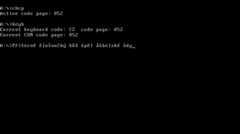
There is confusion as to how old CP852 is. IBM’s globalization registry suggests thatCP852 is from 1993, but that is patently impossible because it was included in the DOS 5.0 release in 1991. And the article referenced above clearly demonstrates that CP852 existed in early 1990.
In fact there is every reason to think that CP852 is a contemporary of CP855 (Cyrillic PC codepage) which issupposedly from 1988, or perhaps even a contemporary of CP850 (Latin-1 PC)from 1986.
Continue reading→