 ▲
▲Download
Cheat Sheet
Documentation
Quickstart
Installation
Tutorial
Features
Security
Performance
Advanced
Reference
Commands
Functions
• Aggregate• Window
Data Types
SQL Grammar
System Tables
Javadoc
PDF (2 MB)
Support
FAQ
Error Analyzer
Google Group
Appendix
History
License
Build
Links
MVStore
Architecture
Migration to 2.0
Features
Feature ListH2 in Use
Connection Modes
Database URL Overview
Connecting to an Embedded (Local) Database
In-Memory Databases
Database Files Encryption
Database File Locking
Opening a Database Only if it Already Exists
Closing a Database
Ignore Unknown Settings
Changing Other Settings when Opening a Connection
Custom File Access Mode
Multiple Connections
Database File Layout
Logging and Recovery
Compatibility
Auto-Reconnect
Automatic Mixed Mode
Page Size
Using the Trace Options
Using Other Logging APIs
Read Only Databases
Read Only Databases in Zip or Jar File
Generated Columns (Computed Columns) / Function Based Index
Multi-Dimensional Indexes
User-Defined Functions and Stored Procedures
Pluggable or User-Defined Tables
Triggers
Compacting a Database
Cache Settings
External Authentication (Experimental)
Feature List
Main Features
- Very fast database engine
- Open source
- Written in Java
- Supports standard SQL, JDBC API
- Embedded and Server mode, Clustering support
- Strong security features
- The PostgreSQL ODBC driver can be used
- Multi version concurrency
Additional Features
- Disk based or in-memory databases and tables, read-only database support, temporary tables
- Transaction support (read uncommitted, read committed, repeatable read, snapshot), 2-phase-commit
- Multiple connections, row-level locking
- Cost based optimizer, using a genetic algorithm for complex queries, zero-administration
- Scrollable and updatable result set support, large result set, external result sorting, functions can return a result set
- Encrypted database (AES), SHA-256 password encryption, encryption functions, SSL
SQL Support
- Support for multiple schemas, information schema
- Referential integrity / foreign key constraints with cascade, check constraints
- Inner and outer joins, subqueries, read only views and inline views
- Triggers and Java functions / stored procedures
- Many built-in functions, including XML and lossless data compression
- Wide range of data types including large objects (BLOB/CLOB) and arrays
- Sequences and identity columns, generated columns (can be used for function based indexes)
- ORDER BY, GROUP BY, HAVING, UNION, OFFSET / FETCH (including PERCENT and WITH TIES), LIMIT, TOP, DISTINCT / DISTINCT ON (...)
- Window functions
- Collation support, including support for the ICU4J library
- Support for users and roles
- Compatibility modes for IBM DB2, Apache Derby, HSQLDB, MS SQL Server, MySQL, Oracle, and PostgreSQL.
Security Features
- Includes a solution for the SQL injection problem
- User password authentication uses SHA-256 and salt
- For server mode connections, user passwords are never transmitted in plain text over the network (even when using insecure connections; this only applies to the TCP server and not to the H2 Console however; it also doesn't apply if you set the password in the database URL)
- All database files (including script files that can be used to backup data) can beencrypted using the AES-128 encryption algorithm
- The remote JDBC driver supports TCP/IP connections over TLS
- The built-in web server supports connections over TLS
- Passwords can be sent to the database using char arrays instead of Strings
Other Features and Tools
- Small footprint (around 2.5 MB), low memory requirements
- Multiple index types (b-tree, tree, hash)
- Support for multi-dimensional indexes
- CSV (comma separated values) file support
- Support for linked tables, and a built-in virtual 'range' table
- Supports the
EXPLAIN PLANstatement; sophisticated trace options - Database closing can be delayed or disabled to improve the performance
- Web-based Console application (translated to many languages) with autocomplete
- The database can generate SQL script files
- Contains a recovery tool that can dump the contents of the database
- Support for variables (for example to calculate running totals)
- Automatic re-compilation of prepared statements
- Uses a small number of database files
- Uses a checksum for each record and log entry for data integrity
- Well tested (high code coverage, randomized stress tests)
H2 in Use
For a list of applications that work with or use H2, see:Links.
Connection Modes
The following connection modes are supported:
- Embedded mode (local connections using JDBC)
- Server mode (remote connections using JDBC or ODBC over TCP/IP)
- Mixed mode (local and remote connections at the same time)
Embedded Mode
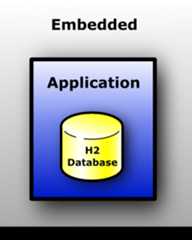
In embedded mode, an application opens a database from within the same JVM using JDBC.This is the fastest and easiest connection mode.The disadvantage is that a database may only be open in one virtual machine (and class loader) at any time.As in all modes, both persistent and in-memory databases are supported.There is no limit on the number of database open concurrently,or on the number of open connections.
In embedded mode I/O operations can be performed by application's threads that execute a SQL command.The application may not interrupt these threads, it can lead to database corruption,because JVM closes I/O handle during thread interruption.Consider other ways to control execution of your application.When interrupts are possible theasync:file system can be used as a workaround, but full safety is not guaranteed.It's recommended to use the client-server model instead, the client side may interrupt own threads.
Server Mode
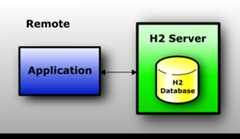
When using the server mode (sometimes called remote mode or client/server mode),an application opens a database remotely using the JDBC or ODBC API.A server needs to be started within the same or another virtual machine, or on another computer.Many applications can connect to the same database at the same time, by connecting to this server.Internally, the server process opens the database(s) in embedded mode.
The server mode is slower than the embedded mode, because all data is transferred over TCP/IP.As in all modes, both persistent and in-memory databases are supported.There is no limit on the number of database open concurrently per server,or on the number of open connections.
Mixed Mode
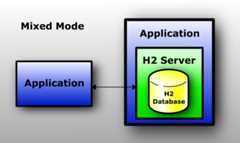
The mixed mode is a combination of the embedded and the server mode.The first application that connects to a database does that in embedded mode, but also startsa server so that other applications (running in different processes or virtual machines) canconcurrently access the same data. The local connections are as fast as ifthe database is used in just the embedded mode, while the remoteconnections are a bit slower.
The server can be started and stopped from within the application (using the server API),or automatically (automatic mixed mode). When using theautomatic mixed mode,all clients that want to connect to the database (no matter ifit's an local or remote connection) can do so using the exact same database URL.
Database URL Overview
This database supports multiple connection modes and connection settings.This is achieved using different database URLs. Settings in the URLs are not case sensitive.
| Topic | URL Format and Examples |
|---|---|
| Embedded (local) connection | jdbc:h2:[file:][<path>]<databaseName> jdbc:h2:~/test jdbc:h2:file:/data/sample jdbc:h2:file:C:/data/sample (Windows only) |
| In-memory (private) | jdbc:h2:mem: |
| In-memory (named) | jdbc:h2:mem:<databaseName> jdbc:h2:mem:test_mem |
| Server mode (remote connections) using TCP/IP | jdbc:h2:tcp://<server>[:<port>]/[<path>]<databaseName> jdbc:h2:tcp://localhost/~/test jdbc:h2:tcp://dbserv:8084/~/sample jdbc:h2:tcp://localhost/mem:test |
| Server mode (remote connections) using TLS | jdbc:h2:ssl://<server>[:<port>]/[<path>]<databaseName> jdbc:h2:ssl://localhost:8085/~/sample; |
| Using encrypted files | jdbc:h2:<url>;CIPHER=AES jdbc:h2:ssl://localhost/~/test;CIPHER=AES jdbc:h2:file:~/secure;CIPHER=AES |
| File locking methods | jdbc:h2:<url>;FILE_LOCK={FILE|SOCKET|FS|NO} jdbc:h2:file:~/private;CIPHER=AES;FILE_LOCK=SOCKET |
| Only open if it already exists | jdbc:h2:<url>;IFEXISTS=TRUE jdbc:h2:file:~/sample;IFEXISTS=TRUE |
| Don't close the database when the VM exits | jdbc:h2:<url>;DB_CLOSE_ON_EXIT=FALSE |
| Execute SQL on connection | jdbc:h2:<url>;INIT=RUNSCRIPT FROM '~/create.sql' jdbc:h2:file:~/sample;INIT=RUNSCRIPT FROM '~/create.sql'\;RUNSCRIPT FROM '~/populate.sql' |
| User name and/or password | jdbc:h2:<url>[;USER=<username>][;PASSWORD=<value>] jdbc:h2:file:~/sample;USER=sa;PASSWORD=123 |
| Debug trace settings | jdbc:h2:<url>;TRACE_LEVEL_FILE=<level 0..3> jdbc:h2:file:~/sample;TRACE_LEVEL_FILE=3 |
| Ignore unknown settings | jdbc:h2:<url>;IGNORE_UNKNOWN_SETTINGS=TRUE |
| Custom file access mode | jdbc:h2:<url>;ACCESS_MODE_DATA=rws |
| Database in a zip file | jdbc:h2:zip:<zipFileName>!/<databaseName> jdbc:h2:zip:~/db.zip!/test |
| Compatibility mode | jdbc:h2:<url>;MODE=<databaseType> jdbc:h2:~/test;MODE=MYSQL;DATABASE_TO_LOWER=TRUE |
| Auto-reconnect | jdbc:h2:<url>;AUTO_RECONNECT=TRUE jdbc:h2:tcp://localhost/~/test;AUTO_RECONNECT=TRUE |
| Automatic mixed mode | jdbc:h2:<url>;AUTO_SERVER=TRUE jdbc:h2:~/test;AUTO_SERVER=TRUE |
| Page size | jdbc:h2:<url>;PAGE_SIZE=512 |
| Changing other settings | jdbc:h2:<url>;<setting>=<value>[;<setting>=<value>...] jdbc:h2:file:~/sample;TRACE_LEVEL_SYSTEM_OUT=3 |
Connecting to an Embedded (Local) Database
The database URL for connecting to a local database isjdbc:h2:[file:][<path>]<databaseName>.The prefixfile: is optional. If no or only a relative path is used, then the current workingdirectory is used as a starting point. The case sensitivity of the path and database name depend on theoperating system, however it is recommended to use lowercase letters only.The database name must be at least three characters long(a limitation ofFile.createTempFile).The database name must not contain a semicolon.To point to the user home directory, use~/, as in:jdbc:h2:~/test.
In-Memory Databases
For certain use cases (for example: rapid prototyping, testing, high performanceoperations, read-only databases), it may not be required to persist data, or persist changes to the data.This database supports the in-memory mode, where the data is not persisted.
In some cases, only one connection to a in-memory database is required.This means the database to be opened is private. In this case, the database URL isjdbc:h2:mem: Opening two connections within the same virtual machinemeans opening two different (private) databases.
Sometimes multiple connections to the same in-memory database are required.In this case, the database URL must include a name. Example:jdbc:h2:mem:db1.Accessing the same database using this URL only works within the same virtual machine andclass loader environment.
To access an in-memory database from another process or from another computer,you need to start a TCP server in the same process as the in-memory database was created.The other processes then need to access the database over TCP/IP or TLS,using a database URL such as:jdbc:h2:tcp://localhost/mem:db1.
By default, closing the last connection to a database closes the database.For an in-memory database, this means the content is lost.To keep the database open, add;DB_CLOSE_DELAY=-1 to the database URL.To keep the content of an in-memory database as long as the virtual machine is alive, usejdbc:h2:mem:test;DB_CLOSE_DELAY=-1.This may create a memory leak, when you need to remove the database, usetheSHUTDOWN command.
Database Files Encryption
The database files can be encrypted.Three encryption algorithms are supported:
- "AES" - also known as Rijndael, only AES-128 is implemented.
- "XTEA" - the 32 round version.
- "FOG" - pseudo-encryption only useful for hiding data from a text editor.
To use file encryption, you need to specify the encryption algorithm (the 'cipher')and the file password (in addition to the user password) when connecting to the database.
Creating a New Database with File Encryption
By default, a new database is automatically created if it does not exist yetwhen theembedded url is used.To create an encrypted database, connect to it as it would already exist locally using the embedded URL.
Connecting to an Encrypted Database
The encryption algorithm is set in the database URL, and the file password is specified in the password field,before the user password. A single space separates the file passwordand the user password; the file password itself may not contain spaces. File passwordsand user passwords are case sensitive. Here is an example to connect to apassword-encrypted database:
String url = "jdbc:h2:~/test;CIPHER=AES";String user = "sa";String pwds = "filepwd userpwd";conn = DriverManager. getConnection(url, user, pwds);
Encrypting or Decrypting a Database
To encrypt an existing database, use theChangeFileEncryption tool.This tool can also decrypt an encrypted database, or change the file encryption key.The tool is available from within the H2 Console in the tools section, or you can run it from the command line.The following command line will encrypt the databasetest in the user home directorywith the file passwordfilepwd and the encryption algorithm AES:
java -cp h2*.jar org.h2.tools.ChangeFileEncryption -dir ~ -db test -cipher AES -encrypt filepwd
Database File Locking
Whenever a database is opened, a lock file is created to signal other processesthat the database is in use. If database is closed, or if the process that openedthe database terminates, this lock file is deleted.
The following file locking methods are implemented:
- The default method is
FILEand uses a watchdog thread toprotect the database file. The watchdog reads the lock file each second. - The second method is
SOCKETand opens a server socket.The socket method does not require reading the lock file every second.The socket method should only be used if the database filesare only accessed by one (and always the same) computer. - The third method is
FS.This will use native file locking usingFileChannel.lock. - It is also possible to open the database without file locking;in this case it is up to the application to protect the database files.Failing to do so will result in a corrupted database.Using the method
NOforces the database to not create a lock file at all.Please note that this is unsafe as another process is able to open the same database,possibly leading to data corruption.
To open the database with a different file locking method, use the parameterFILE_LOCK.The following code opens the database with the 'socket' locking method:
String url = "jdbc:h2:~/test;FILE_LOCK=SOCKET";
For more information about the algorithms, seeAdvanced / File Locking Protocols.
Opening a Database Only if it Already Exists
By default, when an application callsDriverManager.getConnection(url, ...)withembedded URL and the database specified in the URL does not yet exist,a new (empty) database is created.In some situations, it is better to restrict creating new databases, and only allow to openexisting databases. To do this, add;IFEXISTS=TRUEto the database URL. In this case, if the database does not already exist, an exception is thrown whentrying to connect. The connection only succeeds when the database already exists.The complete URL may look like this:
String url = "jdbc:h2:/data/sample;IFEXISTS=TRUE";
Closing a Database
Delayed Database Closing
Usually, a database is closed when the last connection to it is closed. In some situationsthis slows down the application, for example when it is not possible to keep at least one connection open.The automatic closing of a database can be delayed or disabled with the SQL statementSET DB_CLOSE_DELAY <seconds>.The parameter <seconds> specifies the number of seconds to keepa database open after the last connection to it was closed. The following statementwill keep a database open for 10 seconds after the last connection was closed:
SET DB_CLOSE_DELAY 10
The value -1 means the database is not closed automatically.The value 0 is the default and means the database is closed when the last connection is closed.This setting is persistent and can be set by an administrator only.It is possible to set the value in the database URL:jdbc:h2:~/test;DB_CLOSE_DELAY=10.
Don't Close a Database when the VM Exits
By default, a database is closed when the last connection is closed. However, if it is never closed,a persistent database is closed when the virtual machine exits normally, using a shutdown hook.In some situations, the database should not be closed in this case, for example because thedatabase is still used at virtual machine shutdown (to store the shutdown process in the database for example).For those cases, the automatic closing of the database can be disabled in the database URL.The first connection (the one that is opening the database) needs toset the option in the database URL (it is not possible to change the setting afterwards).The database URL to disable database closing on exit is:
String url = "jdbc:h2:~/test;DB_CLOSE_ON_EXIT=FALSE";Warning: when database closing on exit is disabled, an applicationmust execute theSHUTDOWN command by itself in its own shutdown hookafter completion of all operations with database to avoid data lossand should not try to establish new connections to database after that.
Execute SQL on Connection
Sometimes, particularly for in-memory databases, it is useful to be able to execute DDL or DMLcommands automatically when a client connects to a database. This functionality is enabled viathe INIT property. Note that multiple commands may be passed to INIT, but the semicolon delimitermust be escaped, as in the example below.
String url = "jdbc:h2:mem:test;INIT=runscript from '~/create.sql'\\;runscript from '~/init.sql'";
Please note the double backslash is only required in a Java or properties file.In a GUI, or in an XML file, only one backslash is required:
<property name="url" value="jdbc:h2:mem:test;INIT=create schema if not exists test\;runscript from '~/sql/init.sql'"/>
Backslashes within the init script (for example within a runscript statement, to specify the folder names in Windows)need to be escaped as well (using a second backslash). It might be simpler to avoid backslashes in folder names for this reason;use forward slashes instead.
Ignore Unknown Settings
Some applications (for example OpenOffice.org Base) pass some additional parameterswhen connecting to the database. Why those parameters are passed is unknown.The parametersPREFERDOSLIKELINEENDS andIGNOREDRIVERPRIVILEGES are such examples;they are simply ignored to improve the compatibility with OpenOffice.org. If an applicationpasses other parameters when connecting to the database, usually the database throws an exceptionsaying the parameter is not supported. It is possible to ignored such parameters by adding;IGNORE_UNKNOWN_SETTINGS=TRUE to the database URL.
Changing Other Settings when Opening a Connection
In addition to the settings already described,other database settings can be passed in the database URL.Adding;setting=value at the end of a database URL is thesame as executing the statementSET setting value just afterconnecting. For a list of supported settings, seeSQL Grammaror theDbSettings javadoc.
Custom File Access Mode
Usually, the database opens the database file with the access moderw, meaning read-write (except for read only databases,where the moder is used).To open a database in read-only mode if the database file is not read-only, useACCESS_MODE_DATA=r.Also supported arerws andrwd.This setting must be specified in the database URL:
String url = "jdbc:h2:~/test;ACCESS_MODE_DATA=rws";
For more information seeDurability Problems.On many operating systems the access moderws does not guarantee that the data is written to the disk.
Multiple Connections
Opening Multiple Databases at the Same Time
An application can open multiple databases at the same time, including multipleconnections to the same database. The number of open database is only limited by the memory available.
Multiple Connections to the Same Database: Client/Server
If you want to access the same database at the same time from different processes or computers,you need to use the client / server mode. In this case, one process acts as the server, and theother processes (that could reside on other computers as well) connect to the server via TCP/IP(or TLS over TCP/IP for improved security).
Multithreading Support
This database is multithreading-safe.If an application is multi-threaded, it does not need to worry about synchronizing access to the database.An application should normally use one connection per thread.This database synchronizes access to the same connection, but other databases may not do this.To get higher concurrency, you need to use multiple connections.
An application can use multiple threads that access the same database at the same time.Threads that use different connections can use the database concurrently.
Locking, Lock-Timeout, Deadlocks
Usually,SELECT statements will generate read locks. This includes subqueries.Statements that modify data use write locks on the modified rows.It is also possible to issue write locks without modifying data,using the statementSELECT ... FOR UPDATE.Data definition statements may issue exclusive locks on tables.The statementsCOMMIT andROLLBACK releases all open locks.The commandsSAVEPOINT andROLLBACK TO SAVEPOINT don't affect locks.The locks are also released when the autocommit mode changes, and for connections withautocommit set to true (this is the default), locks are released after each statement.The following statements generate locks:
| Type of Lock | SQL Statement |
|---|---|
| Read | SELECT * FROM TEST; CALL SELECT MAX(ID) FROM TEST; SCRIPT; |
| Write (row-level) | SELECT * FROM TEST WHERE 1=0 FOR UPDATE; |
| Write (row-level) | INSERT INTO TEST VALUES(1, 'Hello'); INSERT INTO TEST SELECT * FROM TEST; UPDATE TEST SET NAME='Hi'; DELETE FROM TEST; |
| Exclusive | ALTER TABLE TEST ...; CREATE INDEX ... ON TEST ...; DROP INDEX ...; |
The number of seconds until a lock timeout exception is thrown can beset separately for each connection using the SQL commandSET LOCK_TIMEOUT <milliseconds>.The initial lock timeout (that is the timeout used for new connections) can be set using the SQL commandSET DEFAULT_LOCK_TIMEOUT <milliseconds>. The default lock timeout is persistent.
Database File Layout
The following files are created for persistent databases:
| File Name | Description | Number of Files |
|---|---|---|
| test.mv.db | Database file. Contains the transaction log, indexes, and data for all tables. Format: <database>.mv.db | 1 per database |
| test.newFile | Temporary file for database compaction. Contains the new MVStore file. Format: <database>.newFile | 0 or 1 per database |
| test.tempFile | Temporary file for database compaction. Contains the temporary MVStore file. Format: <database>.tempFile | 0 or 1 per database |
| test.lock.db | Database lock file. Automatically (re-)created while the database is in use. Format: <database>.lock.db | 1 per database (only if in use) |
| test.trace.db | Trace file (if the trace option is enabled). Contains trace information. Format: <database>.trace.dbRenamed to <database>.trace.db.old if too big. | 0 or 1 per database |
| test.123.temp.db | Temporary file. Contains a temporary blob or a large result set. Format: <database>.<id>.temp.db | 1 per object |
Moving and Renaming Database Files
Database name and location are not stored inside the database files.
While a database is closed, the files can be moved to another directory, and they canbe renamed as well (as long as all files of the same database start with the samename and the respective extensions are unchanged).
As there is no platform specific data in the files, they can be moved to other operating systemswithout problems.
Backup
When the database is closed, it is possible to backup the database files.
To backup data while the database is running,the SQL commandsSCRIPT andBACKUP can be used.
Logging and Recovery
Whenever data is modified in the database and those changes are committed, the changes are writtento the transaction log (except for in-memory objects). The changes to the main data area itself are usually writtenlater on, to optimize disk access. If there is a power failure, the main data area is not up-to-date,but because the changes are in the transaction log, the next time the database is opened, the changesare re-applied automatically.
Compatibility
All database engines behave a little bit different. Where possible, H2 supports the ANSI SQL standard,and tries to be compatible to other databases. There are still a few differences however:
In MySQL text columns are case insensitive by default, while in H2 they are case sensitive. HoweverH2 supports case insensitive columns as well. To create the tables with case insensitive texts, appendIGNORECASE=TRUE to the database URL(example:jdbc:h2:~/test;IGNORECASE=TRUE).
Compatibility Modes
For certain features, this database can emulate the behavior of specific databases.However, only a small subset of the differences between databases are implemented in this way.Here is the list of currently supported modes and the differences to the regular mode:
REGULAR Compatibility mode
This mode is used by default.
- Empty IN predicate is allowed.
- TOP clause in SELECT is allowed.
- OFFSET/LIMIT clauses are allowed.
- MINUS can be used instead of EXCEPT.
- IDENTITY can be used as a data type.
- Legacy SERIAL and BIGSERIAL data types are supported.
- AUTO_INCREMENT clause can be used instead of GENERATED { ALWAYS | BY DEFAULT } AS IDENTITY.
STRICT Compatibility Mode
To use the STRICT mode, use the database URLjdbc:h2:~/test;MODE=STRICTor the SQL statementSET MODE STRICT.In this mode some deprecated features are disabled.
If your application or library uses only the H2 or it generates different SQL for different database systemsit is recommended to use this compatibility mode in unit teststo reduce possibility of accidental misuse of such features.This mode cannot be used as SQL validator, however.
It is not recommended to enable this mode in production builds of libraries,because this mode may become more restrictive in future releases of H2 that may break your libraryif it will be used together with newer version of H2.
- Empty IN predicate is disallowed.
- TOP and OFFSET/LIMIT clauses are disallowed, only OFFSET/FETCH can be used.
- MINUS cannot be used instead of EXCEPT.
- IDENTITY cannot be used as a data type and AUTO_INCREMENT clause cannot be specified.Use GENERATED BY DEFAULT AS IDENTITY clause instead.
- SERIAL and BIGSERIAL data types are disallowed.Use INTEGER GENERATED BY DEFAULT AS IDENTITY or BIGINT GENERATED BY DEFAULT AS IDENTITY instead.
LEGACY Compatibility Mode
To use the LEGACY mode, use the database URLjdbc:h2:~/test;MODE=LEGACYor the SQL statementSET MODE LEGACY.In this mode some compatibility features for applications written for H2 1.X are enabled.This mode doesn't provide full compatibility with H2 1.X.
- Empty IN predicate is allowed.
- TOP clause in SELECT is allowed.
- OFFSET/LIMIT clauses are allowed.
- MINUS can be used instead of EXCEPT.
- IDENTITY can be used as a data type.
- MS SQL Server-style IDENTITY clause is supported.
- Legacy SERIAL and BIGSERIAL data types are supported.
- SMALLDATETIME, DATETIME, and DATETIME2 data types are treated like TIMESTAMP data type.
- AUTO_INCREMENT clause can be used instead of GENERATED { ALWAYS | BY DEFAULT } AS IDENTITY.
- If a value for identity column was specified in an INSERT commandthe base value of sequence generator of this column is updated if current value of generator was smaller(larger for generators with negative increment) than the inserted value.
- Identity columns have implicit DEFAULT ON NULL clause.It means a NULL value may be specified for this column in INSERT command and it will be treated as DEFAULT.
- Oracle-style CURRVAL and NEXTVAL can be used on sequences.
- TOP clause can be used in DELETE and UPDATE.
- Non-standard Oracle-style WHERE clause can be used in standard MERGE command.
- Attempt to reference a non-unique set of columns from a referential constraintwill create an UNIQUE constraint on them automatically.
- Unsafe comparison operators between numeric and boolean values are allowed.
- GREATEST and LEAST ignore NULL values by default.
- IDENTITY() and SCOPE_IDENTITY() are supported, but both are implemented like SCOPE_IDENTITY()
- SYSDATE, SYSTIMESTAMP, and TODAY are supported.
DB2 Compatibility Mode
To use the IBM DB2 mode, use the database URLjdbc:h2:~/test;MODE=DB2;DEFAULT_NULL_ORDERING=HIGHor the SQL statementSET MODE DB2.
- For aliased columns,
ResultSetMetaData.getColumnName()returns the alias name andgetTableName()returnsnull. - Support the pseudo-table SYSIBM.SYSDUMMY1.
- Timestamps with dash between date and time are supported.
- Datetime value functions return the same value within a command.
- Second and third arguments of TRANSLATE() function are swapped.
- SEQUENCE.NEXTVAL and SEQUENCE.CURRVAL are supported
- LIMIT / OFFSET clauses are supported.
- MINUS can be used instead of EXCEPT.
- Unsafe comparison operators between numeric and boolean values are allowed.
Derby Compatibility Mode
To use the Apache Derby mode, use the database URLjdbc:h2:~/test;MODE=Derby;DEFAULT_NULL_ORDERING=HIGHor the SQL statementSET MODE Derby.
- For aliased columns,
ResultSetMetaData.getColumnName()returns the alias name andgetTableName()returnsnull. - For unique indexes,
NULLis distinct. That means only one row withNULLin one of the columns is allowed. - Support the pseudo-table SYSIBM.SYSDUMMY1.
- Datetime value functions return the same value within a command.
HSQLDB Compatibility Mode
To use the HSQLDB mode, use the database URLjdbc:h2:~/test;MODE=HSQLDB;DEFAULT_NULL_ORDERING=FIRSTor the SQL statementSET MODE HSQLDB.
- Text can be concatenated using '+'.
- NULL value works like DEFAULT value is assignments to identity columns.
- Datetime value functions return the same value within a command.
- TOP clause in SELECT is supported.
- LIMIT / OFFSET clauses are supported.
- MINUS can be used instead of EXCEPT.
- Unsafe comparison operators between numeric and boolean values are allowed.
- SYSDATE and TODAY are supported.
MS SQL Server Compatibility Mode
To use the MS SQL Server mode, use the database URLjdbc:h2:~/test;MODE=MSSQLServer;DATABASE_TO_UPPER=FALSE;CASE_INSENSITIVE_IDENTIFIERS=TRUE.Do not change value of DATABASE_TO_LOWER and CASE_INSENSITIVE_IDENTIFIERS after creation of database.
- For aliased columns,
ResultSetMetaData.getColumnName()returns the alias name andgetTableName()returnsnull. - Identifiers may be quoted using square brackets as in
[Test]. - For unique indexes,
NULLis distinct. That means only one row withNULLin one of the columns is allowed. - GREATEST and LEAST ignore NULL values by default.
- Text can be concatenated using '+'.
- Arguments of LOG() function are swapped.
- SMALLDATETIME, DATETIME, and DATETIME2 data types are treated like TIMESTAMP data type. DATETIMEOFFSET data type is treated like TIMESTAMP WITH TIME ZONE data type.
- MONEY data type is treated like NUMERIC(19, 4) data type. SMALLMONEY data type is treated like NUMERIC(10, 4) data type.
IDENTITYcan be used for automatic id generation on column level.- Table hints are discarded. Example:
SELECT * FROM table WITH (NOLOCK). - Datetime value functions return the same value within a command.
- 0x literals are parsed as binary string literals.
- TRUNCATE TABLE restarts next values of generated columns.
- TOP clause in SELECT, UPDATE, and DELETE is supported.
- Unsafe comparison operators between numeric and boolean values are allowed.
MariaDB Compatibility Mode
To use the MariaDB mode, use the database URLjdbc:h2:~/test;MODE=MariaDB;DATABASE_TO_LOWER=TRUE.When case-insensitive identifiers are needed append;CASE_INSENSITIVE_IDENTIFIERS=TRUE to URL.Do not change value of DATABASE_TO_LOWER after creation of database.
- Creating indexes in the
CREATE TABLEstatement is allowed usingINDEX(..)orKEY(..). Example:create table test(id int primary key, name varchar(255), key idx_name(name)); - When converting a floating point number to an integer, the fractional digits are not truncated, but the value is rounded.
- ON DUPLICATE KEY UPDATE is supported in INSERT statements, due to this feature VALUES has special non-standard meaning is some contexts.
- INSERT IGNORE is partially supported and may be used to skip rows with duplicate keys if ON DUPLICATE KEY UPDATE is not specified.
- REPLACE INTO is partially supported.
- Spaces are trimmed from the right side of CHAR values.
- REGEXP_REPLACE() uses \ for back-references.
- Datetime value functions return the same value within a command.
- 0x literals are parsed as binary string literals.
- Unrelated expressions in ORDER BY clause of DISTINCT queries are allowed.
- Some MariaDB-specific ALTER TABLE commands are partially supported.
- TRUNCATE TABLE restarts next values of generated columns.
- NEXT VALUE FOR returns different values when invoked multiple times within the same row.
- If value of an identity column was manually specified, its sequence is updated to generate values afterinserted.
- NULL value works like DEFAULT value is assignments to identity columns.
- LIMIT / OFFSET clauses are supported.
- AUTO_INCREMENT clause can be used.
- DATETIME data type is treated like TIMESTAMP data type.
- YEAR data type is treated like SMALLINT data type.
- GROUP BY clause can contain 1-based positions of expressions from the SELECT list.
- Unsafe comparison operators between numeric and boolean values are allowed.
- Accepts non-standard JSON_OBJECT and JSON_OBJECTAGG syntax using comma as key/value separator.
Text comparison in MariaDB is case insensitive by default, while in H2 it is case sensitive (as in most other databases).H2 does support case insensitive text comparison, but it needs to be set separately,usingSET IGNORECASE TRUE.This affects comparison using=, LIKE, REGEXP.
MySQL Compatibility Mode
To use the MySQL mode, use the database URLjdbc:h2:~/test;MODE=MySQL;DATABASE_TO_LOWER=TRUE.When case-insensitive identifiers are needed append;CASE_INSENSITIVE_IDENTIFIERS=TRUE to URL.Do not change value of DATABASE_TO_LOWER after creation of database.
- Creating indexes in the
CREATE TABLEstatement is allowed usingINDEX(..)orKEY(..). Example:create table test(id int primary key, name varchar(255), key idx_name(name)); - When converting a floating point number to an integer, the fractional digits are not truncated, but the value is rounded.
- ON DUPLICATE KEY UPDATE is supported in INSERT statements, due to this feature VALUES has special non-standard meaning is some contexts.
- INSERT IGNORE is partially supported and may be used to skip rows with duplicate keys if ON DUPLICATE KEY UPDATE is not specified.
- REPLACE INTO is partially supported.
- Spaces are trimmed from the right side of CHAR values.
- REGEXP_REPLACE() uses \ for back-references.
- Datetime value functions return the same value within a command.
- 0x literals are parsed as binary string literals.
- Unrelated expressions in ORDER BY clause of DISTINCT queries are allowed.
- Some MySQL-specific ALTER TABLE commands are partially supported.
- TRUNCATE TABLE restarts next values of generated columns.
- If value of an identity column was manually specified, its sequence is updated to generate values afterinserted.
- NULL value works like DEFAULT value is assignments to identity columns.
- Referential constraints don't require an existing primary key or unique constraint on referenced columnsand create a unique constraint automatically if such constraint doesn't exist.
- LIMIT / OFFSET clauses are supported.
- AUTO_INCREMENT clause can be used.
- DATETIME data type is treated like TIMESTAMP data type.
- YEAR data type is treated like SMALLINT data type.
- GROUP BY clause can contain 1-based positions of expressions from the SELECT list.
- Unsafe comparison operators between numeric and boolean values are allowed.
- Accepts non-standard JSON_OBJECT and JSON_OBJECTAGG syntax using comma as key/value separator.
Text comparison in MySQL is case insensitive by default, while in H2 it is case sensitive (as in most other databases).H2 does support case insensitive text comparison, but it needs to be set separately,usingSET IGNORECASE TRUE.This affects comparison using=, LIKE, REGEXP.
Oracle Compatibility Mode
To use the Oracle mode, use the database URLjdbc:h2:~/test;MODE=Oracle;DEFAULT_NULL_ORDERING=HIGHor the SQL statementSET MODE Oracle.
- For aliased columns,
ResultSetMetaData.getColumnName()returns the alias name andgetTableName()returnsnull. - When using unique indexes, multiple rows with
NULLin all columns are allowed, however it is not allowed to have multiple rows with the same values otherwise. - Empty strings are treated like
NULLvalues, concatenatingNULLwith another value results in the other value. - REGEXP_REPLACE() uses \ for back-references.
- RAWTOHEX() converts character strings to hexadecimal representation of their UTF-8 encoding.
- HEXTORAW() decodes a hexadecimal character string to a binary string.
- DATE data type is treated like TIMESTAMP(0) data type.
- Datetime value functions return the same value within a command.
- ALTER TABLE MODIFY COLUMN command is partially supported.
- SEQUENCE.NEXTVAL and SEQUENCE.CURRVAL are supported and return values with DECIMAL/NUMERIC data type.
- Merge when matched clause may have WHERE clause.
- MINUS can be used instead of EXCEPT.
- SYSDATE and SYSTIMESTAMP are supported.
PostgreSQL Compatibility Mode
To use the PostgreSQL mode, use the database URLjdbc:h2:~/test;MODE=PostgreSQL;DATABASE_TO_LOWER=TRUE;DEFAULT_NULL_ORDERING=HIGH.Do not change value of DATABASE_TO_LOWER after creation of database.
- For aliased columns,
ResultSetMetaData.getColumnName()returns the alias name andgetTableName()returnsnull. - When converting a floating point number to an integer, the fractional digits are not be truncated, but the value is rounded.
- The system columns
ctidandoidare supported. - GREATEST and LEAST ignore NULL values by default.
- LOG(x) is base 10 in this mode.
- REGEXP_REPLACE():
- uses \ for back-references;
- does not throw an exception when the
flagsStringparameter contains a 'g'; - replaces only the first matched substring in the absence of the 'g' flag in the
flagsStringparameter.
- LIMIT / OFFSET clauses are supported.
- Legacy SERIAL and BIGSERIAL data types are supported.
- ON CONFLICT DO NOTHING is supported in INSERT statements.
- Spaces are trimmed from the right side of CHAR values, but CHAR values in result sets are right-padded with spaces to the declared length.
- NUMERIC and DECIMAL/DEC data types without parameters are treated like DECFLOAT data type.
- MONEY data type is treated like NUMERIC(19, 2) data type.
- Datetime value functions return the same value within a transaction.
- ARRAY_SLICE() out of bounds parameters are silently corrected.
- EXTRACT function with DOW field returns (0-6), Sunday is 0.
- UPDATE with FROM is partially supported.
- GROUP BY clause can contain 1-based positions of expressions from the SELECT list.
Auto-Reconnect
The auto-reconnect feature causes the JDBC driver to reconnect tothe database if the connection is lost. The automatic re-connect onlyoccurs when auto-commit is enabled; if auto-commit is disabled, an exception is thrown.To enable this mode, append;AUTO_RECONNECT=TRUE to the database URL.
Re-connecting will open a new session. After an automatic re-connect,variables and local temporary tables definitions (excluding data) are re-created.The contents of the system tableINFORMATION_SCHEMA.SESSION_STATEcontains all client side state that is re-created.
If another connection uses the database in exclusive mode (enabled usingSET EXCLUSIVE 1orSET EXCLUSIVE 2), then this connection will try to re-connect until the exclusive mode ends.
Automatic Mixed Mode
Multiple processes can access the same database without having to start the server manually.To do that, append;AUTO_SERVER=TRUE to the database URL.You can use the same database URL independent of whether the database is already open or not.This feature doesn't work with in-memory databases. Example database URL:
jdbc:h2:/data/test;AUTO_SERVER=TRUE
Use the same URL for all connections to this database. Internally, when using this mode,the first connection to the database is made in embedded mode, and additionally a serveris started internally (as a daemon thread). If the database is already open in another process,the server mode is used automatically. The IP address and port of the server are stored in the file.lock.db, that's why in-memory databases can't be supported.
The application that opens the first connection to the database uses the embedded mode,which is faster than the server mode. Therefore the main application should openthe database first if possible. The first connection automatically starts a server on a random port.This server allows remote connections, however only to this database (to ensure that,the client reads.lock.db file and sends the random key that is stored there to the server).When the first connection is closed, the server stops. If other (remote) connections are stillopen, one of them will then start a server (auto-reconnect is enabled automatically).
All processes need to have access to the database files.If the first connection is closed (the connection that started the server), open transactions of other connections will be rolled back(this may not be a problem if you don't disable autocommit).Explicit client/server connections (usingjdbc:h2:tcp:// orssl://) are not supported.This mode is not supported for in-memory databases.
Here is an example how to use this mode. Application 1 and 2 are not necessarily startedon the same computer, but they need to have access to the database files. Application 1and 2 are typically two different processes (however they could run within the same process).
// Application 1:DriverManager.getConnection("jdbc:h2:/data/test;AUTO_SERVER=TRUE");// Application 2:DriverManager.getConnection("jdbc:h2:/data/test;AUTO_SERVER=TRUE");When using this feature, by default the server uses any free TCP port.The port can be set manually usingAUTO_SERVER_PORT=9090.
Page Size
The page size for new databases is 4 KiB (4096 bytes), unless the page size is setexplicitly in the database URL usingPAGE_SIZE= whenthe database is created. The page size of existing databases can not be changed,so this property needs to be set when the database is created.The page size of encrypted databases must be a multiple of 4096 (4096, 8192, …).
Using the Trace Options
To find problems in an application, it is sometimes good to see what database operationswhere executed. This database offers the following trace features:
- Trace to
System.outand/or to a file - Support for trace levels
OFF, ERROR, INFO, DEBUG - The maximum size of the trace file can be set
- It is possible to generate Java source code from the trace file
- Trace can be enabled at runtime by manually creating a file
Trace Options
The simplest way to enable the trace option is setting it in the database URL.There are two settings, one forSystem.out(TRACE_LEVEL_SYSTEM_OUT) tracing,and one for file tracing (TRACE_LEVEL_FILE).The trace levels are0 forOFF,1 forERROR (the default),2 forINFO, and3 forDEBUG.A database URL with both levels set toDEBUG is:
jdbc:h2:~/test;TRACE_LEVEL_FILE=3;TRACE_LEVEL_SYSTEM_OUT=3
The trace level can be changed at runtime by executing the SQL commandSET TRACE_LEVEL_SYSTEM_OUT level (forSystem.out tracing)orSET TRACE_LEVEL_FILE level (for file tracing).Example:
SET TRACE_LEVEL_SYSTEM_OUT 3
Setting the Maximum Size of the Trace File
When using a high trace level, the trace file can get very big quickly.The default size limit is 16 MB, if the trace file exceeds this limit, it is renamed to.old and a new file is created.If another such file exists, it is deleted.To limit the size to a certain number of megabytes, useSET TRACE_MAX_FILE_SIZE mb.Example:
SET TRACE_MAX_FILE_SIZE 1
Java Code Generation
When setting the trace level toINFO orDEBUG,Java source code is generated as well. This simplifies reproducing problems. The trace file looks like this:
...12-20 20:58:09 jdbc[0]:/**/dbMeta3.getURL();12-20 20:58:09 jdbc[0]:/**/dbMeta3.getTables(null, "", null, new String[]{"BASE TABLE", "VIEW"});...To filter the Java source code, use theConvertTraceFile tool as follows:
java -cp h2*.jar org.h2.tools.ConvertTraceFile -traceFile "~/test.trace.db" -javaClass "Test"
The generated fileTest.java will contain the Java source code.The generated source code may be too large to compile (the size of a Java method is limited).If this is the case, the source code needs to be split in multiple methods.The password is not listed in the trace file and therefore not included in the source code.
Using Other Logging APIs
By default, this database uses its own native 'trace' facility. This facility is called 'trace' and not'log' within this database to avoid confusion with the transaction log. Trace messages can bewritten to both file andSystem.out.In most cases, this is sufficient, however sometimes it is better to use the samefacility as the application, for example Log4j. To do that, this database support SLF4J.
SLF4J is a simple facade for various logging APIsand allows to plug in the desired implementation at deployment time.SLF4J supports implementations such as Logback, Log4j, Jakarta Commons Logging (JCL),Java logging, x4juli, and Simple Log.
To enable SLF4J, set the file trace level to 4 in the database URL:
jdbc:h2:~/test;TRACE_LEVEL_FILE=4
Changing the log mechanism is not possible after the database is open, that meansexecuting the SQL statementSET TRACE_LEVEL_FILE 4when the database is already open will not have the desired effect.To use SLF4J, all required jar files need to be in the classpath.The logger name ish2database.If it does not work, check the file<database>.trace.db for error messages.
Read Only Databases
If the database files are read-only, then the database is read-only as well.It is not possible to create new tables, add or modify data in this database.OnlySELECT andCALL statements are allowed.To create a read-only database, close the database.Then, make the database file read-only.When you open the database now, it is read-only.There are two ways an application can find out whether database is read-only:by callingConnection.isReadOnly()or by executing the SQL statementCALL READONLY().
Using theCustom Access Moderthe database can also be opened in read-only mode, even if the database file is not read only.
Read Only Databases in Zip or Jar File
To create a read-only database in a zip file, first create a regular persistent database, and then create a backup.The database must not have pending changes, that means you need to close all connections to the database first.To speed up opening the read-only database and running queries, the database should be closed usingSHUTDOWN DEFRAG.If you are using a database namedtest, an easy way to create a zip file is using theBackup tool. You can start the tool from the command line, or from within theH2 Console (Tools - Backup). Please note that the database must be closed when the backupis created. Therefore, the SQL statementBACKUP TO can not be used.
When the zip file is created, you can open the database in the zip file using the following database URL:
jdbc:h2:zip:~/data.zip!/test
Databases in zip files are read-only. The performance for some queries will be slower than when usinga regular database, because random access in zip files is not supported (only streaming). How much thisaffects the performance depends on the queries and the data. The databaseis not read in memory; therefore large databases are supported as well. The same indexes are used as when usinga regular database.
If the database is larger than a few megabytes, performance is much better if the database file is split into multiple smaller files,because random access in compressed files is not possible.See also the sample applicationReadOnlyDatabaseInZip.
Opening a Corrupted Database
If a database cannot be opened because the boot info (the SQL script that is run at startup)is corrupted, then the database can be opened by specifying a database event listener.The exceptions are logged, but opening the database will continue.
Generated Columns (Computed Columns) / Function Based Index
Each column is either a base column or a generated column.A generated column is a column whose value is calculated before storing and cannot be assigned directly.The formula is evaluated when the row is inserted, and re-evaluated every time the row is updated.One use case is to automatically update the last-modification time:
CREATE TABLE TEST( ID INT, NAME VARCHAR, LAST_MOD TIMESTAMP WITH TIME ZONE GENERATED ALWAYS AS CURRENT_TIMESTAMP);
Function indexes are not directly supported by this database, but they can be emulatedby using generated columns. For example, if an index on the upper-case version ofa column is required, create a generated column with the upper-case version of the original column,and create an index for this column:
CREATE TABLE ADDRESS( ID INT PRIMARY KEY, NAME VARCHAR, UPPER_NAME VARCHAR GENERATED ALWAYS AS UPPER(NAME));CREATE INDEX IDX_U_NAME ON ADDRESS(UPPER_NAME);
When inserting data, it is not required (and not allowed) to specify a value for the upper-caseversion of the column, because the value is generated. But you can use thecolumn when querying the table:
INSERT INTO ADDRESS(ID, NAME) VALUES(1, 'Miller');SELECT * FROM ADDRESS WHERE UPPER_NAME='MILLER';
Multi-Dimensional Indexes
A tool is provided to execute efficient multi-dimension (spatial) range queries.This database does not support a specialized spatial index (R-Tree or similar).Instead, the B-Tree index is used. For each record, the multi-dimensional keyis converted (mapped) to a single dimensional (scalar) value.This value specifies the location on a space-filling curve.
Currently, Z-order (also called N-order or Morton-order) is used;Hilbert curve could also be used, but the implementation is more complex.The algorithm to convert the multi-dimensional value is called bit-interleaving.The scalar value is indexed using a B-Tree index (usually using a generated column).
The method can result in a drastic performance improvementover just using an index on the first column. Depending on thedata and number of dimensions, the improvement is usually higher than factor 5.The tool generates a SQL query from a specified multi-dimensional range.The method used is not database dependent, and the tool can easily be ported to other databases.For an example how to use the tool, please have a look at the sample code providedinTestMultiDimension.java.
User-Defined Functions and Stored Procedures
In addition to the built-in functions, this database supports user-defined Java functions.In this database, Java functions can be used as stored procedures as well.A function must be declared (registered) before it can be used.A function can be defined using source code, or as a reference toa compiled class that is available in the classpath. By default, thefunction aliases are stored in the current schema.
Referencing a Compiled Method
When referencing a method, the class must already be compiled andincluded in the classpath where the database is running.Only static Java methods are supported; both the class and the method must be public.Example Java class:
package acme;import java.math.*;public class Function { public static boolean isPrime(int value) { return new BigInteger(String.valueOf(value)).isProbablePrime(100); }}The Java function must be registered in the database by callingCREATE ALIAS ... FOR:
CREATE ALIAS IS_PRIME FOR "acme.Function.isPrime";
For a complete sample application, seesrc/test/org/h2/samples/Function.java.
Declaring Functions as Source Code
When defining a function alias with source code, the database tries to compilethe source code using the Java compiler (the classjavax.tool.ToolProvider.getSystemJavaCompiler())if it is in the classpath. If not,javac is run as a separate process.Only the source code is stored in the database; the class is compiled each time the database is re-opened.Source code can be passed as dollar quoted text ($$source code$$) to avoid escaping problems.If you use some third-party script processing tool, use standard single quotes instead and don't forget to repeateach single quotation mark twice within the source code.Example:
CREATE ALIAS NEXT_PRIME AS 'String nextPrime(String value) { return new BigInteger(value).nextProbablePrime().toString();}';By default, the three packagesjava.util, java.math, java.sql are imported.The method name (nextPrime in the example above) is ignored.Method overloading is not supported when declaring functions as source code, that means only one method may be declared for an alias.If different import statements are required, they must be declared at the beginningand separated with the tag@CODE:
CREATE ALIAS IP_ADDRESS AS 'import java.net.*;@CODEString ipAddress(String host) throws Exception { return InetAddress.getByName(host).getHostAddress();}';The following template is used to create a complete Java class:
package org.h2.dynamic;< import statements before the tag @CODE; if not set:import java.util.*;import java.math.*;import java.sql.*;>public class <aliasName> { public static <sourceCode>}Method Overloading
Multiple methods may be bound to a SQL function if the class is already compiled and included in the classpath.Each Java method must have a different number of arguments.Method overloading is not supported when declaring functions as source code.
Function Data Type Mapping
Functions that accept non-nullable parameters such asintwill not be called if one of those parameters isNULL.Instead, the result of the function isNULL.If the function should be called if a parameter isNULL, you needto usejava.lang.Integer instead.
SQL types are mapped to Java classes and vice-versa as in the JDBC API. For details, seeData Types.There are a few special cases:java.lang.Object is mapped toOTHER (a serialized object). Therefore,java.lang.Object can not be usedto match all SQL types (matching all SQL types is not supported). The second special case isObject[]:arrays of any class are mapped toARRAY.Objects of typeorg.h2.value.Value (the internal value class) are passed through without conversion.
Functions That Require a Connection
If the first parameter of a Java function is ajava.sql.Connection, then the connectionto database is provided. This connection does not need to be closed before returning.When calling the method from within the SQL statement, this connection parameterdoes not need to be (can not be) specified.
Functions Throwing an Exception
If a function throws an exception, then the current statement is rolled backand the exception is thrown to the application.SQLException are directly re-thrown to the calling application;all other exceptions are first converted to a SQLException.
Functions Returning a Result Set
Functions may returns a result set. Such a function can be called with theCALL statement:
public static ResultSet query(Connection conn, String sql) throws SQLException { return conn.createStatement().executeQuery(sql);}CREATE ALIAS QUERY FOR "org.h2.samples.Function.query";CALL QUERY('SELECT * FROM TEST');Using SimpleResultSet
A function can create a result set using theSimpleResultSet tool:
import org.h2.tools.SimpleResultSet;...public static ResultSet simpleResultSet() throws SQLException { SimpleResultSet rs = new SimpleResultSet(); rs.addColumn("ID", Types.INTEGER, 10, 0); rs.addColumn("NAME", Types.VARCHAR, 255, 0); rs.addRow(0, "Hello"); rs.addRow(1, "World"); return rs;}CREATE ALIAS SIMPLE FOR "org.h2.samples.Function.simpleResultSet";CALL SIMPLE();Using a Function as a Table
A function that returns a result set can be used like a table.However, in this case the function is called at least twice:first while parsing the statement to collect the column names(with parameters set tonull where not known at compile time).And then, while executing the statement to get the data (maybe multiple times if this is a join).If the function is called just to get the column list, the URL of the connection passed to the function isjdbc:columnlist:connection. Otherwise, the URL of the connection isjdbc:default:connection.
public static ResultSet getMatrix(Connection conn, Integer size) throws SQLException { SimpleResultSet rs = new SimpleResultSet(); rs.addColumn("X", Types.INTEGER, 10, 0); rs.addColumn("Y", Types.INTEGER, 10, 0); String url = conn.getMetaData().getURL(); if (url.equals("jdbc:columnlist:connection")) { return rs; } for (int s = size.intValue(), x = 0; x < s; x++) { for (int y = 0; y < s; y++) { rs.addRow(x, y); } } return rs;}CREATE ALIAS MATRIX FOR "org.h2.samples.Function.getMatrix";SELECT * FROM MATRIX(4) ORDER BY X, Y;Pluggable or User-Defined Tables
For situations where you need to expose other data-sources to the SQL engine as a table,there are "pluggable tables".For some examples, have a look at the code inorg.h2.test.db.TestTableEngines.
In order to create your own TableEngine, you need to implement theorg.h2.api.TableEngine interface e.g.something like this:
package acme;public static class MyTableEngine implements org.h2.api.TableEngine { private static class MyTable extends org.h2.table.TableBase { .. rather a lot of code here... } public EndlessTable createTable(CreateTableData data) { return new EndlessTable(data); }}and then create the table from SQL like this:
CREATE TABLE TEST(ID INT, NAME VARCHAR) ENGINE "acme.MyTableEngine";
It is also possible to pass in parameters to the table engine, like so:
CREATE TABLE TEST(ID INT, NAME VARCHAR) ENGINE "acme.MyTableEngine" WITH "param1", "param2";
In which case the parameters are passed down in the tableEngineParams field of the CreateTableData object.
It is also possible to specify default table engine params on schema creation:
CREATE SCHEMA TEST_SCHEMA WITH "param1", "param2";
Params from the schema are used when CREATE TABLE issued on this schema does not have its own engine params specified.
Triggers
This database supports Java triggers that are called before or after a row is updated, inserted or deleted.Triggers can be used for complex consistency checks, or to update related data in the database.It is also possible to use triggers to simulate materialized views.For a complete sample application, seesrc/test/org/h2/samples/TriggerSample.java.A Java trigger must implement the interfaceorg.h2.api.Trigger. The trigger class must be availablein the classpath of the database engine (when using the server mode, it must be in the classpathof the server).
import org.h2.api.Trigger;...public class TriggerSample implements Trigger { public void init(Connection conn, String schemaName, String triggerName, String tableName, boolean before, int type) { // initialize the trigger object is necessary } public void fire(Connection conn, Object[] oldRow, Object[] newRow) throws SQLException { // the trigger is fired } public void close() { // the database is closed } public void remove() { // the trigger was dropped }}The connection can be used to query or update data in other tables.The trigger then needs to be defined in the database:
CREATE TRIGGER INV_INS AFTER INSERT ON INVOICE FOR EACH ROW CALL "org.h2.samples.TriggerSample"
The trigger can be used to veto a change by throwing aSQLException.
As an alternative to implementing theTrigger interface,an application can extend the abstract classorg.h2.tools.TriggerAdapter.This will allows to use theResultSet interface within trigger implementations.In this case, only thefire method needs to be implemented:
import org.h2.tools.TriggerAdapter;...public class TriggerSample extends TriggerAdapter { public void fire(Connection conn, ResultSet oldRow, ResultSet newRow) throws SQLException { // the trigger is fired }}Compacting a Database
Empty space in the database file re-used automatically. When closing the database,the database is automatically compacted for up to 200 milliseconds by default. To compact more,use the SQL statement SHUTDOWN COMPACT. However re-creating the database may furtherreduce the database size because this will re-build the indexes.Here is a sample function to do this:
public static void compact(String dir, String dbName, String user, String password) throws Exception { String url = "jdbc:h2:" + dir + "/" + dbName; String file = "data/test.sql"; Script.execute(url, user, password, file); DeleteDbFiles.execute(dir, dbName, true); RunScript.execute(url, user, password, file, null, false);}See also the sample applicationorg.h2.samples.Compact.The commandsSCRIPT / RUNSCRIPT can be used as well to create a backupof a database and re-build the database from the script.
Cache Settings
The database keeps most frequently used data in the main memory.The amount of memory used for caching can be changed using the settingCACHE_SIZE. This setting can be set in the database connection URL(jdbc:h2:~/test;CACHE_SIZE=131072), or it can be changed at runtime usingSET CACHE_SIZE size.The size of the cache, as represented byCACHE_SIZE is measured in KB, with each KB being 1024 bytes.This setting has no effect for in-memory databases.For persistent databases, the setting is stored in the database and re-used when the database is openedthe next time. However, when opening an existing database, the cache size is set to at mosthalf the amount of memory available for the virtual machine (Runtime.getRuntime().maxMemory()),even if the cache size setting stored in the database is larger; however the setting stored in the databaseis kept. Setting the cache size in the database URL or explicitly usingSET CACHE_SIZEoverrides this value (even if larger than the physical memory).To get the current used maximum cache size, use the querySELECT * FROM INFORMATION_SCHEMA.SETTINGS WHERE SETTING_NAME = 'info.CACHE_MAX_SIZE'
An experimental scan-resistant cache algorithm "Two Queue" (2Q) is available.To enable it, append;CACHE_TYPE=TQ to the database URL.The cache might not actually improve performance.If you plan to use it, please run your own test cases first.
Also included is an experimental second level soft reference cache.Rows in this cache are only garbage collected on low memory.By default the second level cache is disabled.To enable it, use the prefixSOFT_.Example:jdbc:h2:~/test;CACHE_TYPE=SOFT_LRU.The cache might not actually improve performance.If you plan to use it, please run your own test cases first.
To get information about page reads and writes, and the current caching algorithm in use,callSELECT * FROM INFORMATION_SCHEMA.SETTINGS. The number of pages read / writtenis listed.
External authentication (Experimental)
External authentication allows to optionally validate user credentials externally (JAAS,LDAP,custom classes).Is also possible to temporary assign roles to externally authenticated users.This feature is experimental and subject to change
Master user cannot be externally authenticated
To enable external authentication on a database execute statementSET AUTHENTICATOR TRUE. This setting in persisted on the database.
To connect on a database by using external credentials client must appendAUTHREALM=H2 to the database URL.H2is the identifier of the authentication realm (see later).
External authentication requires to send password to the server. For this reason is works only on local connection or remote over ssl
By default external authentication is performed through JAAS login interface (configuration name ish2).To configure JAAS add argument-Djava.security.auth.login.config=jaas.confHere an example ofJAAS login configuration file content:
h2 { com.sun.security.auth.module.LdapLoginModule REQUIRED \ userProvider="ldap://127.0.0.1:10389" authIdentity="uid={USERNAME},ou=people,dc=example,dc=com" \ debug=true useSSL=false ;};Is it possible to specify custom authentication settings by usingJVM argument-Dh2auth.configurationFile={urlOfH2Auth.xml}. Here an example of h2auth.xml file content:
<h2Auth allowUserRegistration="false" createMissingRoles="true"> <!-- realm: DUMMY authenticate users named DUMMY[0-9] with a static password --> <realm name="DUMMY" validatorClass="org.h2.security.auth.impl.FixedPasswordCredentialsValidator"> <property name="userNamePattern" value="DUMMY[0-9]" /> <property name="password" value="mock" /> </realm> <!-- realm LDAPEXAMPLE:perform credentials validation on LDAP --> <realm name="LDAPEXAMPLE" validatorClass="org.h2.security.auth.impl.LdapCredentialsValidator"> <property name="bindDnPattern" value="uid=%u,ou=people,dc=example,dc=com" /> <property name="host" value="127.0.0.1" /> <property name="port" value="10389" /> <property name="secure" value="false" /> </realm> <!-- realm JAAS: perform credentials validation by using JAAS api --> <realm name="JAAS" validatorClass="org.h2.security.auth.impl.JaasCredentialsValidator"> <property name="appName" value="H2" /> </realm> <!--Assign to each user role @{REALM} --> <userToRolesMapper/> <!--Assign to each user role REMOTEUSER --> <userToRolesMapper> <property name="roles" value="REMOTEUSER"/> </userToRolesMapper></h2Auth>Custom credentials validators must implement the interfaceorg.h2.api.CredentialsValidator
Custom criteria for role assignments must implement the interfaceorg.h2.api.UserToRoleMapper