
MacOS RAR via Finder Quick Actions Extension
(This is a guest post from Antoni Sawicki)
I have been using the MacOS CLI version ofRAR for a very long time. I have a bunch of aliases and shell wrappers but every so often I just want to right right click on a file or folder in the Finder and create a RAR archive from there without dealing with the terminal.
There are a bunch of apps like Keka, BetterZip, Unarchiver that can extract .rar files. The app store is littered with a bunch of shady “rar extractors”. But nothing can create a rar archive. I think Keka did have support but it wasremoved.
As a stop gap I have been using an AutomatorQuick Action RAR script. This sort of works for basic stuff but falls apart pretty quick. Firstly you can’t specify any options, secondly there is no progress bar or any output from rar binary so you dont know if this thing worked, failed or even still running. I experimented with various options but nothing worked to my satisfaction.
Claude Code to the rescue I vibe coded a more complete extension in Swift UI:
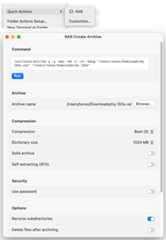
It allows to specify options and parameters, but most importantly the rar command output is printed in a window so you can see it running.
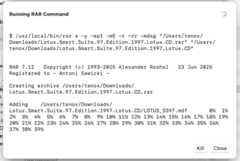
I admit this overall is pretty lame but it works better than any alternative I tried so far.
You can download fromhttps://github.com/tenox7/rarext
Feedback, issues and PRs welcome!
OmniOS / Illumos / SunOS / ARM64 / AARCH64 on QEMU
(This is a guest post from Antoni Sawicki aka Tenox)
Ever since inception ofIllumos I always wanted to get it working on ARM / AARCH64. But being under development it was somewhat difficult task. I previously tried buildingarm64-gate but there always was something not quite right. Turns out OmniOS has aready to run image that one can boot under QEMU!
Download file from here:https://downloads.omnios.org/media/braich/
They also have a run shell command:https://downloads.omnios.org/media/braich/run
This is mine:
qemu-system-aarch64 \
        -nographic \
        -machine virt \
        -accel tcg \
        -m 3G \
        -smp 2 \
        -cpu cortex-a53 \
        -bios u-boot.bin \
        -netdev vmnet-shared,id=net0 \
        -device virtio-net-device,netdev=net0 \
        -device virtio-blk-device,drive=hd0 \
        -drive file=braich-151055.raw,format=raw,id=hd0,if=none \
        -device qemu-xhci \
        -device usb-kbd \
        -device usb-tablet \
        -semihosting-config enable=on,target=native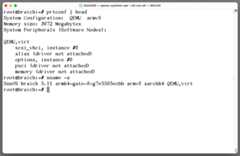
I hope they continue development and at some point I will be able to run this on my home server / NAS !
MIPS RISC/os on MAME
(This is a guest post by Antoni Sawicki aka Tenox)
This is a very lazy post. I didn’t do anything here… I don’t exactly remember where it came from but I had thisHDD dump of a pre-installedRISC/os4.52 for MIPS Systems RC2030 lying around. It might have came frombitsavers and/orhere? I was recently contacted byEnrique Tejeda Canobbio who managed to convert the image into a chd format and boot it up on MAME which hasMIPS support!
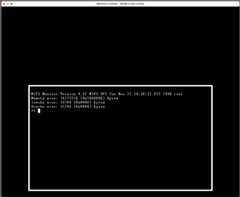
It turns out the disk image had some non trivial password set for the root account, but with help of hashcat and a decent GPU we got it cracked in 20 minutes or so. Here for your viewing pleasure is the fully working OS:
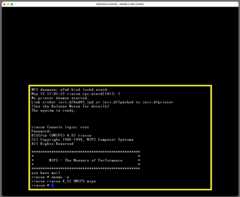
The system comes with a working C compiler and there are known some ports of variousapplications, also X11R5. I will post an update once I add some more stuff to the base image. For now just wanted to get this out in to the wild!
Download fromhere! Login root/root. The root password for the original image isWivvle1!
Please post comments or ping me on Discord if you get networking or X11 working!
Installing HP-UX 11i v1 (11.11) 32bit PA1.1 on QEMU 10.1
(This is a guest post by Antoni Sawicki aka Tenox)
Definitely not the first person doing this. In fact this has been quite widely documented, in particular byastr0baby andopenpa.net. Just my personal observations and tweaks.
Install
ISOs from 2006 MCOE work just fine
qemu-img create -f qcow2 hpux.img 20Gqemu-system-hppa \-machine B160L \-smp cpus=4 \-accel tcg,thread=multi \-boot d \-drive if=scsi,bus=0,index=6,file=hpux.img,format=qcow2 \-m 512 \-d nochain \-cdrom mcoe.1_5.iso \-net nic,model=tulip \-net userI installed mostly the defaults, removed Java spyware and Web based management.
I recommend using advanced mode and editing File Systems to your desired size or just leaving /stand and / and deleting everything else. Otherwise, if you do defaults, you will be facing resizing them in single user mode later.
Forget any serial console, telnet stdio or forwarding X over SSH nonsense. Graphical console now works fully end to end without any issues, except fornsswitch.conf.
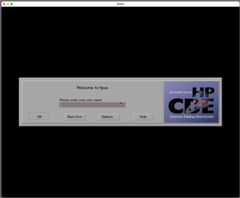
When trying to login via CDE you will get an error about unable to start desktop messaging system. Login either via text console or failsafe session. Copy/etc/nsswitch.files to/etc/nsswitch.conf. Also make sure that your hostname can resolve via/etc/hosts.
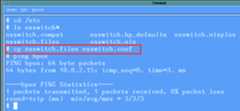
Once this is done you should be able to login via CDE:
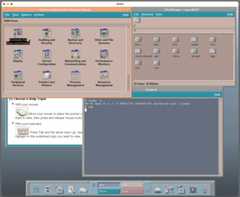
If you left filesystem defaults, you will be facing this:
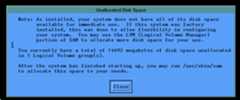
To fix this, add-boot menu=on to qemu parameters, runboot pri then answer yes to interact with IPL and then typehpux -is.
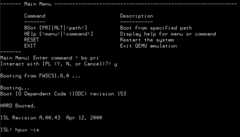
This will land you in single user mode where you can extend volumes like so:
# cat /etc/fstab....lvextend -L 4096 /dev/vg00/lvol7extendfs /dev/vg00/lvol7....But ideally this should be done ahead of time during install in File Systems tabs (advanced mode).
I like to disable some slow starting and unnecessary services on startup, to do so go to/etc/rc.config.d and edit bunch of files changing value from=1 to=0. I typically disable SNMP, CIM and Mailserver, Webadmin, Diagnostics, EMS, nettl, icod, etc at minimum. Also some stubborn services need to be disabled by renaming or removing them from/sbin/rcX.d …
Software Install
Note that this emulatesPA-RISC 1.1 (32bit) and software built forPA-RISC 2.0 (64bit) will not work. Very little software is marked which platform is it for, so your mileage will vary. You will encounter errors and crashes. To avoid confusion check the binary withfile(1) utility.
I have a bunch of handy tools like bash/gmake/gzip/gtar/ncftp bundled uphere. There is GCC 4.0.2here as a depot andhere as a tarball. I also installed a bunch of tools and enhancements from Soft Pack and Apps cdroms.
Most importantly SimCity!
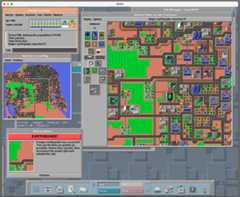
More games can be foundhere. However this emulated HP-UX doesn’t have working OpenGL so don’t expect much.
Finally, to shut down the os:
reboot -hThe ready to run image is availablehere. It works with QEMU 10.1. It has bash & gcc pre-installed. Login as root/root.
rebuilding DOSBox again
I know it’s silly why build DOSBox from Sourceforge with Visual C++ 2003.
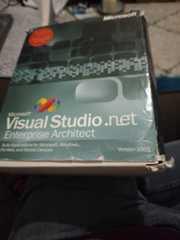
Well there is some building-plant thing that uses an old wheezy MS-DOS app that doesn’t play very nice with it’s “awesome” EGA/VGA graphics, and I’m too old to care about debugging it, but DOSbox runs it just fine, and it can communicate out the serial ports just fine with it. KISS as they say.
Project is over on github:
https://github.com/neozeed/dosbox-svn
Along with abinary release, as not having one generally makes me angry.
Sorry updates have been so crappy lately, I’ve been eaten alive at work. Although now being able to control the boilers and heating from my desk is a nice thing, so at least at work I won’t freeze to death.
Oh I should say I did try Citrix, but it crashed out NTVDM. Qemu didn’t render right, and well like I said I tried DOSBox and it worked fine.
I just wanted to play Simpsons Hit & Run, or how I really hate Apple peripherals
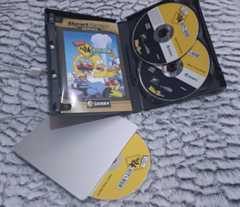
Months ago at the local CeX I had spotted The Simpson’s hit & run for a mere 8GBP. Sweet, I know the game has a massive cult following, and I wanted to try it, but being old and grumpy I wanted to have a physical copy, you know so I could know it only had weird Vivendi spyware on it.
Fun fact! Vevendi bought the call centre I worked at in Miami back in the early 00’s and I had hoped to somehow swing my way to Sierra. Instead I got saddled working with Ticketmaster. Not the fun I wanted.
Anyways flash forward a few decades and yeah, this game is from ’03 back in those good olde days. Wow time flies!
On the home front, I’m not a big fan of Windows 11. As a matter of fact, I hate it. The UI is just obnoxious, and as much fun as WSL is, even it cannot save the horror that is Windows 11’s two things that drive me away from the platform
- The absolute braindead notepad
- It’s reverse sorting of applications on the ALT-TAB stack
Seriously, the last application I used should be the FIRST on the ALT-TAB stack not the last. WTF. And notepad, what the actual fuck, with AI? I can’t even reliably search & replace without it absolutely trashing a document trying to replace double spaces with single spaces. How can you fuck up notepad? Microsoft found a way. Even better replacing it with the one from Windows 8.1 or launch Windows 10 just completly screws up the OS.
Great job guys!
So I did what anyone else would do, I put aside a hundred pounds a month, and after 6 months I pulled the trigger and got a M4 Mac Mini.

The good? It’s surprisingly fast for what it is. It actually plays CyberPunk 2077 (there is a native version, you can even hit over100fps!, or even72fps with ray tracing – granted I did drop the resolution to 720p, and medium textures, and added in frame generation), Crossover is mostly okay, I can still useSQL Server 4.20, andWord 6 for NT, although Excel has major issues for some reason. Edge & Onedrive work just fine, and shockingly.whisper.cpp using the metal backend & ggml isn’t too horrible:
whisper_model_load: model size = 538.59 MBwhisper_backend_init_gpu: using Metal backendggml_metal_init: allocatingggml_metal_init: found device: Apple M4ggml_metal_init: picking default device: Apple M4ggml_metal_load_library: using embedded metal libraryggml_metal_init: GPU name: Apple M4ggml_metal_init: GPU family: MTLGPUFamilyApple9 (1009)ggml_metal_init: GPU family: MTLGPUFamilyCommon3 (3003)ggml_metal_init: GPU family: MTLGPUFamilyMetal3 (5001)Just remember to build with “-DWHISPER_COREML=1” set for Apple hardware.
I went ahead to test using the old “Lord of the Rings” tapes I’d got last year, and aribitrarly pickedtape 12 side 1:
Input #0, flac, from 'lotr-tape12-sie1.flac': Metadata: title : Mount Doom Part 1 album : The Lord of the Rings artist : Brian Sibley date : 1981 genre : Audio Book track : 23 encoder : Lavf58.76.100 Duration: 00:31:35.63, start: 0.000000, bitrate: 596 kb/sAnd the m4 Mac Mini crunched through the 31 minutes in 2:47! You cancheck the output here:
18.52s user 1.69s system 12% cpu 2:47.64 totalOr the JFK benchmark:
whisper_print_timings: total time = 1464.12 ms ./medium.sh samples/jfk.wav 0.18s user 0.15s system 22% cpu 1.512 totalOk that’s all great, but what about this optical drive?
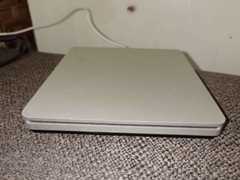
I picked up an Apple Super Drive A1379 used from CeX, again for a whopping 28GBP. Sure it’s a bit scuffed up and ugly but plugging it into my Windows 11 laptop it shows up right away. Nice
Also let me take a moment to say thanks for basically writing this on the under side of the drive in what may as well have been black in on a black surface. I’ve had to use sunlight & a full flash to get this to show up to verify the model number. And what I suspect is 2 parts of the larger problem, it being an optical drive from 2012.
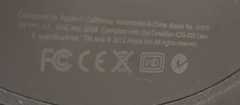
Like seriously could they make it any harder. And yes dropoping support hasalways been a thing.
Okay, so I still have my Windows 11 laptop, and when connected I cannot insert a disc to save my life. Well to cut the story short, YOU NEED A DRIVER. I kid you not.
The driver, namedAppleODDInstaller64.exe is what you are after, and luckily for you, I’ve already gone through the motion of extracting various bootcamp driver packs to find it, and upload it toarchive.org.
With the driver loaded, I could then finally just copy the files off the install discs and install into crossover. Of course the default install requires CD1 to be inserted like a key disc, sogamecopyworld to the rescue.

I have to say that running x86 code through the new rosetta feels pretty snappy. The biggest dissapointment of course is that there is no 32bit support in OS X. Crossover at least maintains that pretty well, although there is no Win16 support. And yes I’ve tried otvdm, and no it doesn’t work.
The funny part is that Hit&Run runs signiicantly faster on the M4 OS X / Crossover setup. That’s unexpected! The annoying part is that although Crossover does support controllers, neither DirectInput or Xinput seem to work. So I’m forced to use keyboard and mouse, which is kind of annoying as I still don’t have a proper desk after moving, and I end up just using bluetooth and my TV to do stuff, as I’m even writing this from my couch.
At least there are some alterantives out there. I know there will be the inevitable cry, what about Linux, and honestly I’d probably go with theMilk-V Titan, and all in on RISC-V. But considering how much more expensive the Titan is than the Jupiter, I’ll be sitting on the sidelines for the first wave to see if the much hoped for 64GB of RAM, and real GPU support actually works. Although I’m glad I got the 16gb model of the Jupiter, I never could get any GPU device recognized so I mostly use it for weird internet edge stuff, as at least if I do get hit with buffer overflows, being RISC-V means default out of the box x86/x86_64 attacks are meaningless.
UNAUTHORIZED WINDOWS/386
I wanted to share something special, a friend of mine, Will, has been so busy working on this project and I wanted to share it here for everyone here first.
This is pretty technical, but still interesting deep look into one of Microsoft’s early 32bit/386 based programs that would go on to revolutionize the world, Windows/386! It brought the v86 virtual machine to normal people wrapped up in a nice GUI.
By Will Klees (CaptainWillStarblazer)
INTRODUCTION
I’m CaptainWillStarblazer, an author who has previously been featured on VirtuallyFun for my work on EmuWOW, which enabled running Win32 apps compiled for the MIPS and Alpha AXP architectures to run on x86 computers. While I was born in the 21st century, I have a keen interest in the computers of the past, particularly in the history of Microsoft. The foundations for the breakout success of Windows 3.0, 3.1, and 9x were laid with Windows/386, but until recently, the inner-workings of Windows/386 have not been well understood, and beyond the very high-level, exactly how it works have been considered an opaque black box, not ventured into with books (official or otherwise) like its successors. No longer.
FOREWORD
Before I begin, I would like to acknowledge that all of my work here was informed by the research of the late, great Geoff Chappell, who has many in-depth pages on this topic as well as many others that laid the groundwork for this post. His contributions to the scene are immeasurable, and I, along with many of you, stand on the shoulders of giants like him. It is unfortunate that up to this point, Windows/386 has not faced much reverse-engineering work (especially in comparison to the better-documented Windows 3.x and 95), but for the first time, it is being examined.
ARCHITECTURE OF WINDOWS/386
Windows/386 Loader (WIN386.EXE)
The structure of Windows/386 is broadly similar to later versions of Windows running in enhanced mode. The journey begins with WIN386.EXE, which is a standard MZ EXE. WIN386 first performs some checks to make sure that your machine can run Windows/386 (you have enough memory, the right version of DOS, you have an 80386, defending against early buggy 386 steppings, etc.), among them being whether your computer is currently executing in Virtual-8086 Mode. If you are, then that means that another piece of protected-mode software is already controlling the computer. From there, it checks if Windows/386 is already running, and if so, displays an error message. From there, it checks if the resident protected-mode software is a memory manager that it recognizes (either Compaq’s CEMM or Microsoft’s EMM386), and if so, uses the GEMMIS (Global EMM Import Specification) API to suck out all of the EMS mapping page tables from the LIMulator and then switch back into real-mode. If it doesn’t recognize the protected-mode software, it at this point throws another error message.
This check for early buggy 386 steppings was retained by Microsoft even into Windows 8.1, surprisingly enough. The system can also check for 386 chips with bad 32-bit multiplication, though it only warns the user of potential issues, it doesn’t fail to run like if you are running a Model 1 Stepping 0 chip.


Finally, it begins loading the Virtual DOS Machine Manager (VDMM) into memory from the file WIN386.386. This file is not an OS/2 Linear Executable like the 386 files from later versions of Windows (that format did not yet exist), rather it is the 32-bit x.out executable format from Xenix-386 (thank you, Michal Necasek!), which makes sense as it was the only 32-bit executable format that Microsoft would have a linker for at the time (and interoperated well with Microsoft’s OMF-based tools, such as MASM). Among the features of this format is that it contains a rather-lengthy symbol table. Not only does this aid reverse-engineering, however, it’s also a key part of the loading process. The WIN386.EXE loader will populate parts of the loaded image with important data using these symbols.
Virtual DOS Machine Manager and Virtual Device Drivers (WIN386.386)
WIN386.386 contains a statically-linked binary image of the VDMM itself as well of all of the virtual device drivers. Disassembling the source code of Windows/386 was an interesting exercise. On my repo, I have a partial disassembly of EGA.3EX, the WIN386.EXE loader for the EGA version of WIN386.386, which is a standard MS-DOS executable and as such easily examined by reverse-engineering tools. However, the 32-bit x.out format used by Windows/386 is not readily supported by any reverse-engineering tools that I am aware of. While it would be possible to write an Ida or Ghidra plugin, I figured the simplest solution was to convert it to a more standard executable format that could be understood; COFF. After extracting the 16-bit entry stub into a small flat binary to be disassembled on its own, the COFF file could finally be opened (in reality, tools didn’t seem to like the COFF file very much, so I had to use GNU objcopy to convert it to ELF so that tools would like it) and examined.


WIN386.386 starts execution in real-mode with a short stub that prepares the Global Descriptor Table, loads the page directory, switches into protected-mode, and does a far jump to the 32-bit entry point. At this point, it starts WIN86.COM (loaded by WIN386.EXE) to start a real-mode copy of Windows in the first VM, otherwise known as the “System VM”.
Two valuable resources for examining the code of Windows/386 have turned out to be the source code for MEMM (Microsoft Expanded Memory Manager, better known by its final name EMM386) from the MS-DOS 4.0 repository, and the Windows 3.0 DDK sample VxDs. It is obvious from comparing the Windows/386 disassembly to portions of the MEMM source code that portions of MEMM, both for EMS emulation and for the V86 monitor in particular, were simply lifted wholesale into Windows/386, and code comments even make reference to this. Amusingly, MEMM was assembled using the MASM 4.00 assembler which has poor support for the 80386, so copious amounts of macros are used to add in 386 instructions. Perhaps the most interesting EMM386-related finding, however, was that parts of EMM386 were written in C. This seemed obvious given the leading underscore and __cdecl-style calling convention in several Windows/386 functions, but examining the code finds it to be true.


Based on my examination, it appears that if you took the EMM386 C code and compiled it for a 32-bit flat model (EMM386’s code was compiled for a 16:16 far pointer model), you’d get the assembly in Windows/386. This is interesting because Windows/386 was previously thought to be written entirely in assembly, and the Microsoft 386 C compiler was in its infancy when Windows/386 was being written. It’s not entirely unbelievable, however, since Xenix-386, the earliest known user of the compiler, came out around the same time as Windows/386.
The other handy reference while disassembling Windows/386 has actually been the Windows 3.0 DDK. Since the VDMM contains all of the virtual device drivers statically linked into it, and many of Windows 3.0’s virtual device drivers can trace their beginnings to Windows/386, there’s often a strong correspondence. Many APIs have changed, however, including how VxDs call each other. In Windows/386, it’s just a simple call, while their status as separate modules in Windows 3.0 requires a VxDCall; a special interrupt that causes the VMM to transfer control to another VxD.


Examination of the MapLinear function finds that the memory map for Windows/386 2.xx is essentially identical to Windows 3.0. The first 4MB is the private per-VM arena (so chosen as it allows a task-switch to be as simple as altering the first PDE in the page directory, rather than having to switch page directories), then the 4-20MB range identity-maps the first 16MB of physical memory, and the VDMM is loaded at the 20MB mark.
As a quick example of one of the code paths in Windows/386, when Windows/386 needs to return an entry point to a client application (such as through the INT 2FH AX=1602H API), it needs some way to cause a client calling that entry point in Virtual 8086 Mode to trap into protected mode. As documented by Raymond Chen, they found that the quickest way to do this was via the invalid opcode fault, and the invalid opcode they chose for this was 63H, or ARPL. As part of a mechanism that is still in place in Windows 95, when a VM executes an ARPL instruction, it’ll trap into the VDMM, vectoring through the IDT to vm_trap06.


From there, it determines if the fault came from a VM or not. If not, it executes the Windows/386 error handler, but if it did, it calls into VmFault. VmFault looks up the faulting opcode through a table and invokes the appropriate handler for it. The appropriate handler for ARPL is called Patch_Fault. From there, it determines what kind of call this is, and if you’re lucky, it’ll end up in TS_VMDA_Call, which is described in the next section.


The System VM – Windows 2 and WINOLDAP
The code running inside of the system VM is almost identical to a standard real-mode Windows 2.xx install, with one exception: WINOLDAP. Responsible for executing MS-DOS (“old”) applications, WINOLDAP is totally different in Windows/386 (and as such, not functional if you try to load WIN86.COM directly from real-mode on its own, which otherwise provides a perfectly workable real-mode Windows experience), making heavy use of 386 instructions and of the “Virtual DOS Applications” (VDA, otherwise known as VMDOSAPP) API (accessed via INT 2FH AX=1601H in Windows/386 2.03 and 2.11) which is made available exclusively to the system VM, allowing WINOLDAP to control the execution of other virtual machines.


While the details of this API certainly changed for Windows 3.0 and for later versions, WINOLDAP continued to work in fundamentally the same way, with the DOS application running in the System VM (intended to be Windows) being uniquely privileged to control operations in other virtual machines. Given that many people have figured out how to make Windows/386 start applications other than Windows itself (such as COMMAND.COM), this means that nothing would stop a sufficiently enterprising developer from developing a text-based MS-DOS application that leveraged this API to provide multitasking. In fact, this is likely how Raymond Chen’s “character-mode task switcher” functioned. WINOLDAP is worthy of further examination to determine exactly how it works, and perhaps to develop a multitasking MS-DOS. Obviously, this API, intended to have only Windows as a client, is totally undocumented other than by myself and Geoff Chappell, but further work could reveal its secrets.
In addition to the VDA API, Windows/386 also provided a much more limited API to callers in other virtual machines (accessed via INT 2FH AX=1602H), that appears to still be available in Windows 3.0 and is primarily responsible for networking.
For most of my experimentation, I actually sidestepped booting Windows altogether so that I could run my own code in the System VM. This is fairly simple; all you need to do is copy COMMAND.COM over WIN86.COM, then start WIN386, and viola! You’re running COMMAND.COM in Virtual 8086 Mode! Probably the most notable change is that if you didn’t already have any LIM EMS memory, you do now.
LOST WINDOWS/386 DDK
While no DDK for Windows/386 2.xx has been located, hints have been scattered for its existence. Most notably, the Windows 3.0 386 Virtual Device Adaptation Guide provides guidance on the differences between Windows/386 2.xx and Windows 3.0, and how to port virtual display drivers from one to the other, suggesting that Microsoft did provide tools to enable third-party developers to write Windows/386 virtual device drivers. It’s not difficult to imagine what this DDK would have looked like. Likely distributed alongside the regular Windows/286 real-mode DDK, the Windows/386-specific portions would include the 32-bit capable MASM5, along with early versions of MAPSYM32, WDEB386, and the Xenix x.out ld link editor. Very likely, Microsoft provided sample code for each of the VxDs included with Windows/386 (including the CGA, EGA, and Hercules VDDs), as well as a precompiled OMF object containing the VDMM itself, and then one would link everything together.
It bears repeating that the documentation on porting virtual device drivers from Windows/386 2.xx to Windows 3.0 was limited solely to virtual display drivers. The only other references to Windows/386 2.xx in the Virtual Device Adaptation Guide discuss the Windows/386 API callable by DOS applications running in a DOS box (many device drivers and applications, including network stacks, were Windows/386 aware). This could mean that other types of drivers could be more easily reassembled for Windows 3.0 without documentation, but I doubt it. As it stands, most of the virtual device drivers included in Windows/386 were fairly generic; the COM port, timer, PIC, keyboard, and other such devices work almost identically in every PC-compatible computer. On the other hand, the display driver is the one major component that Windows would need to interact with and that would significantly change between different types of machines. Additionally, due to the statically-linked nature of Windows/386 at this point, having more than one VxD as the variable factor could balloon into a smorgasbord of different combinations of drivers statically linked into the WIN386.386 image. As such, it stands to reason that the only driver built by third-parties (though no such driver has yet been located) is a virtual display driver. This lines up with Microsoft’s own distribution of Windows/386, as the disks include separate 386 files for each supported display (the appropriate file being copied for your machine based on your selection during setup) and a matching 3EX file that gets copied to become the WIN386.EXE loader, and display drivers (also including their own complete Windows/386 images, obviously based on customizing the EGA/VGA VDD) have been found for other display adapters as well. This is compounded by the fact that during SETUP (including for real-mode Windows), the 16-bit display driver is statically linked into the Windows kernel (in other words, you can only load a display driver during SETUP) for the “fast-boot” configuration (though this can be disabled for a “slow-boot” on debug versions, more similar to how Windows 3.0 and above boot). A lot of reading between the lines is needed here, but it does seem that the only customization Microsoft intended was for OEMs to provide their own virtual display drivers.
BREAKING INTO WINDOWS/386
In absence of the Windows/386 DDK and its associated debugger, options are fairly limited as to peeking into the internals of Windows/386 while it is active. Promise was initially found in WIN386.EXE making a call to INT 68H (the WDEB386 real-mode interface, also used by the Deb386 debugger developed for EMM386 that no doubt was the immediate ancestor of WDEB386, as well as by compatible debuggers such as SoftICE) with AH=43H (D386_Identify, typically the first call made when initializing a program that uses WDEB386), no doubt trying to call out to its version of WDEB386, if present. However, the version of WDEB386 from Windows 3.1 only partially worked. While a CTRL-C could break into WDEB386 at any time, it could only trace through Virtual 8086 Mode code (always breaking at an ARPL VM-86 breakpoint), and whenever you tried to resume execution using the G command, Windows/386 would exit.
As a result, I had to improvise my own debugger, which required me to gain the ability to execute my own 32-bit code within Windows/386, which has never before been achieved. I immediately decided to adopt a similar approach to WDEB386; leave the debugger behind in conventional memory before Windows/386 starts up, and then have it call into me, so I quickly set about writing a small TSR. The TSR hooked INT 69H with a routine called Intrude that would patch the IDT of Windows/386 (found via traversing the image symbol table) to point to my own code for interrupt vector 0 (the divide exception handler). That way, whenever a divide exception occurred, it would vector into my own code.
The next question you may be wondering about is how I got Windows/386 to invoke an INT 69H in the first place? The answer lies in the real-mode initialization stub of WIN386.386; the part that switches into protected-mode. Examine the listing below:
Enable_A20:
01B7 803EBD00F8 CMP BYTE PTR [Computer_Type],0F8H ; Check for fast A20 support
01BC 7707 JA Enable_A20_Slow
01BE E492 IN AL,92H ; Fast A20 enable
01C0 0C02 OR AL,2 ; Set bit 1 (A20 line control)
01C2 E692 OUT 92H,AL ; Output back to port 92H
01C4 C3 RET
Enable_A20_Slow:
01C5 B4DF MOV AH,0DFH
01C7 EB12 JMP Set_A20
By the time Enable_A20 is called, which checks the computer type from the BIOS, most of the data structures needed to enter Windows/386 have already been set up, so I patched Windows/386 to simply remove Fast A20 support and always use the slow code, putting an INT 69H in the slack space. In other words, it replaces the instruction atTEXT16:01B7 with an INT 69H (CD 69). Since the original instruction is 5 bytes long, the remaining three are padded with NOP (90). The instruction atTEXT16:01BC is then altered to be an unconditional jump (EB) to always invoke the slow A20 line control. Since the loaded object is always at offset 400H in the file, and the offsets appear to be the same for all versions of Windows/386 on all devices, the changes are:
5B7: 80 -> CD
5B8: 3E -> 69
5B9: BD -> 90
5BA: 00 -> 90
5BB: F8 -> 90
5BC: 77 -> EB
The trouble at this point was that, while my program did work, it left the protected-mode code sitting in conventional memory, and part of the System VM’s inherited address space and thus subject to corruption. As a result, I wanted to move it up into extended memory, out of the reach of any pesky DOS programs. My first thought was to use XMS memory through HIMEM.SYS, which was introduced with Windows/386 2.11 to facilitate access to the HMA for Windows. Unfortunately, while this did sort of work, it turns out that Windows/386 (which if you’ll recall was initially designed before XMS or HIMEM.SYS) does not respect XMS allocations made before Windows loads, and thus considers them part of its extended memory pool (a fact I was taught by the fact that it corrupts the first two DWORDs of every 64K memory block starting after the HMA as part of its memory test). It is also important to realize that Windows/386 2.11 does not provide virtual XMS services to any client VMs (though Windows 3.0 and later versions do), except for HMA access to the System VM only (Windows/286 2.11 also used the HMA on 80286 and above systems, hence the “286” name, though it otherwise worked fine on XT-class machines, and since Windows/386 ran Windows/286 in the System VM, it made sense to also support the HMA there).
As a result, I used the “expand-down” memory allocation method of determining the amount of installed extended memory using INT 15H AH=88H, and then hooking that interrupt to report 132K less memory than there was before, and using the last 132K of extended memory for my own purposes. Since INT 15H AH=88H can report up to 64MB of installed extended memory, while INT 15H AH=87H to copy into extended memory only supports up to 16MB, I had to write my own routines to copy into extended memory by switching into protected-mode and then back. As a result, W386DBG has to be loaded before any memory manager that places the machine into Virtual 8086 Mode, such as EMM386, or anything that allocates XMS memory (not that any such programs are likely to be used alongside Windows/386, as just as I stated earlier, the XMS memory would be corrupted).
As you can see, if you cause a divide exception in DEBUG.COM, it’ll print out “W386DBG” in the upper-right of the screen and then hang the computer. This won’t work for a software INT 0, because software interrupts from Virtual 8086 Mode vector through the GPF handler.


Note that while we lack any debug version of the VDMM (along with any symbols that it may contain or debug messages it may output), the VDMM itself does as stated earlier have a considerable symbol table, and we have debug versions of Windows 2 as part of its DDK, which were meant to be used with SYMDEB and include symbols, so at least we can have full debugging capabilities for the 16-bit components of Windows, simply by loading debug Windows 2 into the System VM, as no doubt one was intended to do when developing device drivers for Windows/386. Obviously, W386DBG is not yet a functional debugger, but it has gained the ability to grab control from Windows/386, which is perhaps the most important part.
INTO THE FUTURE WITH WINDOWS VERSION 3.0
Lately, I have become interested in turning my attention to the Windows 3.0 version 14 debug release that shipped to ISVs in early 1989. As one would expect, it shows many similarities to Windows 2.xx, but is already well on the way to becoming the Windows 3.0 that we know.
Notably, the WIN386.386 file is now gone, having been merged into WIN386.EXE as with the final version of Windows 3.0, meaning that the same DOS executable both loads the VMM and contains it. However, the VMM itself (pointed to by the e_lfanew field in the MZ header) is not an OS/2 2.0 Cruiser Linear Executable like the final version (or, more properly, the W3 format which contains multiple LE VxDs within it), but rather another bespoke format with a “W386” signature that I have not yet torn into yet. All of the VxDs are still statically linked at this point, but the symbol file is showing movement toward the VMM we know from Windows 3.0.
I haven’t disassembled all of the real-mode entry portion of WIN386 yet (this will allow me to fully understand the file format), but an interesting piece of code new to this build checks to make sure not only that the DOS major version is at least 3 (3 being the minimum DOS version) but also less than 10, as 10 is the major DOS version reported by OS/2 1.x’s 3xBox, making Windows/386 3.0.14 OS/2-aware (and avoidant).
One piece of Windows 3.0-related history that was recently discovered was the manual for Murray Sargent’s Scroll-Screen-Tracer debugger. The debugger is far too rich in features to begin to go over them, but among its incredible DOS-extending features include support for debugging applications in Virtual 8086 Mode (a la SoftICE), debugging Windows, and debugging regular MS-DOS applications running in the 80286’s Protected Mode, much as was described in “Saving Windows from the OS/2 Bulldozer”.
Interestingly, the DOS extender provided by WIN386, along with PKERNEL.EXE (the protected-mode Windows kernel) seem to have more in common with the 80286 DOS extender, DOSX.EXE, from Windows 3.0, along with the 80286 standard mode kernel, KRNL286.EXE, than they do with the enhanced mode counterparts.
For example, like in the final version of Windows 3.0, DOSX (in this case, WIN386) switches into protected-mode before loading PKERNEL/KRNL286, giving it the unique distinction of being an MZ executable that starts in protected-mode, using a stub to start executing the NE portion of the file. By contrast, in Windows 3.1 (and 3.0 enhanced mode), the DOS extender switches back into real / Virtual 8086 Mode before loading the kernel, which then uses DPMI to switch into protected-mode.
Along with translation for DOS API services, according to Michal Necasek of theOS/2 Museum, WIN386 appears to provide some sort of selector management interface via INT 31H that could be considered a sort of proto-DPMI. Disassembling both WIN386 and PKERNEL promises to be an interesting exercise. Not much is known about the early history of DPMI, but the first sign of it outside of Microsoft appears to date to Fall 1989:
I will never forget how startled I was when I encountered the DOS-Protected Mode Interface (DPMI) in its primordial form for the first time. I was sitting in a Microsoft OS/2 2.0 ISV seminar in the Fall of 1989, with my mind only about half-engaged during an uninspiring session about OS/2 2.0’s Multiple Virtual DOS Machines (MVDMs), when the speaker mentioned in passing that OS/2 2.0 would support a new interface for the execution of DOS Extender applications. This casual remark focused my mind remarkably…
After the speaker finished, I went up to him and asked for more information, explaining that his mystery interface was about to have a severe impact on a book project near and dear to my heart. In a couple of hours, the Microsoftie returned with a thick document entitled “DOS Protected Mode Interface Specification, Version 0.04” still warm from the Xerox machine and generously garnished with “CONFIDENTIAL” warning messages. I suspect I made a most amusing spectacle, as I flipped through the pages with my eyes bulging out and my jaw dropping to the floor. The document I had been handed was nothing less than the functional specification of a protected-mode version of MS-DOS!
Microsoft originally defined the DPMI in two layers: a set of low-level functions for interrupt management, mode switching, and extended memory management; and a higher-level interface that provided access to MS-DOS, ROM BIOS, and mouse driver functionality via protected-mode execution of Int 21H, Int 10H, Int 33H, and so on. The higher-level DPMI functions were implemented, of course, in terms of the lower-level DPMI functions and the extant real-mode DOS and ROM BIOS interface.
Ray Duncan, Extending DOS, 2d ed., 1992, pp. 433-438
Obviously, by this point, Microsoft, who was still heavily invested in OS/2, planned to implement DPMI into OS/2 2.0, though they would not do so for about a year afterwards. Desiring crossover with the protected-mode DOS apps that would run on Windows (most crucially, Windows itself) was no doubt a desire for the OS/2 development team. I was surprised to learn that DPMI was already by this point mature enough to have even a preliminary specification released. Moreover, Microsoft went on to, at the behest of DOS Extender vendors, such as Phar Lap and Rational Systems, excise from the DPMI specification all of the higher-level DOS Extender components, and “DPMI 0.9” was born, containing only the low-level building blocks of a DOS Extender. As Andrew Schulman went on to say, the DOS Extender portions of DPMI ended up being split off into their own document:
Microsoft has an internal document (“MS-DOS API Extensions for DPMI Hosts,” October 31, 1990) that devotes about 30 pages to the Windows 3.0 DOS extenders… For example, the 1990 document discusses the 32-bit DOS extender provided by DOSMGR. The DOS file read and write calls (INT 21h functions 3Fh and 40h) have the count register (ECX) extended to 32-bits, allowing 32-bit programs to perform DOS file I/O of more than 64K at a time.
Andrew Schulman, Unauthorized Windows 95, 1994, pp. 151-52
On thePCjs website,Version 0.04 from March 1991 of the MS-DOS API Extensions for DPMIHosts can be found, and it is obviously quite a preliminary document. What it seems is that DPMI was designed simply to expose the Windows DOS Extender (used by the Windows kernel) to other DOS protected-mode software. DPMI sits on the AH=16H Windows/386 part of the INT 2FH multiplex (W386_Int_Multiplex), with the “Get Protected Mode Switch Entry Point” API from DPMI even being documented as part of INT2FAPI.INC from the Windows 3.0 DDK as W386_Get_PM_Switch_Addr. The “Get Selector to Base of LDT” API from the MS-DOS API Extensions document is even part of INT2FAPI.INC as W386_Get_LDT_Base_Sel. DPMI was defined as an interface for protected-mode DOS software to interface with theWindows (and OS/2) DOS Extenders, and ultimately a subset of the Windows DOS Extender API got standardized and duplicated by other vendors; in effect, DPMI hosts implement a genericized version of the Windows DOS Extender.
If you’re interesting in looking at my code and seeing future developments in the disassembly and W386DBG, check it out athttps://github.com/BHTY/WIN386.
How to train your Dragon^H^H AI overlord
It’s no secret to anyone the internet is dead.
Those 2 or 3 of us that still read independant web sites are a stark minority out there on the wild interwebs.
Recenlty however I noticed that the size of my log files forunix.superglobalmegacorp.com, were starting to get out of control. Originally I had this bright idea of taking some popular source code, like Net/2 & GCC/Binutils and putting them online through a CVS explorer in hopes that google would index them, so I could then in turn search through the source code to find things or fragments when I was doing silly and pointless ports. I had achieived part of my dream for a while, and I’d be surprised when other people were suddenly using my site a citations for easily to find code. Then the whole github thing took off and it slid into toal obscurity.
But over the years, I had noticed more and more bots aggressively scouring my UTZoo archives, no doubt training the programs that would give rise to AI, as feeding it materials is absolutey paramount. And the 20GB of the UTZoo usenet archives are a gold mine of popular culture 1981-1991. Although that traffic has dropped off a cliff the last few months, which brings us back to the CVS archives.
Ive been getting quite a few hits, sometimes, as much as200,000 hits a day from varous AIs. So that begs the question,
What is AI really into?
And here is the top 10 hit results:
I know,Hatari? The Atari ST emuator? Yeah.
Further cheating by using AI, I had grouped stuff into categories, then made a nice graph in Excel 97 to better visualize this small sample of data:

So the first thing that popped out was August the 29th. Does the AI take a break on Fridays? Or was there some new bigger priority? Also September 2nd onward has taking on a much more pronounced interest in Qemu. I should add that data for the 6th is incomplete as the day is not over.
The only thing more suitable, was to ask AI what source code would it be interesting in me adding to the easy to scrape site, and it came back with:
Rare or Niche C Projects Worth Surfacing
- TinyCC (TCC): A small, fast C compiler — great for AI to learn compiler construction.
- ELKS (Embeddable Linux Kernel Subset): Linux for 16-bit x86 — ideal for constrained environments.
- LCC (Local C Compiler): A well-documented, retargetable compiler used in academia.
- Old versions of SQLite: Compact, portable, and full of real-world C patterns.
- Early GUI toolkits (e.g., XView, Motif): For AI to learn event loops and widget hierarchies.
Which I have to agree is certainly worth adding.
Also it had made this recommendation:
🧠High-Impact Historical C Codebases to Consider
| Source | Why It Matters |
|---|---|
| Minix (pre-3.x) | Andrew Tanenbaum’s teaching OS — famously inspired Linux. Clean, pedagogical C code. |
| Plan 9 from Bell Labs | Successor to UNIX with elegant abstractions. Great for distributed systems and namespace concepts. |
| Ultrix (DEC) | Rare but valuable BSD variant with VAX and MIPS support. Adds diversity to hardware targets. |
| Apollo Domain/OS | A pre-POSIX UNIX with unique ideas. If you can find it, it’s gold for AI learning edge cases. |
| TENEX or TOPS-20 | Not strictly C, but fascinating for AI to learn OS design from non-UNIX paradigms. |
| CP/M or MP/M | Early microcomputer OSes — useful for understanding low-level disk and memory management. |
| AmigaOS or MorphOS kernel | Rich in multimedia and event-driven design, with C-heavy internals. |
| BSD/OS (BSDi) | Commercial BSD variant — adds nuance to licensing and code evolution. |
| OpenVMS C modules | If available, they offer robust examples of enterprise-grade system programming. |
| Classic UNIX utilities (e.g., ed, awk, yacc) | These are algorithmically rich and often beautifully minimal. |
Although not sure of where to get this kind of stuff, and where it could be suitably hosted if it’s even possible to find.
I had actually been trying to source a lot fo the old Minix sources, and although the patches forBruce Evans 386 port of Minix are around, I cannot find the source code to his 386 compiler & tool chain. Not sure if it was ever publically available, or if anyone saved it.
For the 2-3 humans left alive out there, any other great/useful source bases to feed the machine, so at least it’s got a decent grasp of C?
Today is 30 years since the launch of Windows 95
Yeah I can’t believe it either.
Pretty much everything I wanted to say is something I said adecade ago, when it was only 20 years old. Maybe I’ll expand on it.
In the meantime, check this out!
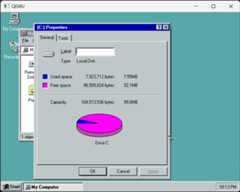
It’styomitch‘s 2 disk Windows 95 bootable set! That’s right, 2 1.44Mb disks, and be whisked away in the exciting world of Windows 95, complete with working command prompt and notepad! … and not much else.
I’ve installed it onto a VMDK for older emulators that seem to have issues with the long filename mapping somehow. But I love the idea of DOSLFN & long name archives coming together like this!
So Yeah I installed it to a VMDK, and added some Sim City, and yep it runs!
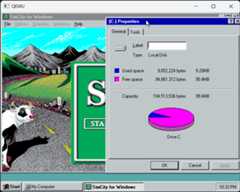
So yeah it’s complete enough for some 16bit tasks for sure! Kind of fun to play with so I’ve uploaded the VMDK on archive.org:Windows 95 ‘2disk’ set with Sim City
I guess look forward to the 40th & 50th anniversary?
A quick lookback at Virtual PC for Windows
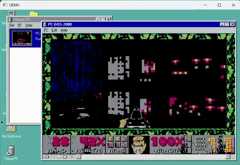
AKA Yes, of course you can run DooM!
While it’s been … quite some time, I used to use an early beta of VMware 1.0 back in the day early 00’s I believe for Linux, where I could run Lotus notes and some other apps that just of course were not available for Linux. And it was neat but a bit pricey. And as I’d tout the benefits of having desktop virtual computers, getting rid of the need of having a stack of random junk PCs from your desk.
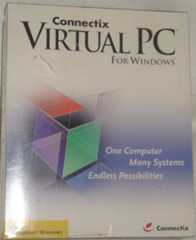
Connectix was trying new things, and yeah, the Mac was a dying platform, and bringing their tech to the PC was a winning move that would have lasting ramifications for the industry for decades. Well that and getting bought out by Microsoft.
Virtual PC for the PC, was another great, but short-lived solution for those few of us that got the ‘pc virtualization’ bug early on, before the tidal wave of bare metal hypervisors, and the serious business it’d create.
For me, it was the ability to use server class hardware with multiple PSU’s lots of RAM, redundant disks as firewalls that I could easily setup with multiple network cards, and instances allowing full isolation, and hide the mess of wires with something that looked pretty elegant.
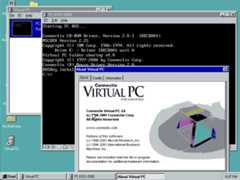
I’d recently come across a copy ofVirtual PC 4.0 for Windows, the system requirements are pretty log, Windows ME (98 is reported to work), NT 4.0 & Windows 2000. As a bonus it includes PC DOS 7.01. Just like the Mac minimal versions.
Running VPC on NT under Qemu is dooable, even under OS X, although you’ll want sound, of course which is a bit tricky now.
qemu-system-i386 -m 256 -cpu pentium -hda nt4wks.vmdk -net nic,model=pcnet -net user -cdrom nt4allinone.iso -device sb16,audiodev=snd,iobase=0x220,irq=7,dma=1 -device adlib,audiodev=snd -audiodev coreaudio,id=snd -parallel none -serial none -drive file=fat:rw:/tmp/vbempAlthough this is a bit involved, I have issues with the later QEMU’s sound blaster emulation and found it best to specify IRQ 7, which means removing the parallel port (who prints anyways?!). I also used thevbempj driver for that full colour experence.
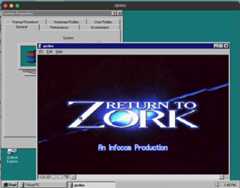
Although games like Links386, Return to Zork, DooM should have had retail Windows versions IMHO, but I know that getting 32bit games up and running on Windows 3.1 had so many dependancies and hardware requirements that made it quite the ordeal (as mentioned when running DooM on Windows 3.1)
For a long while your options for playing ‘old’ circa mid 90’s MS-DOS games was going all in on NT4/2000/XP with a fast machine and VirtualPC (there was a time when DOSBox wasn’t a thing) or the NTVDM emulated sound blaster driver. At least XP 32bit had one built in (and hidden sadly). But as machines pulled away from ISA and got faster, dual booting to MS-DOS for games with sound became a thing of the past, very quickly.
As shown above, of course I had to run DooM. even on the glorious 16 colour display, but yeah. And yeah it’s great!
I should add, that also for a long while this was my preferred way to play DOS games like DooM, or a multitude of things, also like running OS/2, this was my go-to way to get things done. You can check in the history that I was also a super big fan of Virtual PC 2004 on XP. It’s kind of crazy that Virtual PC for Windows is some 24 years ago now!
I had to limit the CPU to pentium level for the installation, then Virtual PC requires a Pentium II or higher. But luckily that’s a simple switch for Qemu.
So, while on this path, I thought it’d be fun to try the next evolution, Virtual Server 2005 on Windows Server 2003. Because I love old stuff, I ran Qemu 0.15.1 because yeah it’s so ancient. bonus!
qemu.exe -L pc-bios -m 512 -cpu pentium3 -net nic,model=pcnet -net user -hda 2003.vmdk -redir tcp:1024::1024The good news is that Windows Server installed okay, and so did Virtual Server. However running was a different story:
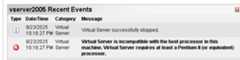
Changing the CPU flag to any combination got the same result that a Pentium II or greater is required. Bummer.
I have a copy of VMWare Workstation handy, and thought I could just mount the VMDK, and good to go. No. Nooooo. Or at least I failed. Use the install template for 2003, and just deal with it. I know. dissapoint.
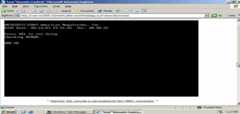
However, the best part is that it runs fine on VMware. Although it is SLOW. so slow. I updated the VM to 4 core, single processor, 512Mb of ram, and installed Service Pack 1 for the 2003 server. It helped a bit too!
The big fun of Virtual Server is of course being able to manage it remotely, although the remote console is an ActiveX control, so you need to enable IE mode on Edge. It’s under settings and ‘compatibility’ , turn on the 11 mode, and add the admin site and blamo good to go!

And yeah!
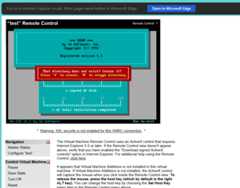
You can kinda use the server remotely from a modern machine. Many menu options don’t render correctly, and I had to copy/paste some of the URL’s directly. I think I had this issue with FireFox 20 years ago, although I don’t feel like digging that far deep. It may have been chrome too, but does it matter? I need that ActiveX hook.
With the control loaded, and DooM set to low resolution and drop the render window and..
Well yeah, it’s almost okay.
I’ll have to dig out a P4 and try it native, as emulation in emulation is of course a finicky thing. But I’m all too happy to run this on my laptop without getting my hands dirty dealing with old hardware.
Kind of what got me into this in the first place, running it all, virtually.
‘Till next time!
![[Valid RSS]](/image.pl?url=https%3a%2f%2fvalidator.w3.org%2ffeed%2fimages%2fvalid-rss-rogers.png&f=jpg&w=240 "Validate my RSS feed")


