Table Of Contents
- What’s New
- Installation
- Contributing to pandas
- Frequently Asked Questions (FAQ)
- Package overview
- 10 Minutes to pandas
- Tutorials
- Cookbook
- Intro to Data Structures
- Essential Basic Functionality
- Working with Text Data
- Options and Settings
- Indexing and Selecting Data
- MultiIndex / Advanced Indexing
- Computational tools
- Working with missing data
- Group By: split-apply-combine
- Merge, join, and concatenate
- Concatenating objects
- Database-style DataFrame joining/merging
- Brief primer on merge methods (relational algebra)
- The merge indicator
- Joining on index
- Joining key columns on an index
- Joining a single Index to a Multi-index
- Joining with two multi-indexes
- Overlapping value columns
- Joining multiple DataFrame or Panel objects
- Merging together values within Series or DataFrame columns
- Timeseries friendly merging
- Reshaping and Pivot Tables
- Time Series / Date functionality
- Time Deltas
- Categorical Data
- Visualization
- Style
- IO Tools (Text, CSV, HDF5, ...)
- Remote Data Access
- Enhancing Performance
- Sparse data structures
- Caveats and Gotchas
- rpy2 / R interface
- pandas Ecosystem
- Comparison with R / R libraries
- Comparison with SQL
- Comparison with SAS
- API Reference
- Internals
- Release Notes
Search
Enter search terms or a module, class or function name.
Merge, join, and concatenate
pandas provides various facilities for easily combining together Series,DataFrame, and Panel objects with various kinds of set logic for the indexesand relational algebra functionality in the case of join / merge-typeoperations.
Concatenating objects
Theconcat function (in the main pandas namespace) does all of the heavylifting of performing concatenation operations along an axis while performingoptional set logic (union or intersection) of the indexes (if any) on the otheraxes. Note that I say “if any” because there is only a single possible axis ofconcatenation for Series.
Before diving into all of the details ofconcat and what it can do, here isa simple example:
In [1]:df1=pd.DataFrame({'A':['A0','A1','A2','A3'], ...:'B':['B0','B1','B2','B3'], ...:'C':['C0','C1','C2','C3'], ...:'D':['D0','D1','D2','D3']}, ...:index=[0,1,2,3]) ...:In [2]:df2=pd.DataFrame({'A':['A4','A5','A6','A7'], ...:'B':['B4','B5','B6','B7'], ...:'C':['C4','C5','C6','C7'], ...:'D':['D4','D5','D6','D7']}, ...:index=[4,5,6,7]) ...:In [3]:df3=pd.DataFrame({'A':['A8','A9','A10','A11'], ...:'B':['B8','B9','B10','B11'], ...:'C':['C8','C9','C10','C11'], ...:'D':['D8','D9','D10','D11']}, ...:index=[8,9,10,11]) ...:In [4]:frames=[df1,df2,df3]In [5]:result=pd.concat(frames)
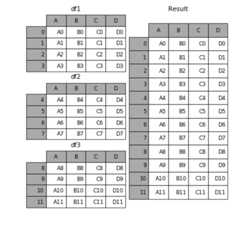
Like its sibling function on ndarrays,numpy.concatenate,pandas.concattakes a list or dict of homogeneously-typed objects and concatenates them withsome configurable handling of “what to do with the other axes”:
pd.concat(objs,axis=0,join='outer',join_axes=None,ignore_index=False,keys=None,levels=None,names=None,verify_integrity=False,copy=True)
objs: a sequence or mapping of Series, DataFrame, or Panel objects. If adict is passed, the sorted keys will be used as thekeys argument, unlessit is passed, in which case the values will be selected (see below). Any Noneobjects will be dropped silently unless they are all None in which case aValueError will be raised.axis: {0, 1, ...}, default 0. The axis to concatenate along.join: {‘inner’, ‘outer’}, default ‘outer’. How to handle indexes onother axis(es). Outer for union and inner for intersection.ignore_index: boolean, default False. If True, do not use the indexvalues on the concatenation axis. The resulting axis will be labeled 0, ...,n - 1. This is useful if you are concatenating objects where theconcatenation axis does not have meaningful indexing information. Notethe index values on the other axes are still respected in the join.join_axes: list of Index objects. Specific indexes to use for the othern - 1 axes instead of performing inner/outer set logic.keys: sequence, default None. Construct hierarchical index using thepassed keys as the outermost level. If multiple levels passed, shouldcontain tuples.levels: list of sequences, default None. Specific levels (unique values)to use for constructing a MultiIndex. Otherwise they will be inferred from thekeys.names: list, default None. Names for the levels in the resultinghierarchical index.verify_integrity: boolean, default False. Check whether the newconcatenated axis contains duplicates. This can be very expensive relativeto the actual data concatenation.copy: boolean, default True. If False, do not copy data unnecessarily.
Without a little bit of context and example many of these arguments don’t makemuch sense. Let’s take the above example. Suppose we wanted to associatespecific keys with each of the pieces of the chopped up DataFrame. We can dothis using thekeys argument:
In [6]:result=pd.concat(frames,keys=['x','y','z'])
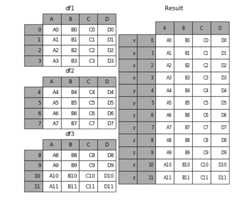
As you can see (if you’ve read the rest of the documentation), the resultingobject’s index has ahierarchical index. Thismeans that we can now do stuff like select out each chunk by key:
In [7]:result.ix['y']Out[7]: A B C D4 A4 B4 C4 D45 A5 B5 C5 D56 A6 B6 C6 D67 A7 B7 C7 D7
It’s not a stretch to see how this can be very useful. More detail on thisfunctionality below.
Note
It is worth noting however, thatconcat (and thereforeappend) makesa full copy of the data, and that constantly reusing this function cancreate a significant performance hit. If you need to use the operation overseveral datasets, use a list comprehension.
frames=[process_your_file(f)forfinfiles]result=pd.concat(frames)
Set logic on the other axes
When gluing together multiple DataFrames (or Panels or...), for example, youhave a choice of how to handle the other axes (other than the one beingconcatenated). This can be done in three ways:
- Take the (sorted) union of them all,
join='outer'. This is the defaultoption as it results in zero information loss. - Take the intersection,
join='inner'. - Use a specific index (in the case of DataFrame) or indexes (in the case ofPanel or future higher dimensional objects), i.e. the
join_axesargument
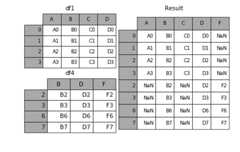
Here is a example of each of these methods. First, the defaultjoin='outer'behavior:
In [8]:df4=pd.DataFrame({'B':['B2','B3','B6','B7'], ...:'D':['D2','D3','D6','D7'], ...:'F':['F2','F3','F6','F7']}, ...:index=[2,3,6,7]) ...:In [9]:result=pd.concat([df1,df4],axis=1)
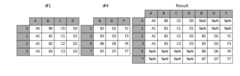
Note that the row indexes have been unioned and sorted. Here is the same thingwithjoin='inner':
In [10]:result=pd.concat([df1,df4],axis=1,join='inner')

Lastly, suppose we just wanted to reuse theexact index from the originalDataFrame:
In [11]:result=pd.concat([df1,df4],axis=1,join_axes=[df1.index])

Concatenating usingappend
A useful shortcut toconcat are theappend instance methods on Seriesand DataFrame. These methods actually predatedconcat. They concatenatealongaxis=0, namely the index:
In [12]:result=df1.append(df2)
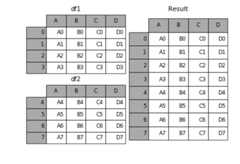
In the case of DataFrame, the indexes must be disjoint but the columns do notneed to be:
In [13]:result=df1.append(df4)
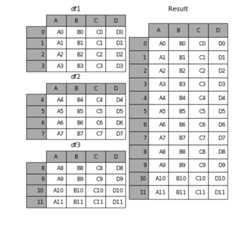
append may take multiple objects to concatenate:
In [14]:result=df1.append([df2,df3])
Note
Unlikelist.append method, which appends to the original list andreturns nothing,append heredoes not modifydf1 andreturns its copy withdf2 appended.
Ignoring indexes on the concatenation axis
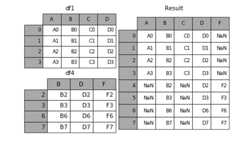
For DataFrames which don’t have a meaningful index, you may wish to append themand ignore the fact that they may have overlapping indexes:
To do this, use theignore_index argument:
In [15]:result=pd.concat([df1,df4],ignore_index=True)
This is also a valid argument toDataFrame.append:
In [16]:result=df1.append(df4,ignore_index=True)

Concatenating with mixed ndims
You can concatenate a mix of Series and DataFrames. TheSeries will be transformed to DataFrames with the column name asthe name of the Series.
In [17]:s1=pd.Series(['X0','X1','X2','X3'],name='X')In [18]:result=pd.concat([df1,s1],axis=1)

If unnamed Series are passed they will be numbered consecutively.
In [19]:s2=pd.Series(['_0','_1','_2','_3'])In [20]:result=pd.concat([df1,s2,s2,s2],axis=1)

Passingignore_index=True will drop all name references.
In [21]:result=pd.concat([df1,s1],axis=1,ignore_index=True)

More concatenating with group keys
A fairly common use of thekeys argument is to override the column names when creating a new DataFrame based on existing Series.Notice how the default behaviour consists on letting the resulting DataFrame inherits the parent Series’ name, when these existed.
In [22]:s3=pd.Series([0,1,2,3],name='foo')In [23]:s4=pd.Series([0,1,2,3])In [24]:s5=pd.Series([0,1,4,5])In [25]:pd.concat([s3,s4,s5],axis=1)Out[25]: foo 0 10 0 0 01 1 1 12 2 2 43 3 3 5
Through thekeys argument we can override the existing column names.
In [26]:pd.concat([s3,s4,s5],axis=1,keys=['red','blue','yellow'])Out[26]: red blue yellow0 0 0 01 1 1 12 2 2 43 3 3 5
Let’s consider now a variation on the very first example presented:
In [27]:result=pd.concat(frames,keys=['x','y','z'])

You can also pass a dict toconcat in which case the dict keys will be usedfor thekeys argument (unless other keys are specified):
In [28]:pieces={'x':df1,'y':df2,'z':df3}In [29]:result=pd.concat(pieces)
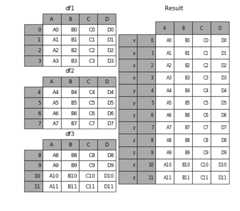
In [30]:result=pd.concat(pieces,keys=['z','y'])

The MultiIndex created has levels that are constructed from the passed keys andthe index of the DataFrame pieces:
In [31]:result.index.levelsOut[31]:FrozenList([[u'z',u'y'],[4,5,6,7,8,9,10,11]])
If you wish to specify other levels (as will occasionally be the case), you cando so using thelevels argument:
In [32]:result=pd.concat(pieces,keys=['x','y','z'], ....:levels=[['z','y','x','w']], ....:names=['group_key']) ....:

In [33]:result.index.levelsOut[33]:FrozenList([[u'z',u'y',u'x',u'w'],[0,1,2,3,4,5,6,7,8,9,10,11]])
Yes, this is fairly esoteric, but is actually necessary for implementing thingslike GroupBy where the order of a categorical variable is meaningful.
Appending rows to a DataFrame
While not especially efficient (since a new object must be created), you canappend a single row to a DataFrame by passing a Series or dict toappend,which returns a new DataFrame as above.
In [34]:s2=pd.Series(['X0','X1','X2','X3'],index=['A','B','C','D'])In [35]:result=df1.append(s2,ignore_index=True)

You should useignore_index with this method to instruct DataFrame todiscard its index. If you wish to preserve the index, you should construct anappropriately-indexed DataFrame and append or concatenate those objects.
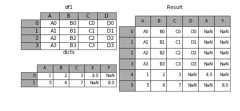
You can also pass a list of dicts or Series:
In [36]:dicts=[{'A':1,'B':2,'C':3,'X':4}, ....:{'A':5,'B':6,'C':7,'Y':8}] ....:In [37]:result=df1.append(dicts,ignore_index=True)
Database-style DataFrame joining/merging
pandas has full-featured,high performance in-memory join operationsidiomatically very similar to relational databases like SQL. These methodsperform significantly better (in some cases well over an order of magnitudebetter) than other open source implementations (likebase::merge.data.framein R). The reason for this is careful algorithmic design and internal layout ofthe data in DataFrame.
See thecookbook for some advanced strategies.
Users who are familiar with SQL but new to pandas might be interested in acomparison with SQL.
pandas provides a single function,merge, as the entry point for allstandard database join operations between DataFrame objects:
pd.merge(left,right,how='inner',on=None,left_on=None,right_on=None,left_index=False,right_index=False,sort=True,suffixes=('_x','_y'),copy=True,indicator=False)
left: A DataFrame objectright: Another DataFrame objecton: Columns (names) to join on. Must be found in both the left andright DataFrame objects. If not passed andleft_indexandright_indexareFalse, the intersection of the columns in theDataFrames will be inferred to be the join keysleft_on: Columns from the left DataFrame to use as keys. Can either becolumn names or arrays with length equal to the length of the DataFrameright_on: Columns from the right DataFrame to use as keys. Can either becolumn names or arrays with length equal to the length of the DataFrameleft_index: IfTrue, use the index (row labels) from the leftDataFrame as its join key(s). In the case of a DataFrame with a MultiIndex(hierarchical), the number of levels must match the number of join keysfrom the right DataFrameright_index: Same usage asleft_indexfor the right DataFramehow: One of'left','right','outer','inner'. Defaultstoinner. See below for more detailed description of each methodsort: Sort the result DataFrame by the join keys in lexicographicalorder. Defaults toTrue, setting toFalsewill improve performancesubstantially in many casessuffixes: A tuple of string suffixes to apply to overlappingcolumns. Defaults to('_x','_y').copy: Always copy data (defaultTrue) from the passed DataFrameobjects, even when reindexing is not necessary. Cannot be avoided in manycases but may improve performance / memory usage. The cases where copyingcan be avoided are somewhat pathological but this option is providednonetheless.indicator: Add a column to the output DataFrame called_mergewith information on the source of each row._mergeis Categorical-typeand takes on a value ofleft_onlyfor observations whose merge keyonly appears in'left'DataFrame,right_onlyfor observations whosemerge key only appears in'right'DataFrame, andbothif theobservation’s merge key is found in both.New in version 0.17.0.
The return type will be the same asleft. Ifleft is aDataFrameandright is a subclass of DataFrame, the return type will still beDataFrame.
merge is a function in the pandas namespace, and it is also available as aDataFrame instance method, with the calling DataFrame being implicitlyconsidered the left object in the join.
The relatedDataFrame.join method, usesmerge internally for theindex-on-index (by default) and column(s)-on-index join. If you are joining onindex only, you may wish to useDataFrame.join to save yourself some typing.
Brief primer on merge methods (relational algebra)
Experienced users of relational databases like SQL will be familiar with theterminology used to describe join operations between two SQL-table likestructures (DataFrame objects). There are several cases to consider which arevery important to understand:
- one-to-one joins: for example when joining two DataFrame objects ontheir indexes (which must contain unique values)
- many-to-one joins: for example when joining an index (unique) to one ormore columns in a DataFrame
- many-to-many joins: joining columns on columns.
Note
When joining columns on columns (potentially a many-to-many join), anyindexes on the passed DataFrame objectswill be discarded.
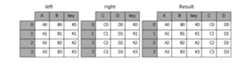
It is worth spending some time understanding the result of themany-to-manyjoin case. In SQL / standard relational algebra, if a key combination appearsmore than once in both tables, the resulting table will have theCartesianproduct of the associated data. Here is a very basic example with one uniquekey combination:
In [38]:left=pd.DataFrame({'key':['K0','K1','K2','K3'], ....:'A':['A0','A1','A2','A3'], ....:'B':['B0','B1','B2','B3']}) ....:In [39]:right=pd.DataFrame({'key':['K0','K1','K2','K3'], ....:'C':['C0','C1','C2','C3'], ....:'D':['D0','D1','D2','D3']}) ....:In [40]:result=pd.merge(left,right,on='key')
Here is a more complicated example with multiple join keys:
In [41]:left=pd.DataFrame({'key1':['K0','K0','K1','K2'], ....:'key2':['K0','K1','K0','K1'], ....:'A':['A0','A1','A2','A3'], ....:'B':['B0','B1','B2','B3']}) ....:In [42]:right=pd.DataFrame({'key1':['K0','K1','K1','K2'], ....:'key2':['K0','K0','K0','K0'], ....:'C':['C0','C1','C2','C3'], ....:'D':['D0','D1','D2','D3']}) ....:In [43]:result=pd.merge(left,right,on=['key1','key2'])

Thehow argument tomerge specifies how to determine which keys are tobe included in the resulting table. If a key combinationdoes not appear ineither the left or right tables, the values in the joined table will beNA. Here is a summary of thehow options and their SQL equivalent names:
| Merge method | SQL Join Name | Description |
|---|---|---|
left | LEFTOUTERJOIN | Use keys from left frame only |
right | RIGHTOUTERJOIN | Use keys from right frame only |
outer | FULLOUTERJOIN | Use union of keys from both frames |
inner | INNERJOIN | Use intersection of keys from both frames |
In [44]:result=pd.merge(left,right,how='left',on=['key1','key2'])
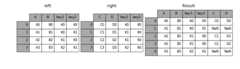
In [45]:result=pd.merge(left,right,how='right',on=['key1','key2'])

In [46]:result=pd.merge(left,right,how='outer',on=['key1','key2'])

In [47]:result=pd.merge(left,right,how='inner',on=['key1','key2'])

The merge indicator
New in version 0.17.0.
merge now accepts the argumentindicator. IfTrue, a Categorical-type column called_merge will be added to the output object that takes on values:
Observation Origin _mergevalueMerge key only in 'left'frameleft_onlyMerge key only in 'right'frameright_onlyMerge key in both frames both
In [48]:df1=pd.DataFrame({'col1':[0,1],'col_left':['a','b']})In [49]:df2=pd.DataFrame({'col1':[1,2,2],'col_right':[2,2,2]})In [50]:pd.merge(df1,df2,on='col1',how='outer',indicator=True)Out[50]: col1 col_left col_right _merge0 0 a NaN left_only1 1 b 2.0 both2 2 NaN 2.0 right_only3 2 NaN 2.0 right_only
Theindicator argument will also accept string arguments, in which case the indicator function will use the value of the passed string as the name for the indicator column.
In [51]:pd.merge(df1,df2,on='col1',how='outer',indicator='indicator_column')Out[51]: col1 col_left col_right indicator_column0 0 a NaN left_only1 1 b 2.0 both2 2 NaN 2.0 right_only3 2 NaN 2.0 right_only
Joining on index
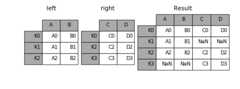
DataFrame.join is a convenient method for combining the columns of twopotentially differently-indexed DataFrames into a single result DataFrame. Hereis a very basic example:
In [52]:left=pd.DataFrame({'A':['A0','A1','A2'], ....:'B':['B0','B1','B2']}, ....:index=['K0','K1','K2']) ....:In [53]:right=pd.DataFrame({'C':['C0','C2','C3'], ....:'D':['D0','D2','D3']}, ....:index=['K0','K2','K3']) ....:In [54]:result=left.join(right)
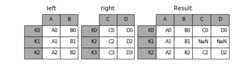
In [55]:result=left.join(right,how='outer')
In [56]:result=left.join(right,how='inner')
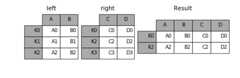
The data alignment here is on the indexes (row labels). This same behavior canbe achieved usingmerge plus additional arguments instructing it to use theindexes:
In [57]:result=pd.merge(left,right,left_index=True,right_index=True,how='outer')

In [58]:result=pd.merge(left,right,left_index=True,right_index=True,how='inner');

Joining key columns on an index
join takes an optionalon argument which may be a column or multiplecolumn names, which specifies that the passed DataFrame is to be aligned onthat column in the DataFrame. These two function calls are completelyequivalent:
left.join(right,on=key_or_keys)pd.merge(left,right,left_on=key_or_keys,right_index=True,how='left',sort=False)
Obviously you can choose whichever form you find more convenient. Formany-to-one joins (where one of the DataFrame’s is already indexed by the joinkey), usingjoin may be more convenient. Here is a simple example:
In [59]:left=pd.DataFrame({'A':['A0','A1','A2','A3'], ....:'B':['B0','B1','B2','B3'], ....:'key':['K0','K1','K0','K1']}) ....:In [60]:right=pd.DataFrame({'C':['C0','C1'], ....:'D':['D0','D1']}, ....:index=['K0','K1']) ....:In [61]:result=left.join(right,on='key')

In [62]:result=pd.merge(left,right,left_on='key',right_index=True, ....:how='left',sort=False); ....:

To join on multiple keys, the passed DataFrame must have aMultiIndex:
In [63]:left=pd.DataFrame({'A':['A0','A1','A2','A3'], ....:'B':['B0','B1','B2','B3'], ....:'key1':['K0','K0','K1','K2'], ....:'key2':['K0','K1','K0','K1']}) ....:In [64]:index=pd.MultiIndex.from_tuples([('K0','K0'),('K1','K0'), ....:('K2','K0'),('K2','K1')]) ....:In [65]:right=pd.DataFrame({'C':['C0','C1','C2','C3'], ....:'D':['D0','D1','D2','D3']}, ....:index=index) ....:
Now this can be joined by passing the two key column names:
In [66]:result=left.join(right,on=['key1','key2'])
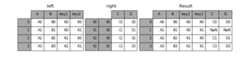
The default forDataFrame.join is to perform a left join (essentially a“VLOOKUP” operation, for Excel users), which uses only the keys found in thecalling DataFrame. Other join types, for example inner join, can be just aseasily performed:
In [67]:result=left.join(right,on=['key1','key2'],how='inner')

As you can see, this drops any rows where there was no match.
Joining a single Index to a Multi-index
New in version 0.14.0.
You can join a singly-indexedDataFrame with a level of a multi-indexedDataFrame.The level will match on the name of the index of the singly-indexed frame againsta level name of the multi-indexed frame.
In [68]:left=pd.DataFrame({'A':['A0','A1','A2'], ....:'B':['B0','B1','B2']}, ....:index=pd.Index(['K0','K1','K2'],name='key')) ....:In [69]:index=pd.MultiIndex.from_tuples([('K0','Y0'),('K1','Y1'), ....:('K2','Y2'),('K2','Y3')], ....:names=['key','Y']) ....:In [70]:right=pd.DataFrame({'C':['C0','C1','C2','C3'], ....:'D':['D0','D1','D2','D3']}, ....:index=index) ....:In [71]:result=left.join(right,how='inner')

This is equivalent but less verbose and more memory efficient / faster than this.
In [72]:result=pd.merge(left.reset_index(),right.reset_index(), ....:on=['key'],how='inner').set_index(['key','Y']) ....:

Joining with two multi-indexes
This is not Implemented viajoin at-the-moment, however it can be done using the following.
In [73]:index=pd.MultiIndex.from_tuples([('K0','X0'),('K0','X1'), ....:('K1','X2')], ....:names=['key','X']) ....:In [74]:left=pd.DataFrame({'A':['A0','A1','A2'], ....:'B':['B0','B1','B2']}, ....:index=index) ....:In [75]:result=pd.merge(left.reset_index(),right.reset_index(), ....:on=['key'],how='inner').set_index(['key','X','Y']) ....:

Overlapping value columns
The mergesuffixes argument takes a tuple of list of strings to append tooverlapping column names in the input DataFrames to disambiguate the resultcolumns:
In [76]:left=pd.DataFrame({'k':['K0','K1','K2'],'v':[1,2,3]})In [77]:right=pd.DataFrame({'k':['K0','K0','K3'],'v':[4,5,6]})In [78]:result=pd.merge(left,right,on='k')

In [79]:result=pd.merge(left,right,on='k',suffixes=['_l','_r'])

DataFrame.join haslsuffix andrsuffix arguments which behavesimilarly.
In [80]:left=left.set_index('k')In [81]:right=right.set_index('k')In [82]:result=left.join(right,lsuffix='_l',rsuffix='_r')

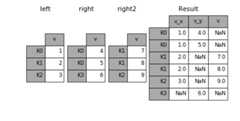
Joining multiple DataFrame or Panel objects
A list or tuple of DataFrames can also be passed toDataFrame.join to jointhem together on their indexes. The same is true forPanel.join.
In [83]:right2=pd.DataFrame({'v':[7,8,9]},index=['K1','K1','K2'])In [84]:result=left.join([right,right2])
Merging together values within Series or DataFrame columns
Another fairly common situation is to have two like-indexed (or similarlyindexed) Series or DataFrame objects and wanting to “patch” values in oneobject from values for matching indices in the other. Here is an example:
In [85]:df1=pd.DataFrame([[np.nan,3.,5.],[-4.6,np.nan,np.nan], ....:[np.nan,7.,np.nan]]) ....:In [86]:df2=pd.DataFrame([[-42.6,np.nan,-8.2],[-5.,1.6,4]], ....:index=[1,2]) ....:
For this, use thecombine_first method:
In [87]:result=df1.combine_first(df2)
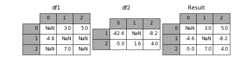
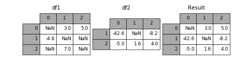
Note that this method only takes values from the right DataFrame if they aremissing in the left DataFrame. A related method,update, alters non-NAvalues inplace:
In [88]:df1.update(df2)
Timeseries friendly merging
Merging Ordered Data
Amerge_ordered() function allows combining time series and otherordered data. In particular it has an optionalfill_method keyword tofill/interpolate missing data:
In [89]:left=pd.DataFrame({'k':['K0','K1','K1','K2'], ....:'lv':[1,2,3,4], ....:'s':['a','b','c','d']}) ....:In [90]:right=pd.DataFrame({'k':['K1','K2','K4'], ....:'rv':[1,2,3]}) ....:In [91]:pd.merge_ordered(left,right,fill_method='ffill',left_by='s')Out[91]: k lv s rv0 K0 1.0 a NaN1 K1 1.0 a 1.02 K2 1.0 a 2.03 K4 1.0 a 3.04 K1 2.0 b 1.05 K2 2.0 b 2.06 K4 2.0 b 3.07 K1 3.0 c 1.08 K2 3.0 c 2.09 K4 3.0 c 3.010 K1 NaN d 1.011 K2 4.0 d 2.012 K4 4.0 d 3.0
Merging AsOf
New in version 0.19.0.
Amerge_asof() is similar to an ordered left-join except that we match on nearest key rather than equal keys. For each row in theleft DataFrame, we select the last row in theright DataFrame whoseon key is less than the left’s key. Both DataFrames must be sorted by the key.
Optionally an asof merge can perform a group-wise merge. This matches theby key equally,in addition to the nearest match on theon key.
For example; we might havetrades andquotes and we want toasof merge them.
In [92]:trades=pd.DataFrame({ ....:'time':pd.to_datetime(['20160525 13:30:00.023', ....:'20160525 13:30:00.038', ....:'20160525 13:30:00.048', ....:'20160525 13:30:00.048', ....:'20160525 13:30:00.048']), ....:'ticker':['MSFT','MSFT', ....:'GOOG','GOOG','AAPL'], ....:'price':[51.95,51.95, ....:720.77,720.92,98.00], ....:'quantity':[75,155, ....:100,100,100]}, ....:columns=['time','ticker','price','quantity']) ....:In [93]:quotes=pd.DataFrame({ ....:'time':pd.to_datetime(['20160525 13:30:00.023', ....:'20160525 13:30:00.023', ....:'20160525 13:30:00.030', ....:'20160525 13:30:00.041', ....:'20160525 13:30:00.048', ....:'20160525 13:30:00.049', ....:'20160525 13:30:00.072', ....:'20160525 13:30:00.075']), ....:'ticker':['GOOG','MSFT','MSFT', ....:'MSFT','GOOG','AAPL','GOOG', ....:'MSFT'], ....:'bid':[720.50,51.95,51.97,51.99, ....:720.50,97.99,720.50,52.01], ....:'ask':[720.93,51.96,51.98,52.00, ....:720.93,98.01,720.88,52.03]}, ....:columns=['time','ticker','bid','ask']) ....:
In [94]:tradesOut[94]: time ticker price quantity0 2016-05-25 13:30:00.023 MSFT 51.95 751 2016-05-25 13:30:00.038 MSFT 51.95 1552 2016-05-25 13:30:00.048 GOOG 720.77 1003 2016-05-25 13:30:00.048 GOOG 720.92 1004 2016-05-25 13:30:00.048 AAPL 98.00 100In [95]:quotesOut[95]: time ticker bid ask0 2016-05-25 13:30:00.023 GOOG 720.50 720.931 2016-05-25 13:30:00.023 MSFT 51.95 51.962 2016-05-25 13:30:00.030 MSFT 51.97 51.983 2016-05-25 13:30:00.041 MSFT 51.99 52.004 2016-05-25 13:30:00.048 GOOG 720.50 720.935 2016-05-25 13:30:00.049 AAPL 97.99 98.016 2016-05-25 13:30:00.072 GOOG 720.50 720.887 2016-05-25 13:30:00.075 MSFT 52.01 52.03
By default we are taking the asof of the quotes.
In [96]:pd.merge_asof(trades,quotes, ....:on='time', ....:by='ticker') ....:Out[96]: time ticker price quantity bid ask0 2016-05-25 13:30:00.023 MSFT 51.95 75 51.95 51.961 2016-05-25 13:30:00.038 MSFT 51.95 155 51.97 51.982 2016-05-25 13:30:00.048 GOOG 720.77 100 720.50 720.933 2016-05-25 13:30:00.048 GOOG 720.92 100 720.50 720.934 2016-05-25 13:30:00.048 AAPL 98.00 100 NaN NaN
We only asof within2ms betwen the quote time and the trade time.
In [97]:pd.merge_asof(trades,quotes, ....:on='time', ....:by='ticker', ....:tolerance=pd.Timedelta('2ms')) ....:Out[97]: time ticker price quantity bid ask0 2016-05-25 13:30:00.023 MSFT 51.95 75 51.95 51.961 2016-05-25 13:30:00.038 MSFT 51.95 155 NaN NaN2 2016-05-25 13:30:00.048 GOOG 720.77 100 720.50 720.933 2016-05-25 13:30:00.048 GOOG 720.92 100 720.50 720.934 2016-05-25 13:30:00.048 AAPL 98.00 100 NaN NaN
We only asof within10ms betwen the quote time and the trade time and we exclude exact matches on time.Note that though we exclude the exact matches (of the quotes), prior quotes DO propogate to that pointin time.
In [98]:pd.merge_asof(trades,quotes, ....:on='time', ....:by='ticker', ....:tolerance=pd.Timedelta('10ms'), ....:allow_exact_matches=False) ....:Out[98]: time ticker price quantity bid ask0 2016-05-25 13:30:00.023 MSFT 51.95 75 NaN NaN1 2016-05-25 13:30:00.038 MSFT 51.95 155 51.97 51.982 2016-05-25 13:30:00.048 GOOG 720.77 100 NaN NaN3 2016-05-25 13:30:00.048 GOOG 720.92 100 NaN NaN4 2016-05-25 13:30:00.048 AAPL 98.00 100 NaN NaN