


Contents
matplotlib has an extensive codebase that can be daunting to manynew users. However, most of matplotlib can be understood with a fairlysimple conceptual framework and knowledge of a few important points.
Plotting requires action on a range of levels, from the most general(e.g., ‘contour this 2-D array’) to the most specific (e.g., ‘colorthis screen pixel red’). The purpose of a plotting package is to assistyou in visualizing your data as easily as possible, with all the necessarycontrol – that is, by using relatively high-level commands most ofthe time, and still have the ability to use the low-level commands whenneeded.
Therefore, everything in matplotlib is organized in a hierarchy. At the topof the hierarchy is the matplotlib “state-machine environment” which isprovided by thematplotlib.pyplot module. At this level, simplefunctions are used to add plot elements (lines, images, text, etc.) tothe current axes in the current figure.
Note
Pyplot’s state-machine environment behaves similarly to MATLAB andshould be most familiar to users with MATLAB experience.
The next level down in the hierarchy is the first level of the object-orientedinterface, in which pyplot is used only for a few functions such as figurecreation, and the user explicitly creates and keeps track of the figureand axes objects. At this level, the user uses pyplot to create figures,and through those figures, one or more axes objects can be created. Theseaxes objects are then used for most plotting actions.
For even more control – which is essential for things like embeddingmatplotlib plots in GUI applications – the pyplot level may be droppedcompletely, leaving a purely object-oriented approach.
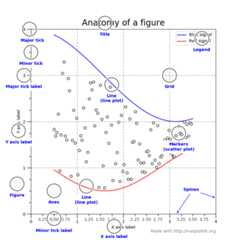
Figure¶Thewhole figure. The figure keepstrack of all the childAxes, a smattering of‘special’ artists (titles, figure legends, etc), and thecanvas.(Don’t worry too much about the canvas, it is crucial as it is theobject that actually does the drawing to get you your plot, but as theuser it is more-or-less invisible to you). A figure can have anynumber ofAxes, but to be useful should haveat least one.
The easiest way to create a new figure is with pyplot:
fig=plt.figure()# an empty figure with no axesfig,ax_lst=plt.subplots(2,2)# a figure with a 2x2 grid of Axes
Axes¶This is what you think of as ‘a plot’, it is the region of the imagewith the data space (marked as the inner blue box). A given figurecan contain many Axes, but a givenAxesobject can only be in oneFigure. TheAxes contains two (or three in the case of 3D)Axis objects (be aware of the differencebetweenAxes andAxis) which take care of the data limits (thedata limits can also be controlled via set via theset_xlim() andset_ylim()Axes methods). EachAxes has a title (set viaset_title()), an x-label (set viaset_xlabel()), and a y-label set viaset_ylabel()).
TheAxes class and it’s member functions are the primary entrypoint to working with the OO interface.
Axis¶These are the number-line-like objects (circled in green). They takecare of setting the graph limits and generating the ticks (the markson the axis) and ticklabels (strings labeling the ticks). Thelocation of the ticks is determined by aLocator object and the ticklabel stringsare formatted by aFormatter. Thecombination of the correctLocator andFormatter givesvery fine control over the tick locations and labels.
Artist¶Basically everything you can see on the figure is an artist (even theFigure,Axes, andAxis objects). ThisincludesText objects,Line2D objects,collection objects,Patch objects ... (you get theidea). When the figure is rendered, all of the artists are drawn tothecanvas. Most Artists are tied to an Axes; such an Artistcannot be shared by multiple Axes, or moved from one to another.
All of plotting functions expectnp.array ornp.ma.masked_array asinput. Classes that are ‘array-like’ such aspandas data objectsandnp.matrix may or may not work as intended. It is best toconvert these tonp.array objects prior to plotting.
For example, to covert apandas.DataFrame
a=pandas.DataFrame(np.random.rand(4,5),columns=list('abcde'))a_asndarray=a.values
and to covert anp.matrix
b=np.matrix([[1,2],[3,4]])b_asarray=np.asarray(b)
Matplotlib is the whole package;matplotlib.pyplotis a module in matplotlib; andpylab is a modulethat gets installed alongsidematplotlib.
Pyplot provides the state-machine interface to the underlyingobject-oriented plotting library. The state-machine implicitly andautomatically creates figures and axes to achieve the desiredplot. For example:
importmatplotlib.pyplotaspltimportnumpyasnpx=np.linspace(0,2,100)plt.plot(x,x,label='linear')plt.plot(x,x**2,label='quadratic')plt.plot(x,x**3,label='cubic')plt.xlabel('x label')plt.ylabel('y label')plt.title("Simple Plot")plt.legend()plt.show()
The first call toplt.plot will automatically create the necessaryfigure and axes to achieve the desired plot. Subsequent calls toplt.plot re-use the current axes and each add another line.Setting the title, legend, and axis labels also automatically use thecurrent axes and set the title, create the legend, and label the axisrespectively.
pylab is a convenience module that bulk importsmatplotlib.pyplot (for plotting) andnumpy(for mathematics and working with arrays) in a single name space.Although many examples usepylab, it is no longer recommended.
For non-interactive plotting it is suggestedto use pyplot to create the figures and then the OO interface forplotting.
When viewing this documentation and examples, you will find differentcoding styles and usage patterns. These styles are perfectly validand have their pros and cons. Just about all of the examples can beconverted into another style and achieve the same results.The only caveat is to avoid mixing the coding styles for your own code.
Note
Developers for matplotlib have to follow a specific style and guidelines.SeeThe Matplotlib Developers’ Guide.
Of the different styles, there are two that are officially supported.Therefore, these are the preferred ways to use matplotlib.
For the pyplot style, the imports at the top of yourscripts will typically be:
importmatplotlib.pyplotaspltimportnumpyasnp
Then one calls, for example, np.arange, np.zeros, np.pi, plt.figure,plt.plot, plt.show, etc. Use the pyplot interfacefor creating figures, and then use the object methods for the rest:
importmatplotlib.pyplotaspltimportnumpyasnpx=np.arange(0,10,0.2)y=np.sin(x)fig=plt.figure()ax=fig.add_subplot(111)ax.plot(x,y)plt.show()
So, why all the extra typing instead of the MATLAB-style (which relieson global state and a flat namespace)? For very simple things likethis example, the only advantage is academic: the wordier styles aremore explicit, more clear as to where things come from and what isgoing on. For more complicated applications, this explicitness andclarity becomes increasingly valuable, and the richer and morecomplete object-oriented interface will likely make the program easierto write and maintain.
Typically one finds oneself making the same plots over and overagain, but with different data sets, which leads to needing to writespecialized functions to do the plotting. The recommended functionsignature is something like:
defmy_plotter(ax,data1,data2,param_dict):""" A helper function to make a graph Parameters ---------- ax : Axes The axes to draw to data1 : array The x data data2 : array The y data param_dict : dict Dictionary of kwargs to pass to ax.plot Returns ------- out : list list of artists added """out=ax.plot(data1,data2,**param_dict)returnout
which you would then use as:
fig,ax=plt.subplots(1,1)my_plotter(ax,data1,data2,{'marker':'x'})
or if you wanted to have 2 sub-plots:
fig,(ax1,ax2)=plt.subplots(1,2)my_plotter(ax1,data1,data2,{'marker':'x'})my_plotter(ax2,data3,data4,{'marker':'o'})
Again, for these simple examples this style seems like overkill, howeveronce the graphs get slightly more complex it pays off.
A lot of documentation on the website and in the mailing lists refersto the “backend” and many new users are confused by this term.matplotlib targets many different use cases and output formats. Somepeople use matplotlib interactively from the python shell and haveplotting windows pop up when they type commands. Some people embedmatplotlib into graphical user interfaces like wxpython or pygtk tobuild rich applications. Others use matplotlib in batch scripts togenerate postscript images from some numerical simulations, and stillothers in web application servers to dynamically serve up graphs.
To support all of these use cases, matplotlib can target differentoutputs, and each of these capabilities is called a backend; the“frontend” is the user facing code, i.e., the plotting code, whereas the“backend” does all the hard work behind-the-scenes to make the figure.There are two types of backends: user interface backends (for use inpygtk, wxpython, tkinter, qt4, or macosx; also referred to as“interactive backends”) and hardcopy backends to make image files(PNG, SVG, PDF, PS; also referred to as “non-interactive backends”).
There are four ways to configure your backend. If they conflict each other,the method mentioned last in the following list will be used, e.g. callinguse() will override the setting in yourmatplotlibrc.
Thebackend parameter in yourmatplotlibrc file (seeCustomizing matplotlib):
backend:WXAgg# use wxpython with antigrain (agg) rendering
Setting theMPLBACKEND environmentvariable, either for your current shell or for a single script:
>exportMPLBACKEND="module://my_backend">pythonsimple_plot.py>MPLBACKEND="module://my_backend"pythonsimple_plot.py
Setting this environment variable will override thebackend parameterinanymatplotlibrc, even if there is amatplotlibrc in yourcurrent working directory. Therefore settingMPLBACKENDglobally, e.g. in your.bashrc or.profile, is discouraged as itmight lead to counter-intuitive behavior.
To set the backend for a single script, you can alternatively use the-dcommand line argument:
>pythonscript.py-dbackend
This method isdeprecated as the-d argument might conflict withscripts which parse command line arguments (see issue#1986). Youshould useMPLBACKEND instead.
If your script depends on a specific backend you can use theuse() function:
importmatplotlibmatplotlib.use('PS')# generate postscript output by default
If you use theuse() function, this must be done beforeimportingmatplotlib.pyplot. Callinguse() afterpyplot has been imported will have no effect. Usinguse() will require changes in your code if users want touse a different backend. Therefore, you should avoid explicitly callinguse() unless absolutely necessary.
Note
Backend name specifications are not case-sensitive; e.g., ‘GTKAgg’and ‘gtkagg’ are equivalent.
With a typical installation of matplotlib, such as from abinary installer or a linux distribution package, a good defaultbackend will already be set, allowing both interactive work andplotting from scripts, with output to the screen and/or toa file, so at least initially you will not need to use any of themethods given above.
If, however, you want to write graphical user interfaces, or a webapplication server (Matplotlib in a web application server), or need a betterunderstanding of what is going on, read on. To make things a littlemore customizable for graphical user interfaces, matplotlib separatesthe concept of the renderer (the thing that actually does the drawing)from the canvas (the place where the drawing goes). The canonicalrenderer for user interfaces isAgg which uses theAnti-GrainGeometry C++ library to make a raster (pixel) image of the figure.All of the user interfaces exceptmacosx can be used withagg rendering, e.g.,WXAgg,GTKAgg,QT4Agg,QT5Agg,TkAgg. Inaddition, some of the user interfaces support other rendering engines.For example, with GTK, you can also select GDK rendering (backendGTK deprecated in 2.0) or Cairo rendering (backendGTKCairo).
For the rendering engines, one can also distinguish betweenvector orraster renderers. Vectorgraphics languages issue drawing commands like “draw a line from thispoint to this point” and hence are scale free, and raster backendsgenerate a pixel representation of the line whose accuracy depends on aDPI setting.
Here is a summary of the matplotlib renderers (there is an eponymousbacked for each; these arenon-interactive backends, capable ofwriting to a file):
| Renderer | Filetypes | Description |
|---|---|---|
| AGG | png | raster graphics – high quality imagesusing theAnti-Grain Geometry engine |
| PS | pseps | vector graphics –Postscript output |
| vector graphics –Portable Document Format | ||
| SVG | svg | vector graphics –Scalable Vector Graphics |
| Cairo | pngpspdfsvg... | vector graphics –Cairo graphics |
| GDK | pngjpgtiff... | raster graphics –theGimp Drawing Kit Deprecated in 2.0 |
And here are the user interfaces and renderer combinations supported;these areinteractive backends, capable of displaying to the screenand of using appropriate renderers from the table above to write toa file:
| Backend | Description |
|---|---|
| GTKAgg | Agg rendering to aGTK 2.x canvas (requiresPyGTK andpycairo orcairocffi; Python2 only) |
| GTK3Agg | Agg rendering to aGTK 3.x canvas (requiresPyGObjectandpycairo orcairocffi) |
| GTK | GDK rendering to aGTK 2.x canvas (not recommended and deprecated in 2.0) (requiresPyGTK andpycairo orcairocffi;Python2 only) |
| GTKCairo | Cairo rendering to aGTK 2.x canvas (requiresPyGTKandpycairo orcairocffi; Python2 only) |
| GTK3Cairo | Cairo rendering to aGTK 3.x canvas (requiresPyGObjectandpycairo orcairocffi) |
| WXAgg | Agg rendering to to awxWidgets canvas(requireswxPython) |
| WX | NativewxWidgets drawing to awxWidgets Canvas(not recommended and deprecated in 2.0) (requireswxPython) |
| TkAgg | Agg rendering to aTk canvas (requiresTkInter) |
| Qt4Agg | Agg rendering to aQt4 canvas (requiresPyQt4 orpyside) |
| Qt5Agg | Agg rendering in aQt5 canvas (requiresPyQt5) |
| macosx | Cocoa rendering in OSX windows(presently lacks blocking show() behavior when matplotlibis in non-interactive mode) |
At present the release version ofwxPython (also known as wxPython classic)does not support python3. A work in progress redesigned version known aswxPython-Phoenix does support python3.Matplotlib should work with both versions.
BothGTK2 andGTK3 have implicit dependencies on PyCairo regardless of thespecific Matplotlib backend used. Unfortunatly the latest release of PyCairofor Python3 does not implement the Python wrappers needed for theGTK3Aggbackend.Cairocffi can be used as a replacement which implements the correctwrapper.
You can choose either PyQt4 or PySide when using theqt4 backend by settingthe appropriate value forbackend.qt4 in yourmatplotlibrc file. Thedefault value isPyQt4.
The setting in yourmatplotlibrc file can be overridden by setting theQT_API environment variable to eitherpyqt orpyside to usePyQt4 orPySide, respectively.
Since the default value for the bindings to be used isPyQt4,matplotlib first tries to import it, if the import fails, it tries toimportPySide.
Use of an interactive backend (seeWhat is a backend?)permits–but does not by itself require or ensure–plottingto the screen. Whether and when plotting to the screen occurs,and whether a script or shell session continues after a plotis drawn on the screen, depends on the functions and methodsthat are called, and on a state variable that determines whethermatplotlib is in “interactive mode”. The default Boolean value is setby thematplotlibrc file, and may be customized like any otherconfiguration parameter (seeCustomizing matplotlib). Itmay also be set viamatplotlib.interactive(), and itsvalue may be queried viamatplotlib.is_interactive(). Turninginteractive mode on and off in the middle of a stream of plottingcommands, whether in a script or in a shell, is rarely neededand potentially confusing, so in the following we will assume allplotting is done with interactive mode either on or off.
Note
Major changes related to interactivity, and in particular therole and behavior ofshow(), were made in thetransition to matplotlib version 1.0, and bugs were fixed in1.0.1. Here we describe the version 1.0.1 behavior for theprimary interactive backends, with the partial exception ofmacosx.
Interactive mode may also be turned on viamatplotlib.pyplot.ion(),and turned off viamatplotlib.pyplot.ioff().
Note
Interactive mode works with suitable backends in ipython and inthe ordinary python shell, but it doesnot work in the IDLE IDE.If the default backend does not support interactivity, an interactivebackend can be explicitly activated using any of the methods discussed inWhat is a backend?.
From an ordinary python prompt, or after invoking ipython with no options,try this:
importmatplotlib.pyplotaspltplt.ion()plt.plot([1.6,2.7])
Assuming you are running version 1.0.1 or higher, and you havean interactive backend installed and selected by default, you shouldsee a plot, and your terminal prompt should also be active; youcan type additional commands such as:
plt.title("interactive test")plt.xlabel("index")
and you will see the plot being updated after each line. This isbecause you are in interactive modeand you are using pyplotfunctions. Now try an alternative method of modifying theplot. Get a reference to theAxes instance, andcall a method of that instance:
ax=plt.gca()ax.plot([3.1,2.2])
Nothing changed, because the Axes methods do not include anautomatic call todraw_if_interactive();that call is added by the pyplot functions. If you are usingmethods, then when you want to update the plot on the screen,you need to calldraw():
plt.draw()
Now you should see the new line added to the plot.
Start a fresh session as in the previous example, but nowturn interactive mode off:
importmatplotlib.pyplotaspltplt.ioff()plt.plot([1.6,2.7])
Nothing happened–or at least nothing has shown up on thescreen (unless you are usingmacosx backend, which isanomalous). To make the plot appear, you need to do this:
plt.show()
Now you see the plot, but your terminal command line isunresponsive; theshow() commandblocks the inputof additional commands until you manually kill the plotwindow.
What good is this–being forced to use a blocking function?Suppose you need a script that plots the contents of a fileto the screen. You want to look at that plot, and then endthe script. Without some blocking command such as show(), thescript would flash up the plot and then end immediately,leaving nothing on the screen.
In addition, non-interactive mode delays all drawing untilshow() is called; this is more efficient than redrawingthe plot each time a line in the script adds a new feature.
Prior to version 1.0, show() generally could not be calledmore than once in a single script (although sometimes onecould get away with it); for version 1.0.1 and above, thisrestriction is lifted, so one can write a script like this:
importnumpyasnpimportmatplotlib.pyplotaspltplt.ioff()foriinrange(3):plt.plot(np.random.rand(10))plt.show()
which makes three plots, one at a time.
In interactive mode, pyplot functions automatically drawto the screen.
When plotting interactively, if usingobject method calls in addition to pyplot functions, thencalldraw() whenever you want torefresh the plot.
Use non-interactive mode in scripts in which you want togenerate one or more figures and display them before endingor generating a new set of figures. In that case, useshow() to display the figure(s) andto block execution until you have manually destroyed them.