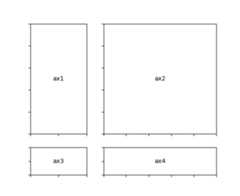
GridSpec- specifies the geometry of the grid that a subplot will beplaced. The number of rows and number of columns of the gridneed to be set. Optionally, the subplot layout parameters(e.g., left, right, etc.) can be tuned.
SubplotSpec- specifies the location of the subplot in the givenGridSpec.
subplot2grid- a helper function that is similar to “pyplot.subplot” but uses0-based indexing and let subplot to occupy multiple cells.
To use subplot2grid, you provide geometry of the grid and the locationof the subplot in the grid. For a simple single-cell subplot:
ax=plt.subplot2grid((2,2),(0,0))
is identical to
ax=plt.subplot(2,2,1)
Note that, unlike matplotlib’s subplot, the index starts from 0 in gridspec.
To create a subplot that spans multiple cells,
ax2=plt.subplot2grid((3,3),(1,0),colspan=2)ax3=plt.subplot2grid((3,3),(1,2),rowspan=2)
For example, the following commands
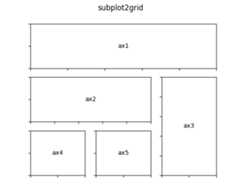
ax1=plt.subplot2grid((3,3),(0,0),colspan=3)ax2=plt.subplot2grid((3,3),(1,0),colspan=2)ax3=plt.subplot2grid((3,3),(1,2),rowspan=2)ax4=plt.subplot2grid((3,3),(2,0))ax5=plt.subplot2grid((3,3),(2,1))
creates
You can create GridSpec explicitly and use them to create a Subplot.
For example,
ax=plt.subplot2grid((2,2),(0,0))
is equal to
importmatplotlib.gridspecasgridspecgs=gridspec.GridSpec(2,2)ax=plt.subplot(gs[0,0])
A gridspec instance provides array-like (2d or 1d) indexing thatreturns the SubplotSpec instance. For, SubplotSpec that spans multiplecells, use slice.
ax2=plt.subplot(gs[1,:-1])ax3=plt.subplot(gs[1:,-1])
The above example becomes
gs=gridspec.GridSpec(3,3)ax1=plt.subplot(gs[0,:])ax2=plt.subplot(gs[1,:-1])ax3=plt.subplot(gs[1:,-1])ax4=plt.subplot(gs[-1,0])ax5=plt.subplot(gs[-1,-2])
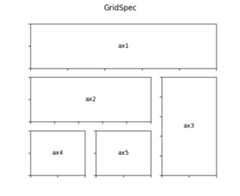
When a GridSpec is explicitly used, you can adjust the layoutparameters of subplots that are created from the gridspec.
gs1=gridspec.GridSpec(3,3)gs1.update(left=0.05,right=0.48,wspace=0.05)
This is similar tosubplots_adjust, but it only affects the subplotsthat are created from the given GridSpec.
The code below
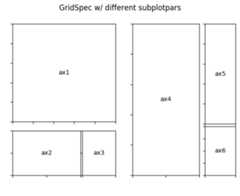
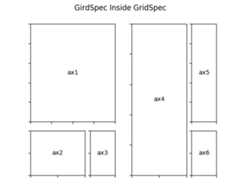
gs1=gridspec.GridSpec(3,3)gs1.update(left=0.05,right=0.48,wspace=0.05)ax1=plt.subplot(gs1[:-1,:])ax2=plt.subplot(gs1[-1,:-1])ax3=plt.subplot(gs1[-1,-1])gs2=gridspec.GridSpec(3,3)gs2.update(left=0.55,right=0.98,hspace=0.05)ax4=plt.subplot(gs2[:,:-1])ax5=plt.subplot(gs2[:-1,-1])ax6=plt.subplot(gs2[-1,-1])
creates
You can create GridSpec from the SubplotSpec, in which case its layoutparameters are set to that of the location of the given SubplotSpec.
gs0=gridspec.GridSpec(1,2)gs00=gridspec.GridSpecFromSubplotSpec(3,3,subplot_spec=gs0[0])gs01=gridspec.GridSpecFromSubplotSpec(3,3,subplot_spec=gs0[1])
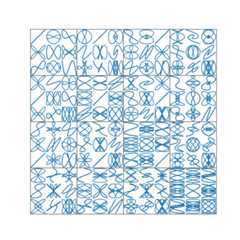
Here’s a more sophisticated example of nested gridspec where we puta box around each cell of the outer 4x4 grid, by hiding appropriatespines in each of the inner 3x3 grids.
By default, GridSpec creates cells of equal sizes. You can adjustrelative heights and widths of rows and columns. Note that absolutevalues are meaningless, only their relative ratios matter.
gs=gridspec.GridSpec(2,2,width_ratios=[1,2],height_ratios=[4,1])ax1=plt.subplot(gs[0])ax2=plt.subplot(gs[1])ax3=plt.subplot(gs[2])ax4=plt.subplot(gs[3])