There are three layers to the matplotlib API. Thematplotlib.backend_bases.FigureCanvas is the area onto whichthe figure is drawn, thematplotlib.backend_bases.Renderer isthe object which knows how to draw on theFigureCanvas, and thematplotlib.artist.Artist is the object that knows how to usea renderer to paint onto the canvas. TheFigureCanvas andRenderer handle all the details oftalking to user interface toolkits likewxPython or drawing languages like PostScript®, andtheArtist handles all the high level constructs like representingand laying out the figure, text, and lines. The typical user willspend 95% of his time working with theArtists.
There are two types ofArtists: primitives and containers. The primitivesrepresent the standard graphical objects we want to paint onto our canvas:Line2D,Rectangle,Text,AxesImage, etc., andthe containers are places to put them (Axis,Axes andFigure). Thestandard use is to create aFigure instance, usetheFigure to create one or moreAxes orSubplot instances, and use theAxes instancehelper methods to create the primitives. In the example below, we create aFigure instance usingmatplotlib.pyplot.figure(), which is aconvenience method for instantiatingFigure instances and connecting themwith your user interface or drawing toolkitFigureCanvas. As we willdiscuss below, this is not necessary – you can work directly with PostScript,PDF Gtk+, or wxPythonFigureCanvas instances, instantiate yourFiguresdirectly and connect them yourselves – but since we are focusing here on theArtist API we’ll letpyplot handle some of those detailsfor us:
importmatplotlib.pyplotaspltfig=plt.figure()ax=fig.add_subplot(2,1,1)# two rows, one column, first plot
TheAxes is probably the most importantclass in the matplotlib API, and the one you will be working with mostof the time. This is because theAxes is the plotting area intowhich most of the objects go, and theAxes has many special helpermethods (plot(),text(),hist(),imshow()) to create the most commongraphics primitives (Line2D,Text,Rectangle,Image, respectively). These helper methodswill take your data (e.g.,numpy arrays and strings) and createprimitiveArtist instances as needed (e.g.,Line2D), add them tothe relevant containers, and draw them when requested. Most of youare probably familiar with theSubplot,which is just a special case of anAxes that lives on a regularrows by columns grid ofSubplot instances. If you want to createanAxes at an arbitrary location, simply use theadd_axes() method which takes a listof[left,bottom,width,height] values in 0-1 relative figurecoordinates:
fig2=plt.figure()ax2=fig2.add_axes([0.15,0.1,0.7,0.3])
Continuing with our example:
importnumpyasnpt=np.arange(0.0,1.0,0.01)s=np.sin(2*np.pi*t)line,=ax.plot(t,s,color='blue',lw=2)
In this example,ax is theAxes instance created by thefig.add_subplot call above (rememberSubplot is just asubclass ofAxes) and when you callax.plot, it creates aLine2D instance and adds it to theAxes.lines list. In the interactiveipython session below, you can see that theAxes.lines list is length one and contains the same line that wasreturned by theline,=ax.plot... call:
In [101]:ax.lines[0]Out[101]:<matplotlib.lines.Line2D instance at 0x19a95710>In [102]:lineOut[102]:<matplotlib.lines.Line2D instance at 0x19a95710>
If you make subsequent calls toax.plot (and the hold state is “on”which is the default) then additional lines will be added to the list.You can remove lines later simply by calling the list methods; eitherof these will work:
delax.lines[0]ax.lines.remove(line)# one or the other, not both!
The Axes also has helper methods to configure and decorate the x-axisand y-axis tick, tick labels and axis labels:
xtext=ax.set_xlabel('my xdata')# returns a Text instanceytext=ax.set_ylabel('my ydata')
When you callax.set_xlabel,it passes the information on theTextinstance of theXAxis. EachAxesinstance contains anXAxis and aYAxis instance, which handle the layout anddrawing of the ticks, tick labels and axis labels.
Try creating the figure below.
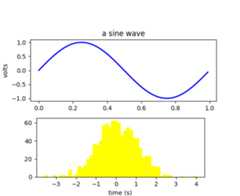
Every element in the figure is represented by a matplotlibArtist, and each has an extensive list ofproperties to configure its appearance. The figure itself contains aRectangle exactly the size of the figure,which you can use to set the background color and transparency of thefigures. Likewise, eachAxes bounding box(the standard white box with black edges in the typical matplotlibplot, has aRectangle instance that determines the color,transparency, and other properties of the Axes. These instances arestored as member variablesFigure.patch andAxes.patch (“Patch” is a name inherited fromMATLAB, and is a 2D “patch” of color on the figure, e.g., rectangles,circles and polygons). Every matplotlibArtist has the followingproperties
| Property | Description |
|---|---|
| alpha | The transparency - a scalar from 0-1 |
| animated | A boolean that is used to facilitate animated drawing |
| axes | The axes that the Artist lives in, possibly None |
| clip_box | The bounding box that clips the Artist |
| clip_on | Whether clipping is enabled |
| clip_path | The path the artist is clipped to |
| contains | A picking function to test whether the artist contains the pick point |
| figure | The figure instance the artist lives in, possibly None |
| label | A text label (e.g., for auto-labeling) |
| picker | A python object that controls object picking |
| transform | The transformation |
| visible | A boolean whether the artist should be drawn |
| zorder | A number which determines the drawing order |
| rasterized | Boolean; Turns vectors into rastergraphics: (for compression & eps transparency) |
Each of the properties is accessed with an old-fashioned setter orgetter (yes we know this irritates Pythonistas and we plan to supportdirect access via properties or traits but it hasn’t been done yet).For example, to multiply the current alpha by a half:
a=o.get_alpha()o.set_alpha(0.5*a)
If you want to set a number of properties at once, you can also usetheset method with keyword arguments. For example:
o.set(alpha=0.5,zorder=2)
If you are working interactively at the python shell, a handy way toinspect theArtist properties is to use thematplotlib.artist.getp() function (simplygetp() in pylab), which lists the propertiesand their values. This works for classes derived fromArtist aswell, e.g.,Figure andRectangle. Here are theFigure rectangleproperties mentioned above:
In [149]:matplotlib.artist.getp(fig.patch) alpha = 1.0 animated = False antialiased or aa = True axes = None clip_box = None clip_on = False clip_path = None contains = None edgecolor or ec = w facecolor or fc = 0.75 figure = Figure(8.125x6.125) fill = 1 hatch = None height = 1 label = linewidth or lw = 1.0 picker = None transform = <Affine object at 0x134cca84> verts = ((0, 0), (0, 1), (1, 1), (1, 0)) visible = True width = 1 window_extent = <Bbox object at 0x134acbcc> x = 0 y = 0 zorder = 1
The docstrings for all of the classes also contain theArtistproperties, so you can consult the interactive “help” or theartist Module for a listing of properties for a given object.
Now that we know how to inspect and set the properties of a givenobject we want to configure, we need to now how to get at that object.As mentioned in the introduction, there are two kinds of objects:primitives and containers. The primitives are usually the things youwant to configure (the font of aTextinstance, the width of aLine2D) althoughthe containers also have some properties as well – for example theAxesArtist is acontainer that contains many of the primitives in your plot, but italso has properties like thexscale to control whether the xaxisis ‘linear’ or ‘log’. In this section we’ll review where the variouscontainer objects store theArtists that you want to get at.
The top level containerArtist is thematplotlib.figure.Figure, and it contains everything in thefigure. The background of the figure is aRectangle which is stored inFigure.patch. Asyou add subplots (add_subplot()) andaxes (add_axes()) to the figurethese will be appended to theFigure.axes. These are also returned by themethods that create them:
In [156]:fig=plt.figure()In [157]:ax1=fig.add_subplot(211)In [158]:ax2=fig.add_axes([0.1,0.1,0.7,0.3])In [159]:ax1Out[159]:<matplotlib.axes.Subplot instance at 0xd54b26c>In [160]:printfig.axes[<matplotlib.axes.Subplot instance at 0xd54b26c>, <matplotlib.axes.Axes instance at 0xd3f0b2c>]
Because the figure maintains the concept of the “current axes” (seeFigure.gca andFigure.sca) to support thepylab/pyplot state machine, you should not insert or remove axesdirectly from the axes list, but rather use theadd_subplot() andadd_axes() methods to insert, and thedelaxes() method to delete. You arefree however, to iterate over the list of axes or index into it to getaccess toAxes instances you want to customize. Here is anexample which turns all the axes grids on:
foraxinfig.axes:ax.grid(True)
The figure also has its own text, lines, patches and images, which youcan use to add primitives directly. The default coordinate system fortheFigure will simply be in pixels (which is not usually what youwant) but you can control this by setting the transform property oftheArtist you are adding to the figure.
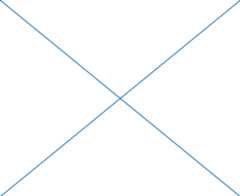
More useful is “figure coordinates” where (0, 0) is the bottom-left ofthe figure and (1, 1) is the top-right of the figure which you canobtain by setting theArtist transform tofig.transFigure:
In [191]:fig=plt.figure()In [192]:l1=matplotlib.lines.Line2D([0,1],[0,1], transform=fig.transFigure, figure=fig)In [193]:l2=matplotlib.lines.Line2D([0,1],[1,0], transform=fig.transFigure, figure=fig)In [194]:fig.lines.extend([l1,l2])In [195]:fig.canvas.draw()
Here is a summary of the Artists the figure contains
| Figure attribute | Description |
|---|---|
| axes | A list of Axes instances (includes Subplot) |
| patch | The Rectangle background |
| images | A list of FigureImages patches - useful for raw pixel display |
| legends | A list of Figure Legend instances (different from Axes.legends) |
| lines | A list of Figure Line2D instances (rarely used, see Axes.lines) |
| patches | A list of Figure patches (rarely used, see Axes.patches) |
| texts | A list Figure Text instances |
Thematplotlib.axes.Axes is the center of the matplotlibuniverse – it contains the vast majority of all theArtists usedin a figure with many helper methods to create and add theseArtists to itself, as well as helper methods to access andcustomize theArtists it contains. Like theFigure, it contains aPatchpatch which is aRectangle for Cartesian coordinates and aCircle for polar coordinates; this patchdetermines the shape, background and border of the plotting region:
ax=fig.add_subplot(111)rect=ax.patch# a Rectangle instancerect.set_facecolor('green')
When you call a plotting method, e.g., the canonicalplot() and pass in arrays or lists ofvalues, the method will create amatplotlib.lines.Line2D()instance, update the line with all theLine2D properties passed askeyword arguments, add the line to theAxes.lines container, and returns it to you:
In [213]:x,y=np.random.rand(2,100)In [214]:line,=ax.plot(x,y,'-',color='blue',linewidth=2)
plot returns a list of lines because you can pass in multiple x, ypairs to plot, and we are unpacking the first element of the lengthone list into the line variable. The line has been added to theAxes.lines list:
In [229]:printax.lines[<matplotlib.lines.Line2D instance at 0xd378b0c>]
Similarly, methods that create patches, likebar() creates a list of rectangles, willadd the patches to theAxes.patches list:
In [233]:n,bins,rectangles=ax.hist(np.random.randn(1000),50,facecolor='yellow')In [234]:rectanglesOut[234]:<a list of 50 Patch objects>In [235]:printlen(ax.patches)
You should not add objects directly to theAxes.lines orAxes.patches lists unless you know exactly what you are doing,because theAxes needs to do a few things when it creates and addsan object. It sets the figure and axes property of theArtist, aswell as the defaultAxes transformation (unless a transformationis set). It also inspects the data contained in theArtist toupdate the data structures controlling auto-scaling, so that the viewlimits can be adjusted to contain the plotted data. You can,nonetheless, create objects yourself and add them directly to theAxes using helper methods likeadd_line() andadd_patch(). Here is an annotatedinteractive session illustrating what is going on:
In [261]:fig=plt.figure()In [262]:ax=fig.add_subplot(111)# create a rectangle instanceIn [263]:rect=matplotlib.patches.Rectangle((1,1),width=5,height=12)# by default the axes instance is NoneIn [264]:printrect.get_axes()None# and the transformation instance is set to the "identity transform"In [265]:printrect.get_transform()<Affine object at 0x13695544># now we add the Rectangle to the AxesIn [266]:ax.add_patch(rect)# and notice that the ax.add_patch method has set the axes# instanceIn [267]:printrect.get_axes()Axes(0.125,0.1;0.775x0.8)# and the transformation has been set tooIn [268]:printrect.get_transform()<Affine object at 0x15009ca4># the default axes transformation is ax.transDataIn [269]:printax.transData<Affine object at 0x15009ca4># notice that the xlimits of the Axes have not been changedIn [270]:printax.get_xlim()(0.0, 1.0)# but the data limits have been updated to encompass the rectangleIn [271]:printax.dataLim.bounds(1.0, 1.0, 5.0, 12.0)# we can manually invoke the auto-scaling machineryIn [272]:ax.autoscale_view()# and now the xlim are updated to encompass the rectangleIn [273]:printax.get_xlim()(1.0, 6.0)# we have to manually force a figure drawIn [274]:ax.figure.canvas.draw()
There are many, manyAxes helper methods for creating primitiveArtists and adding them to their respective containers. The tablebelow summarizes a small sampling of them, the kinds ofArtist theycreate, and where they store them
| Helper method | Artist | Container |
|---|---|---|
| ax.annotate - text annotations | Annotate | ax.texts |
| ax.bar - bar charts | Rectangle | ax.patches |
| ax.errorbar - error bar plots | Line2D and Rectangle | ax.lines and ax.patches |
| ax.fill - shared area | Polygon | ax.patches |
| ax.hist - histograms | Rectangle | ax.patches |
| ax.imshow - image data | AxesImage | ax.images |
| ax.legend - axes legends | Legend | ax.legends |
| ax.plot - xy plots | Line2D | ax.lines |
| ax.scatter - scatter charts | PolygonCollection | ax.collections |
| ax.text - text | Text | ax.texts |
In addition to all of theseArtists, theAxes contains twoimportantArtist containers: theXAxisandYAxis, which handle the drawing of theticks and labels. These are stored as instance variablesxaxis andyaxis. TheXAxis andYAxiscontainers will be detailed below, but note that theAxes containsmany helper methods which forward calls on to theAxis instances so you often do not need towork with them directly unless you want to. For example, you can setthe font size of theXAxis ticklabels using theAxes helpermethod:
forlabelinax.get_xticklabels():label.set_color('orange')
Below is a summary of the Artists that the Axes contains
| Axes attribute | Description |
|---|---|
| artists | A list of Artist instances |
| patch | Rectangle instance for Axes background |
| collections | A list of Collection instances |
| images | A list of AxesImage |
| legends | A list of Legend instances |
| lines | A list of Line2D instances |
| patches | A list of Patch instances |
| texts | A list of Text instances |
| xaxis | matplotlib.axis.XAxis instance |
| yaxis | matplotlib.axis.YAxis instance |
Thematplotlib.axis.Axis instances handle the drawing of thetick lines, the grid lines, the tick labels and the axis label. Youcan configure the left and right ticks separately for the y-axis, andthe upper and lower ticks separately for the x-axis. TheAxisalso stores the data and view intervals used in auto-scaling, panningand zooming, as well as theLocator andFormatter instances which control wherethe ticks are placed and how they are represented as strings.
EachAxis object contains alabel attribute(this is whatpylab modifies in calls toxlabel() andylabel()) as wellas a list of major and minor ticks. The ticks areXTick andYTick instances,which contain the actual line and text primitives that render the ticks andticklabels. Because the ticks are dynamically created as needed (e.g., whenpanning and zooming), you should access the lists of major and minor ticksthrough their accessor methodsget_major_ticks()andget_minor_ticks(). Although the ticks containall the primitives and will be covered below, theAxis methods containaccessor methods to return the tick lines, tick labels, tick locations etc.:
In [285]:axis=ax.xaxisIn [286]:axis.get_ticklocs()Out[286]:array([ 0., 1., 2., 3., 4., 5., 6., 7., 8., 9.])In [287]:axis.get_ticklabels()Out[287]:<a list of 10 Text major ticklabel objects># note there are twice as many ticklines as labels because by# default there are tick lines at the top and bottom but only tick# labels below the xaxis; this can be customizedIn [288]:axis.get_ticklines()Out[288]:<a list of 20 Line2D ticklines objects># by default you get the major ticks backIn [291]:axis.get_ticklines()Out[291]:<a list of 20 Line2D ticklines objects># but you can also ask for the minor ticksIn [292]:axis.get_ticklines(minor=True)Out[292]:<a list of 0 Line2D ticklines objects>
Here is a summary of some of the useful accessor methods of theAxis(these have corresponding setters where useful, such asset_major_formatter)
| Accessor method | Description |
|---|---|
| get_scale | The scale of the axis, e.g., ‘log’ or ‘linear’ |
| get_view_interval | The interval instance of the axis view limits |
| get_data_interval | The interval instance of the axis data limits |
| get_gridlines | A list of grid lines for the Axis |
| get_label | The axis label - a Text instance |
| get_ticklabels | A list of Text instances - keyword minor=True|False |
| get_ticklines | A list of Line2D instances - keyword minor=True|False |
| get_ticklocs | A list of Tick locations - keyword minor=True|False |
| get_major_locator | The matplotlib.ticker.Locator instance for major ticks |
| get_major_formatter | The matplotlib.ticker.Formatter instance for major ticks |
| get_minor_locator | The matplotlib.ticker.Locator instance for minor ticks |
| get_minor_formatter | The matplotlib.ticker.Formatter instance for minor ticks |
| get_major_ticks | A list of Tick instances for major ticks |
| get_minor_ticks | A list of Tick instances for minor ticks |
| grid | Turn the grid on or off for the major or minor ticks |
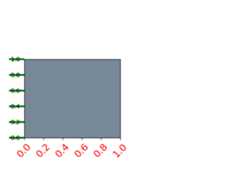
Here is an example, not recommended for its beauty, which customizesthe axes and tick properties
importnumpyasnpimportmatplotlib.pyplotasplt# plt.figure creates a matplotlib.figure.Figure instancefig=plt.figure()rect=fig.patch# a rectangle instancerect.set_facecolor('lightgoldenrodyellow')ax1=fig.add_axes([0.1,0.3,0.4,0.4])rect=ax1.patchrect.set_facecolor('lightslategray')forlabelinax1.xaxis.get_ticklabels():# label is a Text instancelabel.set_color('red')label.set_rotation(45)label.set_fontsize(16)forlineinax1.yaxis.get_ticklines():# line is a Line2D instanceline.set_color('green')line.set_markersize(25)line.set_markeredgewidth(3)plt.show()
Thematplotlib.axis.Tick is the final container object in ourdescent from theFigure to theAxes to theAxisto theTick. TheTick contains the tickand grid line instances, as well as the label instances for the upperand lower ticks. Each of these is accessible directly as an attributeof theTick. In addition, there are boolean variables that determinewhether the upper labels and ticks are on for the x-axis and whetherthe right labels and ticks are on for the y-axis.
| Tick attribute | Description |
|---|---|
| tick1line | Line2D instance |
| tick2line | Line2D instance |
| gridline | Line2D instance |
| label1 | Text instance |
| label2 | Text instance |
| gridOn | boolean which determines whether to draw the tickline |
| tick1On | boolean which determines whether to draw the 1st tickline |
| tick2On | boolean which determines whether to draw the 2nd tickline |
| label1On | boolean which determines whether to draw tick label |
| label2On | boolean which determines whether to draw tick label |
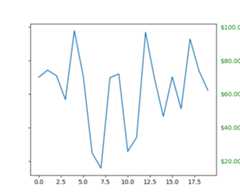
Here is an example which sets the formatter for the right side ticks withdollar signs and colors them green on the right side of the yaxis
importnumpyasnpimportmatplotlib.pyplotaspltimportmatplotlib.tickerasticker# Fixing random state for reproducibilitynp.random.seed(19680801)fig=plt.figure()ax=fig.add_subplot(111)ax.plot(100*np.random.rand(20))formatter=ticker.FormatStrFormatter('$%1.2f')ax.yaxis.set_major_formatter(formatter)fortickinax.yaxis.get_major_ticks():tick.label1On=Falsetick.label2On=Truetick.label2.set_color('green')plt.show()