


matplotlib.transforms¶matplotlib includes a framework for arbitrary geometrictransformations that is used determine the final position of allelements drawn on the canvas.
Transforms are composed into trees ofTransformNode objectswhose actual value depends on their children. When the contents ofchildren change, their parents are automatically invalidated. Thenext time an invalidated transform is accessed, it is recomputed toreflect those changes. This invalidation/caching approach preventsunnecessary recomputations of transforms, and contributes to betterinteractive performance.
For example, here is a graph of the transform tree used to plot datato the graph:
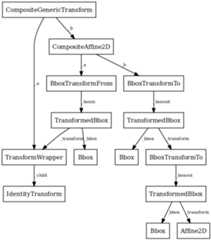
The framework can be used for both affine and non-affinetransformations. However, for speed, we want use the backendrenderers to perform affine transformations whenever possible.Therefore, it is possible to perform just the affine or non-affinepart of a transformation on a set of data. The affine is alwaysassumed to occur after the non-affine. For any transform:
fulltransform==non-affinepart+affinepart
The backends are not expected to handle non-affine transformationsthemselves.
matplotlib.transforms.TransformNode(shorthand_name=None)¶Bases:object
TransformNode is the base class for anything thatparticipates in the transform tree and needs to invalidate itsparents or be invalidated. This includes classes that are notreally transforms, such as bounding boxes, since some transformsdepend on bounding boxes to compute their values.
Creates a newTransformNode.
str(transform) when DEBUG=True.frozen()¶Returns a frozen copy of this transform node. The frozen copywill not update when its children change. Useful for storinga previously known state of a transform wherecopy.deepcopy() might normally be used.
invalidate()¶Invalidate thisTransformNode and triggers aninvalidation of its ancestors. Should be called anytime the transform changes.
pass_through = False¶If pass_through is True, all ancestors will always beinvalidated, even if ‘self’ is already invalid.
set_children(*children)¶Set the children of the transform, to let the invalidationsystem know which transforms can invalidate this transform.Should be called from the constructor of any transforms thatdepend on other transforms.
matplotlib.transforms.BboxBase(shorthand_name=None)¶Bases:matplotlib.transforms.TransformNode
This is the base class of all bounding boxes, and providesread-only access to its data. A mutable bounding box is providedby theBbox class.
The canonical representation is as two points, with norestrictions on their ordering. Convenience properties areprovided to get the left, bottom, right and top edges and widthand height, but these are not stored explicitly.
Creates a newTransformNode.
str(transform) when DEBUG=True.anchored(c,container=None)¶Return a copy of theBbox, shifted to positioncwithin a container.
c: may be either:
- a sequence (cx,cy) wherecx andcy range from 0to 1, where 0 is left or bottom and 1 is right or top
- a string:- ‘C’ for centered- ‘S’ for bottom-center- ‘SE’ for bottom-left- ‘E’ for left- etc.
Optional argumentcontainer is the box within which theBbox is positioned; it defaults to the initialBbox.
contains(x,y)¶ReturnsTrue if (x,y) is a coordinate inside thebounding box or on its edge.
corners()¶Return an array of points which are the four corners of thisrectangle. For example, if thisBbox is defined bythe points (a,b) and (c,d),corners() returns(a,b), (a,d), (c,b) and (c,d).
count_contains(vertices)¶Count the number of vertices contained in theBbox.
vertices is a Nx2 Numpy array.
count_overlaps(bboxes)¶Count the number of bounding boxes that overlap this one.
bboxes is a sequence ofBboxBase objects
expanded(sw,sh)¶Return a newBbox which is thisBboxexpanded around its center by the given factorssw andsh.
frozen()¶TransformNode is the base class for anything thatparticipates in the transform tree and needs to invalidate itsparents or be invalidated. This includes classes that are notreally transforms, such as bounding boxes, since some transformsdepend on bounding boxes to compute their values.
fully_contains(x,y)¶Returns True if (x,y) is a coordinate inside the boundingbox, but not on its edge.
fully_overlaps(other)¶Returns True if this bounding box overlaps with the givenbounding boxother, but not on its edge alone.
intersection(bbox1,bbox2)¶Return the intersection of the two bboxes or Noneif they do not intersect.
Implements the algorithm described at:
intervalx¶(property)intervalx is the pair ofx coordinates that definethe bounding box. It is not guaranteed to be sorted from left toright.
intervaly¶(property)intervaly is the pair ofy coordinates that definethe bounding box. It is not guaranteed to be sorted from bottom totop.
inverse_transformed(transform)¶Return a newBbox object, statically transformed bythe inverse of the given transform.
overlaps(other)¶Returns True if this bounding box overlaps with the givenbounding boxother.
p0¶(property)p0 is the first pair of (x,y) coordinatesthat define the bounding box. It is not guaranteed to be thebottom-left corner. For that, usemin.
p1¶(property)p1 is the second pair of (x,y) coordinatesthat define the bounding box. It is not guaranteed to be thetop-right corner. For that, usemax.
rotated(radians)¶Return a new bounding box that bounds a rotated version ofthis bounding box by the given radians. The new bounding boxis still aligned with the axes, of course.
shrunk(mx,my)¶Return a copy of theBbox, shrunk by the factormxin thex direction and the factormy in they direction.The lower left corner of the box remains unchanged. Normallymx andmy will be less than 1, but this is not enforced.
shrunk_to_aspect(box_aspect,container=None,fig_aspect=1.0)¶Return a copy of theBbox, shrunk so that it is aslarge as it can be while having the desired aspect ratio,box_aspect. If the box coordinates are relative—thatis, fractions of a larger box such as a figure—then thephysical aspect ratio of that figure is specified withfig_aspect, so thatbox_aspect can also be given as aratio of the absolute dimensions, not the relative dimensions.
size¶(property) The width and height of the bounding box. May be negative,in the same way aswidth andheight.
splitx(*args)¶e.g.,bbox.splitx(f1,f2,...)
Returns a list of newBbox objects formed bysplitting the original one with vertical lines at fractionalpositionsf1,f2, ...
splity(*args)¶e.g.,bbox.splitx(f1,f2,...)
Returns a list of newBbox objects formed bysplitting the original one with horizontal lines at fractionalpositionsf1,f2, ...
x0¶(property)x0 is the first of the pair ofx coordinates thatdefine the bounding box.x0 is not guaranteed to beless thanx1. If you require that, usexmin.
x1¶(property)x1 is the second of the pair ofx coordinatesthat define the bounding box.x1 is not guaranteed to begreater thanx0. If you require that, usexmax.
y0¶(property)y0 is the first of the pair ofy coordinates thatdefine the bounding box.y0 is not guaranteed to beless thany1. If you require that, useymin.
matplotlib.transforms.Bbox(points,**kwargs)¶Bases:matplotlib.transforms.BboxBase
A mutable bounding box.
points: a 2x2 numpy array of the form [[x0, y0], [x1, y1]]
If you need to create aBbox object from another formof data, consider the static methodsunit(),from_bounds() andfrom_extents().
from_bounds(x0,y0,width,height)¶(staticmethod) Create a newBbox fromx0,y0,width andheight.
width andheight may be negative.
from_extents(*args)¶(staticmethod) Create a new Bbox fromleft,bottom,right andtop.
They-axis increases upwards.
get_points()¶Get the points of the bounding box directly as a numpy arrayof the form: [[x0, y0], [x1, y1]].
ignore(value)¶Set whether the existing bounds of the box should be ignoredby subsequent calls toupdate_from_data_xy().
value:
- When True, subsequent calls to
update_from_data_xy()will ignore the existing bounds of theBbox.- When False, subsequent calls to
update_from_data_xy()will include the existing bounds of theBbox.
mutated()¶return whether the bbox has changed since init
mutatedx()¶return whether the x-limits have changed since init
mutatedy()¶return whether the y-limits have changed since init
set_points(points)¶Set the points of the bounding box directly from a numpy arrayof the form: [[x0, y0], [x1, y1]]. No error checking isperformed, as this method is mainly for internal use.
update_from_data(x,y,ignore=None)¶Deprecated since version 2.0:The update_from_data function was deprecated in version 2.0. Use update_from_data_xy instead.
Update the bounds of theBbox based on the passed indata. After updating, the bounds will have positivewidthandheight;x0 andy0 will be the minimal values.
x: a numpy array ofx-values
y: a numpy array ofy-values
update_from_data_xy(xy,ignore=None,updatex=True,updatey=True)¶Update the bounds of theBbox based on the passed indata. After updating, the bounds will have positivewidthandheight;x0 andy0 will be the minimal values.
xy: a numpy array of 2D points
updatex: when True, update the x values
updatey: when True, update the y values
update_from_path(path,ignore=None,updatex=True,updatey=True)¶Update the bounds of theBbox based on the passed indata. After updating, the bounds will have positivewidthandheight;x0 andy0 will be the minimal values.
path: aPath instance
updatex: when True, update the x values
updatey: when True, update the y values
matplotlib.transforms.TransformedBbox(bbox,transform,**kwargs)¶Bases:matplotlib.transforms.BboxBase
ABbox that is automatically transformed by a giventransform. When either the child bounding box or transformchanges, the bounds of this bbox will update accordingly.
bbox: a childBbox
transform: a 2DTransform
get_points()¶Get the points of the bounding box directly as a numpy arrayof the form: [[x0, y0], [x1, y1]].
matplotlib.transforms.Transform(shorthand_name=None)¶Bases:matplotlib.transforms.TransformNode
The base class of allTransformNode instances thatactually perform a transformation.
All non-affine transformations should be subclasses of this class.New affine transformations should be subclasses ofAffine2D.
Subclasses of this class should override the following members (atminimum):
If the transform needs to do something non-standard withmatplotlib.path.Path objects, such as adding curveswhere there were once line segments, it should override:
Creates a newTransformNode.
str(transform) when DEBUG=True.contains_branch(other)¶Return whether the given transform is a sub-tree of this transform.
This routine uses transform equality to identify sub-trees, thereforein many situations it is object id which will be used.
For the case where the given transform represents the wholeof this transform, returns True.
contains_branch_seperately(other_transform)¶Returns whether the given branch is a sub-tree of this transform oneach seperate dimension.
A common use for this method is to identify if a transform is a blendedtransform containing an axes’ data transform. e.g.:
x_isdata,y_isdata=trans.contains_branch_seperately(ax.transData)
depth¶Returns the number of transforms which have been chainedtogether to form this Transform instance.
Note
For the special case of a Composite transform, the maximum depthof the two is returned.
get_affine()¶Get the affine part of this transform.
get_matrix()¶Get the Affine transformation array for the affine partof this transform.
has_inverse = False¶True if this transform has a corresponding inverse transform.
input_dims = None¶The number of input dimensions of this transform.Must be overridden (with integers) in the subclass.
inverted()¶Return the corresponding inverse transformation.
The return value of this method should be treated astemporary. An update toself does not cause a correspondingupdate to its inverted copy.
x===self.inverted().transform(self.transform(x))
is_separable = False¶True if this transform is separable in the x- and y- dimensions.
output_dims = None¶The number of output dimensions of this transform.Must be overridden (with integers) in the subclass.
transform(values)¶Performs the transformation on the given array of values.
Accepts a numpy array of shape (N xinput_dims) andreturns a numpy array of shape (N xoutput_dims).
Alternatively, accepts a numpy array of lengthinput_dimsand returns a numpy array of lengthoutput_dims.
transform_affine(values)¶Performs only the affine part of this transformation on thegiven array of values.
transform(values) is always equivalent totransform_affine(transform_non_affine(values)).
In non-affine transformations, this is generally a no-op. Inaffine transformations, this is equivalent totransform(values).
Accepts a numpy array of shape (N xinput_dims) andreturns a numpy array of shape (N xoutput_dims).
Alternatively, accepts a numpy array of lengthinput_dimsand returns a numpy array of lengthoutput_dims.
transform_angles(angles,pts,radians=False,pushoff=1e-05)¶Performs transformation on a set of angles anchored atspecific locations.
Theangles must be a column vector (i.e., numpy array).
Thepts must be a two-column numpy array of x,y positions(angle transforms currently only work in 2D). This array musthave the same number of rows asangles.
The transformed angles are returned in an array with the samesize asangles.
The generic version of this method uses a very genericalgorithm that transformspts, as well as locations veryclose topts, to find the angle in the transformed system.
transform_bbox(bbox)¶Transform the given bounding box.
Note, for smarter transforms including caching (a commonrequirement for matplotlib figures), seeTransformedBbox.
transform_non_affine(values)¶Performs only the non-affine part of the transformation.
transform(values) is always equivalent totransform_affine(transform_non_affine(values)).
In non-affine transformations, this is generally equivalent totransform(values). In affine transformations, this isalways a no-op.
Accepts a numpy array of shape (N xinput_dims) andreturns a numpy array of shape (N xoutput_dims).
Alternatively, accepts a numpy array of lengthinput_dimsand returns a numpy array of lengthoutput_dims.
transform_path(path)¶Returns a transformed path.
path: aPath instance.
In some cases, this transform may insert curves into the paththat began as line segments.
transform_path_affine(path)¶Returns a path, transformed only by the affine part ofthis transform.
path: aPath instance.
transform_path(path) is equivalent totransform_path_affine(transform_path_non_affine(values)).
transform_path_non_affine(path)¶Returns a path, transformed only by the non-affinepart of this transform.
path: aPath instance.
transform_path(path) is equivalent totransform_path_affine(transform_path_non_affine(values)).
transform_point(point)¶A convenience function that returns the transformed copy of asingle point.
The point is given as a sequence of lengthinput_dims.The transformed point is returned as a sequence of lengthoutput_dims.
matplotlib.transforms.TransformWrapper(child)¶Bases:matplotlib.transforms.Transform
A helper class that holds a single child transform and actsequivalently to it.
This is useful if a node of the transform tree must be replaced atrun time with a transform of a different type. This class allowsthat replacement to correctly trigger invalidation.
Note thatTransformWrapper instances must have the sameinput and output dimensions during their entire lifetime, so thechild transform may only be replaced with another child transformof the same dimensions.
child: A class:Transform instance. This child may laterbe replaced withset().
frozen()¶Returns a frozen copy of this transform node. The frozen copywill not update when its children change. Useful for storinga previously known state of a transform wherecopy.deepcopy() might normally be used.
set(child)¶Replace the current child of this transform with another one.
The new child must have the same number of input and outputdimensions as the current child.
matplotlib.transforms.AffineBase(*args,**kwargs)¶Bases:matplotlib.transforms.Transform
The base class of all affine transformations of any number ofdimensions.
get_affine()¶Get the affine part of this transform.
transform(values)¶Performs the transformation on the given array of values.
Accepts a numpy array of shape (N xinput_dims) andreturns a numpy array of shape (N xoutput_dims).
Alternatively, accepts a numpy array of lengthinput_dimsand returns a numpy array of lengthoutput_dims.
transform_affine(values)¶Performs only the affine part of this transformation on thegiven array of values.
transform(values) is always equivalent totransform_affine(transform_non_affine(values)).
In non-affine transformations, this is generally a no-op. Inaffine transformations, this is equivalent totransform(values).
Accepts a numpy array of shape (N xinput_dims) andreturns a numpy array of shape (N xoutput_dims).
Alternatively, accepts a numpy array of lengthinput_dimsand returns a numpy array of lengthoutput_dims.
transform_non_affine(points)¶Performs only the non-affine part of the transformation.
transform(values) is always equivalent totransform_affine(transform_non_affine(values)).
In non-affine transformations, this is generally equivalent totransform(values). In affine transformations, this isalways a no-op.
Accepts a numpy array of shape (N xinput_dims) andreturns a numpy array of shape (N xoutput_dims).
Alternatively, accepts a numpy array of lengthinput_dimsand returns a numpy array of lengthoutput_dims.
transform_path(path)¶Returns a transformed path.
path: aPath instance.
In some cases, this transform may insert curves into the paththat began as line segments.
matplotlib.transforms.Affine2DBase(*args,**kwargs)¶Bases:matplotlib.transforms.AffineBase
The base class of all 2D affine transformations.
2D affine transformations are performed using a 3x3 numpy array:
acebdf001
This class provides the read-only interface. For a mutable 2Daffine transformation, useAffine2D.
Subclasses of this class will generally only need to override aconstructor andget_matrix() that generates a custom 3x3 matrix.
frozen()¶Returns a frozen copy of this transform node. The frozen copywill not update when its children change. Useful for storinga previously known state of a transform wherecopy.deepcopy() might normally be used.
inverted()¶Return the corresponding inverse transformation.
The return value of this method should be treated astemporary. An update toself does not cause a correspondingupdate to its inverted copy.
x===self.inverted().transform(self.transform(x))
matrix_from_values(a,b,c,d,e,f)¶(staticmethod) Create a new transformation matrix as a 3x3numpy array of the form:
acebdf001
to_values()¶Return the values of the matrix as a sequence (a,b,c,d,e,f)
transform_affine(points)¶Performs only the affine part of this transformation on thegiven array of values.
transform(values) is always equivalent totransform_affine(transform_non_affine(values)).
In non-affine transformations, this is generally a no-op. Inaffine transformations, this is equivalent totransform(values).
Accepts a numpy array of shape (N xinput_dims) andreturns a numpy array of shape (N xoutput_dims).
Alternatively, accepts a numpy array of lengthinput_dimsand returns a numpy array of lengthoutput_dims.
transform_point(point)¶A convenience function that returns the transformed copy of asingle point.
The point is given as a sequence of lengthinput_dims.The transformed point is returned as a sequence of lengthoutput_dims.
matplotlib.transforms.Affine2D(matrix=None,**kwargs)¶Bases:matplotlib.transforms.Affine2DBase
A mutable 2D affine transformation.
Initialize an Affine transform from a 3x3 numpy float array:
acebdf001
Ifmatrix is None, initialize with the identity transform.
clear()¶Reset the underlying matrix to the identity transform.
from_values(a,b,c,d,e,f)¶(staticmethod) Create a new Affine2D instance from the givenvalues:
acebdf001
.
get_matrix()¶Get the underlying transformation matrix as a 3x3 numpy array:
acebdf001
.
identity()¶(staticmethod) Return a newAffine2D object that isthe identity transform.
Unless this transform will be mutated later on, consider usingthe fasterIdentityTransform class instead.
rotate(theta)¶Add a rotation (in radians) to this transform in place.
Returnsself, so this method can easily be chained with morecalls torotate(),rotate_deg(),translate()andscale().
rotate_around(x,y,theta)¶Add a rotation (in radians) around the point (x, y) in place.
Returnsself, so this method can easily be chained with morecalls torotate(),rotate_deg(),translate()andscale().
rotate_deg(degrees)¶Add a rotation (in degrees) to this transform in place.
Returnsself, so this method can easily be chained with morecalls torotate(),rotate_deg(),translate()andscale().
rotate_deg_around(x,y,degrees)¶Add a rotation (in degrees) around the point (x, y) in place.
Returnsself, so this method can easily be chained with morecalls torotate(),rotate_deg(),translate()andscale().
scale(sx,sy=None)¶Adds a scale in place.
Ifsy is None, the same scale is applied in both thex- andy-directions.
Returnsself, so this method can easily be chained with morecalls torotate(),rotate_deg(),translate()andscale().
set(other)¶Set this transformation from the frozen copy of anotherAffine2DBase object.
set_matrix(mtx)¶Set the underlying transformation matrix from a 3x3 numpy array:
acebdf001
.
skew(xShear,yShear)¶Adds a skew in place.
xShear andyShear are the shear angles along thex- andy-axes, respectively, in radians.
Returnsself, so this method can easily be chained with morecalls torotate(),rotate_deg(),translate()andscale().
skew_deg(xShear,yShear)¶Adds a skew in place.
xShear andyShear are the shear angles along thex- andy-axes, respectively, in degrees.
Returnsself, so this method can easily be chained with morecalls torotate(),rotate_deg(),translate()andscale().
translate(tx,ty)¶Adds a translation in place.
Returnsself, so this method can easily be chained with morecalls torotate(),rotate_deg(),translate()andscale().
matplotlib.transforms.IdentityTransform(*args,**kwargs)¶Bases:matplotlib.transforms.Affine2DBase
A special class that does one thing, the identity transform, in afast way.
frozen()¶Returns a frozen copy of this transform node. The frozen copywill not update when its children change. Useful for storinga previously known state of a transform wherecopy.deepcopy() might normally be used.
get_affine()¶Return the corresponding inverse transformation.
The return value of this method should be treated astemporary. An update toself does not cause a correspondingupdate to its inverted copy.
x===self.inverted().transform(self.transform(x))
get_matrix()¶Get the Affine transformation array for the affine partof this transform.
inverted()¶Return the corresponding inverse transformation.
The return value of this method should be treated astemporary. An update toself does not cause a correspondingupdate to its inverted copy.
x===self.inverted().transform(self.transform(x))
transform(points)¶Performs only the non-affine part of the transformation.
transform(values) is always equivalent totransform_affine(transform_non_affine(values)).
In non-affine transformations, this is generally equivalent totransform(values). In affine transformations, this isalways a no-op.
Accepts a numpy array of shape (N xinput_dims) andreturns a numpy array of shape (N xoutput_dims).
Alternatively, accepts a numpy array of lengthinput_dimsand returns a numpy array of lengthoutput_dims.
transform_affine(points)¶Performs only the non-affine part of the transformation.
transform(values) is always equivalent totransform_affine(transform_non_affine(values)).
In non-affine transformations, this is generally equivalent totransform(values). In affine transformations, this isalways a no-op.
Accepts a numpy array of shape (N xinput_dims) andreturns a numpy array of shape (N xoutput_dims).
Alternatively, accepts a numpy array of lengthinput_dimsand returns a numpy array of lengthoutput_dims.
transform_non_affine(points)¶Performs only the non-affine part of the transformation.
transform(values) is always equivalent totransform_affine(transform_non_affine(values)).
In non-affine transformations, this is generally equivalent totransform(values). In affine transformations, this isalways a no-op.
Accepts a numpy array of shape (N xinput_dims) andreturns a numpy array of shape (N xoutput_dims).
Alternatively, accepts a numpy array of lengthinput_dimsand returns a numpy array of lengthoutput_dims.
transform_path(path)¶Returns a path, transformed only by the non-affinepart of this transform.
path: aPath instance.
transform_path(path) is equivalent totransform_path_affine(transform_path_non_affine(values)).
matplotlib.transforms.BlendedGenericTransform(x_transform,y_transform,**kwargs)¶Bases:matplotlib.transforms.Transform
A “blended” transform uses one transform for thex-direction, andanother transform for they-direction.
This “generic” version can handle any given child transform in thex- andy-directions.
Create a new “blended” transform usingx_transform totransform thex-axis andy_transform to transform they-axis.
You will generally not call this constructor directly but usetheblended_transform_factory() function instead, whichcan determine automatically which kind of blended transform tocreate.
frozen()¶Returns a frozen copy of this transform node. The frozen copywill not update when its children change. Useful for storinga previously known state of a transform wherecopy.deepcopy() might normally be used.
get_affine()¶Get the affine part of this transform.
inverted()¶Return the corresponding inverse transformation.
The return value of this method should be treated astemporary. An update toself does not cause a correspondingupdate to its inverted copy.
x===self.inverted().transform(self.transform(x))
transform_non_affine(points)¶Performs only the non-affine part of the transformation.
transform(values) is always equivalent totransform_affine(transform_non_affine(values)).
In non-affine transformations, this is generally equivalent totransform(values). In affine transformations, this isalways a no-op.
Accepts a numpy array of shape (N xinput_dims) andreturns a numpy array of shape (N xoutput_dims).
Alternatively, accepts a numpy array of lengthinput_dimsand returns a numpy array of lengthoutput_dims.
matplotlib.transforms.BlendedAffine2D(x_transform,y_transform,**kwargs)¶Bases:matplotlib.transforms.Affine2DBase
A “blended” transform uses one transform for thex-direction, andanother transform for they-direction.
This version is an optimization for the case where both childtransforms are of typeAffine2DBase.
Create a new “blended” transform usingx_transform totransform thex-axis andy_transform to transform they-axis.
Bothx_transform andy_transform must be 2D affinetransforms.
You will generally not call this constructor directly but usetheblended_transform_factory() function instead, whichcan determine automatically which kind of blended transform tocreate.
get_matrix()¶Get the Affine transformation array for the affine partof this transform.
matplotlib.transforms.blended_transform_factory(x_transform,y_transform)¶Create a new “blended” transform usingx_transform to transformthex-axis andy_transform to transform they-axis.
A faster version of the blended transform is returned for the casewhere both child transforms are affine.
matplotlib.transforms.CompositeGenericTransform(a,b,**kwargs)¶Bases:matplotlib.transforms.Transform
A composite transform formed by applying transforma thentransformb.
This “generic” version can handle any two arbitrarytransformations.
Create a new composite transform that is the result ofapplying transforma then transformb.
You will generally not call this constructor directly but usethecomposite_transform_factory() function instead,which can automatically choose the best kind of compositetransform instance to create.
frozen()¶Returns a frozen copy of this transform node. The frozen copywill not update when its children change. Useful for storinga previously known state of a transform wherecopy.deepcopy() might normally be used.
get_affine()¶Get the affine part of this transform.
inverted()¶Return the corresponding inverse transformation.
The return value of this method should be treated astemporary. An update toself does not cause a correspondingupdate to its inverted copy.
x===self.inverted().transform(self.transform(x))
transform_affine(points)¶Performs only the affine part of this transformation on thegiven array of values.
transform(values) is always equivalent totransform_affine(transform_non_affine(values)).
In non-affine transformations, this is generally a no-op. Inaffine transformations, this is equivalent totransform(values).
Accepts a numpy array of shape (N xinput_dims) andreturns a numpy array of shape (N xoutput_dims).
Alternatively, accepts a numpy array of lengthinput_dimsand returns a numpy array of lengthoutput_dims.
transform_non_affine(points)¶Performs only the non-affine part of the transformation.
transform(values) is always equivalent totransform_affine(transform_non_affine(values)).
In non-affine transformations, this is generally equivalent totransform(values). In affine transformations, this isalways a no-op.
Accepts a numpy array of shape (N xinput_dims) andreturns a numpy array of shape (N xoutput_dims).
Alternatively, accepts a numpy array of lengthinput_dimsand returns a numpy array of lengthoutput_dims.
matplotlib.transforms.CompositeAffine2D(a,b,**kwargs)¶Bases:matplotlib.transforms.Affine2DBase
A composite transform formed by applying transforma then transformb.
This version is an optimization that handles the case where bothaandb are 2D affines.
Create a new composite transform that is the result ofapplying transforma then transformb.
Botha andb must be instances ofAffine2DBase.
You will generally not call this constructor directly but usethecomposite_transform_factory() function instead,which can automatically choose the best kind of compositetransform instance to create.
get_matrix()¶Get the Affine transformation array for the affine partof this transform.
matplotlib.transforms.composite_transform_factory(a,b)¶Create a new composite transform that is the result of applyingtransform a then transform b.
Shortcut versions of the blended transform are provided for thecase where both child transforms are affine, or one or the otheris the identity transform.
Composite transforms may also be created using the ‘+’ operator,e.g.:
c=a+b
matplotlib.transforms.BboxTransform(boxin,boxout,**kwargs)¶Bases:matplotlib.transforms.Affine2DBase
BboxTransform linearly transforms points from oneBbox to anotherBbox.
Create a newBboxTransform that linearly transformspoints fromboxin toboxout.
get_matrix()¶Get the Affine transformation array for the affine partof this transform.
matplotlib.transforms.BboxTransformTo(boxout,**kwargs)¶Bases:matplotlib.transforms.Affine2DBase
BboxTransformTo is a transformation that linearlytransforms points from the unit bounding box to a givenBbox.
Create a newBboxTransformTo that linearly transformspoints from the unit bounding box toboxout.
get_matrix()¶Get the Affine transformation array for the affine partof this transform.
matplotlib.transforms.BboxTransformFrom(boxin,**kwargs)¶Bases:matplotlib.transforms.Affine2DBase
BboxTransformFrom linearly transforms points from a givenBbox to the unit bounding box.
get_matrix()¶Get the Affine transformation array for the affine partof this transform.
matplotlib.transforms.ScaledTranslation(xt,yt,scale_trans,**kwargs)¶Bases:matplotlib.transforms.Affine2DBase
A transformation that translates byxt andyt, afterxt andythave been transformad by the given transformscale_trans.
get_matrix()¶Get the Affine transformation array for the affine partof this transform.
matplotlib.transforms.TransformedPath(path,transform)¶Bases:matplotlib.transforms.TransformNode
ATransformedPath caches a non-affine transformed copy ofthePath. This cached copy isautomatically updated when the non-affine part of the transformchanges.
Note
Paths are considered immutable by this class. Any update to thepath’s vertices/codes will not trigger a transform recomputation.
Create a newTransformedPath from the givenPath andTransform.
get_fully_transformed_path()¶Return a fully-transformed copy of the child path.
get_transformed_path_and_affine()¶Return a copy of the child path, with the non-affine part ofthe transform already applied, along with the affine part ofthe path necessary to complete the transformation.
get_transformed_points_and_affine()¶Return a copy of the child path, with the non-affine part ofthe transform already applied, along with the affine part ofthe path necessary to complete the transformation. Unlikeget_transformed_path_and_affine(), no interpolation willbe performed.
matplotlib.transforms.nonsingular(vmin,vmax,expander=0.001,tiny=1e-15,increasing=True)¶Modify the endpoints of a range as needed to avoid singularities.
Returnsvmin,vmax, expanded and/or swapped if necessary.
If either input is inf or NaN, or if both inputs are 0 or veryclose to zero, it returns -expander,expander.

