


matplotlib.patches¶matplotlib.patches.Arc(xy,width,height,angle=0.0,theta1=0.0,theta2=360.0,**kwargs)¶Bases:matplotlib.patches.Ellipse
An elliptical arc. Because it performs various optimizations, itcan not be filled.
The arc must be used in anAxesinstance—it can not be added directly to aFigure—because it is optimized toonly render the segments that are inside the axes bounding boxwith high resolution.
The following args are supported:
Iftheta1 andtheta2 are not provided, the arc will form acomplete ellipse.
Valid kwargs are:
Property Description agg_filterunknown alphafloat or None animated[True | False] antialiasedor aa[True | False] or None for default axesan Axesinstancecapstyle[‘butt’ | ‘round’ | ‘projecting’] clip_boxa matplotlib.transforms.Bboxinstanceclip_on[True | False] clip_path[ ( Path,Transform) |Patch| None ]colormatplotlib color spec containsa callable function edgecoloror ecmpl color spec, None, ‘none’, or ‘auto’ facecoloror fcmpl color spec, or None for default, or ‘none’ for no color figurea matplotlib.figure.Figureinstancefill[True | False] gidan id string hatch[‘/’ | ‘\’ | ‘|’ | ‘-‘ | ‘+’ | ‘x’ | ‘o’ | ‘O’ | ‘.’ | ‘*’] joinstyle[‘miter’ | ‘round’ | ‘bevel’] labelstring or anything printable with ‘%s’ conversion. linestyleor ls[‘solid’ | ‘dashed’, ‘dashdot’, ‘dotted’ | (offset, on-off-dash-seq) | '-'|'--'|'-.'|':'|'None'|''|'']linewidthor lwfloat or None for default path_effectsunknown picker[None|float|boolean|callable] rasterized[True | False | None] sketch_paramsunknown snapunknown transformTransforminstanceurla url string visible[True | False] zorderany number
draw(artist,renderer,*args,**kwargs)¶Ellipses are normally drawn using an approximation that useseight cubic bezier splines. The error of this approximationis 1.89818e-6, according to this unverified source:
Lancaster, Don. Approximating a Circle or an Ellipse UsingFour Bezier Cubic Splines.
There is a use case where very large ellipses must be drawnwith very high accuracy, and it is too expensive to render theentire ellipse with enough segments (either splines or linesegments). Therefore, in the case where either radius of theellipse is large enough that the error of the splineapproximation will be visible (greater than one pixel offsetfrom the ideal), a different technique is used.
In that case, only the visible parts of the ellipse are drawn,with each visible arc using a fixed number of spline segments(8). The algorithm proceeds as follows:
The points where the ellipse intersects the axes boundingbox are located. (This is done be performing an inversetransformation on the axes bbox such that it is relativeto the unit circle – this makes the intersectioncalculation much easier than doing rotated ellipseintersection directly).
This uses the “line intersecting a circle” algorithmfrom:
Vince, John. Geometry for Computer Graphics: Formulae,Examples & Proofs. London: Springer-Verlag, 2005.
The angles of each of the intersection points arecalculated.
Proceeding counterclockwise starting in the positivex-direction, each of the visible arc-segments between thepairs of vertices are drawn using the bezier arcapproximation technique implemented in
matplotlib.path.Path.arc().
matplotlib.patches.Arrow(x,y,dx,dy,width=1.0,**kwargs)¶Bases:matplotlib.patches.Patch
An arrow patch.
Draws an arrow, starting at (x,y), direction and lengthgiven by (dx,dy) the width of the arrow is scaled bywidth.
Valid kwargs are:
Property Description agg_filterunknown alphafloat or None animated[True | False] antialiasedor aa[True | False] or None for default axesan Axesinstancecapstyle[‘butt’ | ‘round’ | ‘projecting’] clip_boxa matplotlib.transforms.Bboxinstanceclip_on[True | False] clip_path[ ( Path,Transform) |Patch| None ]colormatplotlib color spec containsa callable function edgecoloror ecmpl color spec, None, ‘none’, or ‘auto’ facecoloror fcmpl color spec, or None for default, or ‘none’ for no color figurea matplotlib.figure.Figureinstancefill[True | False] gidan id string hatch[‘/’ | ‘\’ | ‘|’ | ‘-‘ | ‘+’ | ‘x’ | ‘o’ | ‘O’ | ‘.’ | ‘*’] joinstyle[‘miter’ | ‘round’ | ‘bevel’] labelstring or anything printable with ‘%s’ conversion. linestyleor ls[‘solid’ | ‘dashed’, ‘dashdot’, ‘dotted’ | (offset, on-off-dash-seq) | '-'|'--'|'-.'|':'|'None'|''|'']linewidthor lwfloat or None for default path_effectsunknown picker[None|float|boolean|callable] rasterized[True | False | None] sketch_paramsunknown snapunknown transformTransforminstanceurla url string visible[True | False] zorderany number
get_patch_transform()¶get_path()¶matplotlib.patches.ArrowStyle¶Bases:matplotlib.patches._Style
ArrowStyle is a container class which defines severalarrowstyle classes, which is used to create an arrow path along agiven path. These are mainly used withFancyArrowPatch.
A arrowstyle object can be either created as:
ArrowStyle.Fancy(head_length=.4,head_width=.4,tail_width=.4)
or:
ArrowStyle("Fancy",head_length=.4,head_width=.4,tail_width=.4)
or:
ArrowStyle("Fancy, head_length=.4, head_width=.4, tail_width=.4")
The following classes are defined
Class Name Attrs Curve -None CurveB ->head_length=0.4,head_width=0.2 BracketB -[widthB=1.0,lengthB=0.2,angleB=None CurveFilledB -|>head_length=0.4,head_width=0.2 CurveA <-head_length=0.4,head_width=0.2 CurveAB <->head_length=0.4,head_width=0.2 CurveFilledA <|-head_length=0.4,head_width=0.2 CurveFilledAB <|-|>head_length=0.4,head_width=0.2 BracketA ]-widthA=1.0,lengthA=0.2,angleA=None BracketAB ]-[widthA=1.0,lengthA=0.2,angleA=None,widthB=1.0,lengthB=0.2,angleB=None Fancy fancyhead_length=0.4,head_width=0.4,tail_width=0.4 Simple simplehead_length=0.5,head_width=0.5,tail_width=0.2 Wedge wedgetail_width=0.3,shrink_factor=0.5 BarAB |-|widthA=1.0,angleA=None,widthB=1.0,angleB=None
An instance of any arrow style class is a callable object,whose call signature is:
__call__(self,path,mutation_size,linewidth,aspect_ratio=1.)
and it returns a tuple of aPath instance and a booleanvalue.path is aPath instance along which the arrowwill be drawn.mutation_size andaspect_ratio have the samemeaning as inBoxStyle.linewidth is a line width to bestroked. This is meant to be used to correct the location of thehead so that it does not overshoot the destination point, but not allclasses support it.
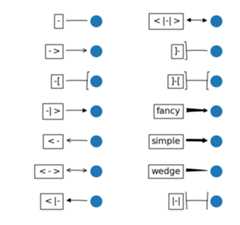
return the instance of the subclass with the given style name.
BarAB(widthA=1.0,angleA=None,widthB=1.0,angleB=None)¶Bases:matplotlib.patches._Bracket
An arrow with a bar(|) at both ends.
ArrowStyle.BracketA(widthA=1.0,lengthA=0.2,angleA=None)¶Bases:matplotlib.patches._Bracket
An arrow with a bracket(]) at its end.
ArrowStyle.BracketAB(widthA=1.0,lengthA=0.2,angleA=None,widthB=1.0,lengthB=0.2,angleB=None)¶Bases:matplotlib.patches._Bracket
An arrow with a bracket(]) at both ends.
ArrowStyle.BracketB(widthB=1.0,lengthB=0.2,angleB=None)¶Bases:matplotlib.patches._Bracket
An arrow with a bracket([) at its end.
ArrowStyle.Curve¶Bases:matplotlib.patches._Curve
A simple curve without any arrow head.
ArrowStyle.CurveA(head_length=0.4,head_width=0.2)¶Bases:matplotlib.patches._Curve
An arrow with a head at its begin point.
ArrowStyle.CurveAB(head_length=0.4,head_width=0.2)¶Bases:matplotlib.patches._Curve
An arrow with heads both at the begin and the end point.
ArrowStyle.CurveB(head_length=0.4,head_width=0.2)¶Bases:matplotlib.patches._Curve
An arrow with a head at its end point.
ArrowStyle.CurveFilledA(head_length=0.4,head_width=0.2)¶Bases:matplotlib.patches._Curve
An arrow with filled triangle head at the begin.
ArrowStyle.CurveFilledAB(head_length=0.4,head_width=0.2)¶Bases:matplotlib.patches._Curve
An arrow with filled triangle heads both at the begin and the endpoint.
ArrowStyle.CurveFilledB(head_length=0.4,head_width=0.2)¶Bases:matplotlib.patches._Curve
An arrow with filled triangle head at the end.
ArrowStyle.Fancy(head_length=0.4,head_width=0.4,tail_width=0.4)¶Bases:matplotlib.patches._Base
A fancy arrow. Only works with a quadratic bezier curve.
transmute(path,mutation_size,linewidth)¶ArrowStyle.Simple(head_length=0.5,head_width=0.5,tail_width=0.2)¶Bases:matplotlib.patches._Base
A simple arrow. Only works with a quadratic bezier curve.
transmute(path,mutation_size,linewidth)¶ArrowStyle.Wedge(tail_width=0.3,shrink_factor=0.5)¶Bases:matplotlib.patches._Base
Wedge(?) shape. Only works with a quadratic bezier curve. Thebegin point has a width of the tail_width and the end point has awidth of 0. At the middle, the width is shrink_factor*tail_width.
transmute(path,mutation_size,linewidth)¶matplotlib.patches.BoxStyle¶Bases:matplotlib.patches._Style
BoxStyle is a container class which defines severalboxstyle classes, which are used forFancyBboxPatch.
A style object can be created as:
BoxStyle.Round(pad=0.2)
or:
BoxStyle("Round",pad=0.2)
or:
BoxStyle("Round, pad=0.2")
Following boxstyle classes are defined.
Class Name Attrs Circle circlepad=0.3 DArrow darrowpad=0.3 LArrow larrowpad=0.3 RArrow rarrowpad=0.3 Round roundpad=0.3,rounding_size=None Round4 round4pad=0.3,rounding_size=None Roundtooth roundtoothpad=0.3,tooth_size=None Sawtooth sawtoothpad=0.3,tooth_size=None Square squarepad=0.3
An instance of any boxstyle class is an callable object,whose call signature is:
__call__(self,x0,y0,width,height,mutation_size,aspect_ratio=1.)
and returns aPath instance.x0,y0,width andheight specify the location and size of the box to bedrawn.mutation_scale determines the overall size of themutation (by which I mean the transformation of the rectangle tothe fancy box).mutation_aspect determines the aspect-ratio ofthe mutation.
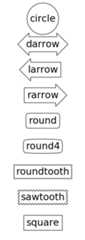
return the instance of the subclass with the given style name.
Circle(pad=0.3)¶Bases:matplotlib.patches._Base
A simple circle box.
| Parameters: | pad : float
|
|---|
transmute(x0,y0,width,height,mutation_size)¶BoxStyle.DArrow(pad=0.3)¶Bases:matplotlib.patches._Base
(Double) Arrow Box
transmute(x0,y0,width,height,mutation_size)¶BoxStyle.LArrow(pad=0.3)¶Bases:matplotlib.patches._Base
(left) Arrow Box
transmute(x0,y0,width,height,mutation_size)¶BoxStyle.RArrow(pad=0.3)¶Bases:matplotlib.patches.LArrow
(right) Arrow Box
transmute(x0,y0,width,height,mutation_size)¶BoxStyle.Round(pad=0.3,rounding_size=None)¶Bases:matplotlib.patches._Base
A box with round corners.
transmute(x0,y0,width,height,mutation_size)¶BoxStyle.Round4(pad=0.3,rounding_size=None)¶Bases:matplotlib.patches._Base
Another box with round edges.
transmute(x0,y0,width,height,mutation_size)¶BoxStyle.Roundtooth(pad=0.3,tooth_size=None)¶Bases:matplotlib.patches.Sawtooth
A rounded tooth box.
transmute(x0,y0,width,height,mutation_size)¶matplotlib.patches.Circle(xy,radius=5,**kwargs)¶Bases:matplotlib.patches.Ellipse
A circle patch.
Create true circle at centerxy = (x,y) with givenradius. UnlikeCirclePolygonwhich is a polygonal approximation, this uses Bézier splinesand is much closer to a scale-free circle.
Valid kwargs are:
Property Description agg_filterunknown alphafloat or None animated[True | False] antialiasedor aa[True | False] or None for default axesan Axesinstancecapstyle[‘butt’ | ‘round’ | ‘projecting’] clip_boxa matplotlib.transforms.Bboxinstanceclip_on[True | False] clip_path[ ( Path,Transform) |Patch| None ]colormatplotlib color spec containsa callable function edgecoloror ecmpl color spec, None, ‘none’, or ‘auto’ facecoloror fcmpl color spec, or None for default, or ‘none’ for no color figurea matplotlib.figure.Figureinstancefill[True | False] gidan id string hatch[‘/’ | ‘\’ | ‘|’ | ‘-‘ | ‘+’ | ‘x’ | ‘o’ | ‘O’ | ‘.’ | ‘*’] joinstyle[‘miter’ | ‘round’ | ‘bevel’] labelstring or anything printable with ‘%s’ conversion. linestyleor ls[‘solid’ | ‘dashed’, ‘dashdot’, ‘dotted’ | (offset, on-off-dash-seq) | '-'|'--'|'-.'|':'|'None'|''|'']linewidthor lwfloat or None for default path_effectsunknown picker[None|float|boolean|callable] rasterized[True | False | None] sketch_paramsunknown snapunknown transformTransforminstanceurla url string visible[True | False] zorderany number
get_radius()¶return the radius of the circle
radius¶return the radius of the circle
set_radius(radius)¶Set the radius of the circle
ACCEPTS: float
matplotlib.patches.CirclePolygon(xy,radius=5,resolution=20,**kwargs)¶Bases:matplotlib.patches.RegularPolygon
A polygon-approximation of a circle patch.
Create a circle atxy = (x,y) with givenradius.This circle is approximated by a regular polygon withresolution sides. For a smoother circle drawn with splines,seeCircle.
Valid kwargs are:
Property Description agg_filterunknown alphafloat or None animated[True | False] antialiasedor aa[True | False] or None for default axesan Axesinstancecapstyle[‘butt’ | ‘round’ | ‘projecting’] clip_boxa matplotlib.transforms.Bboxinstanceclip_on[True | False] clip_path[ ( Path,Transform) |Patch| None ]colormatplotlib color spec containsa callable function edgecoloror ecmpl color spec, None, ‘none’, or ‘auto’ facecoloror fcmpl color spec, or None for default, or ‘none’ for no color figurea matplotlib.figure.Figureinstancefill[True | False] gidan id string hatch[‘/’ | ‘\’ | ‘|’ | ‘-‘ | ‘+’ | ‘x’ | ‘o’ | ‘O’ | ‘.’ | ‘*’] joinstyle[‘miter’ | ‘round’ | ‘bevel’] labelstring or anything printable with ‘%s’ conversion. linestyleor ls[‘solid’ | ‘dashed’, ‘dashdot’, ‘dotted’ | (offset, on-off-dash-seq) | '-'|'--'|'-.'|':'|'None'|''|'']linewidthor lwfloat or None for default path_effectsunknown picker[None|float|boolean|callable] rasterized[True | False | None] sketch_paramsunknown snapunknown transformTransforminstanceurla url string visible[True | False] zorderany number
matplotlib.patches.ConnectionPatch(xyA,xyB,coordsA,coordsB=None,axesA=None,axesB=None,arrowstyle='-',arrow_transmuter=None,connectionstyle='arc3',connector=None,patchA=None,patchB=None,shrinkA=0.0,shrinkB=0.0,mutation_scale=10.0,mutation_aspect=None,clip_on=False,dpi_cor=1.0,**kwargs)¶Bases:matplotlib.patches.FancyArrowPatch
AConnectionPatch class is to makeconnecting lines between two points (possibly in different axes).
Connect pointxyA incoordsA with pointxyB incoordsB
Valid keys are
| Key | Description |
|---|---|
| arrowstyle | the arrow style |
| connectionstyle | the connection style |
| relpos | default is (0.5, 0.5) |
| patchA | default is bounding box of the text |
| patchB | default is None |
| shrinkA | default is 2 points |
| shrinkB | default is 2 points |
| mutation_scale | default is text size (in points) |
| mutation_aspect | default is 1. |
| ? | any key formatplotlib.patches.PathPatch |
coordsA andcoordsB are strings that indicate thecoordinates ofxyA andxyB.
| Property | Description |
|---|---|
| ‘figure points’ | points from the lower left corner of the figure |
| ‘figure pixels’ | pixels from the lower left corner of the figure |
| ‘figure fraction’ | 0,0 is lower left of figure and 1,1 is upper, right |
| ‘axes points’ | points from lower left corner of axes |
| ‘axes pixels’ | pixels from lower left corner of axes |
| ‘axes fraction’ | 0,1 is lower left of axes and 1,1 is upper right |
| ‘data’ | use the coordinate system of the object beingannotated (default) |
| ‘offset points’ | Specify an offset (in points) from thexy value |
| ‘polar’ | you can specifytheta,r for the annotation,even in cartesian plots. Note that if youare using a polar axes, you do not needto specify polar for the coordinatesystem since that is the native “data” coordinatesystem. |
draw(renderer)¶Draw.
get_annotation_clip()¶Returnannotation_clip attribute.Seeset_annotation_clip() for the meaning of return values.
get_path_in_displaycoord()¶Return the mutated path of the arrow in the display coord
set_annotation_clip(b)¶setannotation_clip attribute.
- True: the annotation will only be drawn when self.xy is inside the
- axes.
- False: the annotation will always be drawn regardless of its
- position.
- None: the self.xy will be checked only ifxycoords is “data”
matplotlib.patches.ConnectionStyle¶Bases:matplotlib.patches._Style
ConnectionStyle is a container class which definesseveral connectionstyle classes, which is used to create a pathbetween two points. These are mainly used withFancyArrowPatch.
A connectionstyle object can be either created as:
ConnectionStyle.Arc3(rad=0.2)
or:
ConnectionStyle("Arc3",rad=0.2)
or:
ConnectionStyle("Arc3, rad=0.2")
The following classes are defined
Class Name Attrs Angle angleangleA=90,angleB=0,rad=0.0 Angle3 angle3angleA=90,angleB=0 Arc arcangleA=0,angleB=0,armA=None,armB=None,rad=0.0 Arc3 arc3rad=0.0 Bar bararmA=0.0,armB=0.0,fraction=0.3,angle=None
An instance of any connection style class is an callable object,whose call signature is:
__call__(self,posA,posB,patchA=None,patchB=None,shrinkA=2.,shrinkB=2.)
and it returns aPath instance.posA andposB aretuples of x,y coordinates of the two points to beconnected.patchA (orpatchB) is given, the returned path isclipped so that it start (or end) from the boundary of thepatch. The path is further shrunk byshrinkA (orshrinkB)which is given in points.
return the instance of the subclass with the given style name.
Angle(angleA=90,angleB=0,rad=0.0)¶Bases:matplotlib.patches._Base
Creates a picewise continuous quadratic bezier path betweentwo points. The path has a one passing-through point placed atthe intersecting point of two lines which crosses the start(or end) point and has a angle of angleA (or angleB). Theconnecting edges are rounded withrad.
connect(posA,posB)¶ConnectionStyle.Angle3(angleA=90,angleB=0)¶Bases:matplotlib.patches._Base
Creates a simple quadratic bezier curve between twopoints. The middle control points is placed at theintersecting point of two lines which crosses the start (orend) point and has a angle of angleA (or angleB).
connect(posA,posB)¶ConnectionStyle.Arc(angleA=0,angleB=0,armA=None,armB=None,rad=0.0)¶Bases:matplotlib.patches._Base
Creates a picewise continuous quadratic bezier path betweentwo points. The path can have two passing-through points, apoint placed at the distance of armA and angle of angleA frompoint A, another point with respect to point B. The edges arerounded withrad.
connect(posA,posB)¶ConnectionStyle.Arc3(rad=0.0)¶Bases:matplotlib.patches._Base
Creates a simple quadratic bezier curve between twopoints. The curve is created so that the middle contol points(C1) is located at the same distance from the start (C0) andend points(C2) and the distance of the C1 to the lineconnecting C0-C2 israd times the distance of C0-C2.
connect(posA,posB)¶ConnectionStyle.Bar(armA=0.0,armB=0.0,fraction=0.3,angle=None)¶Bases:matplotlib.patches._Base
A line withangle between A and B witharmA andarmB. One of the arms is extended so that they are connected ina right angle. The length of armA is determined by (armA+fraction x AB distance). Same for armB.
| Parameters: | armA : float
armB : float
fraction : float
angle : float or None
|
|---|
connect(posA,posB)¶matplotlib.patches.Ellipse(xy,width,height,angle=0.0,**kwargs)¶Bases:matplotlib.patches.Patch
A scale-free ellipse.
Valid kwargs are:
Property Description agg_filterunknown alphafloat or None animated[True | False] antialiasedor aa[True | False] or None for default axesan Axesinstancecapstyle[‘butt’ | ‘round’ | ‘projecting’] clip_boxa matplotlib.transforms.Bboxinstanceclip_on[True | False] clip_path[ ( Path,Transform) |Patch| None ]colormatplotlib color spec containsa callable function edgecoloror ecmpl color spec, None, ‘none’, or ‘auto’ facecoloror fcmpl color spec, or None for default, or ‘none’ for no color figurea matplotlib.figure.Figureinstancefill[True | False] gidan id string hatch[‘/’ | ‘\’ | ‘|’ | ‘-‘ | ‘+’ | ‘x’ | ‘o’ | ‘O’ | ‘.’ | ‘*’] joinstyle[‘miter’ | ‘round’ | ‘bevel’] labelstring or anything printable with ‘%s’ conversion. linestyleor ls[‘solid’ | ‘dashed’, ‘dashdot’, ‘dotted’ | (offset, on-off-dash-seq) | '-'|'--'|'-.'|':'|'None'|''|'']linewidthor lwfloat or None for default path_effectsunknown picker[None|float|boolean|callable] rasterized[True | False | None] sketch_paramsunknown snapunknown transformTransforminstanceurla url string visible[True | False] zorderany number
get_patch_transform()¶get_path()¶Return the vertices of the rectangle
matplotlib.patches.FancyArrow(x,y,dx,dy,width=0.001,length_includes_head=False,head_width=None,head_length=None,shape='full',overhang=0,head_starts_at_zero=False,**kwargs)¶Bases:matplotlib.patches.Polygon
Like Arrow, but lets you set head width and head height independently.
Other valid kwargs (inherited fromPatch) are:
Property Description agg_filterunknown alphafloat or None animated[True | False] antialiasedor aa[True | False] or None for default axesan Axesinstancecapstyle[‘butt’ | ‘round’ | ‘projecting’] clip_boxa matplotlib.transforms.Bboxinstanceclip_on[True | False] clip_path[ ( Path,Transform) |Patch| None ]colormatplotlib color spec containsa callable function edgecoloror ecmpl color spec, None, ‘none’, or ‘auto’ facecoloror fcmpl color spec, or None for default, or ‘none’ for no color figurea matplotlib.figure.Figureinstancefill[True | False] gidan id string hatch[‘/’ | ‘\’ | ‘|’ | ‘-‘ | ‘+’ | ‘x’ | ‘o’ | ‘O’ | ‘.’ | ‘*’] joinstyle[‘miter’ | ‘round’ | ‘bevel’] labelstring or anything printable with ‘%s’ conversion. linestyleor ls[‘solid’ | ‘dashed’, ‘dashdot’, ‘dotted’ | (offset, on-off-dash-seq) | '-'|'--'|'-.'|':'|'None'|''|'']linewidthor lwfloat or None for default path_effectsunknown picker[None|float|boolean|callable] rasterized[True | False | None] sketch_paramsunknown snapunknown transformTransforminstanceurla url string visible[True | False] zorderany number
matplotlib.patches.FancyArrowPatch(posA=None,posB=None,path=None,arrowstyle='simple',arrow_transmuter=None,connectionstyle='arc3',connector=None,patchA=None,patchB=None,shrinkA=2.0,shrinkB=2.0,mutation_scale=1.0,mutation_aspect=None,dpi_cor=1.0,**kwargs)¶Bases:matplotlib.patches.Patch
A fancy arrow patch. It draws an arrow using the :class:ArrowStyle.
IfposA andposB is given, a path connecting two point arecreated according to the connectionstyle. The path will beclipped withpatchA andpatchB and further shrunken byshrinkA andshrinkB. An arrow is drawn along thisresulting path using thearrowstyle parameter. Ifpathprovided, an arrow is drawn along this path andpatchA,patchB,shrinkA, andshrinkB are ignored.
Theconnectionstyle describes howposA andposB areconnected. It can be an instance of the ConnectionStyle class(matplotlib.patches.ConnectionStlye) or a string of theconnectionstyle name, with optional comma-separatedattributes. The following connection styles are available.
Class Name Attrs Angle angleangleA=90,angleB=0,rad=0.0 Angle3 angle3angleA=90,angleB=0 Arc arcangleA=0,angleB=0,armA=None,armB=None,rad=0.0 Arc3 arc3rad=0.0 Bar bararmA=0.0,armB=0.0,fraction=0.3,angle=None
Thearrowstyle describes how the fancy arrow will bedrawn. It can be string of the available arrowstyle names,with optional comma-separated attributes, or one of theArrowStyle instance. The optional attributes are meant to bescaled with themutation_scale. The following arrow styles areavailable.
Class Name Attrs Curve -None CurveB ->head_length=0.4,head_width=0.2 BracketB -[widthB=1.0,lengthB=0.2,angleB=None CurveFilledB -|>head_length=0.4,head_width=0.2 CurveA <-head_length=0.4,head_width=0.2 CurveAB <->head_length=0.4,head_width=0.2 CurveFilledA <|-head_length=0.4,head_width=0.2 CurveFilledAB <|-|>head_length=0.4,head_width=0.2 BracketA ]-widthA=1.0,lengthA=0.2,angleA=None BracketAB ]-[widthA=1.0,lengthA=0.2,angleA=None,widthB=1.0,lengthB=0.2,angleB=None Fancy fancyhead_length=0.4,head_width=0.4,tail_width=0.4 Simple simplehead_length=0.5,head_width=0.5,tail_width=0.2 Wedge wedgetail_width=0.3,shrink_factor=0.5 BarAB |-|widthA=1.0,angleA=None,widthB=1.0,angleB=None
Valid kwargs are:
Property Description agg_filterunknown alphafloat or None animated[True | False] antialiasedor aa[True | False] or None for default axesan Axesinstancecapstyle[‘butt’ | ‘round’ | ‘projecting’] clip_boxa matplotlib.transforms.Bboxinstanceclip_on[True | False] clip_path[ ( Path,Transform) |Patch| None ]colormatplotlib color spec containsa callable function edgecoloror ecmpl color spec, None, ‘none’, or ‘auto’ facecoloror fcmpl color spec, or None for default, or ‘none’ for no color figurea matplotlib.figure.Figureinstancefill[True | False] gidan id string hatch[‘/’ | ‘\’ | ‘|’ | ‘-‘ | ‘+’ | ‘x’ | ‘o’ | ‘O’ | ‘.’ | ‘*’] joinstyle[‘miter’ | ‘round’ | ‘bevel’] labelstring or anything printable with ‘%s’ conversion. linestyleor ls[‘solid’ | ‘dashed’, ‘dashdot’, ‘dotted’ | (offset, on-off-dash-seq) | '-'|'--'|'-.'|':'|'None'|''|'']linewidthor lwfloat or None for default path_effectsunknown picker[None|float|boolean|callable] rasterized[True | False | None] sketch_paramsunknown snapunknown transformTransforminstanceurla url string visible[True | False] zorderany number
draw(renderer)¶get_arrowstyle()¶Return the arrowstyle object
get_connectionstyle()¶Return the ConnectionStyle instance
get_dpi_cor()¶dpi_cor is currently used for linewidth-related things andshrink factor. Mutation scale is affected by this.
get_mutation_aspect()¶Return the aspect ratio of the bbox mutation.
get_mutation_scale()¶Return the mutation scale.
get_path()¶return the path of the arrow in the data coordinate. Useget_path_in_displaycoord() method to retrieve the arrow pathin the display coord.
get_path_in_displaycoord()¶Return the mutated path of the arrow in the display coord
set_arrowstyle(arrowstyle=None,**kw)¶Set the arrow style.
comma-separated attributes. Alternatively, the attrs canbe provided as keywords.
set_arrowstyle(“Fancy,head_length=0.2”)set_arrowstyle(“fancy”, head_length=0.2)
Old attrs simply are forgotten.
Without argument (or with arrowstyle=None), returnavailable box styles as a list of strings.
set_connectionstyle(connectionstyle,**kw)¶Set the connection style.
optional comma-separated attributes. Alternatively, the attrs can beprovided as keywords.
set_connectionstyle(“arc,angleA=0,armA=30,rad=10”)set_connectionstyle(“arc”, angleA=0,armA=30,rad=10)
Old attrs simply are forgotten.
Without argument (or with connectionstyle=None), returnavailable styles as a list of strings.
set_dpi_cor(dpi_cor)¶dpi_cor is currently used for linewidth-related things andshrink factor. Mutation scale is affected by this.
set_mutation_aspect(aspect)¶Set the aspect ratio of the bbox mutation.
ACCEPTS: float
set_mutation_scale(scale)¶Set the mutation scale.
ACCEPTS: float
set_patchA(patchA)¶set the begin patch.
set_patchB(patchB)¶set the begin patch
set_positions(posA,posB)¶set the begin and end positions of the connectingpath. Use current value if None.
matplotlib.patches.FancyBboxPatch(xy,width,height,boxstyle='round',bbox_transmuter=None,mutation_scale=1.0,mutation_aspect=None,**kwargs)¶Bases:matplotlib.patches.Patch
Draw a fancy box around a rectangle with lower left atxy*=(*x,y) with specified width and height.
FancyBboxPatch class is similar toRectangleclass, but it draws a fancy box around the rectangle. Thetransformation of the rectangle box to the fancy box is delegatedto theBoxTransmuterBase and its derived classes.
xy = lower left corner
width,height
boxstyle determines what kind of fancy box will be drawn. Itcan be a string of the style name with a comma separatedattribute, or an instance ofBoxStyle. Following boxstyles are available.
Class Name Attrs Circle circlepad=0.3 DArrow darrowpad=0.3 LArrow larrowpad=0.3 RArrow rarrowpad=0.3 Round roundpad=0.3,rounding_size=None Round4 round4pad=0.3,rounding_size=None Roundtooth roundtoothpad=0.3,tooth_size=None Sawtooth sawtoothpad=0.3,tooth_size=None Square squarepad=0.3
mutation_scale : a value with which attributes of boxstyle(e.g., pad) will be scaled. default=1.
mutation_aspect : The height of the rectangle will besqueezed by this value before the mutation and the mutatedbox will be stretched by the inverse of it. default=None.
Valid kwargs are:
Property Description agg_filterunknown alphafloat or None animated[True | False] antialiasedor aa[True | False] or None for default axesan Axesinstancecapstyle[‘butt’ | ‘round’ | ‘projecting’] clip_boxa matplotlib.transforms.Bboxinstanceclip_on[True | False] clip_path[ ( Path,Transform) |Patch| None ]colormatplotlib color spec containsa callable function edgecoloror ecmpl color spec, None, ‘none’, or ‘auto’ facecoloror fcmpl color spec, or None for default, or ‘none’ for no color figurea matplotlib.figure.Figureinstancefill[True | False] gidan id string hatch[‘/’ | ‘\’ | ‘|’ | ‘-‘ | ‘+’ | ‘x’ | ‘o’ | ‘O’ | ‘.’ | ‘*’] joinstyle[‘miter’ | ‘round’ | ‘bevel’] labelstring or anything printable with ‘%s’ conversion. linestyleor ls[‘solid’ | ‘dashed’, ‘dashdot’, ‘dotted’ | (offset, on-off-dash-seq) | '-'|'--'|'-.'|':'|'None'|''|'']linewidthor lwfloat or None for default path_effectsunknown picker[None|float|boolean|callable] rasterized[True | False | None] sketch_paramsunknown snapunknown transformTransforminstanceurla url string visible[True | False] zorderany number
get_bbox()¶get_boxstyle()¶Return the boxstyle object
get_height()¶Return the height of the rectangle
get_mutation_aspect()¶Return the aspect ratio of the bbox mutation.
get_mutation_scale()¶Return the mutation scale.
get_path()¶Return the mutated path of the rectangle
get_width()¶Return the width of the rectangle
get_x()¶Return the left coord of the rectangle
get_y()¶Return the bottom coord of the rectangle
set_bounds(*args)¶Set the bounds of the rectangle: l,b,w,h
ACCEPTS: (left, bottom, width, height)
set_boxstyle(boxstyle=None,**kw)¶Set the box style.
boxstyle can be a string with boxstyle name with optionalcomma-separated attributes. Alternatively, the attrs canbe provided as keywords:
set_boxstyle("round,pad=0.2")set_boxstyle("round",pad=0.2)
Old attrs simply are forgotten.
Without argument (or withboxstyle = None), it returnsavailable box styles.
The following boxstyles are available:
Class Name Attrs Circle circlepad=0.3 DArrow darrowpad=0.3 LArrow larrowpad=0.3 RArrow rarrowpad=0.3 Round roundpad=0.3,rounding_size=None Round4 round4pad=0.3,rounding_size=None Roundtooth roundtoothpad=0.3,tooth_size=None Sawtooth sawtoothpad=0.3,tooth_size=None Square squarepad=0.3
ACCEPTS: [ ‘circle’ | ‘darrow’ | ‘larrow’ | ‘rarrow’ | ‘round’ | ‘round4’ | ‘roundtooth’ | ‘sawtooth’ | ‘square’ ]
set_height(h)¶Set the width rectangle
ACCEPTS: float
set_mutation_aspect(aspect)¶Set the aspect ratio of the bbox mutation.
ACCEPTS: float
set_mutation_scale(scale)¶Set the mutation scale.
ACCEPTS: float
set_width(w)¶Set the width rectangle
ACCEPTS: float
set_x(x)¶Set the left coord of the rectangle
ACCEPTS: float
set_y(y)¶Set the bottom coord of the rectangle
ACCEPTS: float
matplotlib.patches.Patch(edgecolor=None,facecolor=None,color=None,linewidth=None,linestyle=None,antialiased=None,hatch=None,fill=True,capstyle=None,joinstyle=None,**kwargs)¶Bases:matplotlib.artist.Artist
A patch is a 2D artist with a face color and an edge color.
If any ofedgecolor,facecolor,linewidth, orantialiasedareNone, they default to their rc params setting.
The following kwarg properties are supported
| Property | Description |
|---|---|
agg_filter | unknown |
alpha | float or None |
animated | [True | False] |
antialiased or aa | [True | False] or None for default |
axes | anAxes instance |
capstyle | [‘butt’ | ‘round’ | ‘projecting’] |
clip_box | amatplotlib.transforms.Bbox instance |
clip_on | [True | False] |
clip_path | [ (Path,Transform) |Patch | None ] |
color | matplotlib color spec |
contains | a callable function |
edgecolor or ec | mpl color spec, None, ‘none’, or ‘auto’ |
facecolor or fc | mpl color spec, or None for default, or ‘none’ for no color |
figure | amatplotlib.figure.Figure instance |
fill | [True | False] |
gid | an id string |
hatch | [‘/’ | ‘\’ | ‘|’ | ‘-‘ | ‘+’ | ‘x’ | ‘o’ | ‘O’ | ‘.’ | ‘*’] |
joinstyle | [‘miter’ | ‘round’ | ‘bevel’] |
label | string or anything printable with ‘%s’ conversion. |
linestyle or ls | [‘solid’ | ‘dashed’, ‘dashdot’, ‘dotted’ | (offset, on-off-dash-seq) |'-' |'--' |'-.' |':' |'None' |'' |''] |
linewidth or lw | float or None for default |
path_effects | unknown |
picker | [None|float|boolean|callable] |
rasterized | [True | False | None] |
sketch_params | unknown |
snap | unknown |
transform | Transform instance |
url | a url string |
visible | [True | False] |
zorder | any number |
contains(mouseevent,radius=None)¶Test whether the mouse event occurred in the patch.
Returns T/F, {}
contains_point(point,radius=None)¶ReturnsTrue if the given point is inside the path(transformed with its transform attribute).
fill¶return whether fill is set
get_capstyle()¶Return the current capstyle
get_data_transform()¶Return theTransform instance whichmaps data coordinates to physical coordinates.
get_fill()¶return whether fill is set
get_hatch()¶Return the current hatching pattern
get_joinstyle()¶Return the current joinstyle
get_linestyle()¶Return the linestyle. Will be one of [‘solid’ | ‘dashed’ |‘dashdot’ | ‘dotted’]
get_linewidth()¶Return the line width in points.
get_ls()¶Return the linestyle. Will be one of [‘solid’ | ‘dashed’ |‘dashdot’ | ‘dotted’]
get_lw()¶Return the line width in points.
get_patch_transform()¶Return theTransform instance whichtakes patch coordinates to data coordinates.
For example, one may define a patch of a circle which represents aradius of 5 by providing coordinates for a unit circle, and atransform which scales the coordinates (the patch coordinate) by 5.
get_path()¶Return the path of this patch
get_verts()¶Return a copy of the vertices used in this patch
If the patch contains Bezier curves, the curves will beinterpolated by line segments. To access the curves ascurves, useget_path().
get_window_extent(renderer=None)¶set_aa(aa)¶alias for set_antialiased
set_alpha(alpha)¶Set the alpha tranparency of the patch.
ACCEPTS: float or None
set_antialiased(aa)¶Set whether to use antialiased rendering
ACCEPTS: [True | False] or None for default
set_capstyle(s)¶Set the patch capstyle
ACCEPTS: [‘butt’ | ‘round’ | ‘projecting’]
set_color(c)¶Set both the edgecolor and the facecolor.
ACCEPTS: matplotlib color spec
See also
set_facecolor(),set_edgecolor()set_ec(color)¶alias for set_edgecolor
set_edgecolor(color)¶Set the patch edge color
ACCEPTS: mpl color spec, None, ‘none’, or ‘auto’
set_facecolor(color)¶Set the patch face color
ACCEPTS: mpl color spec, or None for default, or ‘none’ for no color
set_fc(color)¶alias for set_facecolor
set_fill(b)¶Set whether to fill the patch
ACCEPTS: [True | False]
set_hatch(hatch)¶Set the hatching pattern
hatch can be one of:
/-diagonalhatching\-backdiagonal|-vertical--horizontal+-crossedx-crosseddiagonalo-smallcircleO-largecircle.-dots*-stars
Letters can be combined, in which case all the specifiedhatchings are done. If same letter repeats, it increases thedensity of hatching of that pattern.
Hatching is supported in the PostScript, PDF, SVG and Aggbackends only.
ACCEPTS: [‘/’ | ‘\’ | ‘|’ | ‘-‘ | ‘+’ | ‘x’ | ‘o’ | ‘O’ | ‘.’ | ‘*’]
set_joinstyle(s)¶Set the patch joinstyle
ACCEPTS: [‘miter’ | ‘round’ | ‘bevel’]
set_linestyle(ls)¶Set the patch linestyle
| linestyle | description |
|---|---|
'-' or'solid' | solid line |
'--' or'dashed' | dashed line |
'-.' or'dashdot' | dash-dotted line |
':' or'dotted' | dotted line |
Alternatively a dash tuple of the following form can be provided:
(offset,onoffseq),
whereonoffseq is an even length tuple of on and off inkin points.
'-' |'--' |'-.' |':' |'None' |'' |'']| Parameters: | ls : { ‘-‘, ‘–’, ‘-.’, ‘:’} and more see description
|
|---|
set_linewidth(w)¶Set the patch linewidth in points
ACCEPTS: float or None for default
set_ls(ls)¶alias for set_linestyle
set_lw(lw)¶alias for set_linewidth
validCap = ('butt', 'round', 'projecting')¶validJoin = ('miter', 'round', 'bevel')¶zorder = 1¶matplotlib.patches.PathPatch(path,**kwargs)¶Bases:matplotlib.patches.Patch
A general polycurve path patch.
path is amatplotlib.path.Path object.
Valid kwargs are:
Property Description agg_filterunknown alphafloat or None animated[True | False] antialiasedor aa[True | False] or None for default axesan Axesinstancecapstyle[‘butt’ | ‘round’ | ‘projecting’] clip_boxa matplotlib.transforms.Bboxinstanceclip_on[True | False] clip_path[ ( Path,Transform) |Patch| None ]colormatplotlib color spec containsa callable function edgecoloror ecmpl color spec, None, ‘none’, or ‘auto’ facecoloror fcmpl color spec, or None for default, or ‘none’ for no color figurea matplotlib.figure.Figureinstancefill[True | False] gidan id string hatch[‘/’ | ‘\’ | ‘|’ | ‘-‘ | ‘+’ | ‘x’ | ‘o’ | ‘O’ | ‘.’ | ‘*’] joinstyle[‘miter’ | ‘round’ | ‘bevel’] labelstring or anything printable with ‘%s’ conversion. linestyleor ls[‘solid’ | ‘dashed’, ‘dashdot’, ‘dotted’ | (offset, on-off-dash-seq) | '-'|'--'|'-.'|':'|'None'|''|'']linewidthor lwfloat or None for default path_effectsunknown picker[None|float|boolean|callable] rasterized[True | False | None] sketch_paramsunknown snapunknown transformTransforminstanceurla url string visible[True | False] zorderany number
See also
Patchget_path()¶matplotlib.patches.Polygon(xy,closed=True,**kwargs)¶Bases:matplotlib.patches.Patch
A general polygon patch.
xy is a numpy array with shape Nx2.
Ifclosed isTrue, the polygon will be closed so thestarting and ending points are the same.
Valid kwargs are:
Property Description agg_filterunknown alphafloat or None animated[True | False] antialiasedor aa[True | False] or None for default axesan Axesinstancecapstyle[‘butt’ | ‘round’ | ‘projecting’] clip_boxa matplotlib.transforms.Bboxinstanceclip_on[True | False] clip_path[ ( Path,Transform) |Patch| None ]colormatplotlib color spec containsa callable function edgecoloror ecmpl color spec, None, ‘none’, or ‘auto’ facecoloror fcmpl color spec, or None for default, or ‘none’ for no color figurea matplotlib.figure.Figureinstancefill[True | False] gidan id string hatch[‘/’ | ‘\’ | ‘|’ | ‘-‘ | ‘+’ | ‘x’ | ‘o’ | ‘O’ | ‘.’ | ‘*’] joinstyle[‘miter’ | ‘round’ | ‘bevel’] labelstring or anything printable with ‘%s’ conversion. linestyleor ls[‘solid’ | ‘dashed’, ‘dashdot’, ‘dotted’ | (offset, on-off-dash-seq) | '-'|'--'|'-.'|':'|'None'|''|'']linewidthor lwfloat or None for default path_effectsunknown picker[None|float|boolean|callable] rasterized[True | False | None] sketch_paramsunknown snapunknown transformTransforminstanceurla url string visible[True | False] zorderany number
See also
Patchget_closed()¶Returns if the polygon is closed
| Returns: | closed : bool
|
|---|
get_xy()¶Get the vertices of the path
| Returns: | vertices : numpy array
|
|---|
set_closed(closed)¶Set if the polygon is closed
| Parameters: | closed : bool
|
|---|
set_xy(xy)¶Set the vertices of the polygon
| Parameters: | xy : numpy array or iterable of pairs
|
|---|
matplotlib.patches.Rectangle(xy,width,height,angle=0.0,**kwargs)¶Bases:matplotlib.patches.Patch
Draw a rectangle with lower left atxy = (x,y) withspecifiedwidth andheight.
- angle
- rotation in degrees (anti-clockwise)
fill is a boolean indicating whether to fill the rectangle
Valid kwargs are:
| Property | Description |
|---|---|
agg_filter | unknown |
alpha | float or None |
animated | [True | False] |
antialiased or aa | [True | False] or None for default |
axes | anAxes instance |
capstyle | [‘butt’ | ‘round’ | ‘projecting’] |
clip_box | amatplotlib.transforms.Bbox instance |
clip_on | [True | False] |
clip_path | [ (Path,Transform) |Patch | None ] |
color | matplotlib color spec |
contains | a callable function |
edgecolor or ec | mpl color spec, None, ‘none’, or ‘auto’ |
facecolor or fc | mpl color spec, or None for default, or ‘none’ for no color |
figure | amatplotlib.figure.Figure instance |
fill | [True | False] |
gid | an id string |
hatch | [‘/’ | ‘\’ | ‘|’ | ‘-‘ | ‘+’ | ‘x’ | ‘o’ | ‘O’ | ‘.’ | ‘*’] |
joinstyle | [‘miter’ | ‘round’ | ‘bevel’] |
label | string or anything printable with ‘%s’ conversion. |
linestyle or ls | [‘solid’ | ‘dashed’, ‘dashdot’, ‘dotted’ | (offset, on-off-dash-seq) |'-' |'--' |'-.' |':' |'None' |'' |''] |
linewidth or lw | float or None for default |
path_effects | unknown |
picker | [None|float|boolean|callable] |
rasterized | [True | False | None] |
sketch_params | unknown |
snap | unknown |
transform | Transform instance |
url | a url string |
visible | [True | False] |
zorder | any number |
get_bbox()¶get_height()¶Return the height of the rectangle
get_patch_transform()¶get_path()¶Return the vertices of the rectangle
get_width()¶Return the width of the rectangle
get_x()¶Return the left coord of the rectangle
get_xy()¶Return the left and bottom coords of the rectangle
get_y()¶Return the bottom coord of the rectangle
set_bounds(*args)¶Set the bounds of the rectangle: l,b,w,h
ACCEPTS: (left, bottom, width, height)
set_height(h)¶Set the width rectangle
ACCEPTS: float
set_width(w)¶Set the width rectangle
ACCEPTS: float
set_x(x)¶Set the left coord of the rectangle
ACCEPTS: float
set_xy(xy)¶Set the left and bottom coords of the rectangle
ACCEPTS: 2-item sequence
set_y(y)¶Set the bottom coord of the rectangle
ACCEPTS: float
xy¶Return the left and bottom coords of the rectangle
matplotlib.patches.RegularPolygon(xy,numVertices,radius=5,orientation=0,**kwargs)¶Bases:matplotlib.patches.Patch
A regular polygon patch.
Constructor arguments:
Valid kwargs are:
Property Description agg_filterunknown alphafloat or None animated[True | False] antialiasedor aa[True | False] or None for default axesan Axesinstancecapstyle[‘butt’ | ‘round’ | ‘projecting’] clip_boxa matplotlib.transforms.Bboxinstanceclip_on[True | False] clip_path[ ( Path,Transform) |Patch| None ]colormatplotlib color spec containsa callable function edgecoloror ecmpl color spec, None, ‘none’, or ‘auto’ facecoloror fcmpl color spec, or None for default, or ‘none’ for no color figurea matplotlib.figure.Figureinstancefill[True | False] gidan id string hatch[‘/’ | ‘\’ | ‘|’ | ‘-‘ | ‘+’ | ‘x’ | ‘o’ | ‘O’ | ‘.’ | ‘*’] joinstyle[‘miter’ | ‘round’ | ‘bevel’] labelstring or anything printable with ‘%s’ conversion. linestyleor ls[‘solid’ | ‘dashed’, ‘dashdot’, ‘dotted’ | (offset, on-off-dash-seq) | '-'|'--'|'-.'|':'|'None'|''|'']linewidthor lwfloat or None for default path_effectsunknown picker[None|float|boolean|callable] rasterized[True | False | None] sketch_paramsunknown snapunknown transformTransforminstanceurla url string visible[True | False] zorderany number
get_patch_transform()¶get_path()¶numvertices¶orientation¶radius¶xy¶matplotlib.patches.Shadow(patch,ox,oy,props=None,**kwargs)¶Bases:matplotlib.patches.Patch
Create a shadow of the givenpatch offset byox,oy.props, if notNone, is a patch property update dictionary.IfNone, the shadow will have have the same color as the face,but darkened.
kwargs are
Property Description agg_filterunknown alphafloat or None animated[True | False] antialiasedor aa[True | False] or None for default axesan Axesinstancecapstyle[‘butt’ | ‘round’ | ‘projecting’] clip_boxa matplotlib.transforms.Bboxinstanceclip_on[True | False] clip_path[ ( Path,Transform) |Patch| None ]colormatplotlib color spec containsa callable function edgecoloror ecmpl color spec, None, ‘none’, or ‘auto’ facecoloror fcmpl color spec, or None for default, or ‘none’ for no color figurea matplotlib.figure.Figureinstancefill[True | False] gidan id string hatch[‘/’ | ‘\’ | ‘|’ | ‘-‘ | ‘+’ | ‘x’ | ‘o’ | ‘O’ | ‘.’ | ‘*’] joinstyle[‘miter’ | ‘round’ | ‘bevel’] labelstring or anything printable with ‘%s’ conversion. linestyleor ls[‘solid’ | ‘dashed’, ‘dashdot’, ‘dotted’ | (offset, on-off-dash-seq) | '-'|'--'|'-.'|':'|'None'|''|'']linewidthor lwfloat or None for default path_effectsunknown picker[None|float|boolean|callable] rasterized[True | False | None] sketch_paramsunknown snapunknown transformTransforminstanceurla url string visible[True | False] zorderany number
draw(renderer)¶get_patch_transform()¶get_path()¶matplotlib.patches.Wedge(center,r,theta1,theta2,width=None,**kwargs)¶Bases:matplotlib.patches.Patch
Wedge shaped patch.
Draw a wedge centered atx,y center with radiusr thatsweepstheta1 totheta2 (in degrees). Ifwidth is given,then a partial wedge is drawn from inner radiusr -widthto outer radiusr.
Valid kwargs are:
Property Description agg_filterunknown alphafloat or None animated[True | False] antialiasedor aa[True | False] or None for default axesan Axesinstancecapstyle[‘butt’ | ‘round’ | ‘projecting’] clip_boxa matplotlib.transforms.Bboxinstanceclip_on[True | False] clip_path[ ( Path,Transform) |Patch| None ]colormatplotlib color spec containsa callable function edgecoloror ecmpl color spec, None, ‘none’, or ‘auto’ facecoloror fcmpl color spec, or None for default, or ‘none’ for no color figurea matplotlib.figure.Figureinstancefill[True | False] gidan id string hatch[‘/’ | ‘\’ | ‘|’ | ‘-‘ | ‘+’ | ‘x’ | ‘o’ | ‘O’ | ‘.’ | ‘*’] joinstyle[‘miter’ | ‘round’ | ‘bevel’] labelstring or anything printable with ‘%s’ conversion. linestyleor ls[‘solid’ | ‘dashed’, ‘dashdot’, ‘dotted’ | (offset, on-off-dash-seq) | '-'|'--'|'-.'|':'|'None'|''|'']linewidthor lwfloat or None for default path_effectsunknown picker[None|float|boolean|callable] rasterized[True | False | None] sketch_paramsunknown snapunknown transformTransforminstanceurla url string visible[True | False] zorderany number
get_path()¶set_center(center)¶set_radius(radius)¶set_theta1(theta1)¶set_theta2(theta2)¶set_width(width)¶matplotlib.patches.YAArrow(figure,xytip,xybase,width=4,frac=0.1,headwidth=12,**kwargs)¶Bases:matplotlib.patches.Patch
Yet another arrow class.
This is an arrow that is defined in display space and has a tip atx1,y1 and a base atx2,y2.
Constructor arguments:
Figure instance(fig.dpi)Valid kwargs are:
Property Description agg_filterunknown alphafloat or None animated[True | False] antialiasedor aa[True | False] or None for default axesan Axesinstancecapstyle[‘butt’ | ‘round’ | ‘projecting’] clip_boxa matplotlib.transforms.Bboxinstanceclip_on[True | False] clip_path[ ( Path,Transform) |Patch| None ]colormatplotlib color spec containsa callable function edgecoloror ecmpl color spec, None, ‘none’, or ‘auto’ facecoloror fcmpl color spec, or None for default, or ‘none’ for no color figurea matplotlib.figure.Figureinstancefill[True | False] gidan id string hatch[‘/’ | ‘\’ | ‘|’ | ‘-‘ | ‘+’ | ‘x’ | ‘o’ | ‘O’ | ‘.’ | ‘*’] joinstyle[‘miter’ | ‘round’ | ‘bevel’] labelstring or anything printable with ‘%s’ conversion. linestyleor ls[‘solid’ | ‘dashed’, ‘dashdot’, ‘dotted’ | (offset, on-off-dash-seq) | '-'|'--'|'-.'|':'|'None'|''|'']linewidthor lwfloat or None for default path_effectsunknown picker[None|float|boolean|callable] rasterized[True | False | None] sketch_paramsunknown snapunknown transformTransforminstanceurla url string visible[True | False] zorderany number
get_patch_transform()¶get_path()¶getpoints(x1,y1,x2,y2,k)¶For line segment defined by (x1,y1) and (x2,y2)return the points on the line that is perpendicular to theline and intersects (x2,y2) and the distance from (x2,y2) of the returned points isk.
matplotlib.patches.bbox_artist(artist,renderer,props=None,fill=True)¶This is a debug function to draw a rectangle around the boundingbox returned byget_window_extent() of an artist,to test whether the artist is returning the correct bbox.
props is a dict of rectangle props with the additional property‘pad’ that sets the padding around the bbox in points.
matplotlib.patches.draw_bbox(bbox,renderer,color='k',trans=None)¶This is a debug function to draw a rectangle around the boundingbox returned byget_window_extent() of an artist,to test whether the artist is returning the correct bbox.

