


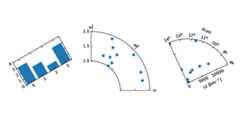
"""Demo of the floating axes.This demo shows features of functions in floating_axes: * Using scatter function and bar function with changing the shape of the plot. * Using GridHelperCurveLinear to rotate the plot and set the boundary of the plot. * Using FloatingSubplot to create a subplot using the return value from GridHelperCurveLinear. * Making sector plot by adding more features to GridHelperCurveLinear."""frommatplotlib.transformsimportAffine2Dimportmpl_toolkits.axisartist.floating_axesasfloating_axesimportnumpyasnpimportmpl_toolkits.axisartist.angle_helperasangle_helperfrommatplotlib.projectionsimportPolarAxesfrommpl_toolkits.axisartist.grid_finderimport(FixedLocator,MaxNLocator,DictFormatter)importmatplotlib.pyplotaspltdefsetup_axes1(fig,rect):""" A simple one. """tr=Affine2D().scale(2,1).rotate_deg(30)grid_helper=floating_axes.GridHelperCurveLinear(tr,extremes=(-0.5,3.5,0,4))ax1=floating_axes.FloatingSubplot(fig,rect,grid_helper=grid_helper)fig.add_subplot(ax1)aux_ax=ax1.get_aux_axes(tr)grid_helper.grid_finder.grid_locator1._nbins=4grid_helper.grid_finder.grid_locator2._nbins=4returnax1,aux_axdefsetup_axes2(fig,rect):""" With custom locator and formatter. Note that the extreme values are swapped. """tr=PolarAxes.PolarTransform()pi=np.piangle_ticks=[(0,r"$0$"),(.25*pi,r"$\frac{1}{4}\pi$"),(.5*pi,r"$\frac{1}{2}\pi$")]grid_locator1=FixedLocator([vforv,sinangle_ticks])tick_formatter1=DictFormatter(dict(angle_ticks))grid_locator2=MaxNLocator(2)grid_helper=floating_axes.GridHelperCurveLinear(tr,extremes=(.5*pi,0,2,1),grid_locator1=grid_locator1,grid_locator2=grid_locator2,tick_formatter1=tick_formatter1,tick_formatter2=None)ax1=floating_axes.FloatingSubplot(fig,rect,grid_helper=grid_helper)fig.add_subplot(ax1)# create a parasite axes whose transData in RA, czaux_ax=ax1.get_aux_axes(tr)aux_ax.patch=ax1.patch# for aux_ax to have a clip path as in axax1.patch.zorder=0.9# but this has a side effect that the patch is# drawn twice, and possibly over some other# artists. So, we decrease the zorder a bit to# prevent this.returnax1,aux_axdefsetup_axes3(fig,rect):""" Sometimes, things like axis_direction need to be adjusted. """# rotate a bit for better orientationtr_rotate=Affine2D().translate(-95,0)# scale degree to radianstr_scale=Affine2D().scale(np.pi/180.,1.)tr=tr_rotate+tr_scale+PolarAxes.PolarTransform()grid_locator1=angle_helper.LocatorHMS(4)tick_formatter1=angle_helper.FormatterHMS()grid_locator2=MaxNLocator(3)ra0,ra1=8.*15,14.*15cz0,cz1=0,14000grid_helper=floating_axes.GridHelperCurveLinear(tr,extremes=(ra0,ra1,cz0,cz1),grid_locator1=grid_locator1,grid_locator2=grid_locator2,tick_formatter1=tick_formatter1,tick_formatter2=None)ax1=floating_axes.FloatingSubplot(fig,rect,grid_helper=grid_helper)fig.add_subplot(ax1)# adjust axisax1.axis["left"].set_axis_direction("bottom")ax1.axis["right"].set_axis_direction("top")ax1.axis["bottom"].set_visible(False)ax1.axis["top"].set_axis_direction("bottom")ax1.axis["top"].toggle(ticklabels=True,label=True)ax1.axis["top"].major_ticklabels.set_axis_direction("top")ax1.axis["top"].label.set_axis_direction("top")ax1.axis["left"].label.set_text(r"cz [km$^{-1}$]")ax1.axis["top"].label.set_text(r"$\alpha_{1950}$")# create a parasite axes whose transData in RA, czaux_ax=ax1.get_aux_axes(tr)aux_ax.patch=ax1.patch# for aux_ax to have a clip path as in axax1.patch.zorder=0.9# but this has a side effect that the patch is# drawn twice, and possibly over some other# artists. So, we decrease the zorder a bit to# prevent this.returnax1,aux_ax##########################################################fig=plt.figure(1,figsize=(8,4))fig.subplots_adjust(wspace=0.3,left=0.05,right=0.95)ax1,aux_ax1=setup_axes1(fig,131)aux_ax1.bar([0,1,2,3],[3,2,1,3])ax2,aux_ax2=setup_axes2(fig,132)theta=np.random.rand(10)*.5*np.piradius=np.random.rand(10)+1.aux_ax2.scatter(theta,radius)ax3,aux_ax3=setup_axes3(fig,133)theta=(8+np.random.rand(10)*(14-8))*15.# in degreesradius=np.random.rand(10)*14000.aux_ax3.scatter(theta,radius)plt.show()
Keywords: python, matplotlib, pylab, example, codex (seeSearch examples)
