


matplotlib.figure¶The figure module provides the top-levelArtist, theFigure, whichcontains all the plot elements. The following classes are defined
SubplotParamsFigurematplotlib.figure.AxesStack¶Bases:matplotlib.cbook.Stack
Specialization of the Stack to handle all tracking of Axes in a Figure.This stack storeskey,(ind,axes) pairs, where:
- key should be a hash of the args and kwargsused in generating the Axes.
- ind is a serial number for tracking the orderin which axes were added.
The AxesStack is a callable, whereax_stack() returnsthe current axes. Alternatively thecurrent_key_axes() willreturn the current key and associated axes.
add(key,a)¶Add Axesa, with keykey, to the stack, and return the stack.
Ifa is already on the stack, don’t add it again, butreturnNone.
as_list()¶Return a list of the Axes instances that have been added to the figure
bubble(a)¶Move the given axes, which must already exist in thestack, to the top.
current_key_axes()¶Return a tuple of(key,axes) for the active axes.
If no axes exists on the stack, then returns(None,None).
get(key)¶Return the Axes instance that was added withkey.If it is not present, return None.
remove(a)¶Remove the axes from the stack.
matplotlib.figure.Figure(figsize=None,dpi=None,facecolor=None,edgecolor=None,linewidth=0.0,frameon=None,subplotpars=None,tight_layout=None)¶Bases:matplotlib.artist.Artist
The Figure instance supports callbacks through acallbacksattribute which is amatplotlib.cbook.CallbackRegistryinstance. The events you can connect to are ‘dpi_changed’, andthe callback will be called withfunc(fig) where fig is theFigure instance.
matplotlib.patches.Rectangle instancefigure.facecolorfigure.edgecolorSubplotParams instance, defaults to rctight_layout() with default padding.When providing a dict containing the keyspad,w_pad,h_padandrect, the defaulttight_layout() paddings will beoverridden.Defaults to rcfigure.autolayout.add_axes(*args,**kwargs)¶Add an axes at positionrect [left,bottom,width,height] where all quantities are in fractions of figurewidth and height. kwargs are legalAxes kwargs plusprojection whichsets the projection type of the axes. (For backwardcompatibility,polar=True may also be provided, which isequivalent toprojection='polar'). Valid values forprojection are: [‘aitoff’, ‘hammer’, ‘lambert’, ‘mollweide’, ‘polar’, ‘rectilinear’]. Some of theseprojections support additional kwargs, which may be providedtoadd_axes(). Typical usage:
rect=l,b,w,hfig.add_axes(rect)fig.add_axes(rect,frameon=False,facecolor='g')fig.add_axes(rect,polar=True)fig.add_axes(rect,projection='polar')fig.add_axes(ax)
If the figure already has an axes with the same parameters,then it will simply make that axes current and return it. Ifyou do not want this behavior, e.g., you want to force thecreation of a new Axes, you must use a unique set of args andkwargs. The axeslabelattribute has been exposed for this purpose. e.g., if you wanttwo axes that are otherwise identical to be added to thefigure, make sure you give them unique labels:
fig.add_axes(rect,label='axes1')fig.add_axes(rect,label='axes2')
In rare circumstances, add_axes may be called with a singleargument, an Axes instance already created in the presentfigure but not in the figure’s list of axes. For example,if an axes has been removed withdelaxes(), it canbe restored with:
fig.add_axes(ax)
In all cases, theAxes instancewill be returned.
In addition toprojection, the following kwargs are supported:
Property Description adjustable[ ‘box’ | ‘datalim’ | ‘box-forced’] agg_filterunknown alphafloat (0.0 transparent through 1.0 opaque) anchorunknown animated[True | False] aspectunknown autoscale_onunknown autoscalex_onunknown autoscaley_onunknown axesan Axesinstanceaxes_locatorunknown axisbelow[True |False | ‘line’ ] clip_boxa matplotlib.transforms.Bboxinstanceclip_on[True | False] clip_path[ ( Path,Transform) |Patch| None ]color_cycleunknown containsa callable function facecolorunknown fcunknown figureunknown frame_on[True |False ] gidan id string labelstring or anything printable with ‘%s’ conversion. navigate[True |False ] navigate_modeunknown path_effectsunknown picker[None|float|boolean|callable] positionunknown rasterization_zorderunknown rasterized[True | False | None] sketch_paramsunknown snapunknown titleunknown transformTransforminstanceurla url string visible[True | False] xboundunknown xlabelunknown xlimunknown xmarginunknown xscale[‘linear’ | ‘log’ | ‘logit’ | ‘symlog’] xticklabelssequence of strings xtickssequence of floats yboundunknown ylabelunknown ylimunknown ymarginunknown yscale[‘linear’ | ‘log’ | ‘logit’ | ‘symlog’] yticklabelssequence of strings ytickssequence of floats zorderany number
add_axobserver(func)¶whenever the axes state change,func(self) will be called
add_subplot(*args,**kwargs)¶Add a subplot. Examples:
fig.add_subplot(111)# equivalent but more generalfig.add_subplot(1,1,1)# add subplot with red backgroundfig.add_subplot(212,facecolor='r')# add a polar subplotfig.add_subplot(111,projection='polar')# add Subplot instance subfig.add_subplot(sub)
kwargs are legalAxes kwargs plusprojection, which chooses a projection type for the axes.(For backward compatibility,polar=True may also beprovided, which is equivalent toprojection=’polar’). Validvalues forprojection are: [‘aitoff’, ‘hammer’, ‘lambert’, ‘mollweide’, ‘polar’, ‘rectilinear’]. Some ofthese projectionssupport additionalkwargs, which may be provided toadd_axes().
TheAxes instance will be returned.
If the figure already has a subplot with key (args,kwargs) then it will simply make that subplot current andreturn it.
See also
subplot() for anexplanation of the args.
The following kwargs are supported:
Property Description adjustable[ ‘box’ | ‘datalim’ | ‘box-forced’] agg_filterunknown alphafloat (0.0 transparent through 1.0 opaque) anchorunknown animated[True | False] aspectunknown autoscale_onunknown autoscalex_onunknown autoscaley_onunknown axesan Axesinstanceaxes_locatorunknown axisbelow[True |False | ‘line’ ] clip_boxa matplotlib.transforms.Bboxinstanceclip_on[True | False] clip_path[ ( Path,Transform) |Patch| None ]color_cycleunknown containsa callable function facecolorunknown fcunknown figureunknown frame_on[True |False ] gidan id string labelstring or anything printable with ‘%s’ conversion. navigate[True |False ] navigate_modeunknown path_effectsunknown picker[None|float|boolean|callable] positionunknown rasterization_zorderunknown rasterized[True | False | None] sketch_paramsunknown snapunknown titleunknown transformTransforminstanceurla url string visible[True | False] xboundunknown xlabelunknown xlimunknown xmarginunknown xscale[‘linear’ | ‘log’ | ‘logit’ | ‘symlog’] xticklabelssequence of strings xtickssequence of floats yboundunknown ylabelunknown ylimunknown ymarginunknown yscale[‘linear’ | ‘log’ | ‘logit’ | ‘symlog’] yticklabelssequence of strings ytickssequence of floats zorderany number
autofmt_xdate(bottom=0.2,rotation=30,ha='right')¶Date ticklabels often overlap, so it is useful to rotate themand right align them. Also, a common use case is a number ofsubplots with shared xaxes where the x-axis is date data. Theticklabels are often long, and it helps to rotate them on thebottom subplot and turn them off on other subplots, as well asturn off xlabels.
subplots_adjust()axes¶Read-only: list of axes in Figure
clf(keep_observers=False)¶Clear the figure.
Setkeep_observers to True if, for example,a gui widget is tracking the axes in the figure.
colorbar(mappable,cax=None,ax=None,use_gridspec=True,**kw)¶Create a colorbar for a ScalarMappable instance,mappable.
Documentation for the pylab thin wrapper:
Add a colorbar to a plot.
Function signatures for thepyplot interface; allbut the first are also method signatures for thecolorbar() method:
colorbar(**kwargs)colorbar(mappable,**kwargs)colorbar(mappable,cax=cax,**kwargs)colorbar(mappable,ax=ax,**kwargs)
arguments:
- mappable
- the
Image,ContourSet, etc. towhich the colorbar applies; this argument is mandatory for thecolorbar()method but optional for thecolorbar()function, which sets thedefault to the current image.
keyword arguments:
- cax
- None | axes object into which the colorbar will be drawn
- ax
- None | parent axes object(s) from which space for a newcolorbar axes will be stolen. If a list of axes is giventhey will all be resized to make room for the colorbar axes.
- use_gridspec
- False | Ifcax is None, a newcax is created as an instance ofAxes. Ifax is an instance of Subplot anduse_gridspec is True,cax is created as an instance of Subplot using thegrid_spec module.
Additional keyword arguments are of two kinds:
axes properties:
Property Description orientation vertical or horizontal fraction 0.15; fraction of original axes to use for colorbar pad 0.05 if vertical, 0.15 if horizontal; fractionof original axes between colorbar and new image axes shrink 1.0; fraction by which to shrink the colorbar aspect 20; ratio of long to short dimensions anchor (0.0, 0.5) if vertical; (0.5, 1.0) if horizontal;the anchor point of the colorbar axes panchor (1.0, 0.5) if vertical; (0.5, 0.0) if horizontal;the anchor point of the colorbar parent axes. IfFalse, the parent axes’ anchor will be unchanged colorbar properties:
Property Description extend [ ‘neither’ | ‘both’ | ‘min’ | ‘max’ ]If not ‘neither’, make pointed end(s) for out-of-range values. These are set for a given colormapusing the colormap set_under and set_over methods. extendfrac [None | ‘auto’ | length | lengths ]If set toNone, both the minimum and maximumtriangular colorbar extensions with have a length of5% of the interior colorbar length (this is thedefault setting). If set to ‘auto’, makes thetriangular colorbar extensions the same lengths asthe interior boxes (whenspacing is set to‘uniform’) or the same lengths as the respectiveadjacent interior boxes (whenspacing is set to‘proportional’). If a scalar, indicates the lengthof both the minimum and maximum triangular colorbarextensions as a fraction of the interior colorbarlength. A two-element sequence of fractions may alsobe given, indicating the lengths of the minimum andmaximum colorbar extensions respectively as afraction of the interior colorbar length. extendrect [False |True ]IfFalse the minimum and maximum colorbar extensionswill be triangular (the default). IfTrue theextensions will be rectangular. spacing [ ‘uniform’ | ‘proportional’ ]Uniform spacing gives each discrete color the samespace; proportional makes the space proportional tothe data interval. ticks [ None | list of ticks | Locator object ]If None, ticks are determined automatically from theinput. format [ None | format string | Formatter object ]If None, the ScalarFormatteris used.If a format string is given, e.g., ‘%.3f’, that isused. An alternativeFormatterobject may begiven instead.drawedges [ False | True ] If true, draw lines at colorboundaries. The following will probably be useful only in the context ofindexed colors (that is, when the mappable has norm=NoNorm()),or other unusual circumstances.
Property Description boundaries None or a sequence values None or a sequence which must be of length 1 lessthan the sequence ofboundaries. For each regiondelimited by adjacent entries inboundaries, thecolor mapped to the corresponding value in valueswill be used.
Ifmappable is aContourSet, itsextendkwarg is included automatically.
Note that theshrink kwarg provides a simple way to keep a verticalcolorbar, for example, from being taller than the axes of the mappableto which the colorbar is attached; but it is a manual method requiringsome trial and error. If the colorbar is too tall (or a horizontalcolorbar is too wide) use a smaller value ofshrink.
For more precise control, you can manually specify the positions ofthe axes objects in which the mappable and the colorbar are drawn. Inthis case, do not use any of the axes properties kwargs.
It is known that some vector graphics viewer (svg and pdf) renders white gapsbetween segments of the colorbar. This is due to bugs in the viewers notmatplotlib. As a workaround the colorbar can be rendered with overlappingsegments:
cbar=colorbar()cbar.solids.set_edgecolor("face")draw()
However this has negative consequences in other circumstances. Particularlywith semi transparent images (alpha < 1) and colorbar extensions and is notenabled by default see (issue #1188).
Colorbar instance; see also its base class,ColorbarBase. Call theset_label() methodto label the colorbar.contains(mouseevent)¶Test whether the mouse event occurred on the figure.
Returns True,{}
delaxes(a)¶remove a from the figure and update the current axes
dpi¶draw(artist,renderer,*args,**kwargs)¶Render the figure usingmatplotlib.backend_bases.RendererBaseinstancerenderer.
draw_artist(a)¶drawmatplotlib.artist.Artist instancea only –this is available only after the figure is drawn
figimage(X,xo=0,yo=0,alpha=None,norm=None,cmap=None,vmin=None,vmax=None,origin=None,resize=False,**kwargs)¶Adds a non-resampled image to the figure.
call signatures:
figimage(X,**kwargs)
adds a non-resampled arrayX to the figure.
figimage(X,xo,yo)
with pixel offsetsxo,yo,
X must be a float array:
Optional keyword arguments:
Keyword Description resize a boolean, True or False. If “True”, then re-size theFigure to match the given image size. xo or yo An integer, thex andy image offset in pixels cmap a matplotlib.colors.Colormapinstance, e.g.,cm.jet. IfNone, default to the rcimage.cmapvaluenorm a matplotlib.colors.Normalizeinstance. Thedefault is normalization(). This scales luminance -> 0-1vmin|vmax are used to scale a luminance image to 0-1. If eitherisNone, the min and max of the luminance values willbe used. Note if you pass a norm instance, the settingsforvmin andvmax will be ignored. alpha the alpha blending value, default isNone origin [ ‘upper’ | ‘lower’ ] Indicates where the [0,0] index ofthe array is in the upper left or lower left corner ofthe axes. Defaults to the rc image.origin value
figimage complements the axes image(imshow()) which will be resampledto fit the current axes. If you want a resampled image tofill the entire figure, you can define anAxes with extent [0,0,1,1].
Anmatplotlib.image.FigureImage instance is returned.

Additional kwargs are Artist kwargs passed on toFigureImage
gca(**kwargs)¶Get the current axes, creating one if necessary
The following kwargs are supported for ensuring the returned axesadheres to the given projection etc., and for axes creation ifthe active axes does not exist:
Property Description adjustable[ ‘box’ | ‘datalim’ | ‘box-forced’] agg_filterunknown alphafloat (0.0 transparent through 1.0 opaque) anchorunknown animated[True | False] aspectunknown autoscale_onunknown autoscalex_onunknown autoscaley_onunknown axesan Axesinstanceaxes_locatorunknown axisbelow[True |False | ‘line’ ] clip_boxa matplotlib.transforms.Bboxinstanceclip_on[True | False] clip_path[ ( Path,Transform) |Patch| None ]color_cycleunknown containsa callable function facecolorunknown fcunknown figureunknown frame_on[True |False ] gidan id string labelstring or anything printable with ‘%s’ conversion. navigate[True |False ] navigate_modeunknown path_effectsunknown picker[None|float|boolean|callable] positionunknown rasterization_zorderunknown rasterized[True | False | None] sketch_paramsunknown snapunknown titleunknown transformTransforminstanceurla url string visible[True | False] xboundunknown xlabelunknown xlimunknown xmarginunknown xscale[‘linear’ | ‘log’ | ‘logit’ | ‘symlog’] xticklabelssequence of strings xtickssequence of floats yboundunknown ylabelunknown ylimunknown ymarginunknown yscale[‘linear’ | ‘log’ | ‘logit’ | ‘symlog’] yticklabelssequence of strings ytickssequence of floats zorderany number
get_axes()¶get_children()¶get a list of artists contained in the figure
get_default_bbox_extra_artists()¶get_dpi()¶Return the dpi as a float
get_edgecolor()¶Get the edge color of the Figure rectangle
get_facecolor()¶Get the face color of the Figure rectangle
get_figheight()¶Return the figheight as a float
get_figwidth()¶Return the figwidth as a float
get_frameon()¶get the boolean indicating frameon
get_size_inches()¶Returns the current size of the figure in inches (1in == 2.54cm)as an numpy array.
| Returns: | size : ndarray
|
|---|
See also
matplotlib.Figure.set_size_inches
get_tight_layout()¶Return the Boolean flag, True to use :meth`tight_layout` when drawing.
get_tightbbox(renderer)¶Return a (tight) bounding box of the figure in inches.
It only accounts axes title, axis labels, and axisticklabels. Needs improvement.
get_window_extent(*args,**kwargs)¶get the figure bounding box in display space; kwargs are void
ginput(n=1,timeout=30,show_clicks=True,mouse_add=1,mouse_pop=3,mouse_stop=2)¶Blocking call to interact with the figure.
This will wait forn clicks from the user and return a list of thecoordinates of each click.
Iftimeout is zero or negative, does not timeout.
Ifn is zero or negative, accumulate clicks until a middle click(or potentially both mouse buttons at once) terminates the input.
Right clicking cancels last input.
The buttons used for the various actions (adding points, removingpoints, terminating the inputs) can be overriden via theargumentsmouse_add,mouse_pop andmouse_stop, that givethe associated mouse button: 1 for left, 2 for middle, 3 forright.
The keyboard can also be used to select points in case your mousedoes not have one or more of the buttons. The delete and backspacekeys act like right clicking (i.e., remove last point), the enter keyterminates input and any other key (not already used by the windowmanager) selects a point.
hold(b=None)¶Deprecated since version 2.0:The hold function was deprecated in version 2.0.
Set the hold state. If hold is None (default), toggle thehold state. Else set the hold state to boolean value b.
e.g.:
hold()# toggle holdhold(True)# hold is onhold(False)# hold is off
All “hold” machinery is deprecated.
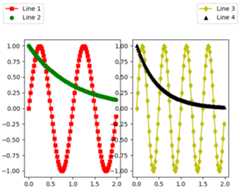
legend(handles,labels,*args,**kwargs)¶Place a legend in the figure. Labels are a sequence ofstrings, handles is a sequence ofLine2D orPatch instances, and loc can be astring or an integer specifying the legend location
USAGE:
legend((line1,line2,line3),('label1','label2','label3'),'upper right')
Theloc location codes are:
'best':0,(currentlynotsupportedforfigurelegends)'upper right':1,'upper left':2,'lower left':3,'lower right':4,'right':5,'center left':6,'center right':7,'lower center':8,'upper center':9,'center':10,
loc can also be an (x,y) tuple in figure coords, whichspecifies the lower left of the legend box. figure coords are(0,0) is the left, bottom of the figure and 1,1 is the right,top.
Keyword arguments:
- prop: [None | FontProperties | dict ]
- A
matplotlib.font_manager.FontPropertiesinstance. Ifprop is a dictionary, a new instance will becreated withprop. IfNone, use rc settings.- numpoints: integer
- The number of points in the legend line, default is 4
- scatterpoints: integer
- The number of points in the legend line, default is 4
- scatteryoffsets: list of floats
- a list of yoffsets for scatter symbols in legend
- markerscale: [None | scalar ]
- The relative size of legend markers vs. original. IfNone, use rcsettings.
- markerfirst: [True |False ]
- ifTrue, legend marker is placed to the left of the legend labelifFalse, legend marker is placed to the right of the legendlabel
- frameon: [None | bool ]
- Control whether the legend should be drawn on a patch (frame).Default isNone which will take the value from the
legend.frameonrcParam.- fancybox: [None |False |True ]
- ifTrue, draw a frame with a round fancybox. IfNone, use rc
- shadow: [None |False |True ]
- IfTrue, draw a shadow behind legend. IfNone, use rc settings.
- framealpha: [None | float ]
- Control the alpha transparency of the legend’s background.Default isNone which will take the value from the
legend.framealpharcParam.- facecolor: [None | “inherit” | a color spec ]
- Control the legend’s background color.Default isNone which will take the value from the
legend.facecolorrcParam.If"inherit", it will take theaxes.facecolorrcParam.- edgecolor: [None | “inherit” | a color spec ]
- Control the legend’s background patch edge color.Default isNone which will take the value from the
legend.edgecolorrcParam.If"inherit", it will take theaxes.edgecolorrcParam.- ncol:integer
- number of columns. default is 1
- mode:[ “expand” |None ]
- if mode is “expand”, the legend will be horizontally expandedto fill the axes area (orbbox_to_anchor)
- title:string
- the legend title
Padding and spacing between various elements use following keywordsparameters. The dimensions of these values are given as a fractionof the fontsize. Values from rcParams will be used if None.
| Keyword | Description |
|---|---|
| borderpad | the fractional whitespace inside the legend border |
| labelspacing | the vertical space between the legend entries |
| handlelength | the length of the legend handles |
| handletextpad | the pad between the legend handle and text |
| borderaxespad | the pad between the axes and legend border |
| columnspacing | the spacing between columns |
Note
Not all kinds of artist are supported by the legend.See LINK (FIXME) for details.
Example:
savefig(*args,**kwargs)¶Save the current figure.
Call signature:
savefig(fname,dpi=None,facecolor='w',edgecolor='w',orientation='portrait',papertype=None,format=None,transparent=False,bbox_inches=None,pad_inches=0.1,frameon=None)
The output formats available depend on the backend being used.
Arguments:
- fname:
A string containing a path to a filename, or a Pythonfile-like object, or possibly some backend-dependent objectsuch as
PdfPages.Ifformat isNone andfname is a string, the outputformat is deduced from the extension of the filename. Ifthe filename has no extension, the value of the rc parameter
savefig.formatis used.Iffname is not a string, remember to specifyformat toensure that the correct backend is used.
Keyword arguments:
- dpi: [None |
scalar>0| ‘figure’]- The resolution in dots per inch. IfNone it will default tothe value
savefig.dpiin the matplotlibrc file. If ‘figure’it will set the dpi to be the value of the figure.- facecolor,edgecolor:
- the colors of the figure rectangle
- orientation: [ ‘landscape’ | ‘portrait’ ]
- not supported on all backends; currently only on postscript output
- papertype:
- One of ‘letter’, ‘legal’, ‘executive’, ‘ledger’, ‘a0’ through‘a10’, ‘b0’ through ‘b10’. Only supported for postscriptoutput.
- format:
- One of the file extensions supported by the activebackend. Most backends support png, pdf, ps, eps and svg.
- transparent:
- IfTrue, the axes patches will all be transparent; thefigure patch will also be transparent unless facecolorand/or edgecolor are specified via kwargs.This is useful, for example, for displayinga plot on top of a colored background on a web page. Thetransparency of these patches will be restored to theiroriginal values upon exit of this function.
- frameon:
- IfTrue, the figure patch will be colored, ifFalse, thefigure background will be transparent. If not provided, thercParam ‘savefig.frameon’ will be used.
- bbox_inches:
- Bbox in inches. Only the given portion of the figure issaved. If ‘tight’, try to figure out the tight bbox ofthe figure.
- pad_inches:
- Amount of padding around the figure when bbox_inches is‘tight’.
- bbox_extra_artists:
- A list of extra artists that will be considered when thetight bbox is calculated.
sca(a)¶Set the current axes to be a and return a
set_canvas(canvas)¶Set the canvas that contains the figure
ACCEPTS: a FigureCanvas instance
set_dpi(val)¶Set the dots-per-inch of the figure
ACCEPTS: float
set_edgecolor(color)¶Set the edge color of the Figure rectangle
ACCEPTS: any matplotlib color - see help(colors)
set_facecolor(color)¶Set the face color of the Figure rectangle
ACCEPTS: any matplotlib color - see help(colors)
set_figheight(val,forward=False)¶Set the height of the figure in inches
ACCEPTS: float
set_figwidth(val,forward=False)¶Set the width of the figure in inches
ACCEPTS: float
set_frameon(b)¶Set whether the figure frame (background) is displayed or invisible
ACCEPTS: boolean
set_size_inches(w,h,forward=False)¶Set the figure size in inches (1in == 2.54cm)
Usage:
fig.set_size_inches(w,h)# ORfig.set_size_inches((w,h))
optional kwargforward=True will cause the canvas size to beautomatically updated; e.g., you can resize the figure windowfrom the shell
ACCEPTS: a w,h tuple with w,h in inches
See also
matplotlib.Figure.get_size_inches
set_tight_layout(tight)¶Set whethertight_layout() is used upon drawing.If None, the rcParams[‘figure.autolayout’] value will be set.
When providing a dict containing the keyspad,w_pad,h_padandrect, the defaulttight_layout() paddings will beoverridden.
ACCEPTS: [True | False | dict | None ]
show(warn=True)¶If using a GUI backend with pyplot, display the figure window.
If the figure was not created usingfigure(), it will lack aFigureManagerBase, andwill raise an AttributeError.
For non-GUI backends, this does nothing, in which casea warning will be issued ifwarn is True (default).
subplots_adjust(*args,**kwargs)¶Call signature:
subplots_adjust(left=None,bottom=None,right=None,top=None,wspace=None,hspace=None)
Update theSubplotParams withkwargs (defaulting to rc whenNone) and update the subplot locations
suptitle(t,**kwargs)¶Add a centered title to the figure.
kwargs arematplotlib.text.Text properties. Using figurecoordinates, the defaults are:
- x:0.5
- The x location of the text in figure coords
- y:0.98
- The y location of the text in figure coords
- horizontalalignment:‘center’
- The horizontal alignment of the text
- verticalalignment:‘top’
- The vertical alignment of the text
If thefontproperties keyword argument is given then thercParams defaults forfontsize (figure.titlesize) andfontweight (figure.titleweight) will be ignored in favourof theFontProperties defaults.
Amatplotlib.text.Text instance is returned.
Example:
fig.suptitle('this is the figure title',fontsize=12)
text(x,y,s,*args,**kwargs)¶Add text to figure.
Call signature:
text(x,y,s,fontdict=None,**kwargs)
Add text to figure at locationx,y (relative 0-1coords). Seetext() for the meaningof the other arguments.
kwargs control theText properties:
Property Description agg_filterunknown alphafloat (0.0 transparent through 1.0 opaque) animated[True | False] axesan Axesinstancebackgroundcolorany matplotlib color bboxFancyBboxPatch prop dict clip_boxa matplotlib.transforms.Bboxinstanceclip_on[True | False] clip_path[ ( Path,Transform) |Patch| None ]colorany matplotlib color containsa callable function familyor fontfamily or fontname or name[FONTNAME | ‘serif’ | ‘sans-serif’ | ‘cursive’ | ‘fantasy’ | ‘monospace’ ] figurea matplotlib.figure.Figureinstancefontpropertiesor font_propertiesa matplotlib.font_manager.FontPropertiesinstancegidan id string horizontalalignmentor ha[ ‘center’ | ‘right’ | ‘left’ ] labelstring or anything printable with ‘%s’ conversion. linespacingfloat (multiple of font size) multialignment[‘left’ | ‘right’ | ‘center’ ] path_effectsunknown picker[None|float|boolean|callable] position(x,y) rasterized[True | False | None] rotation[ angle in degrees | ‘vertical’ | ‘horizontal’ ] rotation_modeunknown sizeor fontsize[size in points | ‘xx-small’ | ‘x-small’ | ‘small’ | ‘medium’ | ‘large’ | ‘x-large’ | ‘xx-large’ ] sketch_paramsunknown snapunknown stretchor fontstretch[a numeric value in range 0-1000 | ‘ultra-condensed’ | ‘extra-condensed’ | ‘condensed’ | ‘semi-condensed’ | ‘normal’ | ‘semi-expanded’ | ‘expanded’ | ‘extra-expanded’ | ‘ultra-expanded’ ] styleor fontstyle[ ‘normal’ | ‘italic’ | ‘oblique’] textstring or anything printable with ‘%s’ conversion. transformTransforminstanceurla url string usetexunknown variantor fontvariant[ ‘normal’ | ‘small-caps’ ] verticalalignmentor ma or va[ ‘center’ | ‘top’ | ‘bottom’ | ‘baseline’ ] visible[True | False] weightor fontweight[a numeric value in range 0-1000 | ‘ultralight’ | ‘light’ | ‘normal’ | ‘regular’ | ‘book’ | ‘medium’ | ‘roman’ | ‘semibold’ | ‘demibold’ | ‘demi’ | ‘bold’ | ‘heavy’ | ‘extra bold’ | ‘black’ ] wrapunknown xfloat yfloat zorderany number
tight_layout(renderer=None,pad=1.08,h_pad=None,w_pad=None,rect=None)¶Adjust subplot parameters to give specified padding.
Parameters:
- pad:float
- padding between the figure edge and the edges of subplots,as a fraction of the font-size.
- h_pad, w_pad:float
- padding (height/width) between edges of adjacent subplots.Defaults to
pad_inches.- rect:if rect is given, it is interpreted as a rectangle
- (left, bottom, right, top) in the normalized figurecoordinate that the whole subplots area (includinglabels) will fit into. Default is (0, 0, 1, 1).
waitforbuttonpress(timeout=-1)¶Blocking call to interact with the figure.
This will return True is a key was pressed, False if a mousebutton was pressed and None iftimeout was reached withouteither being pressed.
Iftimeout is negative, does not timeout.
matplotlib.figure.SubplotParams(left=None,bottom=None,right=None,top=None,wspace=None,hspace=None)¶Bases:object
A class to hold the parameters for a subplot
All dimensions are fraction of the figure width or height.All values default to their rc params
The following attributes are available
update(left=None,bottom=None,right=None,top=None,wspace=None,hspace=None)¶Update the current values. If any kwarg is None, default tothe current value, if set, otherwise to rc
matplotlib.figure.figaspect(arg)¶Create a figure with specified aspect ratio. Ifarg is a number,use that aspect ratio. Ifarg is an array, figaspect willdetermine the width and height for a figure that would fit arraypreserving aspect ratio. The figure width, height in inches arereturned. Be sure to create an axes with equal with and height,e.g.,
Example usage:
# make a figure twice as tall as it is widew,h=figaspect(2.)fig=Figure(figsize=(w,h))ax=fig.add_axes([0.1,0.1,0.8,0.8])ax.imshow(A,**kwargs)# make a figure with the proper aspect for an arrayA=rand(5,3)w,h=figaspect(A)fig=Figure(figsize=(w,h))ax=fig.add_axes([0.1,0.1,0.8,0.8])ax.imshow(A,**kwargs)
Thanks to Fernando Perez for this function

