- Notifications
You must be signed in to change notification settings - Fork145
🌻 Flexible and fast ZSH plugin manager
License
zdharma-continuum/zinit
Folders and files
| Name | Name | Last commit message | Last commit date | |
|---|---|---|---|---|
Repository files navigation



- Zinit Wiki
- Install
- Usage
- Frequently Asked Questions
- Ice Modifiers
- Zinit Commands
- Updating Zinit and Plugins
- Completions
- Zinit Module
- Hints and Tips
- Changelog
- Support
- Getting Help and Community
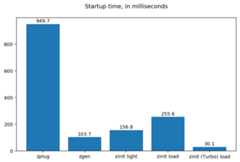
Zinit is a flexible and fast Zshell plugin manager that will allow you to install everything from GitHub and othersites. Its characteristics are:
Zinit is currently the only plugin manager that provides Turbo mode, which yields50-80% faster Zsh startup(i.e., the shell will start up to5 times faster!). Check out a speed comparison with other popular pluginmanagershere.
The plugin manager givesreports from plugin loadings describing whataliases, functions,bindkeys, Zlewidgets, zstyles,completions, variables,
PATHandFPATHelements a plugin has set up. This allows one toquickly familiarize oneself with a new plugin and provides rich and easy-to-digest information which might be helpfulon various occasions.Supported is the unloading of plugin and ability to list, (un)install andselectively disable,enableplugin's completions.
The plugin manager supports loading plugins and libraries from Oh My Zsh or Prezto. However, the implementation isn'tframework-specific and doesn't bloat the plugin manager with such code (more on this topic can be found on the Wiki,in theIntroduction).
The system does not use
$FPATH, loading multiple plugins doesn't clutter$FPATHwith the same number of entries(e.g.10,15or more). Code is immune toKSH_ARRAYSand other options typically causing compatibility problems.Zinit supports special, dedicatedpackages that offload the user from providing long and complex commands. Seethezinit-packages repository for a growing, complete list ofZinit packages and theWiki page for an articleabout the feature.
Also, specialized Zinit extensions — calledannexes — have the ability to extend the plugin manager with newcommands, URL-preprocessors (used by e.g.:zinit-annex-readurl annex), post-install and post-updatehooks, and much more. See thezdharma-continuum organization for a growing,complete list of available Zinit extensions and refer to theWiki article for an introduction on creating your annex.
The information in this README is complemented by theZinit Wiki. TheREADME is an introductory overview of Zinit, while the Wiki gives complete information with examples. Make sure to readit to get the most out of Zinit.
The easiest way to install Zinit is to execute:
bash -c"$(curl --fail --show-error --silent --location https://raw.githubusercontent.com/zdharma-continuum/zinit/HEAD/scripts/install.sh)"This will install Zinit in~/.local/share/zinit/zinit.git..zshrc will be updated with three lines of code that willbe added to the bottom. The lines will be sourcingzinit.zsh and setting up completion for commandzinit.
After installing and reloading the shell, compile Zinit via:
zinit self-update
In your.zshrc, add the following snippet
ZINIT_HOME="${XDG_DATA_HOME:-${HOME}/.local/share}/zinit/zinit.git"[!-d$ZINIT_HOME ]&& mkdir -p"$(dirname$ZINIT_HOME)"[!-d$ZINIT_HOME/.git ]&& git clone https://github.com/zdharma-continuum/zinit.git"$ZINIT_HOME"source"${ZINIT_HOME}/zinit.zsh"
If you sourcezinit.zsh aftercompinit, add the following snippet after sourcingzinit.zsh:
autoload -Uz _zinit((${+_comps}))&& _comps[zinit]=_zinit
Reload Zsh to install Zinit:
exec zshVarious paths can be customized; see sectionCustomizing Paths.
Click here to read the introduction to Zinit. Itexplains basic usage and some of the more unique features of Zinit, such as the Turbo mode. If you're new to Zinit, werecommend you read it at least once.
Plugins can be loaded usingload orlight.
zinit load<repo/plugin># Load with reporting/investigating.zinit light<repo/plugin># Load without reporting/investigating.
If you want to source local or remote files (using direct URL), you can do so withsnippet.
zinit snippet<URL>
Such lines should be added to.zshrc. Snippets are cached locally. Use the-f option to download a new version of asnippet orzinit update {URL}. You can also usezinit update --all to update all snippets (and plugins).
Example
# Plugin history-search-multi-word loaded with investigating.zinit load zdharma-continuum/history-search-multi-word# Two regular plugins loaded without investigating.zinit light zsh-users/zsh-autosuggestionszinit light zdharma-continuum/fast-syntax-highlighting# Snippetzinit snippet https://gist.githubusercontent.com/hightemp/5071909/raw/
Prompt(Theme) Example
This ispowerlevel10k,pure,starship sample:
# Load powerlevel10k themezinit ice depth"1"# git clone depthzinit light romkatv/powerlevel10k# Load pure themezinit ice pick"async.zsh" src"pure.zsh"# with zsh-async library that's bundled with it.zinit light sindresorhus/pure# Load starship theme# line 1: `starship` binary as command, from github release# line 2: starship setup at clone(create init.zsh, completion)# line 3: pull behavior same as clone, source init.zshzinit ice as"command" from"gh-r" \ atclone"./starship init zsh > init.zsh; ./starship completions zsh > _starship" \ atpull"%atclone" src"init.zsh"zinit light starship/starship
Zinit can be updated toself-update and plugins toupdate.
# Self updatezinit self-update# Plugin updatezinit update# Plugin parallel updatezinit update --parallel# Increase the number of jobs in a concurrent-set to 40zinit update --parallel 40
Turbo and lucid are the most used options.
Turbo Mode
Turbo mode is the key to performance. It can be loaded asynchronously, which makes a huge difference when the amount of plugins increases.Usually used aszinit ice wait"<SECONDS>", let's use the previous example:
zinit icewait# wait is the same as wait"0"zinit load zdharma-continuum/history-search-multi-wordzinit ice wait"2"# load after 2 secondszinit load zdharma-continuum/history-search-multi-wordzinit icewait# also be used in `light` and `snippet`zinit snippet https://gist.githubusercontent.com/hightemp/5071909/raw/
Lucid
Turbo mode is verbose, so you need an option for quiet.
You can uselucid:
zinit icewait lucidzinit load zdharma-continuum/history-search-multi-wordF&A: What isice?
ice is zinit's options command. The option melts like ice and is used only once. (more:Ice Modifiers)
Migration from Oh-My-ZSH
Basic
zinit snippet<URL># Raw Syntax with URLzinit snippet OMZ::<PATH># Shorthand OMZ/ (https://github.com/ohmyzsh/ohmyzsh/raw/master/)zinit snippet OMZL::<PATH># Shorthand OMZ/lib/zinit snippet OMZT::<PATH># Shorthand OMZ/themes/zinit snippet OMZP::<PATH># Shorthand OMZ/plugins/
Library
Importing theclipboard andtermsupport Oh-My-Zsh Library Sample:
# Raw Syntaxzi snippet https://github.com/ohmyzsh/ohmyzsh/blob/master/lib/clipboard.zshzi snippet https://github.com/ohmyzsh/ohmyzsh/blob/master/lib/termsupport.zsh# OMZ Shorthand Syntaxzi snippet OMZ::lib/clipboard.zshzi snippet OMZ::lib/termsupport.zsh# OMZL Shorthand Syntaxzi snippet OMZL::clipboard.zshzi snippet OMZL::termsupport.zsh
Theme
To usethemes created for Oh My Zsh you might want to first source thegit library there.
Then you can use the themes as snippets (zinit snippet <file path or GitHub URL>). Some themes require not only Oh MyZsh's Gitlibrary, but also Gitplugin (error aboutcurrent_branch may appear). Load this Git-plugin assingle-file snippet directly from OMZ.
Most themes requirepromptsubst option (setopt promptsubst inzshrc), if it isn't set, then prompt will appear assomething like:... $(build_prompt) ....
You might want to suppress completions provided by the git plugin by issuingzinit cdclear -q (-q is for quiet) –see belowIgnoring Compdefs.
To summarize:
## Oh My Zsh SettingZSH_THEME="robbyrussell"## Zinit Setting# Must Load OMZ Git libraryzi snippet OMZL::git.zsh# Must Load OMZ Async prompt libraryzi snippet OMZL::async_prompt.zsh # Load Git plugin from OMZzi snippet OMZP::gitzi cdclear -q# <- forget completions provided up to this momentsetopt promptsubst# Load Promptzi snippet OMZT::robbyrussell
External Theme Sample:NicoSantangelo/Alpharized
## Oh My Zsh SettingZSH_THEME="alpharized"## Zinit Setting# Must Load OMZ Git libraryzi snippet OMZL::git.zsh# Load Git plugin from OMZzi snippet OMZP::gitzi cdclear -q# <- forget completions provided up to this momentsetopt promptsubst# Load Promptzi light NicoSantangelo/Alpharized
Error occurs when loading OMZ's theme.
If thegit library will not be loaded, the following errors will appear:
........:1:command not found: git_prompt_status........:1:command not found: git_prompt_short_sha
Plugin
If it consists of a single file, you can just load it.
## Oh-My-Zsh Settingplugins=( git dotenv rake rbenv ruby)## Zinit Settingzi snippet OMZP::gitzi snippet OMZP::dotenvzi snippet OMZP::rakezi snippet OMZP::rbenvzi snippet OMZP::ruby
zi ice svnzi snippet OMZP::gitfastzi ice svnzi snippet OMZP::osx
zi ice as"completion"zi snippet OMZP::docker/_dockerzi ice as"completion"zi snippet OMZP::fd/_fd
Migration from Prezto
Basic
zi snippet<URL># Raw Syntax with URLzi snippet PZT::<PATH># Shorthand PZT/ (https://github.com/sorin-ionescu/prezto/tree/master/)zi snippet PZTM::<PATH># Shorthand PZT/modules/
Modules
Importing theenvironment andterminal Prezto Modules Sample:
## Prezto Settingzstyle':prezto:load' pmodule'environment''terminal'## Zinit Setting# Raw Syntaxzi snippet https://github.com/sorin-ionescu/prezto/blob/master/modules/environment/init.zshzi snippet https://github.com/sorin-ionescu/prezto/blob/master/modules/terminal/init.zsh# PZT Shorthand Syntaxzi snippet PZT::modules/environmentzi snippet PZT::modules/terminal# PZTM Shorthand Syntaxzi snippet PZTM::environmentzi snippet PZTM::terminal
Usezinit ice svn if multiple files require an entire subdirectory. Likedocker,git:
zi ice svnzi snippet PZTM::dockerzi ice svnzi snippet PZTM::git
Usezinit ice as"null" if don't exist*.plugin.zsh,init.zsh,*.zsh-theme* files in module. Likearchive:
zi ice svn as"null"zi snippet PZTM::archiveUsezinit ice atclone"git clone <repo> <location>" if module have external module. Likecompletion:
zi ice \ atclone"git clone --recursive https://github.com/zsh-users/zsh-completions.git external" \ blockf\# use blockf to prevent any unnecessary additions to fpath, as zinit manages fpath svnzi snippet PZTM::completion
F&A: What iszstyle?
Readzstyle doc (more:What doeszstyle do?).
Migration from Zgen
Oh My Zsh
More reference: checkMigration from Oh-My-ZSH
# Load ohmyzsh basezgen oh-my-zshzi snippet OMZL::<ALL OF THEM># Load ohmyzsh pluginszgen oh-my-zsh<PATH>zi snippet OMZ::<PATH>
Prezto
More reference: checkMigration from Prezto
# Load Preztozgen preztozi snippet PZTM::<COMMENT's List> # environment terminal editor history directory spectrum utility completion prompt# Load prezto pluginszgen prezto <modulename>zi snippet PZTM::<modulename># Load a repo as Prezto pluginszgen pmodule <reponame> <branch>zi ice ver"<branch>"zi load <repo/plugin># Set prezto optionszgen prezto <modulename> <option> <value(s)>zstyle':prezto:<modulename>:' <option> <values(s)> # Set original prezto style
General
location: referSelection of Files
zgen load<repo> [location] [branch]zi ice ver"[branch]"zi load<repo>
Migration from Zplug
Basic
zplug<repo/plugin>, tag1:<option1>, tag2:<option2>zi ice tag1"<option1>" tag2"<option2>"zi load<repo/plugin>
Tag comparison
as=>asuse=>pick,src,multisrcignore=> Nonefrom=>fromat=>verrename-to=>mv,cpdir=> Selection(pick, ...) with renameif=>ifhook-build=>atclone,atpullhook-load=>atloadfrozen=> Noneon=> Nonedefer=>waitlazy=>autoloaddepth=>depth
After installing Zinit you can start adding some actions (load some plugins) to~/.zshrc, at bottom. Some examples:
# Load the pure theme, with zsh-async library that's bundled with it.zi ice pick"async.zsh" src"pure.zsh"zi light sindresorhus/pure# A glance at the new for-syntax – load all of the above# plugins with a single command. For more information see:# https://zdharma-continuum.github.io/zinit/wiki/For-Syntax/zinitfor \ light-mode \ zsh-users/zsh-autosuggestions \ light-mode \ zdharma-continuum/fast-syntax-highlighting \ zdharma-continuum/history-search-multi-word \ light-mode \ pick"async.zsh" \ src"pure.zsh" \ sindresorhus/pure# Binary release in archive, from GitHub-releases page.# After automatic unpacking it provides program "fzf".zi ice from"gh-r" as"program"zi light junegunn/fzf# One other binary release, it needs renaming from `docker-compose-Linux-x86_64`.# This is done by ice-mod `mv'{from} -> {to}'. There are multiple packages per# single version, for OS X, Linux and Windows – so ice-mod `bpick' is used to# select Linux package – in this case this is actually not needed, Zinit will# grep operating system name and architecture automatically when there's no `bpick'.zi ice from"gh-r" as"program" mv"docker* -> docker-compose" bpick"*linux*"zi load docker/compose# Vim repository on GitHub – a typical source code that needs compilation – Zinit# can manage it for you if you like, run `./configure` and other `make`, etc.# Ice-mod `pick` selects a binary program to add to $PATH. You could also install the# package under the path $ZPFX, see: https://zdharma-continuum.github.io/zinit/wiki/Compiling-programszi ice \ as"program" \ atclone"rm -f src/auto/config.cache; ./configure" \ atpull"%atclone" \ make \ pick"src/vim"zi light vim/vim# Scripts built at install (there's single default make target, "install",# and it constructs scripts by `cat'ing a few files). The make'' ice could also be:# `make"install PREFIX=$ZPFX"`, if "install" wouldn't be the only default target.zi ice as"program" pick"$ZPFX/bin/git-*" make"PREFIX=$ZPFX"zi light tj/git-extras# Handle completions without loading any plugin; see "completions" command.# This one is to be ran just once, in interactive session.zi creinstall %HOME/my_completions
# For GNU ls (the binaries can be gls, gdircolors, e.g. on OS X when installing the# coreutils package from Homebrew; you can also use https://github.com/ogham/exa)zi ice atclone"dircolors -b LS_COLORS > c.zsh" atpull'%atclone' pick"c.zsh" nocompile'!'zi light trapd00r/LS_COLORS
You can see an extended explanation of LS_COLORS in the Wiki.
# make'!...' -> run make before atclone & atpullzi ice as"program" make'!' atclone'./direnv hook zsh > zhook.zsh' atpull'%atclone' src"zhook.zsh"zi light direnv/direnv
You can see an extended explanation of direnv in the Wiki.
If you're interested in more examples, then check out thezinit-configs repository, where users have uploaded their~/.zshrc and Zinit configurations. Feel free tosubmityour~/.zshrc there if it contains Zinit commands.
You can also check out theGallery of Zinit Invocations forsome additional examples.
Also, two articles on the Wiki present an example setuphere andhere.
Followingice modifiers are to bepassed tozinit ice ... to obtain described effects. The wordice means something that's added (like ice to a drink) – and inZinit it means adding modifier to a nextzinit command, and also something that's temporary because it melts – andthis means that the modification will last only for asingle nextzinit command.
Some Ice-modifiers are highlighted and clicking on them will take you to the appropriate Wiki page for an extendedexplanation.
You may safely assume a given ice works with both plugins and snippets unless explicitly stated otherwise.
| Modifier | Description |
|---|---|
bpick | Used to select which release from GitHub Releases to download, e.g.zini ice from"gh-r" as"program" bpick"*Darwin*"; zini load docker/compose.Does not work with snippets. |
cloneopts | Pass the contents ofcloneopts togit clone. Defaults to--recursive. I.e.: change cloning options. Pass empty ice to disable recursive cloning.Does not work with snippets. |
depth | Pass--depth togit, i.e. limit how much of history to download.Does not work with snippets. |
from | Clone plugin from given site. Supported arefrom"github" (default),..."github-rel",..."gitlab",..."bitbucket",..."notabug" (short names:gh,gh-r,gl,bb,nb). Can also be a full domain name (e.g. for GitHub enterprise).Does not work with snippets. |
proto | Change protocol togit,ftp,ftps,ssh,rsync, etc. Default ishttps.Does not work with snippets. |
pullopts | Pass the contents ofpullopts togit pull used when updating plugins.Does not work with snippets. |
svn | Use Subversion for downloading snippet. GitHub supportsSVN protocol, this allows to clone subdirectories as snippets, e.g.zinit ice svn; zinit snippet OMZP::git. Other icepick can be used to select file to source (default are:*.plugin.zsh,init.zsh,*.zsh-theme).Does not work with plugins. |
ver | Used withfrom"gh-r" (i.e. downloading a binary release, e.g. for use withas"program") – selects which version to download. Default is latest, can also be explicitlyver"latest". Works also with regular plugins and packages (pack ice) checkouts e.g.ver"abranch", i.e. a specific version.Does not work with snippets. |
| Modifier | Description |
|---|---|
multisrc | Allows to specify multiple files for sourcing, enumerated with spaces as the separators (e.g.multisrc'misc.zsh grep.zsh') and also using brace-expansion syntax (e.g.multisrc'{misc,grep}.zsh'). Supports patterns. |
pick | Select the file to source, or the file to set as command (when usingsnippet --command or the iceas"program"); it is a pattern, alphabetically first matched file is being chosen; e.g.zinit ice pick"*.plugin.zsh"; zinit load …. |
src | Specify additional file to source after sourcing main file or after setting up command (viaas"program"). It is not a pattern but a plain file name. |
| Modifier | Description |
|---|---|
cloneonly | Don't load the plugin / snippet, only download it |
has | Load plugin or snippet only when given command is available (in $PATH), e.g.zinit ice has'git' ... |
if | Load plugin or snippet only when given condition is fulfilled, for example:zinit ice if'[[ -n "$commands[otool]" ]]'; zinit load .... |
load | A condition to check which should cause plugin to load. It will load once, the condition can be still true, but will not trigger second load (unless plugin is unloaded earlier, seeunload below). E.g.:load'[[ $PWD = */github* ]]'. |
subscribe /on-update-of | Postpone loading of a plugin or snippet until the given file(s) get updated, e.g.subscribe'{~/files-*,/tmp/files-*}' |
trigger-load | Creates a function that loads the associated plugin/snippet, with an option (to use it, precede the ice content with!) to automatically forward the call afterwards, to a command of the same name as the function. Can obtain multiple functions to create – separate with;. |
unload | A condition to check causing plugin to unload. It will unload once, then only if loaded again. E.g.:unload'[[ $PWD != */github* ]]'. |
wait | Postpone loading a plugin or snippet. Forwait'1', loading is done1 second after prompt. Forwait'[[ ... ]]',wait'(( ... ))', loading is done when given condition is meet. Forwait'!...', prompt is reset after load. Zsh can start 80% (i.e.: 5x) faster thanks to postponed loading.Fact: whenwait is used without value, it works aswait'0'. |
| Modifier | Description |
|---|---|
lucid | SkipLoaded ... message under prompt forwait, etc. loaded plugins (a subset ofsilent). |
notify | Output given message under-prompt after successfully loading a plugin/snippet. In case of problems with the loading, output a warning message and the return code. If starts with! it will then always output the given message. Hint: if the message is empty, then it will just notify about problems. |
silent | Mute plugin's or snippet'sstderr &stdout. Also skipLoaded ... message under prompt forwait, etc. loaded plugins, and completion-installation messages. |
| Modifier | Description |
|---|---|
blockf | Disallow plugin to modifyfpath. Useful when a plugin wants to provide completions in traditional way. Zinit can manage completions and plugin can be blocked from exposing them. |
completions | Do detect, install and manage completions for this plugin. Overwritesas'null' ornocompletions. |
nocompletions | Don't detect, install and manage completions for this plugin. Completions can be installed later withzinit creinstall {plugin-spec}. |
| Modifier | Description |
|---|---|
atclone | Run command after cloning, within plugin's directory, e.g.zinit ice atclone"echo Cloned". Ran also after downloading snippet. |
atinit | Run command after directory setup (cloning, checking it, etc.) of plugin/snippet but before loading. |
atload | Run command after loading, within plugin's directory. Can be also used with snippets. Passed code can be preceded with!, it will then be investigated (if usingload, notlight). |
atpull | Run command after updating (only if new commits are waiting for download), within plugin's directory. If starts with "!" then command will be ran beforemv &cp ices and beforegit pull orsvn update. Otherwise it is ran after them. Can beatpull'%atclone', to repeatatclone Ice-mod. |
configure | Runs./configure script and by default changes the installation directory by passing--prefix=$ZPFX to the script. Runs beforemake'' and aftermake'!', you can pass'!' too to this ice (i.e.:configure'!') to make it execute earlier – beforemake'!' and aftermake'!!'. If# given in the ice value then also executes script./autogen.sh first before running./configure. The script is run anyway if there is noconfigure script. Also, when there exist another build-system related files, then it is run if noconfigure script is found. Currently supported systems are: CMake, scons and meson, checked-for/run in this order |
countdown | Causes an interruptable (by Ctrl-C) countdown 5…4…3…2…1…0 to be displayed before executingatclone'',atpull'' andmake ices |
cp | Copy file after cloning or after update (then, only if new commits were downloaded). Example:cp "docker-c* -> dcompose". Ran aftermv. |
make | Runmake command after cloning/updating and executingmv,cp,atpull,atclone Ice mods. Can obtain argument, e.g.make"install PREFIX=/opt". If the value starts with! thenmake is ran beforeatclone/atpull, e.g.make'!'. |
mv | Move file after cloning or after update (then, only if new commits were downloaded). Example:mv "fzf-* -> fzf". It uses-> as separator for old and new file names. Works also with snippets. |
nocd | Don't switch the current directory into the plugin's directory when evaluating the above ice-modsatinit'',atload'', etc. |
reset | Invokesgit reset --hard HEAD for plugins orsvn revert for SVN snippets before pulling any new changes. This waygit orsvn will not report conflicts if some changes were done in e.g.:atclone'' ice. For file snippets andgh-r plugins it invokesrm -rf *. |
run-atpull | Always run the atpull hook (when updating), not only when there are new commits to be downloaded. |
| Modifier | Description |
|---|---|
sh/!sh | Source the plugin's (or snippet's) script withsh emulation so that also all functions declared within the file will get asticky emulation assigned – when invoked they'll execute also with thesh emulation set-up. The!sh version switches additional options that are rather not important from the portability perspective. |
csh/!csh | The same assh, but emulatingcsh shell. |
ksh/!ksh | The same assh, but emulatingksh shell. |
bash/!bash | The same assh, but with theSH_GLOB option disabled, so that Bash regular expressions work. |
| Modifier | Description |
|---|---|
as | Can beas"program" (also the alias:as"command"), and will cause to add script/program to$PATH instead of sourcing (seepick). Can also beas"completion" – use with plugins or snippets in whose only underscore-starting_* files you are interested in. The third possible value isas"null" – a shorthand forpick"/dev/null" nocompletions – i.e.: it disables the default script-file sourcing and also the installation of completions. |
link | Use a symlink to cache a local snippet instead of copying into the snippets directory. Uses relative links if realpath >= 8.23 is found.Does not apply to URL-based snippets. Does not work with plugins. |
id-as | Nickname a plugin or snippet, to e.g. create a short handler for long-url snippet. |
subst | Substitute the given string into another string when sourcing the plugin script, e.g.:zinit subst'autoload → autoload -Uz' …. |
aliases | Load the plugin with the aliases mechanism enabled. Use with plugins that defineand use aliases in their scripts. |
autoload | Autoload the given functions (from their files). Equivalent to callingatinit'autoload the-function'. Supports renaming of the function – pass'… → new-name' or'… -> new-name', e.g.:zinit autoload'fun → my-fun; fun2 → my-fun2'. |
bindmap | To hold;-separated strings likeKey(s)A -> Key(s)B, e.g.^R -> ^T; ^A -> ^B. In general,bindmap''changes bindings (done with thebindkey builtin) the plugin does. The example would cause the plugin to map Ctrl-T instead of Ctrl-R, and Ctrl-B instead of Ctrl-A.Does not work with snippets. |
compile | Pattern (+ possible{...} expansion, like{a/*,b*}) to select additional files to compile, e.g.compile'*.zsh'. |
extract | Performs archive extraction supporting multiple formats likezip,tar.gz, etc. and also notably OS Xdmg images. If it has no value, then it works in theauto mode – it automatically extracts all files of known archive extensions IF they aren't located deeper than in a sub-directory (this is to prevent extraction of some helper archive files, typically located somewhere deeper in the tree). If no such files will be found, then it extracts all found files of knowntype – the type is being read by thefile Unix command. If not empty, then takes names of the files to extract. Refer to the Wiki page for further information. |
service | Make following plugin or snippet aservice, which will be ran in background, and only in single Zshell instance. Seethe zservice-* repositories. |
light-mode | Load the plugin without the investigating, i.e.: as if it would be loaded with thelight command. Useful for the for-syntax, where there is noload norlight subcommand |
nocompile | Don't try to compilepick-pointed files. If passed the exclamation mark (i.e.nocompile'!'), then do compile, but aftermake'' andatclone'' (useful if Makefile installs some scripts, to pointpick'' at the location of their installation). |
trackbinds | Shadow but onlybindkey calls even withzinit light ..., i.e. even with investigating disabled (fast loading), to allowbindmap to remap the key-binds. The same effect haszinit light -b ..., i.e. additional-b option to thelight-subcommand.Does not work with snippets. |
wrap-track | Takes a;-separated list of function names that are to be investigated (meaning gathering report and unload data)once during execution. It works by wrapping the functions with a investigating-enabling and disabling snippet of code. In summary,wrap-track allows to extend the investigating beyond the moment of loading of a plugin. Example use is towrap-track a precmd function of a prompt (like_p9k_precmd() of powerlevel10k) or other plugin thatpostpones its initialization till the first prompt (like e.g.: zsh-autosuggestions).Does not work with snippets. |
reset-prompt | Reset the prompt after loading the plugin/snippet (by issuingzle .reset-prompt). Note: normally it's sufficient to precede the value ofwait'' ice with!. |
Order of execution of related Ice-mods:atinit ->atpull! ->make'!!' ->mv ->cp ->make! ->atclone/atpull ->make ->(plugin script loading) ->src ->multisrc ->atload.
Following commands are passed tozinit ... to obtain described effects.
| Command | Description |
|---|---|
help | Usage information. |
man | Manual. |
version | Display Zinit version |
| Command | Description |
|---|---|
load {plg-spec} | Load plugin, can also receive absolute local path. |
snippet [-f] {url} | Source local or remote file (by direct URL).-f – don't use cache (force redownload). The URL can use the following shorthands:PZT:: (Prezto),PZTM:: (Prezto module),OMZ:: (Oh My Zsh),OMZP:: (OMZ plugin),OMZL:: (OMZ library),OMZT:: (OMZ theme), e.g.:PZTM::environment,OMZP::git, etc. |
light [-b] {plg-spec} | Light plugin load, without reporting/investigating.-b – investigatebindkey-calls only. There's alsolight-mode ice which can be used to induce the no-investigating (i.e.:light) loading, regardless of the command used. |
unload [-q] {plg-spec} | Unload plugin loaded withzinit load ....-q – quiet. |
| Command | Description |
|---|---|
cclear | Clear stray and improper completions. |
cdclear [-q] | Clear compdef replay list.-q – quiet. |
cdisable {cname} | Disable completioncname. |
cdlist | Show compdef replay list. |
cdreplay [-q] | Replay compdefs (to be done after compinit).-q – quiet. |
cenable {cname} | Enable completioncname. |
completions \[*columns*\] | List completions in use, withcolumns completions per line.zpl clist 5 will for example print 5 completions per line. Default is 3. |
compinit | Refresh installed completions. |
creinstall [-q] [-Q] {plg-spec} | Install completions for plugin, can also receive absolute local path.-q – quiet.-Q - quiet all. |
csearch | Search for available completions from any plugin. |
cuninstall {plg-spec} | Uninstall completions for plugin. |
| Command | Description |
|---|---|
dclear | Clear report of what was going on in session. |
dstop | Stop investigating what's going on in session. |
dreport | Report what was going on in session. |
dunload | Revert changes recorded between dstart and dstop. |
dtrace, dstart | Start investigating what's going on in session. |
| Command | Description |
|---|---|
bindkeys | Lists bindkeys set up by each plugin. |
list-plugins [keyword] | Show what plugins are loaded (filter with 'keyword'). |
list-snippets | List snippets in formatted and colorized manner. Requirestree program. |
recently [time-spec] | Show plugins that changed recently, argument is e.g. 1 month 2 days. |
report {plg-spec} | Show plugin report.--all – do it for all plugins. |
status {plg-spec} | Git status for plugin or svn status for snippet.--all – do it for all plugins and snippets. |
zstatus | Display brief statistics for your Zinit installation. |
times [-a] [-m] [-s] | Print load times for each plugin.-s – Times are printed in seconds.-m – Show plugin loading moments.-a - Times and loading moments are printed. |
List plugins that are compiled.
zinit [options] compile PLUGIN
| Option | Description |
|---|---|
-a, --all | Compile all plugins |
-h, --help | Print usage |
-q, --quiet | Suppress the build output |
List plugins that are compiled.
zinit compiled
List plugins that are compiled.
zinit [options] uncompile PLUGIN
| Option | Description |
|---|---|
-a, --all | Remove any compiled files for all plugins |
-h, --help | Print usage |
-q, --quiet | Suppress the output |
| Command | Description |
|---|---|
module | Manage binary Zsh module shipped with Zinit, seezinit module help. |
self-update | Updates and compiles Zinit. |
cd {plg-spec} | Cd into plugin's directory. Also support snippets if fed with URL. |
edit {plg-spec} | Edit plugin's file with $EDITOR. |
changes {plg-spec} | View plugin's git log. |
create {plg-spec} | Create plugin (also together with GitHub repository). |
glance {plg-spec} | Look at plugin's source (pygmentize, {,source-}highlight). |
stress {plg-spec} | Test plugin for compatibility with set of options. |
recall {plg-spec}|URL | Fetch saved ice modifiers and constructzinit ice ... command. |
srv {service-id} [cmd] | Control a service, command can be: stop,start,restart,next,quit;next moves the service to another Zshell. |
ice <ice specification> | Add ice to next command, argument is e.g. from"gitlab". |
env-whitelist [-v] [-h] {env..} | Allows to specify names (also patterns) of variables left unchanged during an unload.-v – verbose. |
run[-l][plugin]{command} | Runs the given command in the given plugin's directory. If the option-l will be given then the plugin should be skipped – the option will cause the previous plugin to be reused. |
delete {plg-spec}|URL|--clean|--all | Remove plugin or snippet from disk (good to forget wrongly passed ice-mods).--all – purge.--clean – delete plugins and snippets that are not loaded. |
update [-q] [-r] {plg-spec}|URL|--all | Git update plugin or snippet.--all – update all plugins and snippets.-q – quiet.-r |--reset – rungit reset --hard /svn revert before pulling changes. |
add-fpath|fpath[-f|--front]{plg-spec}[subdirectory] | Adds given plugin (not yet snippet) directory to$fpath. If the second argument is given, it is appended to the directory path. If the option-f/--front is given, the directory path is prepended instead of appended to$fpath. The{plg-spec} can be absolute path, i.e.: it's possible to also add regular directories. |
To update Zinit issuezinit self-update in the command line.
To update all plugins and snippets, issuezinit update. If you wish to update only a single plugin/snippet insteadissuezinit update NAME_OF_PLUGIN. A list of commits will be shown:

Some plugins require performing an action each time they're updated. One way you can do this is by using theatpullice modifier. For example, writingzinit ice atpull'./configure' before loading a plugin will execute./configureafter a successful update. Refer toIce Modifiers for more information.
The ice modifiers for any plugin or snippet are stored in their directory in a._zinit subdirectory, hence the plugindoesn't have to be loaded to be correctly updated. There's one other file created there,.zinit_lstupd – it holds thelog of the new commits pulled-in in the last update.
With no Turbo mode in use, compinit can be called normally, i.e.: asautoload compinit; compinit. This should be doneafter loading of all plugins and before possibly callingzinit cdreplay.
Thecdreplay subcommand is provided to re-play all caughtcompdef calls. Thecompdef calls are used to define acompletion for a command. For example,compdef _git git defines that thegit command should be completed by a_gitfunction.
Thecompdef function is provided bycompinit call. As it should be called later, after loading all of the plugins,Zinit provides its owncompdef function that catches (i.e.: records in an array) the arguments of the call, so thatthe loaded plugins can freely callcompdef. Then, thecdreplay (compdef-replay) can be used, aftercompinit willbe called (and the originalcompdef function will become available), to execute all detectedcompdef calls. Tosummarize:
ZINIT_HOME="${XDG_DATA_HOME:-${HOME}/.local/share}/zinit/zinit.git"source"${ZINIT_HOME}/zinit.zsh"zinit load"some/plugin"...compdef _gnu_generic fd# this will be intercepted by Zinit, because as the compinit# isn't yet loaded, thus there's no such function `compdef'; yet# Zinit provides its own `compdef' function which saves the# completion-definition for later possible re-run with `zinit# cdreplay' or `zicdreplay' (the second one can be used in hooks# like atload'', atinit'', etc.)...zinit load"other/plugin"autoload -Uz compinitcompinit# -q is for quiet; actually run all the `compdef's saved before `compinit` call# (`compinit' declares the `compdef' function, so it cannot be used until# `compinit' is ran; Zinit solves this via intercepting the `compdef'-calls and# storing them for later use with `zinit cdreplay')zinit cdreplay -q
This allows to call compinit once. Performance gains are huge, example shell startup time with doublecompinit:0.980 sec, withcdreplay and singlecompinit:0.156 sec.
If you load completions usingwait'' Turbo mode then you can addatinit'zicompinit' to syntax-highlighting plugin(which should be the last one loaded, as their (2 projects,z-sy-h &f-sy-h) documentation state), oratload'zicompinit'to last completion-related plugin.zicompinit is a function that just runsautoload compinit; compinit, created forconvenience. There's alsozicdreplay which will replay any caught compdefs so you can also do:atinit'zicompinit; zicdreplay', etc. Basically, the whole topic is the same as normalcompinit call, but it is doneinatinit oratload hook of the last related plugin with use of the helper functions (zicompinit,zicdreplay &zicdclear – see below for explanation of the last one). To summarize:
ZINIT_HOME="${XDG_DATA_HOME:-${HOME}/.local/share/zinit}"source"${ZINIT_HOME}/zinit.zsh"# Load using the for-syntaxzinit lucidwaitfor \"some/plugin"zinit lucidwaitfor \"other/plugin"zifor \ atload"zicompinit; zicdreplay" \ blockf \ lucid \wait \ zsh-users/zsh-completions
If you want to ignore compdefs provided by some plugins or snippets, place their load commands before commands loadingother plugins or snippets, and issuezinit cdclear (orzicdclear, designed to be used in hooks likeatload''):
ZINIT_HOME="${XDG_DATA_HOME:-${HOME}/.local/share}/zinit/zinit.git"source"${ZINIT_HOME}/zinit.zsh"zi snippet OMZP::gitzi cdclear -q# <- forget completions provided by Git pluginzi load"some/plugin"...zi load"other/plugin"autoload -Uz compinitcompinitzi cdreplay -q# <- execute compdefs provided by rest of pluginszi cdlist# look at gathered compdefs
Thecdreplay is important if you use plugins likeOMZP::kubectl orasdf-vm/asdf, because these plugins callcompdef.
On some systems, users might be surprised to see that completions work even though they didn’t callcompinit in their~/.zshrc. This happens becausecompinit is being called from/etc/zshrc. To disable this behavior -- which isrecommended to avoid slow startup, especially if you load plugins that bring their own completions (which is almostalways the case) -- follow the instructions for your system below:
On Ubuntu, the globalcompinit call can be disabled on a per-user basis by adding the following lines to a users~/.zshenv:
# Skip the not really helping Ubuntu global compinitskip_global_compinit=1On NixOS, the globalcompinit call can be disabled system-wide by setting the following option in your/etc/nixos/configuration.nix:
# Disable global completion init to speed up `compinit` call in `~/.zshrc`.programs.zsh.enableGlobalCompInit = false;Don't forget to add thecompinit call to every user's~/.zshrc! Otherwise completions for system packages might notwork.
The module is now hostedin its own repository
Zinit uses a special, short named variable$ZPFX to denote a standard "prefix" for installing compiled software. Such,commonly used, prefixes are usually, e.g.:/usr/,/usr/local or$HOME/.local. Basically, when one would want toexplain what a prefix-dir is in one sentence, it would be something like: a root directory, under which…/bin,…/share,…/lib sub-dirs are populated with installed binaries, data-files, libraries, etc.
How to use the variable? It is automatically exploited when usingconfigure'' andmake'' ices, and user doesn't haveto take any actions. This means that theconfigure command that'll be run will be:
./configure --prefix=$ZPFXThe default location used for$ZPFX is:~/.local/share/zinit/polaris. You can, for example, set it to$HOME/.localto have the software installed withconfigure'' andmake'' ices installed to that directory.
Typical use cases when working with$ZPFX are, e.g.:
ls$ZPFXcd$ZPFXcd$ZPFX/bin# note: $ZPFX/bin is automatically prepended to $PATHcd$ZPFX/share
Before theconfigure'' ice appeared one would use$ZPFX as follows:
zinit atclone'./configure --prefix=$ZPFX` atpull'%atclone' make \ for universal-ctags/ctags
but now it's sufficient to do:
# Will work for any build system# (supported are: configure, cmake, scons and meson)zinit configure makefor universal-ctags/ctags
To set ZPFX, one should do (in.zshrc before loadingzinit):
export ZPFX=$HOME/my-software# or: ZPFX=$HOME/.local, etc.
We encourage people to install compiled software with use of$ZPFX andconfigure'' andmake'' ices, to have anice, clean user-home dir based setup.
Following variables can be set to custom values, before sourcing Zinit. The previous global variables like$ZPLG_HOMEhave been removed to not pollute the namespace – there's single$ZINIT hash instead of8 string variables. Pleaseupdate your dotfiles.
declare -A ZINIT# initial Zinit's hash definition, if configuring before loading Zinit, and then:
| Hash Field | Description |
|---|---|
| ZINIT[BIN_DIR] | Where Zinit code resides, e.g.: "~/.local/share/zinit/zinit.git" |
| ZINIT[HOME_DIR] | Where Zinit should create all working directories, e.g.: "~/.local/share/zinit" |
| ZINIT[MAN_DIR] | Directory where plugins can store their manpages (atclone"cp -vf myplugin.1 $ZINIT[MAN_DIR]/man1"). If overridden, this directory will not necessarily be used byman (See #8). Default:$ZPFX/man |
| ZINIT[PLUGINS_DIR] | Override single working directory – for plugins, e.g. "/opt/zsh/zinit/plugins" |
| ZINIT[COMPLETIONS_DIR] | As above, but for completion files, e.g. "/opt/zsh/zinit/root_completions" |
| ZINIT[SNIPPETS_DIR] | As above, but for snippets |
| ZINIT[LIST_COMMAND] | Command to use for displaying a directory tree (e.g.,ls --tree,tree, etc.) |
| ZINIT[ZCOMPDUMP_PATH] | Path to.zcompdump file, with the file included (i.e. its name can be different) |
| ZINIT[COMPINIT_OPTS] | Options forcompinit call (i.e. done byzicompinit), use to pass -C to speed up loading |
| ZINIT[MUTE_WARNINGS] | If set to1, then mutes some of the Zinit warnings, specifically theplugin already registered warning |
| ZINIT[OPTIMIZE_OUT_DISK_ACCESSES] | If set to1, then Zinit will skip checking if a Turbo-loaded object exists on the disk. By default Zinit skips Turbo for non-existing objects (plugins or snippets) to install them before the first prompt – without any delays, during the normal processing ofzshrc. This option can give a performance gain of about 10 ms out of 150 ms (i.e.: Zsh will start up in 140 ms instead of 150 ms). |
| ZINIT[NO_ALIASES] | If set to1, then Zinit will not set aliases such aszi orzini |
There is also$ZPFX, set by default to~/.local/share/zinit/polaris – a directory where software withMakefile,etc. can be pointed to, by e.g.atclone'./configure --prefix=$ZPFX'.
Usecreate subcommand with user name_local (the default) to create plugin's skeleton in$ZINIT[PLUGINS_DIR]. Itwill be not connected with GitHub repository (because of user name being_local). To enter the plugin's directory usecd command with just plugin's name (without_local, it's optional).
If user name will not be_local, then Zinit will create repository also on GitHub and setup correct repository origin.
There are several projects that provide git extensions. Installing them with Zinit has many benefits:
- all files are under
$HOME– no administrator rights needed, - declarative setup (like Chef or Puppet) – copying
.zshrcto different account brings also git-related setup, - easy update by e.g.
zinit update --all.
Below is a configuration that adds multiple git extensions, loaded in Turbo mode, 1 second after prompt, with use of theBin-Gem-Node annex:
zi as'null' lucid sbin wait'1'for \ Fakerr/git-recall \ davidosomething/git-my \ iwata/git-now \ paulirish/git-open \ paulirish/git-recent \ atload'export _MENU_THEME=legacy' \ arzzen/git-quick-stats \ make'install' \ tj/git-extras \ make'GITURL_NO_CGITURL=1' \ sbin'git-url;git-guclone' \ zdharma-continuum/git-url
Target directory for installed files is$ZPFX (~/.local/share/zinit/polaris by default).
Link to theCHANGELOG.
Zinit is a personal, free-time project with no funding and a hugefeature request backlog. If you love it, consider supporting itsdevelopment via GitHub Sponsors [pending]. Any help counts!
Do you need help or wish to get in touch with other Zinit users?
Or via reach out via Matrix
About
🌻 Flexible and fast ZSH plugin manager
Topics
Resources
License
Code of conduct
Uh oh!
There was an error while loading.Please reload this page.
Stars
Watchers
Forks
Packages0
Uh oh!
There was an error while loading.Please reload this page.
Uh oh!
There was an error while loading.Please reload this page.