


An elegant, animated and customizable segmented control for iOS.
This project is maintained by Tapptitude, a mobile app development agency specialized in building high-quality iOS and Android mobile apps, for startups and brands alike. A lively team of skilled app developers and app designers based in Europe, we provide full-stack mobile app development services to entrepreneurs looking to innovate on mobile.
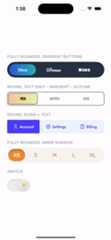
- Variable number of items
- Animated transition
- Bounce animation
- Fully configurable (color, gradient, shadow, border, corner radius)
- Designable into Interface Builder
Swift Package Manager
dependencies: [ .package(url: "https://github.com/dumitruigor/TTSegmentedControl.git", branch: "swiftPackage")]
CocoaPods
pod'TTSegmentedControl',:git=>'https://github.com/dumitruigor/TTSegmentedControl.git',:branch=>'swiftPackage'
Carthage
github "tapptitude/TTSegmentedControl"
Manually
Add the TTSegmentedControl to your project.
lettitles=["Title1","Title2"].map{TTSegmentedControlTitle(text: $0)}TTSwiftUISegmentedControl(titles: titles, selectedIndex: $selectedIndex)lettitles=["Title1","Title2"].map{TTSegmentedControlTitle(text: $0)}letsegmentedControl=TTSegmentedControl()segmentedControl.titles= titlesview.addSubview(segmentedControl)In order to customize the segmented control you'll have to edit it's properties:
//UIKitsegmentedControl.selectionViewFillType=.fillSegmentsegmentedControl.titleDistribution=.equalSpacing segmentedControl.isDragEnabled=true segmentedControl.isSizeAdjustEnabled=truesegmentedControl.isSwitchBehaviorEnabled=falsesegmentedControl.containerBackgroundColor=.whitesegmentedControl.cornerRadius=.constant(value:15)segmentedControl.cornerCurve=.continoussegmentedControl.padding=.init(width:2, height:2)//SwiftUITTSwiftUISegmentedControl(titles: titles).titleDistribution(.equalSpacing).padding(.init(width:2, height:2)).isDragEnabled(true).containerBackgroundColor(.white).selectionViewColor(.blue).cornerRadius(.constant(value:15)).isSwitchBehaviorEnabled(false))
You can even disable animation or/and bounce effect:
//UIKitsegmentedControl.animationOptions=nil segmentedControl.bounceAnimationOptions=nil//SwiftUITTSwiftUISegmentedControl(titles: titles).animationOptions(nil).bounceAnimationOptions(nil))
Or you can edit them:
letanimationOptions=TTSegmentedControlAnimationOption(duration:0.5, options:.curveEaseInOut)letbounceAnimationOptions=TTSegmentedControlBounceOptions(springDamping:0.7, springInitialVelocity:0.2)//UIKitsegmentedControl.animationOptions= animationOptionssegmentedControl.bounceAnimationOptions= bounceAnimationOptions//SwiftUITTSwiftUISegmentedControl(titles: titles).animationOptions(animationOptions).bounceAnimationOptions(bounceAnimationOptions))
The segmentedControl titles can be customized:
lettitle1=TTSegmentedControlTitle( text:"Title 1", defaultColor:.black, defaultFont:.systemFont(ofSize:12), selectedColor:.white, selectedFont:.systemFont(ofSize:13))lettitle2=TTSegmentedControlTitle( text:"Title 2", defaultColor:.black, defaultFont:.systemFont(ofSize:12), selectedColor:.white, selectedFont:.systemFont(ofSize:13))//UIKitsegmentedControl.titles=[title1, title2]//SwiftUITTSwiftUISegmentedControl(titles:[title1, title2])
Instead of text the titles can be initialized with NSAttributedString objects:
lettitle1=TTSegmentedControlTitle( defaultAttributedText: attributedText1, selectedAttributedText: attributedText2)lettitle2=TTSegmentedControlTitle( defaultAttributedText: attributedText3, selectedAttributedText: attributedText4)//UIKitsegmentedControl.titles=[title1, title2]//SwiftUITTSwiftUISegmentedControl(titles:[title1, title2])
You can add image instead of title:

lettitle1=TTSegmentedControlTitle( defaultImageName:"default_image_1", selectedImageName:"selected_image_1")lettitle2=TTSegmentedControlTitle( defaultImageName:"default_image_2", selectedImageName:"selected_image_2")lettitle3=TTSegmentedControlTitle( defaultImageName:"default_image_3", selectedImageName:"selected_image_3")//UIKitsegmentedControl.titles=[title1, title2, title3]//SwiftUITTSwiftUISegmentedControl(titles:[title1, title2, title3])
The image sizes can be customized for each title:

lettitle1=TTSegmentedControlTitle( defaultImageName:"default_image_1", selectedImageName:"selected_image_1", imageSize:CGSize(width:10, height:10))lettitle2=TTSegmentedControlTitle( defaultImageName:"default_image_2", selectedImageName:"selected_image_2", imageSize:CGSize(width:30, height:30))lettitle3=TTSegmentedControlTitle( defaultImageName:"default_image_3", selectedImageName:"selected_image_3", imageSize:CGSize(width:20, height:20))//UIKitsegmentedControl.titles=[title1, title2, title3]//SwiftUITTSwiftUISegmentedControl(titles:[title1, title2, title3])
The texts can be combined with the images:

lettitle1=TTSegmentedControlTitle( text:"Facebook", defaultImageName:"default_image_1", selectedImageName:"selected_image_1", imageSize:CGSize(width:5, height:5), imagePosition:.left)lettitle2=TTSegmentedControlTitle( text:"Youtube", defaultImageName:"default_image_2", selectedImageName:"selected_image_2", imageSize:CGSize(width:8, height:8), imagePosition:.bottom)lettitle3=TTSegmentedControlTitle( text:"Twitter", defaultImageName:"default_image_2", selectedImageName:"selected_image_2", imageSize:CGSize(width:8, height:7), imagePosition:.top)//UIKitsegmentedControl.titles=[title1, title2, title3]//SwiftUITTSwiftUISegmentedControl(titles:[title1, title2, title3])
Feel free to Fork, submit Pull Requests or send us your feedback and suggestions!
TTSegmentedControl is available under the MIT license. See the LICENSE file for more info.


