With Composercomposer create-project --no-interaction scriptburn/git-auto-deploy my-app
Or simply download and unzip from github
Suggest you to create a subdomain likedeploy.example.com
open app\settings.php and updatedb, git_path, composer_path according to your server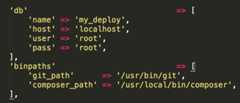
Make sure to add webserver user's public ssh keys inGitHub, BitBucket, GitLab
Login to your ssh as the same user as your webserver process is running and issue these commands And accept 'Yes' after you have added your public ssh keys toGitHub, BitBucket, GitLab$ ssh git@github.com$ ssh git@bitbucket.com$ ssh git@gitlab.com
$ pbcopy < ~/.ssh/id_rsa.pub
Puthttp://< your-domain >/webhook as WebHook url in appropriate repository
Default login and password isadmin andadmin
Now Create a new project and appropriate details and you are ready to go
After you push the changes to your remote repo deployment process in your server will start and if you entered your email in project form you will get detailed deployment log or you can check last deployment log any time by visting project list page


