- Notifications
You must be signed in to change notification settings - Fork136
Connect AI models like Claude & GPT with robots using MCP and ROS.
License
robotmcp/ros-mcp-server
Folders and files
| Name | Name | Last commit message | Last commit date | |
|---|---|---|---|---|
Repository files navigation

ROS-MCP-Server connects large language models (such as Claude, GPT, and Gemini) with existing robots giving them bidirectional AI integration.
With no changes to existing robot source code, this enables:
- 🗣Commanding the robot in natural language → instructions are translated into ROS/ROS2 commands.
- 👀Giving AI full visibility → subscribe to topics, call services, read sensor data, and monitor robot state in real time.
- No robot code changes → only requires adding the
rosbridgenode. - True two-way communication → LLMs can bothcontrol robots andobserve everything happening in ROS (sensors, topics, parameters).
- ROS1 & ROS2 support → works with both versions out of the box.
- MCP-compatible → integrates with any MCP-enabled LLM (Claude Desktop, Gemini, ChatGPT, and beyond).
🖥️Example - Controlling the MOCA mobile manipulator in NVIDIA Isaac Sim
Commands are entered into Claude Desktop, which uses the MCP server to directly drive the simulated robot.

🐕Example - Controlling Unitree Go with natural language (video)
The MCP server enables the Claude to interpret images from the robot's cameras, and then command the robot based on human natural language commands.

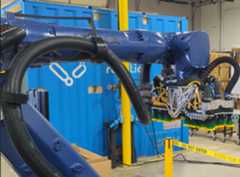
🏭Example - Debugging an industrial robot (Video)
- Connecting to an industrial robot enables the LLM to browse all ROS topics and services to assess the robot state.
- With no predefined context, the MCP server enables the LLM to query details about custom topic and service types and their syntax (00:28).
- Using only natural language, the operator calls the custom services to test and debug the robot(01:42).
- List topics, services, and message types → explore everything available in your robot’s ROS environment.
- View type definitions (incl. custom) → understand the structure of any message.
- Publish/subscribe to topics → send commands or stream robot data in real time.
- Call services (incl. custom) → trigger robot functions directly.
- Get/set parameters → read or adjust robot settings on the fly.
- 🔜Action support → upcoming support for ROS Actions.
- 🔜Permission controls → manage access for safer deployments.
The MCP server is version-agnostic (ROS1 or ROS2) and works with any MCP-compatible LLM.

Follow theinstallation guide for step-by-step instructions to install, run, and troubleshoot the ROS-MCP server.
For developers, we also have instructions forinstallation from source
Browse ourexamples to see the server in action.
We welcome community PRs with new examples and integrations!
We love contributions of all kinds:
- Bug fixes and documentation updates
- New features (e.g., Action support, permissions)
- Additional examples and tutorials
Check out thecontributing guidelines and see issues taggedgood first issue to get started.
This project is licensed under theApache License 2.0.
About
Connect AI models like Claude & GPT with robots using MCP and ROS.
Topics
Resources
License
Contributing
Uh oh!
There was an error while loading.Please reload this page.
Stars
Watchers
Forks
Packages0
Uh oh!
There was an error while loading.Please reload this page.
Contributors12
Uh oh!
There was an error while loading.Please reload this page.