- Notifications
You must be signed in to change notification settings - Fork207
Create full-fledged APIs for slowly moving datasets without writing a single line of code.
License
roapi/roapi
Folders and files
| Name | Name | Last commit message | Last commit date | |
|---|---|---|---|---|
Repository files navigation

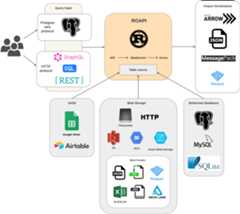
ROAPI automatically spins up read-only APIs for static datasets withoutrequiring you to write a single line of code. It builds on top ofApacheArrow andDatafusion. Thecore of its design can be boiled down to the following:
- Query frontends totranslate SQL, FlightSQL, GraphQL and REST API queries intoDatafusion plans.
- Datafusion for query plan execution.
- Data layerto load datasets from a variety of sources and formats with automatic schemainference.
- Response encoding layer toserialize intermediate Arrow record batch into various formats requested byclient.
See below for a high level diagram:
# if you are using homebrewbrew install roapi# or if you prefer pippip install roapi
Check outGithub release page forpre-built binaries for each platform. Pre-built docker images are also available atghcr.io/roapi/roapi.
cargo install --locked --git https://github.com/roapi/roapi --branch main --bins roapi
Spin up APIs fortest_data/uk_cities_with_headers.csv andtest_data/spacex_launches.json:
roapi \ --table"uk_cities=test_data/uk_cities_with_headers.csv" \ --table"test_data/spacex_launches.json"
Or using docker:
docker run -t --rm -p 8080:8080 ghcr.io/roapi/roapi:latest --addr-http 0.0.0.0:8080 \ --table"uk_cities=test_data/uk_cities_with_headers.csv" \ --table"test_data/spacex_launches.json"
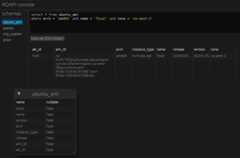
Query data using the builtin web UI athttp://localhost:8080/ui:
Query data using SQL, GraphQL or REST via curl:
curl -X POST -d"SELECT city, lat, lng FROM uk_cities LIMIT 2" localhost:8080/api/sqlcurl -X POST -d"query { uk_cities(limit: 2) {city, lat, lng} }" localhost:8080/api/graphqlcurl"localhost:8080/api/tables/uk_cities?columns=city,lat,lng&limit=2"
Get inferred schema for all tables:
curl'localhost:8080/api/schema'For MySQL and SQLite, specify the table argument like below:
--table "table_name=mysql://username:password@localhost:3306/database"--table "table_name=sqlite://path/to/database"Want dynamic register data? Add parameter-d to command.--table parameter cannot be ignored for now.
roapi \ --table"uk_cities=test_data/uk_cities_with_headers.csv" \ -dThen post config to/api/table register data.
curl -X POST http://172.24.16.1:8080/api/table \ -H'Content-Type: application/json' \ -d'[ { "tableName": "uk_cities2", "uri": "./test_data/uk_cities_with_headers.csv" }, { "tableName": "table_name", "uri": "sqlite://path/to/database" } ]'
For windows, full scheme(file:// or filesystem://) must filled, and use double quote(") instead of single quote(') to escape windows cmdline limit:
roapi \ --table"uk_cities=file://d:/path/to/uk_cities_with_headers.csv" \ --table"file://d:/path/to/test_data/spacex_launches.json"
You can also configure multiple table sources using YAML or Toml config, which supports moreadvanced format specific table options:
addr:http:0.0.0.0:8080postgres:0.0.0.0:5433tables: -name:"blogs"uri:"test_data/blogs.parquet" -name:"ubuntu_ami"uri:"test_data/ubuntu-ami.json"option:format:"json"pointer:"/aaData"array_encoded:trueschema:columns: -name:"zone"data_type:"Utf8" -name:"name"data_type:"Utf8" -name:"version"data_type:"Utf8" -name:"arch"data_type:"Utf8" -name:"instance_type"data_type:"Utf8" -name:"release"data_type:"Utf8" -name:"ami_id"data_type:"Utf8" -name:"aki_id"data_type:"Utf8" -name:"spacex_launches"uri:"https://api.spacexdata.com/v4/launches"option:format:"json" -name:"github_jobs"uri:"https://web.archive.org/web/20210507025928if_/https://jobs.github.com/positions.json"
To run serve tables using config file:
roapi -c ./roapi.yml# or .tomlSeeconfigdocumentation for moreoptions includingusing Google spreadsheet as a tablesource.
By default, ROAPI encodes responses in JSON format, but you can requestdifferent encodings by specifying theACCEPT header:
curl -X POST \ -H'ACCEPT: application/vnd.apache.arrow.stream' \ -d"SELECT launch_library_id FROM spacex_launches WHERE launch_library_id IS NOT NULL" \ localhost:8080/api/sql
You can query tables through REST API by sendingGET requests to/api/tables/{table_name}. Query operators are specified as query params.
REST query frontend currently supports the following query operators:
- columns
- sort
- limit
- filter
To sort columncol1 in ascending order andcol2 in descending order, setquery param to:sort=col1,-col2.
To find all rows withcol1 equal to string'foo', set query param to:filter[col1]='foo'. You can also do basic comparisons with filters, forexample predicate0 <= col2 < 5 can be expressed asfilter[col2]gte=0&filter[col2]lt=5.
To query tables using GraphQL, send the query throughPOST request to/api/graphql endpoint.
GraphQL query frontend supports the same set of operators supported byRESTquery frontend. Here how isyou can apply various operators in a query:
{table_name(filter: {col1:false,col2: {gteq:4,lt:1000 } }sort: [{field:"col2",order:"desc" }, {field:"col3" }]limit:100 ) {col1col2col3 }}To query tables using a subset of standard SQL, send the query throughPOSTrequest to/api/sql endpoint. This is the only query interface that supportstable joins.
You can pick two columns from a table to use a key and value to create a quickkeyvalue store API by adding the following lines to the config:
kvstores: -name:"launch_name"uri:"test_data/spacex_launches.json"key:idvalue:name
Key value lookup can be done through simple HTTP GET requests:
curl -v localhost:8080/api/kv/launch_name/600f9a8d8f798e2a4d5f979eStarlink-21 (v1.0)%
ROAPI can present itself as a Postgres server so users can use Postgres clientsto issue SQL queries.
$ psql -h 127.0.0.1psql (12.10 (Ubuntu 12.10-0ubuntu0.20.04.1), server 13)WARNING: psql major version 12, server major version 13. Some psql features might not work.Type"help"for help.houqp=>selectcount(*) from uk_cities; COUNT(UInt8(1))----------------- 37(1 row)
Query layer:
- REST API GET
- GraphQL
- SQL
- join between tables
- access to array elements by index
- access to nested struct fields by key
- column index
- protocol
- Postgres
- FlightSQL
- Key value lookup
Response serialization:
- JSON
application/json - Arrow
application/vnd.apache.arrow.stream - Parquet
application/vnd.apache.parquet - msgpack
Data layer:
- filesystem
- HTTP/HTTPS
- S3
- GCS
- Azure Storage
- Google spreadsheet
- MySQL
- SQLite
- Postgres
- Airtable
- Data format
- CSV
- JSON
- NDJSON
- parquet
- xls, xlsx, xlsb, ods:https://github.com/tafia/calamine
- DeltaLake
Misc:
- auto gen OpenAPI doc for rest layer
- query input type conversion based on table schema
- stream arrow encoding response
- authentication layer
The core of ROAPI, including query front-ends and data layer, lives in theself-containedcolumnqcrate. It takes queries and outputs Arrow record batches. Data sources willalso be loaded and stored in memory as Arrow record batches.
Theroapi crate wrapscolumnq with a multi-protocol query layer. It serializes Arrow record batchesproduced bycolumnq into different formats based on client request.
To log all FlightSQL requests in console, setRUST_LOG=tower_http=trace.
docker build --rm -t ghcr.io/roapi/roapi:latest.- Vscode
- Ensure this extension is installed on your vs code
ms-vscode-remote.remote-containers
Once done you will see prompt from left side to reopen the project in dev container or open command palette and search for open with remote container:
- install dependencies
apt-get update&& apt-get install --no-install-recommends -y cmake- connect to database from your local using db client of choice using the following credentials
username: userpassword: userdatabase: testonce done create table so you can map it in-t arg or consider using sample in.devcontainer/db-migration.sql to populate some tables with data
- run cargo command with mysql db as feature
cargo run --bin roapi --features database -- -a localhost:8080 -t posts=mysql://user:user@db:3306/test
otherwise if you are looking for other featuresyou have to select appropriate one fromroapi/Cargo.toml
About
Create full-fledged APIs for slowly moving datasets without writing a single line of code.
Topics
Resources
License
Uh oh!
There was an error while loading.Please reload this page.
Stars
Watchers
Forks
Packages0
Uh oh!
There was an error while loading.Please reload this page.
Uh oh!
There was an error while loading.Please reload this page.