We like browsing GitHub's trending page, so we built a Git extension for it.
Browse trending repositories from your terminal. View READMEs, export data, and skip the web interface.
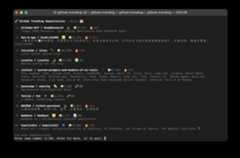


- Works as a Git extension (
git trending) - Daily, weekly, and monthly trending views
- Click repositories to read their READMEs
- Export data to CSV or JSON Lines
- Terminal-based interface
- No configuration needed
# Install pipx if you don't have itpip install --user pipxpipx ensurepath# Install git-trendingpipx install git+https://github.com/psalias2006/github-trending-cli.git# Use it anywheregit trending
git clone https://github.com/psalias2006/github-trending-cli.gitcd github-trending-clipython3 -m venv venv&&source venv/bin/activatepip install -r requirements.txt&& pip install -e.
git clone https://github.com/psalias2006/github-trending-cli.gitcd github-trending-clidocker build -t git-trending.
git trending# Show today's trending reposgit trending -r weekly# Show this week's trending reposgit trending -r monthly# Show this month's trending repos
git trending -e# Export to CSVgit trending -e -f json# Export as JSON Linesgit trending -e -r weekly# Export weekly data
docker run -it --rm git-trendingdocker run -it --rm git-trending -r weekly# Export (requires volume mount)docker run --rm -v"$(pwd)/exported:/app/exported" git-trending -edocker run --rm -v"$(pwd)/exported:/app/exported" git-trending -e -f json
When you installgit-trending, Git automatically recognizes it as an extension:
git trending → runsgit-trendinggit trending -r weekly → runsgit-trending -r weekly- Works from any directory, like other git commands
Files saved toexported/ with timestamps:github_trending_{range}_{datetime}.{csv|jsonl}
CSV: Standard format with headers
JSON Lines: One JSON object per line
Columns: name, url, description, language, stars, stars_period, range, export_datetime
Fork it, make changes, send a PR.
MIT


