Uh oh!
There was an error while loading.Please reload this page.
- Notifications
You must be signed in to change notification settings - Fork9
.NET library to easily create Voice Command Control feature.
License
nhannt201/VoiceNET.Library
Folders and files
| Name | Name | Last commit message | Last commit date | |
|---|---|---|---|---|
Repository files navigation

- Introduce
- How its work?
- Features
- Advantage
- Disadvantage
- Installation
- Quickstart
- How to create a Model?
- Setting
- Resources
- License
VoiceNET Library makes it easy and fast to create Voice Command Control functionality through Label Prediction. It helps develop voice control in real-time on software or the web. It free supports online and offline use. This is a community development project to help people access voice recognition technology more easily.
It's a research project from the FPT Edu Research Festival 2021 contest.

VoiceNET Library
Using ML.NET and Spectrogram libraries, theVoiceNET library works by converting your voice into a spectrogram. From there, proceed to use the Image Classification function in the ML.NET library to mark the label.
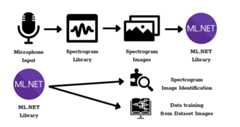
How the VoiceNET Library works
- Voice Command Control in real time.
- Voice Command Control based on recording.
- Easily integrate the library into your program.
- The code has been simple for every to use.
- It can be used both online and offline.
- It can be used for any communication language in the world.
- It's free.
- It takes a long time to create a Model for the library
- The time it takes to load the model into the program can be slow.
- There's still an error rate when labeling recognition.
Once you have an app, you can install the VoiceNET Library NuGet package from the .NET Core CLI using:
dotnet add package VoiceNET.Libraryor from the NuGet Package Manager:
Install-Package VoiceNET.Library
A real-time voice-controlled image gallery
Drag and drop into the Windows Forms interface:
- Label: lbResult
- Timer: tmGetResult (Interval=1)
In Form_Load
VBuilder.ModelPath("<your_model_path>");if(VBuilder.loadModel()){tmGetResult.Start();VBuilder.WFListener();}
In tmGetResult
lbResult.Text=VBuilder.WFGetResult;
Use the following code if you want to stop listening
VBuilder.WFStopListener();

Example of command label recognition by recording
Drag and drop into the Windows Forms interface:
- Button: btnRecord, btnStop
- Label: lbResult
Form_Load
VBuilder.ModelPath("<your_model_path>");if(VBuilder.loadModel())//do something after Load Model else//do something if fail
btnRecord_Click
VBuilder.StartRecord();btnStop.Enabled=true;btnRecord.Enabled=false;
btnStop
VBuilder.StopRecord();lbResult.Text=VBuilder.Result(true);btnRecord.Enabled=true;btnStop.Enabled=false;
Drag and drop into the WPF Application interface:
- Label: lbResult
Before MainWindow()
publicDispatcherTimertmGetResult=newDispatcherTimer();
In MainWindow()
tmGetResult.Interval=TimeSpan.FromSeconds(1);tmGetResult.Tick+=tmGetResult_Tick;VBuilder.ModelPath("<your_model_path>");if(VBuilder.loadModel()){tmGetResult.Start();VBuilder.WPFListener();}
In void tmGetResult_Tick
lbResult.Content=VBuilder.WPFGetResult;
Use the following code if you want to stop listening
VBuilder.WPFStopListener();
See the example inVoiceNET.Lib.WPF.Record for more how to use it.
See the example inVoiceNET.Lib.Web.AspNet for more how to use it.
See the example inSampleWebAPI for more how to use it.
It includes exampleASP.NET Core Web API andWinForm App (WinForm Realtime) using Web API.
Use the includedMicBuilder program to build an MLModel.zip file for your Dataset.

MicBuilder Model Builder
Microphone volume adjustment:
VBuilder.setVolume(80);
Ambient noise reduction setting
- Min Value: Adjust the minimum volume level to perform capturing. Input sound that is less than this portion will be considered noise. The default value is 10%.
VBuilder.setMinVolume(10);
- Continuous: How long does the sound stay continuous when Sound Input > Min Volume. The default value is 250 milliseconds.
VBuilder.setMicTime(250);
MIT LICENSE
- Spectrogram - is a .NET library for creating spectrograms from pre-recorded signals or live audio from the sound card.
- ML.NET - is a cross-platform open-source machine learning (ML) framework for .NET.
- VoiceNET Library - is a .NET Library makes it easy and fast to create Voice Command Control functionality.
About
.NET library to easily create Voice Command Control feature.
Topics
Resources
License
Uh oh!
There was an error while loading.Please reload this page.
Stars
Watchers
Forks
Sponsor this project
Uh oh!
There was an error while loading.Please reload this page.
Uh oh!
There was an error while loading.Please reload this page.
Contributors2
Uh oh!
There was an error while loading.Please reload this page.