- Notifications
You must be signed in to change notification settings - Fork1.6k
🙌 Welcome open-source Python mini-project contributions!
License
ndleah/python-mini-project
Folders and files
| Name | Name | Last commit message | Last commit date | |
|---|---|---|---|---|
Repository files navigation


A collection of easy Python small projects to help you improve your programming skills.

As a Python newbie, I understand the problems that people face when they first begin studying and attempting to understand various Data Science concepts, particularly Python. This project is designed for folks who are just getting started with Python principles and exploring GitHub as "contributors."
My goal is to build a common playground where everyone, from beginners to experts, can learn and share knowledge, and I hope you enjoy your stay here!
Let's "folk-ing" create amazing things together! 👉

Step 1: Star The Repo
Star the repo by pressing the topmost-right button to start your wonderful journey

Step 3: Clone it
- Method 1: GitHub Desktop
⚠️ NOTE: If you're not familiar with Git, usingGitHub Desktop Application is a better start. If you choose this method, make sure to download it before continuing reading.❗❗ Access link to downloadhere.
Learn more about how to clone the remote respository on your local machine usingGitHub Desktophere.
- Method 2: Git
Clone the forked repository. Open git bash and type:
git clone https://github.com/<your-github-username>/python-mini-project.git
This makes a local copy of the repository in your machine.
⚠️ Replace <your-github-username>!
Learn more aboutforking andcloning a repo.
Step 4: Create your feature branch
Always keep your local copy of the repository updated with the original repository.Before making any changes and/or in an appropriate interval, follow the following steps:
- Method 1: GitHub Desktop
Learn more about how to create new branchhere and how to fetch and pull origin from/to your local machinehere.
Learn more about how to fetch and pull origin from/to your local machine usingGitHub Desktophere.
- Method 2: Git
Run the following commandscarefully to update your local repository
# If you cloned a while ago, get the latest changes from upstreamgit checkout<master>git pull upstream<master># Make a feature branch (Always check your current branch is up to date before creating a new branch from it to avoid merge conflicts)git checkout -b<branch-name>#
Step 5: Ready, Set, Go...
Once you have completed these steps, you are ready to start contributing to the project and creatingpull requests.
- Create a folder inprojects directory according to your project name.
The folder name should follow the following format "Your_Project_Name_Here". For example: Dice_Stimulator
- Write your code and add to the respective folder in the projects directory, locally.
- Don't forget to add a
README.mdin your folder, according to theREADME_TEMPLATE.
- Method 1: GitHub Desktop
Learn more how to pull request from your local machine usingGitHub Desktop to the main repohere.
- Method 2: Git
Add the changes withgit add,git commit:
git add -Agit commit -m"<your message>"Push the codeto your repository.
git push origin<branch-name>
Step 6: Pull Request
Go to the GitHub page ofyour fork, andmake a pull request:
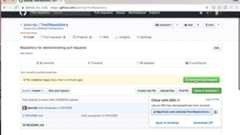
Read more about pull requests on theGitHub help pages.
Now wait, untilyour Pull Request is approved! If there are any conflicts, you will get a notification.

please make sure to add aREADME.md file that follow the same construction as this template for consistency.


If you have any feedback or ideas to improve this project, feel free to contact me via


About
🙌 Welcome open-source Python mini-project contributions!
Topics
Resources
License
Code of conduct
Uh oh!
There was an error while loading.Please reload this page.
Stars
Watchers
Forks
Uh oh!
There was an error while loading.Please reload this page.