- Notifications
You must be signed in to change notification settings - Fork234
The best way to learn Python is by practicing examples. The repository contains examples of basic concepts of Python. You are advised to take the references from these examples and try them on your own.
License
milaan9/90_Python_Examples
Folders and files
| Name | Name | Last commit message | Last commit date | |
|---|---|---|---|---|
Repository files navigation


The best way to learn Python is by practicing examples. This repository contains the examples on basic and advance concepts of Python. You are advised to take the references from these examples and try them on your own.
All the programs on this page are tested and should work on all platforms.
These are onlineread-only versions. However you canRun ▶ all the codesonline by clicking here ➞
You can and
Starring and Forking is free for you, but it tells me and other people that it was helpful and you like this tutorial.
Gohere if you aren't here already and click ➞✰ Star andⵖ Fork button in the top right corner. You will be asked to create a GitHub account if you don't already have one.

Go
hereand click the big green ➞Codebutton in the top right of the page, then click ➞Download ZIP.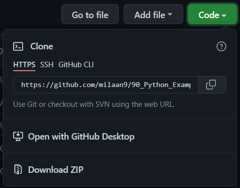
Extract the ZIP and open it. Unfortunately I don't have any more specific instructions because how exactly this is done depends on which operating system you run.
Launch ipython notebook from the folder which contains the notebooks. Open each one of them
Kernel > Restart & Clear Output

This will clear all the outputs and now you can understand each statement and learn interactively.
If you have git and you know how to use it, you can also clone the repository instead of downloading a zip and extracting it. An advantage with doing it this way is that you don't need to download the whole tutorial again to get the latest version of it, all you need to do is to pull with git and run ipython notebook again.
I'm Dr. Milaan Parmar and I have written this tutorial. If you think you can add/correct/edit and enhance this tutorial you are most welcome🙏
Seegithub's contributors page for details.
If you have trouble with this tutorial please tell me about it byCreate an issue on GitHub. and I'll make this tutorial better. This is probably the best choice if you had trouble following the tutorial, and something in it should be explained better. You will be asked to create a GitHub account if you don't already have one.
If you like this tutorial, pleasegive it a ⭐ star.
You may use this tutorial freely at your own risk. SeeLICENSE.
About
The best way to learn Python is by practicing examples. The repository contains examples of basic concepts of Python. You are advised to take the references from these examples and try them on your own.
Topics
Resources
License
Uh oh!
There was an error while loading.Please reload this page.