- Notifications
You must be signed in to change notification settings - Fork451
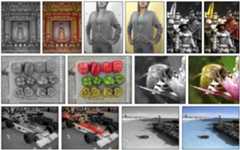
Deep learning software for colorizing black and white images with a few clicks.
License
junyanz/interactive-deep-colorization
Folders and files
| Name | Name | Last commit message | Last commit date | |
|---|---|---|---|---|
Repository files navigation
Project Page |Paper |Demo Video |SIGGRAPH Talk
04/10/2020 Update:@mabdelhack provided a windows installation guide for the PyTorch model in Python 3.6. Check out the Windowsbranch for the guide.
10/3/2019 Update: Our technology is also now available in Adobe Photoshop Elements 2020. See thisblog andvideo for more details.
9/3/2018 Update: The code now supports a backend PyTorch model (with PyTorch 0.5.0+). Please find the Local Hints Network training code in thecolorization-pytorch repository.
Real-Time User-Guided Image Colorization with Learned Deep Priors.
Richard Zhang*,Jun-Yan Zhu*,Phillip Isola,Xinyang Geng, Angela S. Lin, Tianhe Yu, andAlexei A. Efros.
In ACM Transactions on Graphics (SIGGRAPH 2017).
(*indicates equal contribution)
We first describe the system(0) Prerequisities and steps for(1) Getting started. We then describe the interactive colorization demo(2) Interactive Colorization (Local Hints Network). There are two demos: (a) a "barebones" version in iPython notebook and (b) the full GUI we used in our paper. We then provide an example of the(3) Global Hints Network.
- Linux or OSX
- Caffe or PyTorch
- CPU or NVIDIA GPU + CUDA CuDNN.
- Clone this repo:
git clone https://github.com/junyanz/interactive-deep-colorization ideepcolorcd ideepcolor- Download the reference model
bash ./models/fetch_models.sh- InstallCaffe orPyTorch and 3rd party Python libraries (OpenCV,scikit-learn andscikit-image). See theRequirements for more details.

We provide a "barebones" demo in iPython notebook, which does not require QT. We also provide our full GUI demo.
- Run
ipython notebookand click onDemoInteractiveColorization.ipynb.
If you need to convert the Notebook to an older version, usejupyter nbconvert --to notebook --nbformat 3 ./DemoInteractiveColorization.ipynb.
InstallQt5 andQDarkStyle. (SeeInstallation)
Run the UI:
python ideepcolor.py --gpu [GPU_ID] --backend [CAFFE OR PYTORCH]. Arguments are described below:
--win_size [512] GUI window size--gpu [0] GPU number--image_file ['./test_imgs/mortar_pestle.jpg'] path to the image file--backend ['caffe'] either use 'caffe' or 'pytorch'; 'caffe' is the official model from siggraph 2017, and 'pytorch' is the same weights converted- User interactions

- Adding points: Left-click somewhere on the input pad
- Moving points: Left-click and hold on a point on the input pad, drag to desired location, and let go
- Changing colors: For currently selected point, choose a recommended color (middle-left) or choose a color on the ab color gamut (top-left)
- Removing points: Right-click on a point on the input pad
- Changing patch size: Mouse wheel changes the patch size from 1x1 to 9x9
- Load image: Click the load image button and choose desired image
- Restart: Click on the restart button. All points on the pad will be removed.
- Save result: Click on the save button. This will save the resulting colorization in a directory where the
image_filewas, along with the user input ab values. - Quit: Click on the quit button.

We include an example usage of our Global Hints Network, applied to global histogram transfer. We show its usage in an iPython notebook.
Add
./caffe_filesto yourPYTHONPATHRun
ipython notebook. Click on./DemoGlobalHistogramTransfer.ipynb
Install Caffe or PyTorch. The Caffe model is official. PyTorch is a reimplementation.
- Install Caffe: see the Caffeinstallation and Ubuntu installationdocument. Please compile the Caffe with the python layersupport (set
WITH_PYTHON_LAYER=1in theMakefile.config) and build Caffe python library bymake pycaffe.
You also need to add
pycaffeto yourPYTHONPATH. Usevi ~/.bashrcto edit the environment variables.PYTHONPATH=/path/to/caffe/python:$PYTHONPATHLD_LIBRARY_PATH=/path/to/caffe/build/lib:$LD_LIBRARY_PATH
- Install PyTorch: see the PyTorchinstallation guide.
- Install Caffe: see the Caffeinstallation and Ubuntu installationdocument. Please compile the Caffe with the python layersupport (set
Install scikit-image, scikit-learn, opencv, Qt5, and QDarkStyle pacakges:
# ./install/install_deps.shsudo pip install scikit-imagesudo pip install scikit-learnsudo apt-get install python-opencvsudo apt-get install qt5-defaultsudo pip install qdarkstyleFor Conda users, type the following command lines (this may work for full Anaconda but not Miniconda):
# ./install/install_conda.shconda install -c anaconda protobuf## photobufconda install -c anaconda scikit-learn=0.19.1## scikit-learnconda install -c anaconda scikit-image=0.13.0## scikit-imageconda install -c menpo opencv=2.4.11## opencvconda install -c anaconda qt## qt5conda install -c auto qdarkstyle## qdarkstyle
For Docker users, please follow the Dockerdocument.
Docker: [OSX Docker file] and [OSX Installation video] by @vbisbest, [Docker file 2] (by @sabrinawallner) based onDL Docker.
More installationhelp (by @SleepProgger).
Please find a PyTorch reimplementation of the Local Hints Network training code in thecolorization-pytorch repository.
If you use this code for your research, please cite our paper:
@article{zhang2017real, title={Real-Time User-Guided Image Colorization with Learned Deep Priors}, author={Zhang, Richard and Zhu, Jun-Yan and Isola, Phillip and Geng, Xinyang and Lin, Angela S and Yu, Tianhe and Efros, Alexei A}, journal={ACM Transactions on Graphics (TOG)}, volume={9}, number={4}, year={2017}, publisher={ACM}}One of the authors objects to the inclusion of this list, due to an allergy. Another author objects on the basis that cats are silly creatures and this is a serious, scientific paper. However, if you love cats, and love reading cool graphics, vision, and learning papers, please check out the Cat Paper Collection:[Github][Webpage]
About
Deep learning software for colorizing black and white images with a few clicks.
Topics
Resources
License
Uh oh!
There was an error while loading.Please reload this page.
Stars
Watchers
Forks
Releases
Packages0
Uh oh!
There was an error while loading.Please reload this page.
Contributors4
Uh oh!
There was an error while loading.Please reload this page.