- Notifications
You must be signed in to change notification settings - Fork7
Intercept & mock http requests issued by XMLHttpRequest, fetch, nodejs https/http module, axios, jquery, superagent, ky, node-fetch, request, got or any other request libraries by intercepting XMLHttpRequest, fetch and nodejs native requests at low level.
huturen/http-request-mock
Folders and files
| Name | Name | Last commit message | Last commit date | |
|---|---|---|---|---|
Repository files navigation


English |中文

Full documentation:https://huturen.github.io/http-request-mock-docs/
A quick demo:https://huturen.github.io/http-request-mock-docs/plain-html/
A CURD demo:https://huturen.github.io/http-request-mock-curd/
It mocks http requests issued by axios, jquery, superagent, node-fetch, got, (… you name it) by interceptingXMLHttpRequest, fetch, and nodejs native HTTP/HTTPS module requests at the low level.
- XMLHttpRequest
- fetch
- https.request, https.get (nodejs native https request)
- http.request, http.get (nodejs native http request)
- wx.request (for mini program in Wechat)
Because of the low-level interception, any 3th-party request libraries thatbased on the above requests can also be supported, such as:
axios,jquery,superagent,ky,node-fetch,got,request ...
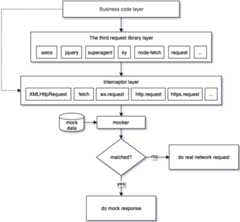
It differs from the other mocking libraries in that it provides a webpack plugin and command line toolto separate mock data from your business code. It's a truly non-hacking mocking library. You neverhave to hack into your business code to mock something ever again after a one-time configuration.
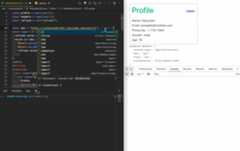
A simple integration case with vue3:
- Introduction And Motivation
- Features
- Installation
- Examples
- Integration
- Command Line Tool Options
- API
- Unit test
- Mock data file
- FAQ
- License
http-request-mock is an http request mocking library that lets you develop, build and test as normal even whenbackend APIs are down or not ready yet. It supplies a new way to prototype your web application.
The original intention of making this library was to find a mocking library to decouple from backend.However, we can't find a library that meets our requirements. Some libraries have occupied the mostreadable names, but they provide weak functionalities or even no longer provide any updates .
There are some problems you may encounter when using the other mocking libraries:
- You may have to hack your source code to mock something and revert it back to restore normal after mocking.
- You may involve complex setups, such as all kinds of proxies, http servers.
- Not all in one, some library only for
XMLHttpRequest, some library only forfetch. - No updates, hard to set up and a lot of bugs.
- Business-code-unaware: Does not interfere with code writing. Keep your code unaware of whether something is mocked or not.
- Interceptor: It can be used as an interceptor. You can decide how to handle requests.
- All in one: XMLHttpRequest, fetch, https.get, http.get, https.request, http.request, and wx.request.
- More 3rd-party libraries support: It supports axios, jquery, superagent, ky, node-fetch, got, (you name it).
- Unit test capability: It can be worked in jest, mocha, and ava environments.
- Dynamic mocking: Dynamically resolve response based on request query, payloads...
- Flexible route matching: Supports RegExp matching and partial string matching.
- Delaying mocking: Support for simulating network latency.
- Fake data: Easy to generate massive amounts of fake data.
- Complete unit tests: It has complete unit tests including the 3th-party request libraries.
- Remote: Support for using remote mock data, where you can dynamically modify the data returned from the remote.
NPM:
npm install --save-dev http-request-mock
// using ES6 modulesimportHttpRequestMockfrom'http-request-mock';// using CommonJS modulesconstHttpRequestMock=require('http-request-mock');
CDN:
The UMD build is also available onunpkg:
<!-- unpkg --><scriptsrc="https://unpkg.com/http-request-mock/http-request-mock.js"></script>
You can find the library on window.HttpRequestMock.
To mock an http request, just call amock method or http verb method(get,post,put,patch,delete).
importHttpRequestMockfrom'http-request-mock';constmocker=HttpRequestMock.setup();mocker.mock({url:'www.api.com/some-api'// or RegExp: /.*\/some-api$/method:'get',// get, post, put, patch or deletedelay:0,status:200,headers:{// respone headers'content-type':'application/json','some-header':'value',},body:'some response data'});// or using http verb method:mocker.get('www.api.com/some-api','some response data');
// mock configuration:importHttpRequestMockfrom'http-request-mock';constmocker=HttpRequestMock.setup();mocker.get('https://www.api.com/text-response','<html>mock response content</html>');mocker.post('https://www.api.com/json-response',{ret:0,msg:'ok'});// issue some requests:...consttext=awaitaxios.get('https://www.api.com/text-response');constjson=awaitaxios.post('https://www.api.com/json-response',null,{responseType:'json'});console.log(text);// <html>mock response content</html>console.log(json);// { ret: 0, msg: 'ok' }...
You can export a function instead of an object to resolve a dynamic response,so as to simulate a complex business logic in the real world.
// mock configuration:importHttpRequestMockfrom'http-request-mock';constmocker=HttpRequestMock.setup();lettimes=0;// requestInfo: please refer to < RequestInfo > in src/types.tsmocker.get('https://www.api.com/dynamic-response',(requestInfo)=>{times=times+1;return{times:'times: '+times,url:requestInfo.url};});// Note: the contents of url and times fields are different between the two requests below:...constres1=awaitaxios({url:'https://www.api.com/dynamic-response?a=1',responseType:'json'});constres2=awaitaxios({url:'https://www.api.com/dynamic-response?b=2',responseType:'json'});console.log(res1);// { times: 'times: 1', url: 'https://www.api.com/dynamic-response?a=1' }console.log(res2);// { times: 'times: 2', url: 'https://www.api.com/dynamic-response?b=2' }...
// configurationimportHttpRequestMockfrom'http-request-mock';constmocker=HttpRequestMock.setup();mocker.mock({url:'https://some.api.com/name',method:'get',delay:3000// the response will be resolved in 3 seconds});// issue a request:lettime=Date.now();axios.get('https://some.api.com/name').then(()=>{console.log(Date.now()-time);// >= 3000});
// configurationimportHttpRequestMockfrom'http-request-mock';constmocker=HttpRequestMock.setup();mocker.mock({url:'www.api.com/status404',status:404,headers:{'content-type':'application/json','some-header':'header-value',}});// issue a request:// Note: axios will throw an error when meets a 404 responseaxios.get('https://www.api.com/status404').catch(err=>{console.log(err.message);// Request failed with status code 404console.log(err.response.status);// 404console.log(err.response.headers['some-header']);// header-value});
For more details, please refer toexperiment/disable.js.
// configurationconstmocker=HttpRequestMock.setup();constmockItem=mocker.mock({url:'https://jsonplaceholder.typicode.com/todos/1',method:'any',body:{mock:'some response data'}});(async()=>{constres1=awaitaxios.get('https://jsonplaceholder.typicode.com/todos/1');console.log('res1:',res1.data);// it'll resolve a response from mocking.mockItem.disable='yes';constres2=awaitaxios.get('https://jsonplaceholder.typicode.com/todos/1');console.log('res2:',res2.data);// it'll resolve a response from real network request.})();// res1: { mock: 'some response data' }// res2: { userId: 1, id: 1, title: 'delectus aut autem', completed: false }
For more details, please refer toexperiment/times.js:
constmocker=HttpRequestMock.setup();mocker.mock({url:'https://jsonplaceholder.typicode.com/todos/1',method:'any',times:2,body:{mock:'some response data'}});(async()=>{leti=0;awaitaxios.get('https://jsonplaceholder.typicode.com/todos/1').then(res=>{console.log(++i,'res:',res.data);});awaitaxios.get('https://jsonplaceholder.typicode.com/todos/1').then(res=>{console.log(++i,'res:',res.data);});awaitaxios.get('https://jsonplaceholder.typicode.com/todos/1').then(res=>{console.log(++i,'res:',res.data);});})();// 1 res: { mock: 'some response data' }// 2 res: { mock: 'some response data' }// 3 res: { userId: 1, id: 1, title: 'delectus aut autem', completed: false }
mocker.mock({url:'https://www.api.com/reqinfo',response(requestInfo){returnrequestInfo;}});axios.post('https://www.api.com/reqinfo?abc=123',{xyz:456},{responseType:'json'}).then(res=>{console.log('info:',res.data);});// output may look like below:// info: {// "url": "https://www.api.com/reqinfo?abc=123",// "method": "POST",// "query": {// "abc": "123"// },// "headers": {// "Accept": "application/json, text/plain, */*",// "Content-Type": "application/json;charset=utf-8"// },// "body": {// "xyz": 456// }// }
You can intercept a request, do something, then make the original call and capture the response and do something again.For more detailed discussions about the interceptor, please refer to thisissue.
// mock casemocker.mock({url:'//jsonplaceholder.typicode.com/',response:asyncfunction(requestInfo){// 1. intercept a request, do something (here, output the original request information)console.log('original request info: ',requestInfo);// 2. then make the original call and capture the responseconstres=awaitrequestInfo.doOriginalCall();// 3. and do something again.console.log('original response:',res);return{code:0,msg:'ok',data:res.responseJson};}});// issue a requestaxios.get('https://jsonplaceholder.typicode.com/photos/1').then(res=>console.log(res.data));
In a bare-bones example, you just importhttp-request-mock into your applicationentry file(such as: src/main.js) and configure your mock datas there.Take a Vue project as an example:
import{createApp}from'vue'importAppfrom'./App.vue'importHttpRequestMockfrom'http-request-mock'if(process.env.NODE_ENV==='development'){constmocker=HttpRequestMock.setup()mocker.get('https://some.api.com/some-path', ...)mocker.post('https://some.api.com/other-path', ...) ...}createApp(App).mount('#app')
It may be ok in a small project, however, for a large web application,it may have lots of APIs to be mocked. You may need frequently changethe entry file when adding/deleting/updating a mock data.There will be a day that you'll get a mess as the project grows.
In order to solve the problem above, we provide a webpack plugin and commandtool to integrate your project. In this way, the mock data file can beseparated from the entry to reduce the burden of managing this entry file.
You can set it up by the steps below:
- Run
npx http-request-mock-cli -i. It'll initialize some samples in your mock directory. - Configure
HttpRequestMockWebpackPluginin your webpack configurations, which looks like below.
constpath=require('path');// The webpack plugin will parse mock files under the mock directory and generate a mock// configuration entry file named `.runtime.js`, then inject it into the your application entry file.constHttpRequestMockWebpackPlugin=require('http-request-mock/plugin/webpack.js');module.exports={// ...plugins:[newHttpRequestMockWebpackPlugin(enable:process.env.NODE_ENV==='development',// activate/deactivateentry:/src\/main\.js$/,// web application entrydir:path.resolve(__dirname,'mock/'),// mock directory),]// ...};
- In your package.json, set a command named
mock-devto start a mock development:
"scripts": {"dev":"npm run start","mock-dev":"NODE_ENV=development npm run start" },
Webpack Plugin options
| Option | Required | Description |
|---|---|---|
| entry | yes | Application entry file, must be a Regexp object |
| dir | yes | Mock directory |
| enable | no | Whether or not to enable this plugin, default: true |
| watch | no | A callback that is triggered when a mock data file is changed |
| proxyMode | no | Proxy mode. Valid values: marked |
An alternative way to integrate with your project is using CLI.You can set it up by the steps below:
- Run
npx http-request-mock-cli -j src/xxx.jsto inject mock configuration fileinto the specified entry which may look like below:
import'../mock/.runtime.js'import{createApp}from'vue'importAppfrom'./App.vue'// ...createApp(App).mount('#app')
- In your package.json, set a command named
mock-devto start a mock development:
"scripts": {"serve":"vue-cli-service serve","mock-dev":"http-request-mock-cli -w\"vue-cli-service serve\"",},
The command passed intohttp-request-mock-cli -w must be quoted with double quotes.
Note:
If-e --environment is not specified, mock function will be enabled byNODE_ENV=development.
Or, you can specify another environment variable, such as:-e MOCK=yes.
npx http-request-mock-cli -h:
Usage: npx http-request-mock-cli [options]Description: http-request-mock command line tool at version 1.6.8.Glossary: [.runtime.js] A runtime mock configuration entry file.Example: npx http-request-mock-cli -iOptions: -d, --directory [directory] The mock directory relative to the working directory. (default: "mock") -e, --environment [variable-pair] Enable mock function by environment variable for .runtime.js. (default: "NODE_ENV=development") -i, --init Initialize some samples & a .runtime.js in the mock directory. -w, --watch [command] Watch mock directory & update .runtime.js. If the [command] is specified, ths specified command will be executed together with watching. -j, --inject <app-entry-file> Inject .runtime.js into the specified entry relative to the working directory. -t, --type [module-type] The module type of .runtime.js. Possible values are: es6(alias of ESM), cjs(alias of commonjs). (default: "cjs") --index [index-entry] Index entry, automatic detection by default. Possible values are: src/index.js, http-request-mock.js and http-request-mock.esm.mjs. [src/index.js] for commonJS [http-request-mock.js] for UMD [http-request-mock.pure.js] An alternative version without faker and cache plugins for UMD. [http-request-mock.esm.mjs] for ESM [http-request-mock.pure.esm.mjs] An alternative version without faker and cache plugins for ESM. -p, --proxy [mode] Proxy mode. In proxy mode, http-request-mock will start a proxy server which receives incoming requests on localhost. The mock files will be run in a nodejs environment. This feature is designed for browser, so do not use it in a nodjs project. Note: proxy mode is still under experimental stage, only for experts. [matched] All requests matched by @url will be proxied to a proxy server. (default: "none") -h, --help output usage informationsetup() : Mocker:
Auto detect request environment and set up request mock.
setupForWx() : Mocker:
Set up request mock for wx.request.
setupForXhr() : Mocker:
Set up request mock for XMLHttpRequest.
setupForFetch() : Mocker:
Set up request mock for fetch.
setupForNode() : Mocker:
Set up request mock for http.get, https.get, http.request and https.request in nodejs envrioment.
setupForUnitTest() : Mocker:
Set up request mock for unit test.
enable() : Mocker:
Enable mock function temporarily.
disable() : Mocker:
Disable mock function temporarily.
setMockData(mockConfigData: MockConfigData)
Set global mock data configuration.
reset()
Reset global mock data configuration.
mock(mockItem: MockItemInfo)
Check specified mock item & add it to global mock data configuration.
interfaceMockItemInfo{ url:RegExp|string;method?:HttpVerb;// GET, POST, PUT, PATCH, DELETE or HEADheaders?:Header,// response headersdelay?:number;disable?:Disable;// yes or notimes?:number;body?:any;// response bodystatus?:number;// http status code};
get(url: RegExp | String, body: any, opts: MockItemExt)
Make a mock item that matches an HTTP GET request.
interfaceMockItemExt{headers?:Header,// response headersdisable?:Disable;// yes or nodelay?:number;times?:number;status?:number;// http status code};
post(url: RegExp | String, body: any, opts: MockItemExt)
Make a mock item that matches an HTTP POST request.
put(url: RegExp | String, body: any, opts: MockItemExt)
Make a mock item that matches an HTTP PUT request.
patch(url: RegExp | String, body: any, opts: MockItemExt)
Make a mock item that matches an HTTP PATCH request.
delete(url: RegExp | String, body: any, opts: MockItemExt)
Make a mock item that matches an HTTP DELETE request.
head(url: RegExp | String, opts: MockItemExt)
Make a mock item that matches an HTTP HEAD request.
any(url: RegExp | String, body: any, opts: MockItemExt)
Make a mock item that matches an HTTP GET, POST, PUT, PATCH, DELETE or HEAD request.
http-request-mock comes with built-in unit test capability and can be used in jest and mocha environments.
An example of jest:
importaxiosfrom'axios';importxhrAdapterfrom'axios/lib/adapters/xhr';importHttpRequestMockfrom'http-request-mock';axios.defaults.adapter=xhrAdapter;constmocker=HttpRequestMock.setupForUnitTest('xhr');mocker.get('https://your.api.com/path',function(){return{abc:123};});it('should match object`',async()=>{constres=awaitaxios.get('https://your.api.com/path');expect(res.data).toMatchObject({abc:123});});
/** * Note: Only the first comments block will be parsed. * * The url to be mocked. * Both string and RegExp(which begins and ends with # or /) are supported. * RegExp example: #.*\/getUserInfo.*# *@url https://jsonplaceholder.typicode.com/todos/1 * * The request method to be mocked. * One of http verb method get, post, put, patch, delete, head. * Default: any *@method any * * Response http status to be mocked. * Default: 200 *@status 200 * * Response http headers to be mocked. * It can be set repeatedly. *@headers content-type: application/json * * Request headers, request headers, only available for @remote tag * It can be set repeatedly. *@remoteRequestHeaders content-type: application/json * * Simulate network latency in milliseconds. * Default: 0 *@delay 100 * * Limited number of mocking. * It'll do a real network request after specified number of mocking. * Default: Infinity *@times 5 * * Whether or not to enable this mock item. * 'yes' for real network request, 'no' for mock request. * Default: no *@disable no * * Remote mock data. * In browser, the specified remote url must conform to the cross-domain specification. *@remote https://remote.api.com/some/mock/data */// Response body to be mocked.// It supports to export an object, function, async function, sting or any other types.// If a function is specified, the function accepts an argument with request information.module.exports=(requestInfo)=>{return'Your response data';};
1. Cannot assign to read only property 'exports' of object '#' at Module.eval
Solution 1: You can avoid this issue by setting sourceType: unambiguous in your babel config file: { // babel.config.js or .babelrc.js "presets": [...], "plugins": [...], sourceType: 'unambiguous' }Solution 2: set [type] option to es6. Note: es6 can't work with proxy mode, don't use es6 and proxy mode together. a. If you are using cli to set up your http-request-mock: http-request-mock-cli -t es6 -w "vue-cli-service serve" b. If you are using webpack to set up your http-request-mock: new HttpRequestMockPlugin({ ... type: 'cjs', ... }),2. TypeError:webpack_require.r is not a function
Solution: Change `require('http-request-mock')` to `require('http-request-mock/http-request-mock.js')`, or change `import('http-request-mock')` to `import('http-request-mock/http-request-mock.js')` if you are using es6.Integration with vue by webpack plugin:Codesandbox,Github
Integration with vue by webpack CLI:Codesandbox,Github
Integration with react:Codesandbox,Github
Integration with nodejs:Codesandbox,Github
Integration with webpack-dev-server:Codesandbox,Github
A CURD demo (http-request-mock + vite + vue3 + ES2015+ + TypeScript):Website,Github
Unit test:Codesandbox,Github
http-request-mock is licensed under the MIT license.
About
Intercept & mock http requests issued by XMLHttpRequest, fetch, nodejs https/http module, axios, jquery, superagent, ky, node-fetch, request, got or any other request libraries by intercepting XMLHttpRequest, fetch and nodejs native requests at low level.
Topics
Resources
Uh oh!
There was an error while loading.Please reload this page.
Stars
Watchers
Forks
Packages0
Uh oh!
There was an error while loading.Please reload this page.
Contributors5
Uh oh!
There was an error while loading.Please reload this page.