- Notifications
You must be signed in to change notification settings - Fork55
fogleman/hmm
Folders and files
| Name | Name | Last commit message | Last commit date | |
|---|---|---|---|---|
Repository files navigation
hmm is aheightmapmeshing utility.
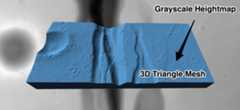
If you've done any 3D game development, 3D printing, or other such things,you've likely wanted to convert a grayscale heightmap image into a 3D mesh. Thenaive way is pretty simple but generates huge meshes with millions oftriangles. After hacking my way through various solutions over the years, Ifinally decided I needed to write a good tool for this purpose.
hmm is a modern implementation of a nice algorithm from the 1995 paperFast Polygonal Approximation of Terrains and Height Fieldsby Garland and Heckbert. The meshes produced byhmm satisfy the Delaunaycondition and can satisfy a specified maximal error or maximal number oftriangles or vertices. It's also very fast.
- C++11 or higher
- glm
brew install glm# on macOSsudo apt-get install libglm-dev# on Ubuntu / Debiangit clone https://github.com/fogleman/hmm.gitcd hmmmakemake install
heightmap meshing utilityusage: hmm --zscale=float [options] ... infile outfile.stloptions: -z, --zscale z scale relative to x & y (float) -x, --zexagg z exaggeration (float [=1]) -e, --error maximum triangulation error (float [=0.001]) -t, --triangles maximum number of triangles (int [=0]) -p, --points maximum number of vertices (int [=0]) -b, --base solid base height (float [=0]) --level auto level input to full grayscale range --invert invert heightmap --blur gaussian blur sigma (int [=0]) --gamma gamma curve exponent (float [=0]) --border-size border size in pixels (int [=0]) --border-height border z height (float [=1]) --normal-map path to write normal map png (string [=]) --shade-path path to write hillshade png (string [=]) --shade-alt hillshade light altitude (float [=45]) --shade-az hillshade light azimuth (float [=0]) -q, --quiet suppress console output -?, --help print this messagehmm supports a variety of file formats like PNG, JPG, etc. for the inputheightmap. The output is always a binary STL file. The only other requiredparameter is-z, which specifies how much to scale the Z axis in the outputmesh.
$ hmm input.png output.stl -z ZSCALE
You can also provide a maximal allowed error, number of triangles, or number ofvertices. (If multiple are specified, the first one reached is used.)
$ hmm input.png output.stl -z 100 -e 0.001 -t 1000000
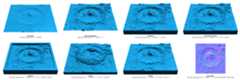
Click on the image below to see examples of various command line arguments. Youcan try these examples yourself with this heightmap:gale.png.

The required-z parameter defines the distance between a fully black pixeland a fully white pixel in the vertical Z axis, with units equal to one pixelwidth or height. For example, if each pixel in the heightmap represented a 1x1meter square area, and the vertical range of the heightmap was 100 meters, then-z 100 should be used.
The-x parameter is simply an extra multiplier on top of the provided Zscale. It is provided as a convenience so you don't have to do multiplicationin your head just to exaggerate by, e.g. 2x, since Z scales are often derivedfrom real world data and can have strange values like 142.2378.
The-e parameter defines the maximum allowed error in the output mesh, as apercentage of the total mesh height. For example, if-e 0.01 is used, then nopixel will have an error of more than 1% of the distance between a fully blackpixel and a fully white pixel. This means that for an 8-bit input image, anerror ofe = 1 / 256 ~= 0.0039 will ensure that no pixel has an error greaterthan one full grayscale unit. (It may still be desirable to use a lower valuelike0.5 / 256.)
When the-b option is used to create a solid mesh, it defines the height ofthe base before the lowest part of the heightmesh appears, as a percentage ofthe heightmap's height. For example, if-z 100 -b 0.5 were used, then thefinal mesh would be about 150 units tall (if a fully white pixel exists in theinput).
A border can be added to the mesh with the--border-size and--border-height flags. The heightmap will be padded byborder-size pixelsbefore triangulating. The (pre-scaled) Z value of the border can be set withborder-height which defaults to 1.
A Gaussian blur can be applied with the--blur flag. This is particularlyuseful for noisy images.
The heightmap can be inverted with the--invert flag. This is useful forlithophanes.
The heightmap can be auto-leveled with the--level flag. This will stretchthe grayscale values to use the entire black => white range.
A gamma curve can be applied to the heightmap with the--gamma flag. Thisappliesx = x ^ gamma to each pixel, wherex is in [0, 1].
A full resolutionnormal mapcan be generated with the--normal-map argument. This will save a normal mapas an RGB PNG to the specified path. This is useful for rendering higherresolution bumps and details while using a lower resolution triangle mesh.
A grayscale hillshade image can be generated with the--shade-path argument.The altitude and azimuth of the light source can be changed with the--shade-alt and--shade-az arguments, which default to 45 degrees inaltitude and 0 degrees from north (up).
Performance depends a lot on the amount of detail in the heightmap, but hereare some figures for an example heightmap of a40x40 kilometer area centeredon Mount Everest. Various heightmapresolutions and permitted max errors are shown. Times computed on a 2018 13"MacBook Pro (2.7 GHz Intel Core i7).

| Image Size / Error | e=0.01 | e=0.001 | e=0.0005 | e=0.0001 |
|---|---|---|---|---|
| 9490 x 9490 px (90.0 MP) | 6.535 | 13.102 | 19.394 | 58.949 |
| 4745 x 4745 px (22.5 MP) | 1.867 | 4.903 | 8.886 | 33.327 |
| 2373 x 2373 px (5.6 MP) | 0.559 | 2.353 | 4.930 | 14.243 |
| 1187 x 1187 px (1.4 MP) | 0.168 | 1.021 | 1.961 | 3.709 |
| Image Size / Error | e=0.01 | e=0.001 | e=0.0005 | e=0.0001 |
|---|---|---|---|---|
| 9490 x 9490 px (90.0 MP) | 33,869 | 1,084,972 | 2,467,831 | 14,488,022 |
| 4745 x 4745 px (22.5 MP) | 33,148 | 1,032,263 | 2,323,772 | 11,719,491 |
| 2373 x 2373 px (5.6 MP) | 31,724 | 935,787 | 1,979,227 | 6,561,070 |
| 1187 x 1187 px (1.4 MP) | 27,275 | 629,352 | 1,160,079 | 2,347,713 |
- reconstruct grayscale image?
- better error handling, especially for file I/O
- better overflow handling - what's the largest supported heightmap?
- mesh validation?
About
Heightmap meshing utility.
Topics
Resources
License
Uh oh!
There was an error while loading.Please reload this page.