Uh oh!
There was an error while loading.Please reload this page.
- Notifications
You must be signed in to change notification settings - Fork397
dynamicexpresso/DynamicExpresso
Folders and files
| Name | Name | Last commit message | Last commit date | |
|---|---|---|---|---|
Repository files navigation


Supported platforms: .NET Core 3.1, .NET Core 5.0 and above, .NET 4.6.2
Dynamic Expresso is an interpreter for simple C# statements written in .NET Standard 2.0.Dynamic Expresso embeds its own parsing logic, really interprets C# statements by converting it to .NET lambda expressions or delegates.
Using Dynamic Expresso developers can create scriptable applications, execute .NET code without compilation or create dynamic linq statements.
Statements are written using a subset of C# language specifications. Global variables or parameters can be injected and used inside expressions. It doesn't generate assembly but it creates an expression tree on the fly.
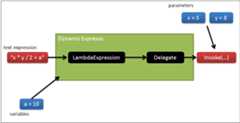
For example you can evaluate math expressions:
varinterpreter=newInterpreter();varresult=interpreter.Eval("8 / 2 + 2");
or parse an expression with variables or parameters and invoke it multiple times:
varinterpreter=newInterpreter().SetVariable("service",newServiceExample());stringexpression="x > 4 ? service.OneMethod() : service.AnotherMethod()";LambdaparsedExpression=interpreter.Parse(expression,newParameter("x",typeof(int)));varresult=parsedExpression.Invoke(5);
or generate delegates and lambda expressions for LINQ queries:
varprices=new[]{5,8,6,2};varwhereFunction=newInterpreter().ParseAsDelegate<Func<int,bool>>("arg > 5");varcount=prices.Where(whereFunction).Count();
Dynamic Expresso live demo:http://dynamic-expresso.azurewebsites.net/
Dynamic Expresso is available on [NuGet]. You can install the package using:
PM> Install-Package DynamicExpresso.CoreSource code and symbols (.pdb files) for debugging are available on [Symbol Source].
- Expressions can be written using a subset of C# syntax (see Syntax section for more information)
- Support for variables and parameters
- Can generate delegates or lambda expression
- Full suite of unit tests
- Good performance compared to other similar projects
- Partial support of generic, params array and extension methods (only with implicit generic arguments detection)
- Partial support of
dynamic(ExpandoObjectfor get properties, method invocation and indexes(#142), see #72.DynamicObjectfor get properties and indexes, see #142) - Partial support of lambda expressions (disabled by default, because it has a slight performance penalty)
- Case insensitive expressions (default is case sensitive)
- Ability to discover identifiers (variables, types, parameters) of a given expression
- Small footprint, generated expressions are managed classes, can be unloaded and can be executed in a single appdomain
- Easy to use and deploy, it is all contained in a single assembly without other external dependencies
- Written in .NET Standard 2.0
- Build available for .NET 4.6.1 and .NET Core 2.0
- Open source (MIT license)
You can parse and execute void expression (without a return value) or you can return any valid .NET type.When parsing an expression you can specify the expected expression return type. For example you can write:
vartarget=newInterpreter();doubleresult=target.Eval<double>("Math.Pow(x, y) + 5",newParameter("x",typeof(double),10),newParameter("y",typeof(double),2));
The built-in parser can also understand the return type of any given expression so you can check if the expression returns what you expect.
Variables can be used inside expressions withInterpreter.SetVariable method:
vartarget=newInterpreter().SetVariable("myVar",23);Assert.That(target.Eval("myVar"),Is.EqualTo(23));
Variables can be primitive types or custom complex types (classes, structures, delegates, arrays, collections, ...).
Custom functions can be passed with delegate variables usingInterpreter.SetFunction method:
Func<double,double,double>pow=(x,y)=>Math.Pow(x,y);vartarget=newInterpreter().SetFunction("pow",pow);Assert.That(target.Eval("pow(3, 2)"),Is.EqualTo(9.0));
CustomExpression can be passed by usingInterpreter.SetExpression method.
Parsed expressions can accept one or more parameters:
varinterpreter=newInterpreter();varparameters=new[]{newParameter("x",23),newParameter("y",7)};Assert.That(interpreter.Eval("x + y",parameters),Is.EqualTo(30));
Parameters can be primitive types or custom types. You can parse an expression once and invoke it multiple times with different parameter values:
vartarget=newInterpreter();varparameters=new[]{newParameter("x",typeof(int)),newParameter("y",typeof(int))};varmyFunc=target.Parse("x + y",parameters);Assert.That(myFunc.Invoke(23,7),Is.EqualTo(30));Assert.That(myFunc.Invoke(32,-2),Is.EqualTo(30));
Either a variable or a parameter with namethis can be referenced implicitly.
classCustomer{publicstringName{get;set;}}vartarget=newInterpreter();// 'this' is treated as a special identifier and can be accessed implicitlytarget.SetVariable("this",newCustomer{Name="John"});// explicit context reference via 'this' variableAssert.That(target.Eval("this.Name"),Is.EqualTo("John"));// 'this' variable is referenced implicitlyAssert.That(target.Eval("Name"),Is.EqualTo("John"));
Currently predefined types available are:
Object object Boolean bool Char charString stringSByte Byte byteInt16 UInt16 Int32 int UInt32 Int64 long UInt64 Single Double double Decimal decimal DateTime TimeSpanGuidMath ConvertYou can reference any other custom .NET type by usingInterpreter.Reference method:
vartarget=newInterpreter().Reference(typeof(Uri));Assert.That(target.Eval("typeof(Uri)"),Is.EqualTo(typeof(Uri)));Assert.That(target.Eval("Uri.UriSchemeHttp"),Is.EqualTo(Uri.UriSchemeHttp));
You can use theInterpreter.ParseAsDelegate<TDelegate> method to directly parse an expression into a .NET delegate type that can be normally invoked.In the example below I generate aFunc<Customer, bool> delegate that can be used in a LINQ where expression.
classCustomer{publicstringName{get;set;}publicintAge{get;set;}publiccharGender{get;set;}}[Test]publicvoidLinq_Where(){varcustomers=newList<Customer>{newCustomer(){Name="David",Age=31,Gender='M'},newCustomer(){Name="Mary",Age=29,Gender='F'},newCustomer(){Name="Jack",Age=2,Gender='M'},newCustomer(){Name="Marta",Age=1,Gender='F'},newCustomer(){Name="Moses",Age=120,Gender='M'},};stringwhereExpression="customer.Age > 18 && customer.Gender == 'F'";varinterpreter=newInterpreter();Func<Customer,bool>dynamicWhere=interpreter.ParseAsDelegate<Func<Customer,bool>>(whereExpression,"customer");Assert.That(customers.Where(dynamicWhere).Count(),Is.EqualTo(1));}
This is the preferred way to parse an expression that you known at compile time what parameters can accept and what value must return.
You can use theInterpreter.ParseAsExpression<TDelegate> method to directly parse an expression into a .NET lambda expression (Expression<TDelegate>).
In the example below I generate aExpression<Func<Customer, bool>> expression that can be used in a Queryable LINQ where expression or in any other place where an expression is required. Like Entity Framework or other similar libraries.
classCustomer{publicstringName{get;set;}publicintAge{get;set;}publiccharGender{get;set;}}[Test]publicvoidLinq_Queryable_Expression_Where(){IQueryable<Customer>customers=(newList<Customer>{newCustomer(){Name="David",Age=31,Gender='M'},newCustomer(){Name="Mary",Age=29,Gender='F'},newCustomer(){Name="Jack",Age=2,Gender='M'},newCustomer(){Name="Marta",Age=1,Gender='F'},newCustomer(){Name="Moses",Age=120,Gender='M'},}).AsQueryable();stringwhereExpression="customer.Age > 18 && customer.Gender == 'F'";varinterpreter=newInterpreter();Expression<Func<Customer,bool>>expression=interpreter.ParseAsExpression<Func<Customer,bool>>(whereExpression,"customer");Assert.That(customers.Where(expression).Count(),Is.EqualTo(1));}
Statements can be written using a subset of the C# syntax. Here you can find a list of the supported expressions:
Supported operators:
| Category | Operators |
|---|---|
| Primary | x.y f(x) a[x] new typeof |
| Unary | + - ! (T)x |
| Multiplicative | * / % |
| Additive | + - |
| Relational and type testing | < > <= >= is as |
| Equality | == != |
| Logical AND | & |
| Logical OR | | |
| Logical XOR | ^ |
| Conditional AND | && |
| Conditional OR | || |
| Conditional | ?: |
| Assignment | = |
| Null coalescing | ?? |
Operators precedence is respected followingC# rules (Operator precedence and associativity).
Some operators, like the assignment operator, can be disabled for security reason.
| Category | Operators |
|---|---|
| Constants | true false null |
| Real literal suffixes | d f m |
| Integer literal suffixes | u l ul lu |
| String/char | "" '' |
The following character escape sequences are supported inside string or char literals:
\'- single quote, needed for character literals\"- double quote, needed for string literals\\- backslash\0- Unicode character 0\a- Alert (character 7)\b- Backspace (character 8)\f- Form feed (character 12)\n- New line (character 10)\r- Carriage return (character 13)\t- Horizontal tab (character 9)\v- Vertical quote (character 11)
Any standard .NET method, field, property or constructor can be invoked.
varservice=newMyTestService();varcontext=newMyTestContext();vartarget=newInterpreter().SetVariable("x",service).SetVariable("this",context);Assert.That(target.Eval("x.HelloWorld()"),Is.EqualTo(service.HelloWorld()));Assert.That(target.Eval("x.AProperty"),Is.EqualTo(service.AProperty));Assert.That(target.Eval("x.AField"),Is.EqualTo(service.AField));// implicit context referenceAssert.That(target.Eval("GetContextId()"),Is.EqualTo(context.GetContextId()));Assert.That(target.Eval("ContextName"),Is.EqualTo(context.ContextName));Assert.That(target.Eval("ContextField"),Is.EqualTo(context.ContextField));
vartarget=newInterpreter();Assert.That(target.Eval("new DateTime(2015, 1, 24)"),Is.EqualTo(newDateTime(2015,1,24));
Dynamic Expresso also supports:
- Extension methods
varx=newint[]{10,30,4};vartarget=newInterpreter().Reference(typeof(System.Linq.Enumerable)).SetVariable("x",x);Assert.That(target.Eval("x.Count()"),Is.EqualTo(x.Count()));
- Indexer methods (like
array[0]) - Generics, only partially supported (only implicit, you cannot invoke an explicit generic method)
- Params array (see C#
paramskeyword)
Dynamic Expresso has partial supports of lambda expressions. For example, you can use any Linq method:
varx=newstring[]{"this","is","awesome"};varoptions=InterpreterOptions.Default|InterpreterOptions.LambdaExpressions;// enable lambda expressionsvartarget=newInterpreter(options).SetVariable("x",x);varresults=target.Eval<IEnumerable<string>>("x.Where(str => str.Length > 5).Select(str => str.ToUpper())");Assert.That(results,Is.EqualTo(new[]{"AWESOME"}));
Note that parsing lambda expressions is disabled by default, because it has a slight performance cost.To enable them, you must set theInterpreterOptions.LambdaExpressions flag.
It's also possible to create a delegate directly from a lambda expression:
varoptions=InterpreterOptions.Default|InterpreterOptions.LambdaExpressions;// enable lambda expressionsvartarget=newInterpreter(options).SetVariable("increment",3);// access a variable from the lambda expressionvarmyFunc=target.Eval<Func<int,string,string>>("(i, str) => str.ToUpper() + (i + increment)");Assert.That(lambda.Invoke(5,"test"),Is.EqualTo("TEST8"));
By default all expressions are considered case sensitive (VARX is different thanvarx, as in C#).There is an option to use a case insensitive parser. For example:
vartarget=newInterpreter(InterpreterOptions.DefaultCaseInsensitive);doublex=2;varparameters=new[]{newParameter("x",x.GetType(),x)};Assert.That(target.Eval("x",parameters),Is.EqualTo(x));Assert.That(target.Eval("X",parameters),Is.EqualTo(x));
Sometimes you need to check which identifiers (variables, types, parameters) are used in expression before parsing it.Maybe because you want to validate it or you want to ask the user to enter parameters value of a given expression.Because if you parse an expression without the right parameter an exception is throwed.
In these cases you can useInterpreter.DetectIdentifiers method to obtain a list of used identifiers, both known and unknown.
vartarget=newInterpreter();vardetectedIdentifiers=target.DetectIdentifiers("x + y");Assert.That(detectedIdentifiers.UnknownIdentifiers,Is.EqualTo(new[]{"x","y"});
In C #, numbers are usually interpreted as integers or doubles if they have decimal places.
In some cases it may be useful to be able to configure the default type of numbers if no particular suffix is specified: for example in financial calculations, where usually numbers are interpreted as decimal type.
In these cases you can set the default number type usingInterpreter.SetDefaultNumberType method.
vartarget=newInterpreter();target.SetDefaultNumberType(DefaultNumberType.Decimal);Assert.That(target.Eval("45"),Is.InstanceOf<System.Decimal>());Assert.That(target.Eval("10/3"),Is.EqualTo(10M/3M));// 3.33333333333 instead of 3
Not every C# syntaxes are supported. Here some examples of NOT supported features:
- Multiline expressions
- for/foreach/while/do operators
- Array/list/dictionary initialization
- Explicit generic invocation (like
method<type>(arg)) - Lambda/delegate declaration (delegate and lamda are only supported as variables or parameters or as a return type of the expression)
- Array/list/dictionary element assignment (set indexer operator)
- Other operations on
dynamicobjects (only property, method invocation and index now are supported)
If there is an error during the parsing always an exception of typeParseException is throwed.ParseException has several specialization classes based on the type of error (UnknownIdentifierException, NoApplicableMethodException. ...).
TheInterpreter class can be used by multiple threads but without modify it.In essence only get properties,Parse andEval methods are thread safe. Other methods (SetVariable,Reference, ...) must be called in an initialization phase.Lambda andParameter classes are completely thread safe.
If you need to run the same expression multiple times with different parameters I suggest to parse it one time and then invoke the parsed expression multiple times.
If you allow an end user to write expression you must consider some security implications.
Parsed expressions can access only the .NET types that you have referenced using theInterpreter.Reference method or types that you pass as a variable or parameter.You must pay attention of what types you expose.In any case generated delegates are executed as any other delegate and standard security .NET rules can be applied (for more info seeSecurity in the .NET Framework).
If expressions test can be written directly by users you must ensure that only certain features are available. Here some guidelines:
For example you can disable assignment operators, to ensure that the user cannot change some values that you don't expect.By default assignment operators are enables, by you can disable it using:
vartarget=newInterpreter().EnableAssignment(AssignmentOperators.None);
From version 1.3 to prevent malicious users to call unexpected types or assemblies within an expression,some reflection methods are blocked. For example you cannot write:
vartarget=newInterpreter();target.Eval("typeof(double).GetMethods()");// ortarget.Eval("typeof(double).Assembly");
The only exception to this rule is theType.Name property that is permitted for debugging reasons.To enable standard reflection features you can useInterpreter.EnableReflection method, like:
vartarget=newInterpreter().EnableReflection();
Here are some possible usage scenarios of Dynamic Expresso:
- Programmable applications
- Allow the user to inject customizable rules and logic without recompiling
- Evaluate dynamic functions or commands
- LINQ dynamic query
Seegithub open issues and milestones.
If you need help you can try one of the following:
- FAQ wiki page
- githubofficial repository
Currently Dynamic Expresso is maintained by @davideicardi and @metoule.
This project is based on two old works:
- "Converting String expressions to Funcs with FunctionFactory by Matthew Abbott" (link not more available)
- DynamicQuery - Dynamic LINQ - Visual Studio 2008 sample:http://msdn.microsoft.com/en-us/vstudio/bb894665.aspx
Thanks to allcontributors!
Below you can find a list of some similar projects that I have evaluated or that can be interesting to study.For one reason or another none of these projects exactly fit my needs so I decided to write my own interpreter.
- Roslyn Project - Scripting API -https://github.com/dotnet/roslyn/wiki/Scripting-API-Samples
- This is the new Microsoft Official Compiler as a service library. I suggest to consider using Roslyin instead of DynamicExpresso for complex scenarios.
- Mono.CSharp - C# Compiler Service and Runtime Evaulator -http://docs.go-mono.com/index.aspx?link=N%3AMono.CSharp
- NCalc - Mathematical Expressions Evaluator for .NET -http://ncalc.codeplex.com/
- David Wynne CSharpEvalhttps://github.com/DavidWynne/CSharpEval
- CSharp Evalhttp://csharp-eval.com/
- C# Expression Evaluatorhttp://csharpeval.codeplex.com/
- Jint - Javascript interpreter for .NET -http://jint.codeplex.com/
- Jurassic - Javascript compiler for .NET -http://jurassic.codeplex.com/
- Javascrpt.net - javascript V8 engine -http://javascriptdotnet.codeplex.com/
- CS-Script -http://www.csscript.net/
- IronJS, IronRuby, IronPython
- paxScript.NEThttp://eco148-88394.innterhost.net/paxscriptnet/
A continuous integration pipeline is configured using Github Actions, see.github/workflows folder.
Whenever a newRelease is created, Nuget packages are published. For snapshot releases packages are published only to Github.For official releases packages are published to both GitHub and Nuget.
To compile the solution you can run:
dotnet build DynamicExpresso.sln -c ReleaseTo create nuget packages:
dotnet pack DynamicExpresso.sln -c ReleaseTo run unit tests:
dotnet test DynamicExpresso.sln -c Releaseor run unit tests for a specific project with a specific framework:
dotnet test DynamicExpresso.sln --no-restore -c Release --verbosity normal -f netcoreapp3.1Add--logger:trx to generate test results for VSTS.
Seereleases page.
About
C# expressions interpreter
Topics
Resources
License
Uh oh!
There was an error while loading.Please reload this page.
Stars
Watchers
Forks
Sponsor this project
Uh oh!
There was an error while loading.Please reload this page.
Packages0
Uh oh!
There was an error while loading.Please reload this page.