- Notifications
You must be signed in to change notification settings - Fork245
🏃→🎼 docker run asdlksjfksdf > docker-composerize up
License
composerize/composerize
Folders and files
| Name | Name | Last commit message | Last commit date | |
|---|---|---|---|---|
Repository files navigation


http://composerize.com - Turnsdocker run commands intocompose.yaml files and even merge with existingcompose.yaml!
Looking for the reverse :http://decomposerize.com /Decomposerize
Want to convert from Docker compose file formats :http://composeverter.com /Composeverter
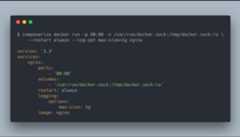
composerize can be run in the cli.
npm install composerize -g to install, and run as such:
$ composerize docker run -p 80:80 -v /var/run/docker.sock:/tmp/docker.sock:ro --restart always --log-opt max-size=1g nginx
Seecomposerize --help for more options.
A dockker image of composerize, decomposerize and composeverter websites is available here:https://github.com/Oaklight/composerize-minimal/blob/master/README_en.md (thanks to @Oaklight)
Make sure to install thecomposerize package in your project by running:
npm install composerize
With the following code, you can easily integrateComposerize into your Node.js project and generate Docker Compose configurations from Docker run commands.
constcomposerize=require('composerize');constdockerRunCommand='docker run -d -p 8080:80 --name my-web-app nginx:latest';// Convert the Docker run command to a Docker Compose configurationconstcomposeConfig=composerize(dockerRunCommand);console.log(composeConfig);
You can also merge docker run command(s) with an existing Docker Compose file content :
constcomposerize=require('composerize');constdockerRunCommand='docker run -d -p 8080:80 --name my-web-app nginx:latest';// An existing Docker Compose configuration as a stringconstexistingComposeConfig=`version: '3'services: existing-service: image: my-existing-image:latest ports: - '8000:80'`;// Convert the Docker run command to a Docker Compose configuration and merge with provided docker composeconstcomposeConfig=composerize(dockerRunCommand,existingComposeConfig);console.log(composeConfig);
You can also choose which version of Docker compose V2, you target : 2.x, 3.x or Common Specification by specifying a third parametercomposeVersion onconvertDockerRunToCompose :
- 'v2x'
- 'v3x'
- 'latest'
constcomposerize=require('composerize');constdockerRunCommand='docker run -d -p 8080:80 --name my-web-app nginx:latest';// Convert the Docker run command to a Docker Compose configuration for 2.xconstcomposeConfig=composerize(dockerRunCommand,null,'v2x');console.log(composeConfig);
You can also choose indentation level by specifying a fourth parameterindent onconvertDockerRunToCompose :
- 'v2x'
- 'v3x'
- 'latest'
constcomposerize=require('composerize');constdockerRunCommand='docker run -d -p 8080:80 --name my-web-app nginx:latest';// Convert the Docker run command to a Docker Compose configuration for 2.xconstcomposeConfig=composerize(dockerRunCommand,null,'latest',2);console.log(composeConfig);
- Clone a fork of the repo and install the project dependencies by running
yarn - Make your changes, and build the project by running
make build - Test your changes with
make test
- Mark Larah (Twitter:@mark_larah)
- ShareVBGitHub
About
🏃→🎼 docker run asdlksjfksdf > docker-composerize up
Topics
Resources
License
Uh oh!
There was an error while loading.Please reload this page.
Stars
Watchers
Forks
Packages0
Uh oh!
There was an error while loading.Please reload this page.