- Notifications
You must be signed in to change notification settings - Fork0
File upload example for Spring Boot using converters
License
bootify-io/spring-boot-file-upload-example
Folders and files
| Name | Name | Last commit message | Last commit date | |
|---|---|---|---|---|
Repository files navigation
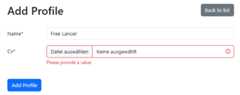
This is an example project for a file upload in Spring Boot4.0.0. Uploads can be part of any form using DTOs. In this example you can manage profiles with a resume in PDF or DOC format in a Thymeleaf frontend. Implementation details:
- Separate table
FileContentfor storing file content - The entity
Profilecontains a JSON objectFileDatawith the name and UID of the file - The
FileDataServiceprovides utility functions for uploads and downloads - The
ConverterConfigregisters a converter for transforming uploads fromMultipartFileto aFileDataobject transparently - The annotation
ValidFileTypeensures the correct file type
This project was created usingBootify.io. Choose your preferred frontend and preferences,create your own database schema including file fields, and get a working Spring Boot application directly in your browser.
Update your local database connection inapplication.yml or create your ownapplication-local.yml file to override settings for development.
During development it is recommended to use the profilelocal. In IntelliJ-Dspring.profiles.active=local can be added in the VM options of the Run Configuration after enabling this property in "Modify options".
After starting the application it is accessible underlocalhost:8080.
The application can be built using the following command:
mvnw clean packageStart your application with the following command - here with the profileproduction:
java -Dspring.profiles.active=production -jar ./target/file-upload-0.0.1-SNAPSHOT.jarIf required, a Docker image can be created with the Spring Boot plugin. AddSPRING_PROFILES_ACTIVE=production as environment variable when running the container.
mvnw spring-boot:build-image -Dspring-boot.build-image.imageName=io.bootify/file-uploadAbout
File upload example for Spring Boot using converters
Topics
Resources
License
Uh oh!
There was an error while loading.Please reload this page.