- Notifications
You must be signed in to change notification settings - Fork19
akmamun/kafka-python-camera-stream
Folders and files
| Name | Name | Last commit message | Last commit date | |
|---|---|---|---|---|
Repository files navigation
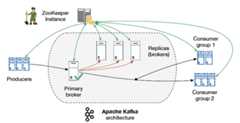
Install And ConfigureApache Kafka,Java andZooKeeper
sudo apt-get update -ysudo apt-get upgrade -y
Before installing Kafka, you will need to install Java, add this repository
sudo add-apt-repository -y ppa:webupd8team/java
Next, update the metadata of the new repository and install JDK 8
sudo apt-get updatesudo apt-get install oracle-java8-installer -y
sudo apt-get install zookeeperd
wget https://www-eu.apache.org/dist/kafka/2.1.1/kafka_2.11-2.1.1.tgz
If not work, download latest binary of apache kafka fromKafka official site
Next, create a directory for Kafka installation
sudo mkdir /opt/Kafkacd /opt/KafkaExtract the downloaded archive using tar command in /opt/Kafka
sudo tar -xvf kafka_2.11-2.1.1.tgz -C /opt/Kafka/
Make Sure Server is Running
sudo /opt/Kafka/kafka_2.11-2.1.1/bin/kafka-server-start.sh /opt/Kafka/kafka_2.11-2.1.1/config/server.properties
Now create a sample topic with name "testing"
sudo /opt/Kafka/kafka_2.11-2.1.1/bin/kafka-topics.sh --create --zookeeper localhost:2181 --replication-factor 1 --partitions 1 --topic testing
Now create environment and install Kafka-Python, Open-CV and Flask Server
pip install -r requirements.txt
Lets run Producer
python producer.py
Consumer
python consumer.py
Now Browse thishttp://localhost:5000/
Credit
About
Distributed Streaming with Apache Kafka and Python OpenCV
Topics
Resources
Uh oh!
There was an error while loading.Please reload this page.
Stars
Watchers
Forks
Releases
Packages0
Uh oh!
There was an error while loading.Please reload this page.