- Notifications
You must be signed in to change notification settings - Fork6
OSGi bundle to generate Liferay Portal data (permissions, roles, sites, pages etc.). Takes schemed XML declaration as an input and creates database entries accordingly.
License
ableneo/liferay-db-setup-core
Folders and files
| Name | Name | Last commit message | Last commit date | |
|---|---|---|---|---|
Repository files navigation


Library that allows to automateLiferay data setup. It uses XML configuration input to add the data.
Install the
com.ableneo.liferay.db.setup.core-7.4.3125.2.jarbundle in${liferay.home}/osgi/modulesPrepare your own bundle that uses the library as a
provided/compileOnlydependency. For example:build.gradledependencies { compileOnly'com.ableneo.liferay:com.ableneo.liferay.db.setup.core:7.4.3125.2'}pom.xml<dependency> <groupId>com.ableneo.liferay</groupId> <artifactId>com.ableneo.liferay.db.setup.core</artifactId> <version>7.4.3125.2</version> <scope>provided</scope></dependency>
Prepare xml data configuration. Documentation sits directly in thesetup_definition.xsd file.
Example documentation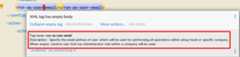 Example configuration: setup.xml
<?xml version="1.0" encoding="UTF-8" ?><setupxmlns="http://www.ableneo.com/liferay/setup"> <configuration><!-- uses random administrator account for the setup in the company, run-as-user-email tag allows to specify particular admin account to be used for the setup--> <company> <companyid>20101</companyid><!-- companywebid can be used alternatively--> </company> </configuration> <sites> <site><!-- Guest by default--> <vocabularyname="Some categories"uuid="602f55b6-6021-455e-8d6d-696cc25daa91"> <title-translationlocale="de_DE"text="Einige Kategorien"/> <categoryname="Other categories"uuid="867b33df-2465-4a81-9945-88159c604589"> <title-translationlocale="de_DE"text="Andere Kategorien"/> <categoryname="New category"uuid="5fb4308e-bd21-4cf4-bdc5-3557508ffe4a"> <title-translationlocale="de_DE"text="Neue Kategorie"/> </category> </category> </vocabulary> </site> </sites></setup>
Load the XML setup file and run
setupmethod on it:URLresource =Thread.currentThread().getContextClassLoader().getResource(path);InputStreamsetupFile =Objects.requireNonNull(resource,"XML Liferay DB setup file not found in classpath.").openStream();Setupsetup =MarshallUtil.unmarshall(setupFile);booleansetupSuccess =LiferaySetup.setup(setup);

Used primarily for integration testing but may be a good start for your application:com.ableneo.liferay.portal.setup.example
Bundling XML descriptors and code that will execute them in bundle separate to the
All data definitions in the setup XML file are applied according to theconfiguration header. The header defines:
thevirtual instance on which the library will modify the data.
admin user account to be used for data modification
<?xml version="1.0" encoding="UTF-8"?><setupxmlns="http://www.ableneo.com/liferay/setup"> <configuration><!-- run as automatically selected admin--> <company> <companywebid>liferay.com</companywebid> </company> </configuration></setup>
<?xml version="1.0" encoding="UTF-8"?><setupxmlns="http://www.ableneo.com/liferay/setup"> <configuration> <run-as-user-email>admin@my.web.com</run-as-user-email> <company> <companywebid>liferay.com</companywebid> </company> </configuration></setup>
Service access policy is asecond from four of Liferay’s API security layers. Together withIP Permission Layer,Authentication and verification layer andUser permission layer is responsible for securing access to web services provided by portal instance.
If you develop newREST Builder REST/GraphQL endpoint’s it’s a common requirement to setup an access for those API’s for an unauthenticated portal user- Guest which is by default forbidden.
<?xml version="1.0" encoding="UTF-8"?><setupxmlns="http://www.ableneo.com/liferay/setup"><company-settings> <service-access-policies> <service-access-policyname="MY_ACCESS_POLICY"enabled="true"unauthenticated="true"> <titlelocale="sk_SK"text="Moja pristupova politika" /> <allowed-service-signatures> (1) com.liferay.headless.admin.user.internal.resource.v1_0.SiteResourceImpl#getSite </allowed-service-signatures> </service-access-policy> </service-access-policies></company-settings></setup>
allowed-service-signaturesprovides the same functionality asAdvanced Mode
<?xml version="1.0" encoding="UTF-8"?><setupxmlns="http://www.ableneo.com/liferay/setup"><company-settings> <service-access-policies> <delete-service-access-policyname="WIZARD_GUEST_ACCESS"/> </service-access-policies></company-settings></setup>
Resource permissions.
<?xml version="1.0" encoding="UTF-8"?><setupxmlns="http://www.ableneo.com/liferay/setup"><resource-permissions> <resourceresource-id="my.custom.resource.string"> <actionIdname="SPECIAL_PERMISSION"> <rolename="My Role"/> <rolename="Your Role"/> </actionId> </resource></resource-permissions></setup>
Resource permissions are set per company are verifiable with followin API call.
permissionChecker.hasPermission(groupId,"my.custom.resource.string",companyId,"SPECIAL_PERMISSION" );
Portlet permissions.
<?xml version="1.0" encoding="UTF-8"?><setupxmlns="http://www.ableneo.com/liferay/setup"><resource-permissions> <resourceresource-id="myportlet_WAR_portlets"> <actionIdname="VIEW"> <rolename="User"/> <rolename="Guest"/> </actionId> </resource></resource-permissions></setup>
<?xml version="1.0" encoding="UTF-8"?><setupxmlns="http://www.ableneo.com/liferay/setup"><roles> <rolename="Regular Role"/> <rolename="Site Role"type="site"/></roles></setup>
Following snippet creates expando attributecanonical-url with permissions to view by guest user.
<?xml version="1.0" encoding="UTF-8"?><setupxmlns="http://www.ableneo.com/liferay/setup"><custom-fields> <fieldname="canonical-url"type="string"class-name="com.liferay.portal.kernel.model.Layout"> <role-permissionrole-name="Guest"permission="view"/> </field></custom-fields></setup>
All content likepages,articles,documents etc. is always created within a specific site. You can create new or refer to existing site.
<?xml version="1.0" encoding="UTF-8"?><setupxmlns="http://www.ableneo.com/liferay/setup"><sites> <sitedefault="true"><!-- default company site--> </site> <siteglobal="true"><!-- global company site--> </site> <sitedefault="false"site-friendly-url="/admin"name="Admin"><!-- specific site--> <name-translationlocale="en_US"text="Admin"/> </site></sites></setup>
Filesnew_structure.xml andnew_structure_template.ftl are deployed as a part of a module that is using thedb-setup-core library and reside in it’s classpath.
<?xml version="1.0" encoding="UTF-8"?><setupxmlns="http://www.ableneo.com/liferay/setup"><sites> <sitesite-friendly-url="/admin"name="Admin"> <article-structurekey="NEW-STRUCTURE-KEY"path="new_structure.xml"name="New Structure"/> <article-templatekey="NEW-STRUCTURE-TEMPLATE-KEY"path="new_structure_template.ftl"article-structure-key="NEW-STRUCTURE-KEY"name="New Structure Template"cacheable="true"/> </site></sites></setup>
Fileartcle.xml is deployed as a part of a module that is using thedb-setup-core library and reside in it’s classpath.
<?xml version="1.0" encoding="UTF-8"?><setupxmlns="http://www.ableneo.com/liferay/setup"><sites> <siteglobal="true"> <articletitle="Article Title"path="article.xml"article-structure-key="NEW-STRUCTURE-KEY"article-template-key="NEW-STRUCTURE-TEMPLATE-KEY"articleId="ARTICLE_ID"> <tagname="product" /> </article> </site></sites></setup>
Document’s file itself is determined byfile-system-name attribute which defines resource on classpath.
<?xml version="1.0" encoding="UTF-8"?><setupxmlns="http://www.ableneo.com/liferay/setup"><sites> <sitename="Guest"> <documentfile-system-name="image.svg"document-folder-name="/Images"document-filename="image.svg"document-title="image.svg"/> </site></sites></setup>
The code is compatible withLiferay Portal 7.4.3.125. Other versions that have been or are supported:
integration withSite Initializers
more tests
project integration with lundegaard fork:https://github.com/lundegaard/liferay-db-setup-core, until than changes and fixes from lundegaard fork will be ported to the library
We useLiferay as an application building platform.
Portlets, content and permissions, in short-data serve as a building block of a web application with consistent portal UX. In the use case thedata play important role in application building, greatly influencing UX.
By storing the applicationdata as XML declaration we enable developers to version and progressdata development as if it was acode. All standard development practices like versioning, code review, building and deployment can be applied to the Liferaydata as code.
Want/need to hack on db-setup-core? See oursuper short contributing guide for information on building, testing and contributing changes.
They are probably not perfect, please let me know if anything feels wrong or incomplete.
switched to JDK21
api compatible with Liferay 7.4.3.125
fixed category import (updating parent)
fixed working with global/default sites[_site_selection]
updated docs
switched to JDK11
upgraded and tested all features inexample setup with Liferay Portal 7.4.3.86
attached two tests from lundegaard fork, credit goes toJakub Jandak, thank you!
fixed bug when handling multilineservice access policy
added an ability to create/update/deleteService Access Policies
target Liferay Portal version is still minimum 7.3.6 (GA7)
fix: add individual resource for permissions setup in case there are declared not for portlet but a
model-resource, allows to usehasUserPermissionmethod for the custom resource id string and aprimKey = companyIdFixed configuration<?xml version="1.0" encoding="UTF-8"?><setupxmlns="http://www.ableneo.com/liferay/setup"> <resource-permissions> <resourceresource-id="custom.resource.id-not.a.portlet.id"> <actionIdname="SOME_PERMISSION"> <rolename="Some Portal Role"/> </actionId> </resource> </resource-permissions></setup>
Bumped target Liferay Portal version to minimum 7.3.6 ga7.
Improved category/vocabulary idempotency, it’s possible to update categories and vocabularies with optional uuid, before categories/vocabularies were identified only by name. That allows to update a category name which wasn’t possible before.
Improved categories/vocabulary updates performance, update is only issued if anything in the definition differs compared to the data in the DB.
Category by_name search is scoped only to a particular vocabulary.
Added property element in categories that allows to define AssetCategoryProperty. These are identified by a key.
TipTODO: deletion of existing property.
divided xsd to "elements" and "types" parts, replaced many element references with types which improves naming flexibility
every xsd type follows is camel cased and suffixed with word: Type, e.g. UuidType
simplified dependency management with
release.portal.bomremoved
shademaven plugin as portal exportscom.liferay.portlet.asset.utilpackage already inorg.eclipse.osgi_3.13.0.LIFERAY-PATCHED-11bundle
OSGI descriptors in JAR, the bundle can be deployed and work as a standalone Liferay 7.x bundle
instance import feature added, credit goes to@bimki - thank you!
portal properties feature added, credit goes to@fabalint - thank you!
new helper methods to run the setup (ported from 1.x branch):
com.ableneo.liferay.portal.setup.LiferaySetup#setup(java.io.InputStream)com.ableneo.liferay.portal.setup.LiferaySetup#setup(java.io.File)
fixed categorization idempotency (vocabulary and category name handling)
fixed language handling for groups
improved javadoc in entrypoint
com.ableneo.liferay.portal.setup.LiferaySetupclassupped dependencies toLiferay 7.3.5, credit goes to@fabalint - thank you!
changed versioning so that major.minor.patch version reflects target platform, build version will be used to track changes in the library
documentation format conversion from markdown toaciidoc
added slf4j and changed logger in few classes for more ergonomic log message interpolation (Liferay 7.x provides slf4j by default)
added prettier formatter to the project
added build environment setup automation withnix
it’s possible to use more than one company id per configuration file, the configuration will be applied to all listed companies
tag names in configuration follow unified naming convention: word-word
run-as-user renamed to run-as-user-email to be explicit about expected value
added missing documentation to few xml elements
setup xsd provides a version attribute
configured sonar analysis on each commit
configured maven test / coverage runner
maven project structure has changed to single-module
companyId, groupId and runAsUserId are set in Setup class and propagated to all involved Utils with SetupConfigurationThreadLocal context class
improved MarshallUtil performance
introduced unit tests
most of the problems reported by sonar are fixed
improved logging
About
OSGi bundle to generate Liferay Portal data (permissions, roles, sites, pages etc.). Takes schemed XML declaration as an input and creates database entries accordingly.
Topics
Resources
License
Contributing
Uh oh!
There was an error while loading.Please reload this page.
Stars
Watchers
Forks
Packages0
Uh oh!
There was an error while loading.Please reload this page.
Contributors8
Uh oh!
There was an error while loading.Please reload this page.