- Notifications
You must be signed in to change notification settings - Fork33
A wrapper around MoonSharp that allows easy development of moddable Unity games
License
Semaeopus/Unity-Lua
Folders and files
| Name | Name | Last commit message | Last commit date | |
|---|---|---|---|---|
Repository files navigation
A wrapper around MoonSharp that allows easy development of moddable Unity games
- Create "Assets/Plugins/Lua" in your Unity project
- Download and place the contents of this repository to the newly created folder
This codebase allows Unity developers to easily create game specific modding apis for their Unity games!It was created during the development ofOff Grid
LuaVM is the main Lua interface, it's the class you use to run Lua scripts or individual Lua command strings.
conststringluaCode=@" -- Lua Code num = 1 + 1 print(num)";LuaVMvm=newLuaVM();vm.ExecuteString(luaCode);// Prints 2
Most of the time you'll want to load and execute Lua code from a script file written to disk, here's an example of how that's achieved.
Contents of fruits.lua
fruits= {"apple","banana",}GetRandomFruit=function()returnfruits[math.random(1,#fruits)]end
Here's some code that loads the fruits table from the script, as well as getting a reference to the GetRandomFruit and calling it.
LuaVMvm=newLuaVM();vm.ExecuteScript("/path/to/fruits.lua");// Get table to iterateTablefruitTable=vm.GetGlobalTable("fruits");foreach(DynValuefruitinfruitTable.Values){Debug.Log(fruit.String);// Prints "apple" then "banana"}// Or get a lua function and call itDynValuefruitFunction=vm.GetGlobal("GetRandomFruit");Debug.Log(vm.Call(fruitFunction).String);// Prints return of GetRandomFruit
Creating an api with this framework is incredibly simple, let's say we're making a game where the player can interact with supermarkets.We of course want this game to be moddable, so let's write up information about the super market in Lua, things like stock and name for a start.
Here's an example of a very simple Lua api to let the players get random items that can go in their shops stocklist.
[LuaApi(luaName="SuperMarket",description="This is a test lua api")]publicclassSuperMarketAPI:LuaAPIBase{privatereadonlyList<string>m_Veggies=newList<string>{"Aubergine","Broccoli","Cauliflower","Carrot","Kale",};privatereadonlyList<string>m_Fruits=newList<string>{"Strawberry","Grape","Lychee","Melon","Apple",};publicSuperMarketAPI():base("SuperMarket"){}protectedoverridevoidInitialiseAPITable(){m_ApiTable["GetRandomVeg"]=(System.Func<string>)(Lua_GetRandomVeggies);m_ApiTable["GetRandomFruit"]=(System.Func<string>)(Lua_GetRandomFruits);m_ApiTable["MaxStock"]=MaxStock;}[LuaApiEnumValue(description="The max stock any shop should contain")]privateconstintMaxStock=10;[LuaApiFunction(name="GetRandomVeg",description="Returns a random vegetable that can be stocked by an in-game shop")]privatestringLua_GetRandomVeggies(){intrandomIndex=Random.Range(0,m_Veggies.Count-1);returnm_Veggies[randomIndex];}[LuaApiFunction(name="GetRandomFruit",description="Returns a random fruit that can be stocked by an in-game shop")]privatestringLua_GetRandomFruits(){intrandomIndex=Random.Range(0,m_Fruits.Count-1);returnm_Fruits[randomIndex];}}
Lua apis become available to LuaVM instances by default, the first time a LuaVM is created reflection is used to cache all types that derive from LuaAPIBase.Here's a Lua script that uses the brand new SuperMarket api:
Shop= {Name="Dumpling's Super Store",Stock= {},}-- Generate the stock itemsfori=1,SuperMarket.MaxStockdotable.insert(Shop.Stock,SuperMarket.GetRandomVeg())table.insert(Shop.Stock,SuperMarket.GetRandomFruit())end
Corrisponding C# code
LuaVMvm=newLuaVM();vm.ExecuteScript("/path/to/DumplingsStore.lua");// Get the shops namestringshopName=vm.GetGlobal("Shop","Name").String;Debug.Log(shopName);// Prints "Dumpling's Super Store"// Get Items in stockTablefruitTable=vm.GetGlobalTable("Shop","Stock");foreach(DynValueiteminfruitTable.Values){Debug.Log(item.String);}
So there's a really simple example of how you can add arbitrary apis to your game for use in Lua.LuaApiBase uses the string passed into its constructor as the true name of the Lua api, in this example that's "SuperMarket".It then allows the derived type to fill in m_ApiTable, note how above this is really a MoonSharp wrapper around a Lua table, meaning that it's not just functions.Above we've used a MaxStock int which whilst it's currently a const, could be set by calling into a gameplay system.
One thing that can be a pain when dealing with lua is having to use raw ints rather than enums, using this framework fixes this issue by allowing the automatic generation of Lua versions of your enums.Let's say in our game the player can adopt pets, and we want modders to be able to create new pets with different personalities and abilities.Here's how you could go about exposing an enum type to your modders in order to know how to render the correct model/sprite.
[LuaApiEnum(name="PetType",description="Defines what type a pet is")]publicenumPetType{[LuaApiEnumValue(description="Aloof and occasionally affectionate")]Cat,[LuaApiEnumValue(description="A loyal best friend")]Dog,[LuaApiEnumValue(description="Slow and a bit snappy")]Turtle,[LuaApiEnumValue(description="Cute, small and loves grain")]Hamster,// Not ready for modders yet![LuaApiEnumValue(hidden=true)]Dragon,}
In a similar vein to how Lua apis are automatically detected by LuaVM, any enum with the LuaApiEnum is automatically exposed to all lua scripts run from LuaVM.So modders can now use it like so:
Pet= {Name="Rex",Type=PetType.Dog,attack=function(target)-- Attack Logicend}
** Note: ** It's worth noting that enum values can be hidden from exposure by the LuaApiEnumValue attributes hidden value, just as we've done with the Dragon type above.
The LuaVM constructor optionally takes in an instance of the VMSettings flag, this allows the user to attach only attach apis, enums, both or none at all.If you know you're not going to need any of the attachments, it's more performant to usenew LuaVM(VMSettings.None)
One of this frameworks most handy features is its automatic documentation creation.Document creation is triggered by using the built in Unity menu items:
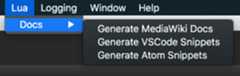
Currently the framework supports the creation of the following documentation:
- MediaWiki pages per api
- Visual Studio Code snippets for auto complete
- Atom Snippets for auto complete
These are all created by using the attributes attached to your apis, api function, api variables and enums.All the available attributes are used in the code snippets above, however here's a quick reference:
| Attribute | Use |
|---|---|
| LuaApi | Above LuaApiBase derived type |
| LuaApiFunction | Above functions that are part of the Lua api table |
| LuaApiVariable | Above variables that are part of the Lua api table |
| LuaApiEnum | Above enums that you want to be attached to LuaVMs |
| LuaApiEnumValue | Above enums values that you'd like to describe or hide |
Adding more documentation formats is very easy, why not try adding another doucmentation type yourself in LuaDocGenerator.cs!
About
A wrapper around MoonSharp that allows easy development of moddable Unity games
Topics
Resources
License
Uh oh!
There was an error while loading.Please reload this page.