- Notifications
You must be signed in to change notification settings - Fork8
➗ Library for parsing math expressions with rational numbers, finding their derivatives and compiling an optimal IL code
License
KvanTTT/MathExpressions.NET
Folders and files
| Name | Name | Last commit message | Last commit date | |
|---|---|---|---|---|
Repository files navigation
A library for parsing math expressions with rational numbers,finding their derivatives, and compiling an optimal IL code.
- ANTLR - Code generation from math expression grammar.
- WolframAlpha.NET - Symbolic derivatives testing.
- ILSpy - IL assembly disassembler. For compilation testing.
- NUnit - General testing purposes.
varfunc=newMathFunc("(2 * x ^ 2 - 1 + 0 * a) ^ -1 * (2 * x ^ 2 - 1 * 1) ^ -1").Simplify();// func == (x ^ 2 * 2 + -1) ^ -2;
varfunc=newMathFunc("(2 * x ^ 2 - 1 + 0 * a) ^ -1 * (2 * x ^ 2 - 1 * 1) ^ -1").GetDerivative();// func == -((x ^ 2 * 2 + -1) ^ -3 * x * 8)
using(varmathAssembly=newMathAssembly("(2 * x ^ 2 - 1 + 0 * a) ^ -1 * (2 * x ^ 2 - 1 * 1) ^ -1","x")){varfuncResult=mathAssembly.Func(5);// funcResult == 0.00041649312786339027 (precision value is -1/2401)varfuncDerResult=mathAssembly.FuncDerivative(5);// funcDerResult == -0.00033999439009256349 (precision value is -40/117649)}
You should compile assembly with MathExpressions.NET and add make referenceto this assembly your project.For function:(2 * x ^ 2 - 1 + 0 * a) ^ -1 * (2 * x ^ 2 - 1 * 1) ^ -1with the variable ofx, you'll get:
varfuncResult=MathFuncLib.MathFunc.Func(5);// funcResult == 0.00041649312786339027 (precision value is -1/2401)varfuncDerResult=MathFuncLib.MathFunc.FuncDerivative(5);// funcDerResult == -0.00033999439009256349 (precision value is -40/117649)
using(varmathAssembly=newMathAssembly("b(x) + 10 * x * a","x")){varb=newFunc<double,double>(x=>x*x);varfuncResult=mathAssembly.Func(5,2,b);// x = 5; a = 2; b = x ^ 2// funcResult == 5 ^ 2 + 10 * 5 * 2 = 125varfuncDerResult=mathAssembly.FuncDerivative(5,2,b);// x = 5; a = 2; b = x ^ 2// funcDerResult == (b(x + dx) - b(x)) / dx + 10 * a = 30}
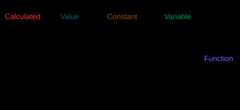
- Calculated - Calculated
decimalconstant. - Value - Calculated constant of
Rational<long, long>format.Based onStephen M. McKamey implementation. - Constant - Undefined constant. It have name such as
a,betc. - Variable - It have name, such as
x,yetc. - Function - This node present known (
sin(x),log(x, 3),x + a) orunknown (a(x), b'(x))function. It may have one or more children.
Implemented withANTLR. The output of this step is athe tree structure of MathFuncNode types, which was described above.

- Taking of symbolic derivative. This is the recursive process ofreplacing simple nodes without children by constants (0 and 1),taking substitutions from the table for known functions (such as for
sin(x)' = cos(x)),and replacing unknown functions with themselves with stroke (I meana(x)' = a'(x)).- Calculated' = Value' = Constant' = 0
- Variable' = 1
- KnownFunc(x)' = Derivatives[KnownFunc](x) * x'
- UnknownFunc(x)' = UnknownFunc'(x) * x'
- Simplification. This is similar to the previous process, but with another substitution rules, such as
- a * 1 = a
- a + 0 = a
- a - a = 0
- ...
It's worth mentioning that commutative functions (addition and multiplication)taken as a function with several nodes for more easy and flexible traversers.
For properly nodes comparison, sorting is using, as demonstrated on the image below:
At this step simplified tree from the previous step transformedto the list of IL commands. There are implemented some optimizations:
At this step expression with powers converts to optimized form withexponentiation by squaring algorithm.For example:a*a*a*a*a*a will be converted to(a^2)^2 * a^2.
If the result of the calculated value of any function is using more than one time,it can be stored to the local variable and it can be used at further code by such way:
if(!func.Calculated){EmitFunc(funcNode);func.Calculated=true;}elseIlInstructions.Add(newOpCodeArg(OpCodes.Ldloc,funcNode.Number));
For generated IL code for math functions without loops, the following optimizations are available:
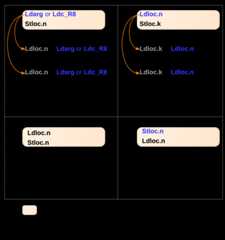
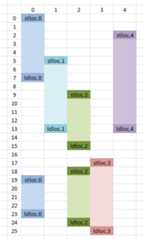
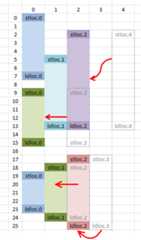
One local variable is used for every calculated function.But it can be also used for another calculated result. So, it is possible to reducethe number of local variables by such a way:
 |  |
This lib for comparison of expected derivative from WolframAlpha API and actual derivative.
.NET assembly has been generated on the compilation step. For dynamical assemblyloading and unloadingAppDomain is used withCreateInstanceFromAndUnwrap.
I compared generated IL code for example following function:
x ^ 3 + sin(3 * ln(x * 1)) + x ^ ln(2 * sin(3 * ln(x))) - 2 * x ^ 3
| csc.exe .NET 4.5.1 | MathExpressions.NET |
|---|---|
| ldarg.0 ldc.r8 3 call float64 Math::Pow(float64, float64) ldc.r8 3 ldarg.0 ldc.r8 1 mul call float64 Math::Log(float64) mul call float64 Math::Sin(float64) add ldarg.0 ldc.r8 2 ldc.r8 3 ldarg.0 call float64Math::Log(float64) mul call float64 Math::Sin(float64) mul call float64 Math::Log(float64) ldc.r8 2 ldarg.0 ldc.r83 call float64 Math::Pow(float64, float64) mul sub call float64 Math::Pow(float64, float64) add ret | ldarg.0 ldc.r8 2 ldc.r8 3 ldarg.0 call float64 Math::Log(float64) mul call float64 Math::Sin(float64) stloc.0 ldloc.0 mul call float64 Math::Log(float64) call float64 Math::Pow(float64,float64) ldarg.0 ldarg.0 mul ldarg.0 mul sub ldloc.0 add ret |
More detail explanation availableon Russian
About
➗ Library for parsing math expressions with rational numbers, finding their derivatives and compiling an optimal IL code
Topics
Resources
License
Uh oh!
There was an error while loading.Please reload this page.
Stars
Watchers
Forks
Packages0
Uh oh!
There was an error while loading.Please reload this page.