- Notifications
You must be signed in to change notification settings - Fork13
FunTechInc/use-shader-fx
Folders and files
| Name | Name | Last commit message | Last commit date | |
|---|---|---|---|---|
Repository files navigation

use-shader-fx is a library designed to easily implement shader effects such as fluid simulations and noise. It relies onreact-three-fiber and has been designed with performance control in mind, especially when combined withdrei.
For details on each FX, please refer to Storybook👉Storybook 👈
npm install @funtech-inc/use-shader-fx
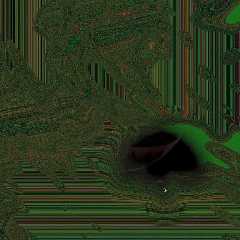 |  |  |  |
 |  |  |
| misc | useBeat,useFPSLimiter,usePointer,useDomSyncer |
|---|
From eachfxHooks, you can receive [updateFx,setParams,fxObject] in array format.HooksProps are objects that are different for each hook and contain values such assize,dpr ... etc.
updateFx- Functions to update parameters and render.updateParams- Function to update parameters only.fxObject- An object that holds various FX components, such as scene, camera, mesh, renderTarget, andoutput(final rendered texture).HooksProps-size,dpr,isSizeUpdate,onBeforeInitandrenderTargetOptions※isSizeUpdate: Whether tosetSizethe FBO when updating size or dpr(default :false).
const[updateFx,updateParams,fxObject]=useSomeFx(HooksProps);
CallupdateFx onuseFrame. The first argument is the RootState ofuseFrame and the second argument isHookParams. The third argument can beCustomParams customised by the user. Each FX hasHookParams and each type is exported.
useFrame((rootState)=>{consttexture=updateFx(rootState,HookParams,CustomParams);});

This is the simplest example!
import*asTHREEfrom"three";import{useRef}from"react";import{useFrame,useThree}from"@react-three/fiber";import{useFluid}from"@funtech-inc/use-shader-fx";exportconstHome=()=>{const{ size}=useThree();const[updateFluid,,{ output}]=useFluid({size:{width:size.width,height:size.height,},dpr:1,});useFrame((rootState)=>updateFluid(rootState));return(<mesh><boxGeometryargs={[3,3,3]}/><meshStandardMaterialmap={output}roughness={0.05}metalness={0.4}/></mesh>);};
You can user3f/createPortal to make some mesh render off-screen. All that remains is to combine the generated textures with FX!
import*asTHREEfrom"three";import{useMemo,useRef,useState}from"react";import{useFrame,useThree,createPortal}from"@react-three/fiber";import{useNoise,useSingleFBO}from"@hmng8/use-shader-fx";functionBox(props:any){// This reference will give us direct access to the meshconstmeshRef=useRef<THREE.Mesh>();// Set up state for the hovered and active stateconst[hovered,setHover]=useState(false);const[active,setActive]=useState(false);// Subscribe this component to the render-loop, rotate the mesh every frameuseFrame((state,delta)=>{meshRef.current!.rotation.x+=delta;meshRef.current!.rotation.y-=delta;});// Return view, these are regular three.js elements expressed in JSXreturn(<mesh{...props}ref={meshRef}scale={active ?2 :1.5}onClick={(event)=>setActive(!active)}onPointerOver={(event)=>setHover(true)}onPointerOut={(event)=>setHover(false)}><boxGeometryargs={[1,1,1]}/><meshStandardMaterialcolor={hovered ?"hotpink" :"orange"}/></mesh>);}exportconstHome=()=>{constref=useRef<THREE.ShaderMaterial>(null);const{ size, viewport, camera}=useThree();const[updateNoise,,{ output}]=useNoise({ size,dpr:viewport.dpr,});// This scene is rendered offscreenconstoffscreenScene=useMemo(()=>newTHREE.Scene(),[]);// create FBO for offscreen renderingconst[boxView,updateRenderTarget]=useSingleFBO({scene:offscreenScene, camera, size,dpr:viewport.dpr,});useFrame((rootState)=>{updateNoise(rootState);updateRenderTarget(rootState.gl);});return(<>{createPortal(<mesh><ambientLightintensity={Math.PI}/><spotLightposition={[10,10,10]}angle={0.15}penumbra={1}decay={0}intensity={Math.PI}/><pointLightposition={[-10,-10,-10]}decay={0}intensity={Math.PI}/><Boxposition={[-1.5,0,0]}/><Boxposition={[1.5,0,0]}/></mesh>,offscreenScene)}<mesh><planeGeometryargs={[2,2]}/><shaderMaterialref={ref}transparentvertexShader={`varying vec2 vUv;void main() {vUv = uv;gl_Position = vec4(position, 1.0);}`}fragmentShader={`precision highp float;varying vec2 vUv;uniform sampler2D u_fx;uniform sampler2D u_texture;void main() {vec2 uv = vUv;vec3 noiseMap = texture2D(u_fx, uv).rgb;vec3 nNoiseMap = noiseMap * 2.0 - 1.0;uv = uv * 2.0 - 1.0;uv *= mix(vec2(1.0), abs(nNoiseMap.rg), .6);uv = (uv + 1.0) / 2.0;gl_FragColor = texture2D(u_texture, uv);}`}uniforms={{u_texture:{value:boxView.texture},u_fx:{value:output},}}/></mesh></>);};
You can control thedpr using thePerformanceMonitor fromdrei. For more details, please refer to thescaling-performance of r3f.
exportconstFx=()=>{const[dpr,setDpr]=useState(1.5);return(<Canvasdpr={dpr}><PerformanceMonitorfactor={1}onChange={({ factor})=>{console.log(`dpr:${dpr}`);setDpr(Math.round((0.5+1.5*factor)*10)/10);}}><Suspensefallback={null}><Scene/></Suspense><Perfposition={"bottom-right"}minimal={false}/></PerformanceMonitor></Canvas>);};
By using thePerformanceMonitor, you can subscribe to performance changes withusePerformanceMonitor. For more details, refer todrei.
WithsetParams received fromfxHooks, it's possible to independently control high-load items such as iteration counts.
usePerformanceMonitor({onChange({ factor}){setParams({pressure_iterations:Math.round(20*factor),});},});
When using some expensive FX (such asuseFluid), lowering thedpr of the FBO of that FX can improve performance.
const[updateFx,setParams,fxObject]=useSomeFx({ size,dpr:0.01});
Also, you can make more detailed adjustments by passing an object todpr instead ofnumber.
typeDpr=|number|{/** you can set whether `dpr` affects `shader`. default : `false` */shader?:false|number;/** you can set whether `dpr` affects `fbo`. default : `false` */fbo?:false|number;};
The second argument contains the dependency array that updates the DOM. For example, you can pass apathname when navigating pages.
const[updateDomSyncer,setDomSyncer,domSyncerObj]=useDomSyncer({ size, dpr},[state]);useLayoutEffect(()=>{if(state===0){domArr.current=[...document.querySelectorAll(".item")!];}else{domArr.current=[...document.querySelectorAll(".item2")!];}setDomSyncer({// Because DOM rendering and React updates occur asynchronously, there may be a lag between updating dependent arrays and setting DOM arrays. That's what the Key is for. If the dependent array is updated but the Key is not, the loop will skip and return an empty texture. By updating the timing key when DOM acquisition is complete, you can perfectly synchronize DOM and Mesh updates.updateKey must be a unique value for each update, for example `performance.now()updateKey:performance.now(),dom:domArr.current,boderRadius:[...Array(domArr.current.length)].map((_,i)=>i*50.0),onIntersect:[...Array(domArr.current.length)].map((_,i)=>(entry)=>{if(entry.isIntersecting&&!domSyncerObj.isIntersecting(i,true)){// some callback}}),});},[state]);const[,copyTexture]=useCopyTexture({scene:fxTextureObj.scene,camera:fxTextureObj.camera, size, dpr},domArr.current.length);useFrame((rootState)=>{constsyncedTexture=updateDomSyncer(rootState,{texture:[...Array(domArr.current.length)].map((_,i)=>{if(domSyncerObj.isIntersecting(i,false)){textureRef.current=updateFxTexture(rootState,{map:someFx,texture0:someTexture,});returncopyTexture(rootState.gl,i);}}),});});
domSyncerObj contains an isIntersecting function that returns the DOM intersection testThe boolean will be updated after executing theonIntersect function.
typeDomSyncerObject={scene:THREE.Scene;camera:THREE.Camera;renderTarget:THREE.WebGLRenderTarget;output:THREE.Texture;/** * A function that returns a determination whether the DOM intersects or not. * The boolean will be updated after executing the onIntersect function. *@param index - Index of the dom for which you want to return an intersection decision. -1 will return the entire array. *@param once - If set to true, it will continue to return true once crossed. */isIntersecting:IsIntersecting;/** target's DOMRect[] */DOMRects:DOMRect[];/** target's intersetions boolean[] */intersections:boolean[];/** You can set callbacks for when at least one DOM is visible and when it is completely hidden. */useDomView:UseDomView;};
DomSyncerParams can be passed theonIntersect function.
typeDomSyncerParams={/** DOM array you want to synchronize */dom?:(HTMLElement|Element|null)[];/** Texture array that you want to synchronize with the DOM rectangle */texture?:THREE.Texture[];/** default:0.0[] */boderRadius?:number[];/** the angle you want to rotate */rotation?:THREE.Euler[];/** Array of callback functions when crossed */onIntersect?:((entry:IntersectionObserverEntry)=>void)[];/** Because DOM rendering and React updates occur asynchronously, there may be a lag between updating dependent arrays and setting DOM arrays. That's what the Key is for. If the dependent array is updated but the Key is not, the loop will skip and return an empty texture. By updating the timing key when DOM acquisition is complete, you can perfectly synchronize DOM and Mesh updates. */updateKey?:Key;};
updateKey : Because DOM rendering and React updates occur asynchronously, there may be a lag between updating dependent arrays and setting DOM arrays. That's what the Key is for. If the dependent array is updated but the Key is not, the loop will skip and return an empty texture. By updating the timing key when DOM acquisition is complete, you can perfectly synchronize DOM and Mesh updates.
When given thepointer vector2 from r3f'sRootState, it generates an update function that returns {currentPointer, prevPointer, diffPointer, isVelocityUpdate, velocity}.You can also addlerp (0~1, lerp intensity (0 to less than 1) , default: 0)
constupdatePointer=usePointer(lerp);const{ currentPointer, prevPointer, diffPointer, isVelocityUpdate, velocity}=updatePointer(pointer);
You can override the pointer process by passingpointerValues toupdateFx in theuseFrame.
useFrame((rootState)=>{constpointerValues=updatePointer(rootState.pointer);updateBrush(rootState,{pointerValues:pointerValues,});});
Time-sensitive hooks such asuseNoise anduseMarble acceptbeat.The second argument can beeasing.easing functions are referenced fromhttps://github.com/ai/easings.net , default : "easeOutQuart"
constbeting=useBeat(bpm,"easeOutQuad");useFrame((rootState)=>{const{ beat, hash}=beting(rootState.clock);updateMarble(rootState,{beat:beat,});});
typeBeatValues={beat:number;floor:number;fract:number;/** unique hash specific to the beat */hash:number;};
Allows you to skip FX that do not need to be processed at 60 FPS.
constlimiter=useFPSLimiter(30);useFrame((rootState)=>{if(!limiter(rootState.clock)){return;}});
Generate an FBO array to copy the texture.
const[renderTargets,copyTexture]=useCopyTexture(UseFboProps,length);copyTexture(gl,index);// return texture
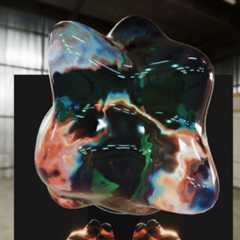
The3D series has a set of exported hooks, each withCreate, likeuseCreateWobble3D, which can be used as a texture, but also to addobject3D as aprimitive to an r3f scene. It is also possible to addobject3D as aprimitive to an r3f scene.
const[updateWobble,wobble]=useCreateWobble3D({baseMaterial:THREE.MeshPhysicalMaterial,materialParameters:{roughness:0.0,transmission:1,thickness:1,},});useFrame((rootState)=>updateWobble(rootState));return(<mesh><Environmentpreset="warehouse"background/><primitiveobject={wobble.mesh}/></mesh>);
By default, it is a blank canvas with nothing drawn on it. You can customise the shaders usingonBeforeInit.
Fragment shaders haveuTexture,uBackbuffer,uTime,uPointer anduResolution as default uniforms.useRawBlank is more raw, default uniforms is onlyuResolution.
const[updateBlank,_,{output:blank, material}]=useBlank({ size,dpr:viewport.dpr,onBeforeInit:useCallback((shader:OnBeforeInitParameters)=>{Object.assign(shader.uniforms,{hoge:{value:0},});shader.fragmentShader=shader.fragmentShader.replace("#usf <uniforms>","uniform float hoge;");shader.fragmentShader=shader.fragmentShader.replace("#usf <main>",`usf_FragColor=vec4(vec3(1.,hoge,1.),1.);`);},[]),});useFrame((rootState)=>{updateBlank(rootState,{},{hoge:Math.sin(rootState.clock.getElapsedTime()),});});
※usf_FragColor overridesgl_FragColor※usf_Position overridesgl_Position
About
⚡️ More fx, Less GLSL
Topics
Resources
License
Contributing
Uh oh!
There was an error while loading.Please reload this page.
Stars
Watchers
Forks
Uh oh!
There was an error while loading.Please reload this page.
Contributors4
Uh oh!
There was an error while loading.Please reload this page.