- Notifications
You must be signed in to change notification settings - Fork8
Colbydude/phaser-3-palette-swapping-example
Folders and files
| Name | Name | Last commit message | Last commit date | |
|---|---|---|---|---|
Repository files navigation
Example of using palette swapping on a spritesheet in Phaser 3.
This initial idea came from this article:
http://laxvikinggames.blogspot.com/2015/01/build-dynamic-texture-atlas-in-phaser.html
The palette swapping in this example is achieved by taking an image that contains palette data then going through a spritesheet and switching the matching pixels from the original palette to the new palette.
Our "palette data" image is a small image consisting of each unique color we want to replace and their replacements. Each color is a single pixel, and each row represents an individual palette.
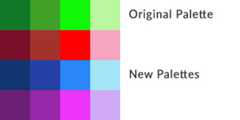
We then define a config containing the relevant information for creating the necessary spritesheets and animations after the palette swapping is performed.
varanimConfig={paletteKey:'link-palette',// Palette file we're referencing.paletteNames:['green','red','blue','purple'],// Names for each palette to build out the names for the atlas.spriteSheet:{// Spritesheet we're manipulating.key:'link',frameWidth:32,// NOTE: Potential drawback. All frames are the same size.frameHeight:32},animations:[// Animation data.{key:'walk-down',frameRate:15,startFrame:0,endFrame:9},{key:'walk-left',frameRate:15,startFrame:10,endFrame:19},{key:'walk-up',frameRate:15,startFrame:20,endFrame:29}]};
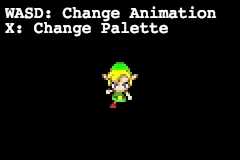
Once the spritesheets and animations have been built, we can then use them in our game as we need!
About
Example of using palette swapping on a spritesheet in Phaser 3.
Topics
Resources
Uh oh!
There was an error while loading.Please reload this page.
Stars
Watchers
Forks
Releases
Packages0
Uh oh!
There was an error while loading.Please reload this page.