Uh oh!
There was an error while loading.Please reload this page.
- Notifications
You must be signed in to change notification settings - Fork264
📈📊📱💻🖥️An elegant modern declarative data visualization chart framework for iOS, iPadOS and macOS. Extremely powerful, supports line, spline, area, areaspline, column, bar, pie, scatter, angular gauges, arearange, areasplinerange, columnrange, bubble, box plot, error bars, funnel, waterfall and polar chart types. 极其精美而又强大的现代化声明式数据可视化图表框架,支持柱状图、条形…
License
AAChartModel/AAChartKit-Swift
Folders and files
| Name | Name | Last commit message | Last commit date | |
|---|---|---|---|---|
Repository files navigation


AAInfographics is theSwift language version ofAAChartKit which is object-oriented, a set of easy-to-use, extremely elegant graphics drawing controls,based on the popular open source front-end chart libraryHighcharts. It makes it very fast to add interactive charts to your mobile projects. It supports single touch-drag for data inspection, multi-touch for zooming, and advanced responsiveness for your apps .
🎂Environment friendly. Support
iOS、iPadOSandmacOS. Totally supportSwiftlanguage, and there are more types version such asObjective-Clanguage versionAAChartKit 、Javalanguage versionAAChartCore 、Kotlinlanguage versionAAInfographics . To get more details you can see thesource code links list.🚀Powerful and easy to use. It supports
column chart,bar chart,area chart,areaspline chart,line chart,spline chart,radar chart,polar chart,pie chart,bubble chart,packedbubble chart,pyramid chart,funnel chart,columnpyramid chart,columnrange chart,arearange chart,mixed chartand other graphics. Support for more chart types is planned.📝Modern Declarative Syntax. Unlike previous imperative programming techniques, drawing any custom chart in AAChartKit, you don't need to care about the inner implementation details which is annoying && boring.Describe what you want, you will get what you described.
🎮Interactive and animated. The charts
animationeffect is exquisite, delicate, smooth and beautiful.⛓Chain programming. Supports
chain programming syntaxlikeSwiftUI andJetpack Compose.🦋Minimalist.
AAChartView + AAChartModel = Chart. TheAAInfographics follows a minimalist formula: Chart view + Chart model = The chart you want, just like the powerful and beautiful charts frameworkAAChartKit.🖱Interaction event callback. Support for monitoringuser click events and single finger move over events, which can be used to achieve double charts linked-working and even multiple charts linkage, as well as other more complex custom user interaction effects.
| Column Chart | Column Range Chart | Area Chart |
|---|---|---|
 |  |  |
| Line Chart | Step Area Chart | Step Line Chart |
|---|---|---|
 |  |  |
| Spline Chart | Areaspline Chart | Stacked Polar Chart |
|---|---|---|
 |  |  |
| Bubble Chart | Arearange Average Value Chart | Column Mixed Line Chart |
|---|---|---|
 |  |  |
| Scatter Chart | Boxplot Chart | Mirror Column Chart |
|---|---|---|
 |  |  |
- Add following content
pod'AAInfographics',:git=>'https://github.com/AAChartModel/AAChartKit-Swift.git'
to your project Podfile.
- Run
pod installorpod update. - Import
AAInfographics.
- Add following content
github"https://github.com/AAChartModel/AAChartKit-Swift.git" ~>1.0
to your project Cartfile.
- Run
carthage bootstraporcarthage update. - Import
AAInfographics.
- Download whole project demo of
AAInfographicsDemo - Drag the folder
AAInfographicsinto your project.
- Creat the instance object of chart view:
AAChartView
letchartViewWidth=self.view.frame.size.widthletchartViewHeight=self.view.frame.size.height aaChartView=AAChartView() aaChartView?.frame=CGRect(x:0, y:60, width: chartViewWidth, height: chartViewHeight) // set the content height of aachartView // aaChartView?.contentHeight = self.view.frame.size.heightself.view.addSubview(aaChartView!)
- Configure the properties of chart model:
AAChartModel
letaaChartModel=AAChartModel().chartType(.area)//Can be any of the chart types listed under `AAChartType`..animationType(.bounce).title("TITLE")//The chart title.subtitle("subtitle")//The chart subtitle.dataLabelsEnabled(false) //Enable or disable the data labels. Defaults to false.tooltipValueSuffix("USD")//the value suffix of the chart tooltip.categories(["Jan","Feb","Mar","Apr","May","Jun","Jul","Aug","Sep","Oct","Nov","Dec"]).colorsTheme(["#fe117c","#ffc069","#06caf4","#7dffc0"]).series([AASeriesElement().name("Tokyo").data([7.0,6.9,9.5,14.5,18.2,21.5,25.2,26.5,23.3,18.3,13.9,9.6]),AASeriesElement().name("New York").data([0.2,0.8,5.7,11.3,17.0,22.0,24.8,24.1,20.1,14.1,8.6,2.5]),AASeriesElement().name("Berlin").data([0.9,0.6,3.5,8.4,13.5,17.0,18.6,17.9,14.3,9.0,3.9,1.0]),AASeriesElement().name("London").data([3.9,4.2,5.7,8.5,11.9,15.2,17.0,16.6,14.2,10.3,6.6,4.8]),])
- Draw the chart(This method is called only for the first time after you create an AAChartView instance object)
//The chart view object calls the instance object of AAChartModel and draws the final graphic aaChartView?.aa_drawChartWithChartModel(aaChartModel!)
🌹🌹🌹Congratulations! Everything was done!!! You will get what you want!!!
if you want to refresh chart content,you should do something as follow.According to your actual needs, select the function that fits you.
- Only refresh the chart data(This method is recommended to be called for updating the series data dynamically)
//Only refresh the chart series data aaChartView?.aa_onlyRefreshTheChartDataWithChartModelSeries(chartModelSeriesArray)
- Refresh the chart, minus the chart data (this method is recommended for subsequent refreshes after the first drawing of graphics has completed. If you want to update the chart data only, you should use the function
aa_onlyRefreshTheChartDataWithChartModelSeries)
//Refresh the chart after the AAChartModel whole content is updated aaChartView?.aa_refreshChartWholeContentWithChartModel(aaChartModel!)


- Note: The following
DEMO pictureis aGIF dynamic picturewhich has a size of around6M. If you don't see any dynamic preview, then this is because the picture resources were not fully loaded. In such a case please be patient and wait for the contents to finish loading. Maybe you need to reload this page.

you can monitor the user cick or finger move over events message through implementing delegate function for AAChartView instance object
//Set AAChartView events delegate aaChartView!.delegate=selfasAAChartViewDelegate //implement AAChartView user click or finger move over events delegate functionextensionBasicChartVC:AAChartViewDelegate{openfunc aaChartView(_ aaChartView:AAChartView, clickEventMessage:AAClickEventMessageModel){print(""" clicked point series element name:\(clickEventMessage.name??"") 🖱🖱🖱WARNING!!!!!!!!!!!!!!!!!!!! Click Event Message !!!!!!!!!!!!!!!!!!!! WARNING🖱🖱🖱 ========================================================================================== ------------------------------------------------------------------------------------------ user finger moved over!!!,get the move over event message: { category =\(String(describing: clickEventMessage.category)) index =\(String(describing: clickEventMessage.index)) name =\(String(describing: clickEventMessage.name)) offset =\(String(describing: clickEventMessage.offset)) x =\(String(describing: clickEventMessage.x)) y =\(String(describing: clickEventMessage.y)) } +++++++++++++++++++++++++++++++++++++++++++++++++++++++++++++++++++++++++++++++++++++++++++""")}openfunc aaChartView(_ aaChartView:AAChartView, moveOverEventMessage:AAMoveOverEventMessageModel){print(""" moved over point series element name:\(moveOverEventMessage.name??"") ✋🏻✋🏻✋🏻✋🏻✋🏻WARNING!!!!!!!!!!!!!! Move Over Event Message !!!!!!!!!!!!!! WARNING✋🏻✋🏻✋🏻✋🏻✋🏻 ========================================================================================== ------------------------------------------------------------------------------------------ user finger moved over!!!,get the move over event message: { category =\(String(describing: moveOverEventMessage.category)) index =\(String(describing: moveOverEventMessage.index)) name =\(String(describing: moveOverEventMessage.name)) offset =\(String(describing: moveOverEventMessage.offset)) x =\(String(describing: moveOverEventMessage.x)) y =\(String(describing: moveOverEventMessage.y)) } +++++++++++++++++++++++++++++++++++++++++++++++++++++++++++++++++++++++++++++++++++++++++++""")}}
The received user click or finger move over events contain following content
publicclassAAEventMessageModel:NSObject{publicvarname:String?publicvarx:Float?publicvary:Float?publicvarcategory:String?publicvaroffset:[String:Any]?publicvarindex:Int?}publicclassAAClickEventMessageModel:AAEventMessageModel{}publicclassAAMoveOverEventMessageModel:AAEventMessageModel{}
Monitoring user click events can achieve a variety of custom functions. For example, you can implementDouble Charts Linkage through user click event callbacks. The example effects are as follows

As we all know, AAInfographics support using HTML String. Most of time, theheaderFormat 、pointFormat、footerFormat HTML string is enough for customizing chart tooltip string content, However, sometimes the needs of APP is so weird to satified, in this time, you can even customize the chart tooltip style throughJavaScript function.
For example
- configuring AATooltip instance object properties as follow:
aaOptions.tooltip?.useHTML(true).formatter("""function(){return' 🌕 🌖 🌗 🌘 🌑 🌒 🌓 🌔 <br/> '+' Support JavaScript Function Just Right Now !!! <br/> '+' The Gold Price For <b>2020 '+this.x+' </b> Is <b> '+this.y+' </b> Dollars ';}""").valueDecimals(2)//设置取值精确到小数点后几位//设置取值精确到小数点后几位.backgroundColor("#000000").borderColor("#000000").style(AAStyle().color("#FFD700").fontSize(12))
you can get the customized tooltip style chart like this👇
- configuring AATooltip instance object properties as follow:
aaOptions.tooltip?.useHTML(true).formatter(#"""function(){letwholeContentStr='<span style=\"'+'color:lightGray; font-size:13px\"'+'>◉ Time: '+this.x+' year</span><br/>';letlength=this.points.length;for(leti=0;i<length;i++){letthisPoint=this.points[i];letyValue=thisPoint.y;if(yValue!=0){letspanStyleStartStr='<span style=\"'+'color:'+thisPoint.color+'; font-size:13px\"'+'>◉ ';letspanStyleEndStr='</span> <br/>';wholeContentStr+=spanStyleStartStr+thisPoint.series.name+': '+thisPoint.y+'℃'+spanStyleEndStr;}}returnwholeContentStr;}"""#).backgroundColor("#050505").borderColor("#050505")
you can get the customized tooltip style chart like this👇
chart with value range segmentation
bands 🎀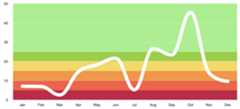
chart with value range segmentation
lines 🧶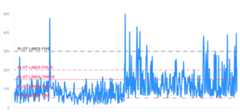
chart with value range segmentation
zones 🧱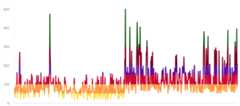


publicenumAAChartType:String{case column //Column series display one column per value along an X axis.case bar //A bar series is a special type of column series where the columns are horizontal.case area //The area series type.case areaspline //The area spline series is an area series where the graph between the points is smoothed into a spline.case line //A line series displays information as a series of data points connected by straight line segments.case spline //A spline series is a special type of line series, where the segments between the data points are smoothed.case scatter //A scatter plot uses cartesian coordinates to display values for two variables for a set of data.case pie //A pie chart is a circular graphic which is divided into slices to illustrate numerical proportion.case bubble //A bubble series is a three dimensional series type where each point renders an X, Y and Z value. Each points is drawn as a bubble where the position along the X and Y axes mark the X and Y values, and the size of the bubble relates to the Z value.case packedbubble //A packed bubble series is a two dimensional series type, where each point renders a value in X, Y position. Each point is drawn as a bubble where the bubbles don't overlap with each other and the radius of the bubble relates to the value.case pyramid //A pyramid series is a special type of funnel, without neck and reversed by default.case funnel //Funnel charts are a type of chart often used to visualize stages in a sales project, where the top are the initial stages with the most clients. It requires that the modules/funnel.js file is loaded.case columnpyramid //Column pyramid series display one pyramid per value along an X axis. To display horizontal pyramids, set chart.inverted to true.case columnrange //The column range is a cartesian series type with higher and lower Y values along an X axis. To display horizontal bars, set chart.inverted to true.case arearange //The area range series is a cartesian series with higher and lower values for each point along an X axis, where the area between the values is shaded.case areasplinerange //The area spline range is a cartesian series type with higher and lower Y values along an X axis. The area inside the range is colored, and the graph outlining the area is a smoothed spline.case boxplot //A box plot is a convenient way of depicting groups of data through their five-number summaries: the smallest observation (sample minimum), lower quartile (Q1), median (Q2), upper quartile (Q3), and largest observation (sample maximum).case waterfall //A waterfall chart displays sequentially introduced positive or negative values in cumulative columns.case polygon //A polygon series can be used to draw any freeform shape in the cartesian coordinate system. A fill is applied with the color option, and stroke is applied through lineWidth and lineColor options.case gauge //Gauges are circular plots displaying one or more values with a dial pointing to values along the perimeter.case errorbar //Error bars are a graphical representation of the variability of data and are used on graphs to indicate the error, or uncertainty in a reported measurement.}
enumAAChartZoomType:String{case none="none"case x="x"case y="y"case xy="xy"}
publicenumAAChartLineDashStyleType:String{case solid //———————————————————————————————————case shortDash //— — — — — — — — — — — — — — — — — —case shortDot //ⵈⵈⵈⵈⵈⵈⵈⵈⵈⵈⵈⵈⵈⵈⵈⵈⵈⵈⵈⵈⵈⵈⵈⵈⵈⵈⵈⵈcase shortDashDot //—‧—‧—‧—‧—‧—‧—‧—‧—‧—‧—‧—‧—‧—‧—‧—‧—‧—‧case shortDashDotDot //—‧‧—‧‧—‧‧—‧‧—‧‧—‧‧—‧‧—‧‧—‧‧—‧‧—‧‧—‧‧case dot //‧‧‧‧‧‧‧‧‧‧‧‧‧‧‧‧‧‧‧‧‧‧‧‧‧‧‧‧‧‧‧‧‧‧‧case dash //—— —— —— —— —— —— —— —— —— —— —— ——case longDash //——— ——— ——— ——— ——— ——— ——— ——— ———case dashDot //——‧——‧——‧——‧——‧——‧——‧——‧——‧——‧——‧——‧case longDashDot //———‧———‧———‧———‧———‧———‧———‧———‧———‧case longDashDotDot //———‧‧———‧‧———‧‧———‧‧———‧‧———‧‧———‧‧}
publicenumAAChartAnimationType:String{case easeInQuad="easeInQuad"case easeOutQuad="easeOutQuad"case easeInOutQuad="easeInOutQuad"case easeInCubic="easeInCubic"case easeOutCubic="easeOutCubic"case easeInOutCubic="easeInOutCubic"case easeInQuart="easeInQuart"case easeOutQuart="easeOutQuart"case easeInOutQuart="easeInOutQuart"case easeInQuint="easeInQuint"case easeOutQuint="easeOutQuint"case easeInOutQuint="easeInOutQuint"case easeInSine="easeInSine"case easeOutSine="easeOutSine"case easeInOutSine="easeInOutSine"case easeInExpo="easeInExpo"case easeOutExpo="easeOutExpo"case easeInOutExpo="easeInOutExpo"case easeInCirc="easeInCirc"case easeOutCirc="easeOutCirc"case easeInOutCirc="easeInOutCirc"case easeOutBounce="easeOutBounce"case easeInBack="easeInBack"case easeOutBack="easeOutBack"case easeInOutBack="easeInOutBack"case elastic="elastic"case swingFromTo="swingFromTo"case swingFrom="swingFrom"case swingTo="swingTo"case bounce="bounce"case bouncePast="bouncePast"case easeFromTo="easeFromTo"case easeFrom="easeFrom"case easeTo="easeTo"}
Here are the ten concrete animation types ofAAInfographics
| Back | Bounce | Circ | Cubic | Elastic |
|---|---|---|---|---|
 |  |  |  |  |
| Expo | Quad | Quart | Quint | Sine |
|---|---|---|---|---|
 |  |  |  |  |
| Property name | Property type | Description | Value Range |
|---|---|---|---|
| title | String | The chart title | Any valid string |
| subtitle | String | The chart subtitle | Any valid string |
| chartType | AAChartType | The default series type for the chart. Can be any of the chart types listed underAAChartType. | .column, .bar, .area, .areaSpline, .line, .spline, .pie, .bubble, .scatter, .pyramid, .funnel, .areaRange, .columnRange |
| stacking | AAChartStackingType | Whether to stack the values of each series on top of each other. Possible values are null to disable, "normal" to stack by value or "percent". When stacking is enabled, data must be sorted in ascending X order | .none, .normal, .percent |
| symbol | AAChartSymbolType | A predefined shape or symbol for the marker. When null, the symbol is pulled from options.symbols. Other possible values are "circle", "square", "diamond", "triangle" and "triangle-down" | .circle, .square, .diamond, .triangle, .triangleDown |
publicclassAAChartModel:AAObject{publicvaranimationType:AAChartAnimationType? //The type of chart animationpublicvaranimationDuration:Int? //The chart rendering animation durationpublicvartitle:String? //The chart titlepublicvartitleStyle:AAStyle? //The chart title stylepublicvarsubtitle:String? //The chart subtitlepublicvarsubtitleAlign:AAChartAlignType?//The chart subtitle text align stylepublicvarsubtitleStyle:AAStyle? //The chart subtitle stylepublicvarchartType:AAChartType? //The default series type for the chart. Can be any of the chart types listed under `AAChartType`. Defaults to linepublicvarstacking:AAChartStackingType? //Whether to stack the values of each series on top of each other. Possible values are null to disable, "normal" to stack by value or "percent". When stacking is enabled, data must be sorted in ascending X orderpublicvarmarkerSymbol:AAChartSymbolType? //A predefined shape or symbol for the marker. When null, the symbol is pulled from options.symbols. Other possible values are "circle", "square", "diamond", "triangle" and "triangle-down"publicvarmarkerSymbolStyle:AAChartSymbolStyleType?publicvarzoomType:AAChartZoomType? //Decides in what dimensions the user can zoom by dragging the mouse. Can be one of x, y or xypublicvarinverted:Bool? //Whether to invert the axes so that the x axis is vertical and y axis is horizontal. When true, the x axis is reversed by default. If a bar series is present in the chart, it will be inverted automatically.Inverting the chart doesn't have an effect if there are no cartesian series in the chart, or if the chart is polar.Defaults to falsepublicvarxAxisReversed:Bool? //Whether to reverse the axis so that the highest number is closest to the origin. If the chart is inverted, the x axis is reversed by default. Defaults to falsepublicvaryAxisReversed:Bool? //Whether to reverse the axis so that the highest number is closest to the origin. If the chart is inverted, the x axis is reversed by default. Defaults to falsepublicvarpolar:Bool? //When true, cartesian charts like line, spline, area and column are transformed into the polar coordinate system. Requires `AAHighchartsMore.js`. Defaults to falsepublicvarmargin:[Any?]?publicvardataLabelsEnabled:Bool? //Enable or disable the data labels. Defaults to falsepublicvardataLabelsStyle:AAStyle? //The data labels stylepublicvarxAxisLabelsEnabled:Bool? //Enable or disable the axis labels. Defaults to truepublicvarxAxisLabelsStyle:AAStyle? //The x axis labels stylepublicvarcategories:[String]? //Set new categories for the axispublicvarxAxisGridLineWidth:Float? //The width of the grid lines extending the ticks across the plot area.Defaults to 0publicvarxAxisVisible:Bool? //Show the x axis or notpublicvarxAxisTickInterval:Float? //Custom x axis tick interval,It is useful when the x categories array is too long to show all of thempublicvaryAxisVisible:Bool? //Show the y axis or notpublicvaryAxisLabelsEnabled:Bool? //Enable or disable the axis labels. Defaults to truepublicvaryAxisLabelsStyle:AAStyle? //The y axis labels stylepublicvaryAxisTitle:String? //The actual text of the axis titlepublicvarxAxisTitle:String? //The actual text of the axis titlepublicvaryAxisLineWidth:Float? //The width of y axis linepublicvaryAxisGridLineWidth:Float? //The width of the grid lines extending the ticks across the plot area. Defaults to 1publicvaryAxisMin:Double? //The y axis mini valuepublicvaryAxisMax:Double? //The y axis max valuepublicvaryAxisTickPositions:[Any]? //An array defining where the ticks are laid out on the axis. This overrides the default behaviour of tickPixelInterval and tickInterval.publicvaryAxisAllowDecimals:Bool? //The y axis values label allow decimals or notpublicvartooltipEnabled:Bool? //Show the tooltip or notpublicvartooltipValueSuffix:String? //Custom tooltip value unit suffixpublicvarcolorsTheme:[Any]? //An array containing the default colors for the chart's series. When all colors are used, new colors are pulled from the start again. Defaults to: ["#bb250c","#f67210","#fde680","#257679","#f1c6c5"]publicvarseries:[Any]? //An array of all the chart's seriespublicvarlegendEnabled:Bool? //Enable or disable the legend. Defaults to truepublicvarbackgroundColor:Any? //The background color or gradient for the outer chart area. Defaults to #FFFFFFpublicvarborderRadius:Float? //The corner radius of the outer chart border. Defaults to 0publicvarmarkerRadius:Float? //The radius of the point marker. Defaults to 4publicvarscrollablePlotArea:AAScrollablePlotArea? //Scroll properties if supported......}
An An
"CODE IS FAR AWAY FROM BUG WITH THE ANIMAL PROTECTING" * ##2 ##2 * ┏-##1 ┏-##1 * ┏_┛ ┻---━┛_┻━━┓ * ┃ ┃ * ┃ ━ ┃ * ┃@^ @^ ┃ * ┃ ┃ * ┃ ┻ ┃ * ┃_ _┃ * ┗━┓ ┏━┛ * ┃ ┃神兽保佑 * ┃ ┃永无BUG! * ┃ ┗━━━┓----| * ┃ ┣┓}}} * ┃ ┏┛ * ┗┓&&&┓-┏&&&┓┏┛-| * ┃┫┫ ┃┫┫ * ┗┻┛ ┗┻┛ * *"CODE IS FAR AWAY FROM BUG WITH THE ANIMAL PROTECTING"
| Language | Project Name | Target Platform | Source Code Link |
|---|---|---|---|
| Swift | AAInfographics | iOS | https://github.com/AAChartModel/AAChartKit-Swift |
| Objective C | AAChartKit | iOS | https://github.com/AAChartModel/AAChartKit |
| Kotlin | AAInfographics | Android | https://github.com/AAChartModel/AAChartCore-Kotlin |
| Java | AAChartCore | Android | https://github.com/AAChartModel/AAChartCore |
Pro Versions are more powerful data visualization frameworks that support more types beautiful chart like bellcurve, bullet, columnpyramid, cylinder, dependencywheel, heatmap, histogram, networkgraph, organization, packedbubble, pareto, sankey, series, solidgauge, streamgraph, sunburst, tilemap, timeline, treemap, variablepie, variwide, vector, venn, windbarb, wordcloud, xrange charts and so on.
| Language | Project Name | Target Platform | Source Code Link |
|---|---|---|---|
| Swift | AAInfographics-Pro | iOS | https://github.com/AAChartModel/AAChartKit-Swift-Pro |
| Objective C | AAChartKit-Pro | iOS | https://github.com/AAChartModel/AAChartKit-Pro |
| Kotlin | AAInfographics-Pro | Android | Coming Soon... |
| Java | AAChartCore-Pro | Android | Coming Soon... |

AAInfographics is available under the MIT license. See theLICENSE file for more information.
- 🌕 🌖 🌗 🌘 WARM TIPS!!! 🌑 🌒 🌓 🌔
- Please contact me on GitHub,if there are any problems encountered in use.
- GitHub Issues :https://github.com/AAChartModel/AAChartKit-Swift/issues
- And if you want to contribute for this project, please contact me as well
- GitHub :https://github.com/AAChartModel
- StackOverflow :https://stackoverflow.com/users/7842508/codeforu
- JianShu :http://www.jianshu.com/u/f1e6753d4254
- SegmentFault :https://segmentfault.com/u/huanghunbieguan
- Support for the user to add delegate events after the graphics content loading was completed
- Support graphics to refresh global content dynamically
- Support graphics to refresh pure data (
series) content dynamically - Support color layer gradient effects
- Support 3D graphics effects, valid only for partial graphics such as
column chart、bar chart、pie charts、scatterplot chart、bubble chart, etc - Support horizontal screen (full screen) effect
- Support setting graphics rendering animation freely
- Support for users to configure
AAOptionsmodel object properties freely - Support stacking the graphics
- Support reversing the graphics axis
- Support rendering the scatter chart
- Support rendering the column range map
- Support rendering the area range graph
- Support rendering the polar chart
- Support rendering the step line chart
- Support rendering the step area chart
- Support rendering the rectangular tree hierarchy diagrams
- Support rendering the circular progress bar chart
- Support adding clicked event callbacks for graphics
- Support adding finger✋🏻 or mouse🖱 move over event callbacks for graphics
- Support graphics to refresh pure data in real time and scroll dynamically
- Support rendered graphics to generate image files
- Support generating image files saved to the system album
About
📈📊📱💻🖥️An elegant modern declarative data visualization chart framework for iOS, iPadOS and macOS. Extremely powerful, supports line, spline, area, areaspline, column, bar, pie, scatter, angular gauges, arearange, areasplinerange, columnrange, bubble, box plot, error bars, funnel, waterfall and polar chart types. 极其精美而又强大的现代化声明式数据可视化图表框架,支持柱状图、条形…
Topics
Resources
License
Uh oh!
There was an error while loading.Please reload this page.
Stars
Watchers
Forks
Sponsor this project
Uh oh!
There was an error while loading.Please reload this page.
Packages0
Uh oh!
There was an error while loading.Please reload this page.