

Broadcasting#
See also
The term broadcasting describes how NumPy treats arrays with differentshapes during arithmetic operations. Subject to certain constraints,the smaller array is “broadcast” across the larger array so that theyhave compatible shapes. Broadcasting provides a means of vectorizingarray operations so that looping occurs in C instead of Python. It doesthis without making needless copies of data and usually leads toefficient algorithm implementations. There are, however, cases wherebroadcasting is a bad idea because it leads to inefficient use of memorythat slows computation.
NumPy operations are usually done on pairs of arrays on anelement-by-element basis. In the simplest case, the two arrays musthave exactly the same shape, as in the following example:
>>>importnumpyasnp>>>a=np.array([1.0,2.0,3.0])>>>b=np.array([2.0,2.0,2.0])>>>a*barray([2., 4., 6.])
NumPy’s broadcasting rule relaxes this constraint when the arrays’shapes meet certain constraints. The simplest broadcasting example occurswhen an array and a scalar value are combined in an operation:
>>>importnumpyasnp>>>a=np.array([1.0,2.0,3.0])>>>b=2.0>>>a*barray([2., 4., 6.])
The result is equivalent to the previous example whereb was an array.We can think of the scalarb beingstretched during the arithmeticoperation into an array with the same shape asa. The new elements inb, as shown inFigure 1, are simply copies of theoriginal scalar. The stretching analogy isonly conceptual. NumPy is smart enough to use the original scalar valuewithout actually making copies so that broadcasting operations are asmemory and computationally efficient as possible.
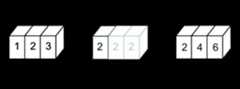
Figure 1#
In the simplest example of broadcasting, the scalarbisstretched to become an array of same shape asaso the shapesare compatible for element-by-element multiplication.
The code in the second example is more efficient than that in the firstbecause broadcasting moves less memory around during the multiplication(b is a scalar rather than an array).
General broadcasting rules#
When operating on two arrays, NumPy compares their shapes element-wise.It starts with the trailing (i.e. rightmost) dimension and works itsway left. Two dimensions are compatible when
they are equal, or
one of them is 1.
If these conditions are not met, aValueError:operandscouldnotbebroadcasttogether exception isthrown, indicating that the arrays have incompatible shapes.
Input arrays do not need to have the samenumber of dimensions. Theresulting array will have the same number of dimensions as the input arraywith the greatest number of dimensions, where thesize of each dimension isthe largest size of the corresponding dimension among the input arrays. Notethat missing dimensions are assumed to have size one.
For example, if you have a256x256x3 array of RGB values, and you wantto scale each color in the image by a different value, you can multiply theimage by a one-dimensional array with 3 values. Lining up the sizes of thetrailing axes of these arrays according to the broadcast rules, shows thatthey are compatible:
Image(3darray):256x256x3Scale(1darray):3Result(3darray):256x256x3
When either of the dimensions compared is one, the other isused. In other words, dimensions with size 1 are stretched or “copied”to match the other.
In the following example, both theA andB arrays have axes withlength one that are expanded to a larger size during the broadcastoperation:
A(4darray):8x1x6x1B(3darray):7x1x5Result(4darray):8x7x6x5
Broadcastable arrays#
A set of arrays is called “broadcastable” to the same shape ifthe above rules produce a valid result.
For example, ifa.shape is (5,1),b.shape is (1,6),c.shape is (6,)andd.shape is () so thatd is a scalar, thena,b,c,andd are all broadcastable to dimension (5,6); and
a acts like a (5,6) array where
a[:,0]is broadcast to the othercolumns,b acts like a (5,6) array where
b[0,:]is broadcastto the other rows,c acts like a (1,6) array and therefore like a (5,6) arraywhere
c[:]is broadcast to every row, and finally,d acts like a (5,6) array where the single value is repeated.
Here are some more examples:
A(2darray):5x4B(1darray):1Result(2darray):5x4A(2darray):5x4B(1darray):4Result(2darray):5x4A(3darray):15x3x5B(3darray):15x1x5Result(3darray):15x3x5A(3darray):15x3x5B(2darray):3x5Result(3darray):15x3x5A(3darray):15x3x5B(2darray):3x1Result(3darray):15x3x5
Here are examples of shapes that do not broadcast:
A(1darray):3B(1darray):4# trailing dimensions do not matchA(2darray):2x1B(3darray):8x4x3# second from last dimensions mismatched
An example of broadcasting when a 1-d array is added to a 2-d array:
>>>importnumpyasnp>>>a=np.array([[0.0,0.0,0.0],...[10.0,10.0,10.0],...[20.0,20.0,20.0],...[30.0,30.0,30.0]])>>>b=np.array([1.0,2.0,3.0])>>>a+barray([[ 1., 2., 3.], [11., 12., 13.], [21., 22., 23.], [31., 32., 33.]])>>>b=np.array([1.0,2.0,3.0,4.0])>>>a+bTraceback (most recent call last):ValueError:operands could not be broadcast together with shapes (4,3) (4,)
As shown inFigure 2,b is added to each row ofa.InFigure 3, an exception is raised because of theincompatible shapes.
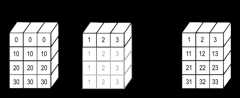
Figure 2#
A one dimensional array added to a two dimensional array results inbroadcasting if number of 1-d array elements matches the number of 2-darray columns.
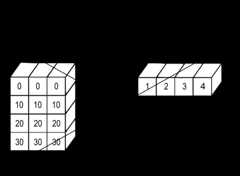
Figure 3#
When the trailing dimensions of the arrays are unequal, broadcasting failsbecause it is impossible to align the values in the rows of the 1st arraywith the elements of the 2nd arrays for element-by-element addition.
Broadcasting provides a convenient way of taking the outer product (orany other outer operation) of two arrays. The following example shows anouter addition operation of two 1-d arrays:
>>>importnumpyasnp>>>a=np.array([0.0,10.0,20.0,30.0])>>>b=np.array([1.0,2.0,3.0])>>>a[:,np.newaxis]+barray([[ 1., 2., 3.], [11., 12., 13.], [21., 22., 23.], [31., 32., 33.]])
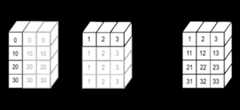
Figure 4#
In some cases, broadcasting stretches both arrays to form an output arraylarger than either of the initial arrays.
Here thenewaxis index operator inserts a new axis intoa,making it a two-dimensional4x1 array. Combining the4x1 arraywithb, which has shape(3,), yields a4x3 array.
A practical example: vector quantization#
Broadcasting comes up quite often in real world problems. A typical exampleoccurs in the vector quantization (VQ) algorithm used in information theory,classification, and other related areas. The basic operation in VQ findsthe closest point in a set of points, calledcodes in VQ jargon, to a givenpoint, called theobservation. In the very simple, two-dimensional caseshown below, the values inobservation describe the weight and height of anathlete to be classified. Thecodes represent different classes ofathletes.[1] Finding the closest point requires calculating the distancebetween observation and each of the codes. The shortest distance provides thebest match. In this example,codes[0] is the closest class indicating thatthe athlete is likely a basketball player.
>>>fromnumpyimportarray,argmin,sqrt,sum>>>observation=array([111.0,188.0])>>>codes=array([[102.0,203.0],...[132.0,193.0],...[45.0,155.0],...[57.0,173.0]])>>>diff=codes-observation# the broadcast happens here>>>dist=sqrt(sum(diff**2,axis=-1))>>>argmin(dist)0
In this example, theobservation array is stretched to matchthe shape of thecodes array:
Observation(1darray):2Codes(2darray):4x2Diff(2darray):4x2
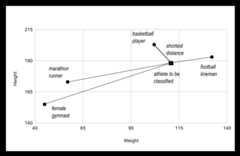
Figure 5#
The basic operation of vector quantization calculates the distance betweenan object to be classified, the dark square, and multiple known codes, thegray circles. In this simple case, the codes represent individual classes.More complex cases use multiple codes per class.
Typically, a large number ofobservations, perhaps read from a database,are compared to a set ofcodes. Consider this scenario:
Observation(2darray):10x3Codes(3darray):5x1x3Diff(3darray):5x10x3
The three-dimensional array,diff, is a consequence of broadcasting, not anecessity for the calculation. Large data sets will generate a largeintermediate array that is computationally inefficient. Instead, if eachobservation is calculated individually using a Python loop around the codein the two-dimensional example above, a much smaller array is used.
Broadcasting is a powerful tool for writing short and usually intuitive codethat does its computations very efficiently in C. However, there are caseswhen broadcasting uses unnecessarily large amounts of memory for a particularalgorithm. In these cases, it is better to write the algorithm’s outer loop inPython. This may also produce more readable code, as algorithms that usebroadcasting tend to become more difficult to interpret as the number ofdimensions in the broadcast increases.
Footnotes
[1]In this example, weight has more impact on the distance calculationthan height because of the larger values. In practice, it is important tonormalize the height and weight, often by their standard deviation across thedata set, so that both have equal influence on the distance calculation.