

Development workflow#
You already have your own forked copy of the NumPy repository, have configuredGit, and have linked the upstream repository as explained inLinking your repository to the upstream repo. What is described below is a recommended workflowwith Git.
Basic workflow#
In short:
Start a newfeature branch for each set of edits that you do.Seebelow.
Hack away! Seebelow
When finished:
Contributors: push your feature branch to your own Github repo, andcreate a pull request.
Core developers: If you want to push changes withoutfurther review, see the notesbelow.
This way of working helps to keep work well organized and the historyas clear as possible.
Making a new feature branch#
First, fetch new commits from theupstream repository:
gitfetchupstream
Then, create a new branch based on the main branch of the upstreamrepository:
gitcheckout-bmy-new-featureupstream/main
The editing workflow#
Overview#
# hack hackgitstatus# Optionalgitdiff# Optionalgitaddmodified_filegitcommit# push the branch to your own Github repogitpushoriginmy-new-feature
In more detail#
Make some changes. When you feel that you’ve made a complete, working setof related changes, move on to the next steps.
Optional: Check which files have changed with
gitstatus. You’ll see alisting like this one:# On branch my-new-feature# Changed but not updated:# (use "git add <file>..." to update what will be committed)# (use "git checkout -- <file>..." to discard changes in working directory)## modified: README## Untracked files:# (use "git add <file>..." to include in what will be committed)## INSTALLnochangesaddedtocommit(use"git add"and/or"git commit -a")
Optional: Compare the changes with the previous version using with
gitdiff. This brings up a simple text browser interface thathighlights the difference between your files and the previous version.Add any relevant modified or new files using
gitaddmodified_file.This puts the files into a staging area, which is a queueof files that will be added to your next commit. Only add files that haverelated, complete changes. Leave files with unfinished changes for latercommits.To commit the staged files into the local copy of your repo, do
gitcommit. At this point, a text editor will open up to allow you to write acommit message. Read thecommit messagesection to be sure that you are writing aproperly formatted and sufficiently detailed commit message. After savingyour message and closing the editor, your commit will be saved. For trivialcommits, a short commit message can be passed in through the command lineusing the-mflag. For example,gitcommit-am"ENH:Somemessage".In some cases, you will see this form of the commit command:
gitcommit-a. The extra-aflag automatically commits all modified files andremoves all deleted files. This can save you some typing of numerousgitaddcommands; however, it can add unwanted changes to a commit if you’renot careful.Push the changes to your fork on GitHub:
gitpushoriginmy-new-feature
Note
Assuming you have followed the instructions in these pages, git will createa default link to your GitHb repo calledorigin. Youcan ensure that the link to origin is permanently set by using the--set-upstream option:
gitpush--set-upstreamoriginmy-new-feature
From now on,git will know thatmy-new-feature is related to themy-new-feature branch in your own GitHub repo. Subsequent push callsare then simplified to the following:
gitpush
You have to use--set-upstream for each new branch that you create.
It may be the case that while you were working on your edits, new commits havebeen added toupstream that affect your work. In this case, follow theRebasing on main section of this document to apply those changes toyour branch.
Writing the commit message#
Commit messages should be clear and follow a few basic rules. Example:
ENH:addfunctionalityXtonumpy.<submodule>.Thefirstlineofthecommitmessagestartswithacapitalizedacronym(optionslistedbelow)indicatingwhattypeofcommitthisis.Thenablankline,thenmoretextifneeded.Linesshouldn't be longer than 72characters.Ifthecommitisrelatedtoaticket,indicatethatwith"See #3456","See ticket 3456","Closes #3456"orsimilar.
Describing the motivation for a change, the nature of a bug for bug fixes orsome details on what an enhancement does are also good to include in a commitmessage. Messages should be understandable without looking at the codechanges. A commit message likeMAINT:fixedanotherone is an example ofwhat not to do; the reader has to go look for context elsewhere.
Standard acronyms to start the commit message with are:
API:an(incompatible)APIchangeBENCH:changestothebenchmarksuiteBLD:changerelatedtobuildingnumpyBUG:bugfixCI:continuousintegrationDEP:deprecatesomething,orremoveadeprecatedobjectDEV:developmenttoolorutilityDOC:documentationENH:enhancementMAINT:maintenancecommit(refactoring,typos,etc.)MNT:aliasforMAINTNEP:NumPyenhancementproposalsREL:relatedtoreleasingnumpyREV:revertanearliercommitSTY:stylefix(whitespace,PEP8)TST:additionormodificationoftestsTYP:statictypingWIP:workinprogress,donotmerge
Commands to skip continuous integration#
By default a lot of continuous integration (CI) jobs are run for every PR,from running the test suite on different operating systems and hardwareplatforms to building the docs. In some cases you already know that CI isn’tneeded (or not all of it), for example if you work on CI config files, text inthe README, or other files that aren’t involved in regular build, test or docssequences. In such cases you may explicitly skip CI by including one or more ofthese fragments in each commit message of a PR:
[skipci]: skip all CIOnly recommended if you are still not ready for the checks to run on your PR(for example, if this is only a draft.)
[skipactions]: skip GitHub Actions jobsGitHub Actions is where most of the CIchecks are run, including the linter, benchmarking, running basic tests formost architectures and OSs, and several compiler and CPU optimizationsettings.See the configuration files for these checks.
[skipazp]: skip Azure jobsAzure iswhere all comprehensive tests are run. This is an expensive run, and one youcould typically skip if you do documentation-only changes, for example.See the main configuration file for these checks.
[skipcircle]: skip CircleCI jobsCircleCI is where we build the documentation andstore the generated artifact for preview in each PR. This check will also runall the docstrings examples and verify their results. If you don’t makedocumentation changes, but you make changes to a function’s API, for example,you may need to run these tests to verify that the doctests are still valid.See the configuration file for these checks.
[skipcirrus]: skip Cirrus jobsCirrusCI mostly triggers Linux aarch64 and MacOS Arm64 wheelsuploads.See the configuration file for these checks.
Test building wheels#
Numpy currently usescibuildwheelin order to build wheels through continuous integration services. To save resources, thecibuildwheel wheel builders are not run by default on every single PR or commit to main.
If you would like to test that your pull request do not break the wheel builders,you can do so by appending[wheelbuild] to the first line of the commitmessage of the newest commit in your PR. Please only do so for build-relatedPRs, because running all wheel builds is slow and expensive.
The wheels built via github actions (including 64-bit Linux, x86-64 macOS, and32/64-bit Windows) will be uploaded as artifacts in zip files. You can accessthem from the Summary page of the “Wheel builder” action. The aarch64 Linux andarm64 macOS wheels built via Cirrus CI are not available as artifacts.Additionally, the wheels will be uploaded tohttps://anaconda.org/scientific-python-nightly-wheels/ on the following conditions:
by a weekly cron job or
if the GitHub Actions or Cirrus build has been manually triggered, whichrequires appropriate permissions
The wheels will be uploaded tohttps://anaconda.org/multibuild-wheels-staging/if the build was triggered by a tag to the repo that begins withv
Get the mailing list’s opinion#
If you plan a new feature or API change, it’s wisest to first email theNumPymailing listasking for comment. If you haven’t heard back in a week, it’sOK to ping the list again.
Asking for your changes to be merged with the main repo#
When you feel your work is finished, you can create a pull request (PR).If your changes involve modifications to the API or addition/modification of afunction, add a release note to thedoc/release/upcoming_changes/directory, following the instructions and format in thedoc/release/upcoming_changes/README.rst file.
Getting your PR reviewed#
We review pull requests as soon as we can, typically within a week. If you getno review comments within two weeks, feel free to ask for feedback byadding a comment on your PR (this will notify maintainers).
If your PR is large or complicated, asking for input on the numpy-discussionmailing list may also be useful.
Rebasing on main#
This updates your feature branch with changes from the upstream NumPyGitHub repo. If you do not absolutely need to do this, try to avoid doingit, except perhaps when you are finished. The first step will be to updatethe remote repository with new commits from upstream:
gitfetchupstream
Next, you need to update the feature branch:
# go to the feature branchgitcheckoutmy-new-feature# make a backup in case you mess upgitbranchtmpmy-new-feature# rebase on upstream main branchgitrebaseupstream/main
If you have made changes to files that have changed also upstream,this may generate merge conflicts that you need to resolve. Seebelow for help in this case.
Finally, remove the backup branch upon a successful rebase:
gitbranch-Dtmp
Note
Rebasing on main is preferred over merging upstream back to yourbranch. Usinggitmerge andgitpull is discouraged whenworking on feature branches.
Recovering from mess-ups#
Sometimes, you mess up merges or rebases. Luckily, in Git it isrelatively straightforward to recover from such mistakes.
If you mess up during a rebase:
gitrebase--abort
If you notice you messed up after the rebase:
# reset branch back to the saved pointgitreset--hardtmp
If you forgot to make a backup branch:
# look at the reflog of the branchgitreflogshowmy-feature-branch8630830my-feature-branch@{0}:commit:BUG:io:closefilehandlesimmediately278dd2amy-feature-branch@{1}:rebasefinished:refs/heads/my-feature-branchonto11ee694744f2552d26aa21amy-feature-branch@{2}:commit:BUG:lib:makeseek_gzip_factorynotleakgzipobj...# reset the branch to where it was before the botched rebasegitreset--hardmy-feature-branch@{2}
If you didn’t actually mess up but there are merge conflicts, you need toresolve those.
Additional things you might want to do#
Rewriting commit history#
Note
Do this only for your own feature branches.
There’s an embarrassing typo in a commit you made? Or perhaps youmade several false starts you would like the posterity not to see.
This can be done viainteractive rebasing.
Suppose that the commit history looks like this:
gitlog--onelineeadc391Fixsomeremainingbugsa815645Modifyitsothatitworks2dec1acFixafewbugs+disable13d7934Firstimplementation6ad92e5*maskedisnowaninstanceofanewobject,MaskedConstant29001edAddpre-nepforacoupleofstructured_array_extensions....
and6ad92e5 is the last commit in themain branch. Suppose wewant to make the following changes:
Rewrite the commit message for
13d7934to something more sensible.Combine the commits
2dec1ac,a815645,eadc391into a single one.
We do as follows:
# make a backup of the current stategitbranchtmpHEAD# interactive rebasegitrebase-i6ad92e5
This will open an editor with the following text in it:
pick13d7934Firstimplementationpick2dec1acFixafewbugs+disablepicka815645Modifyitsothatitworkspickeadc391Fixsomeremainingbugs# Rebase 6ad92e5..eadc391 onto 6ad92e5## Commands:# p, pick = use commit# r, reword = use commit, but edit the commit message# e, edit = use commit, but stop for amending# s, squash = use commit, but meld into previous commit# f, fixup = like "squash", but discard this commit's log message## If you remove a line here THAT COMMIT WILL BE LOST.# However, if you remove everything, the rebase will be aborted.#
To achieve what we want, we will make the following changes to it:
r13d7934Firstimplementationpick2dec1acFixafewbugs+disablefa815645Modifyitsothatitworksfeadc391Fixsomeremainingbugs
This means that (i) we want to edit the commit message for13d7934, and (ii) collapse the last three commits into one. Now wesave and quit the editor.
Git will then immediately bring up an editor for editing the commitmessage. After revising it, we get the output:
[detachedHEAD721fc64]FOO:Firstimplementation2fileschanged,199insertions(+),66deletions(-)[detachedHEAD0f22701]Fixafewbugs+disable1fileschanged,79insertions(+),61deletions(-)Successfullyrebasedandupdatedrefs/heads/my-feature-branch.
and the history looks now like this:
0f22701Fixafewbugs+disable721fc64ENH:Sophisticatedfeature6ad92e5*maskedisnowaninstanceofanewobject,MaskedConstant
If it went wrong, recovery is again possible as explainedabove.
Deleting a branch on GitHub#
gitcheckoutmain# delete branch locallygitbranch-Dmy-unwanted-branch# delete branch on githubgitpushorigin--deletemy-unwanted-branch
See also:https://stackoverflow.com/questions/2003505/how-do-i-delete-a-git-branch-locally-and-remotely
Several people sharing a single repository#
If you want to work on some stuff with other people, where you are allcommitting into the same repository, or even the same branch, then justshare it via GitHub.
First fork NumPy into your account, as fromMaking your own copy (fork) of scikit-image.
Then, go to your forked repository github page, sayhttps://github.com/your-user-name/numpy
Click on the ‘Admin’ button, and add anyone else to the repo as acollaborator:
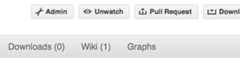
Now all those people can do:
gitclonegit@github.com:your-user-name/numpy.git
Remember that links starting withgit@ use the ssh protocol and areread-write; links starting withgit:// are read-only.
Your collaborators can then commit directly into that repo with theusual:
gitcommit-am'ENH - much better code'gitpushoriginmy-feature-branch# pushes directly into your repo
Checkout changes from an existing pull request#
If you want to test the changes in a pull request or continue the work in anew pull request, the commits are to be cloned into a local branch in yourforked repository
First ensure your upstream points to the main repo, as fromLinking your repository to the upstream repo
Then, fetch the changes and create a local branch. Assuming$ID is the pull request numberand$BRANCHNAME is the name of thenew local branch you wish to create:
git fetch upstream pull/$ID/head:$BRANCHNAME
Checkout the newly created branch:
git checkout $BRANCHNAME
You now have the changes in the pull request.
Exploring your repository#
To see a graphical representation of the repository branches andcommits:
gitk--all
To see a linear list of commits for this branch:
gitlog
Backporting#
Backporting is the process of copying new feature/fixes committed in NumPy’smain branch back to stable release branches. To do this you make a branchoff the branch you are backporting to, cherry pick the commits you want fromnumpy/main, and then submit a pull request for the branch containing thebackport.
First, you need to make the branch you will work on. This needs to bebased on the older version of NumPy (not main):
# Make a new branch based on numpy/maintenance/1.8.x,# backport-3324 is our new name for the branch.gitcheckout-bbackport-3324upstream/maintenance/1.8.x
Now you need to apply the changes from main to this branch using
gitcherry-pick:# Update remotegitfetchupstream# Check the commit log for commits to cherry pickgitlogupstream/main# This pull request included commits aa7a047 to c098283 (inclusive)# so you use the .. syntax (for a range of commits), the ^ makes the# range inclusive.gitcherry-pickaa7a047^..c098283...# Fix any conflicts, then if needed:gitcherry-pick--continue
You might run into some conflicts cherry picking here. These areresolved the same way as merge/rebase conflicts. Except here you canuse
gitblameto see the difference between main and thebackported branch to make sure nothing gets screwed up.Push the new branch to your Github repository:
gitpush-uoriginbackport-3324
Finally make a pull request using Github. Make sure it is against themaintenance branch and not main, Github will usually suggest youmake the pull request against main.
Pushing changes to the main repo#
Requires commit rights to the main NumPy repo.
When you have a set of “ready” changes in a feature branch ready forNumPy’smain ormaintenance branches, you can pushthem toupstream as follows:
First, merge or rebase on the target branch.
Only a few, unrelated commits then prefer rebasing:
gitfetchupstreamgitrebaseupstream/main
SeeRebasing on main.
If all of the commits are related, create a merge commit:
gitfetchupstreamgitmerge--no-ffupstream/main
Check that what you are going to push looks sensible:
gitlog-pupstream/main..gitlog--oneline--graph
Push to upstream:
gitpushupstreammy-feature-branch:main
Note
It’s usually a good idea to use the-n flag togitpush to checkfirst that you’re about to push the changes you want to the place youwant.