numpy.kaiser#
- numpy.kaiser(M,beta)[source]#
Return the Kaiser window.
The Kaiser window is a taper formed by using a Bessel function.
- Parameters:
- Mint
Number of points in the output window. If zero or less, anempty array is returned.
- betafloat
Shape parameter for window.
- Returns:
- outarray
The window, with the maximum value normalized to one (the valueone appears only if the number of samples is odd).
Notes
The Kaiser window is defined as
\[w(n) = I_0\left( \beta \sqrt{1-\frac{4n^2}{(M-1)^2}}\right)/I_0(\beta)\]with
\[\quad -\frac{M-1}{2} \leq n \leq \frac{M-1}{2},\]where\(I_0\) is the modified zeroth-order Bessel function.
The Kaiser was named for Jim Kaiser, who discovered a simpleapproximation to the DPSS window based on Bessel functions. The Kaiserwindow is a very good approximation to the Digital Prolate SpheroidalSequence, or Slepian window, which is the transform which maximizes theenergy in the main lobe of the window relative to total energy.
The Kaiser can approximate many other windows by varying the betaparameter.
beta
Window shape
0
Rectangular
5
Similar to a Hamming
6
Similar to a Hanning
8.6
Similar to a Blackman
A beta value of 14 is probably a good starting point. Note that as betagets large, the window narrows, and so the number of samples needs to belarge enough to sample the increasingly narrow spike, otherwise NaNs willget returned.
Most references to the Kaiser window come from the signal processingliterature, where it is used as one of many windowing functions forsmoothing values. It is also known as an apodization (which means“removing the foot”, i.e. smoothing discontinuities at the beginningand end of the sampled signal) or tapering function.
References
[1]J. F. Kaiser, “Digital Filters” - Ch 7 in “Systems analysis bydigital computer”, Editors: F.F. Kuo and J.F. Kaiser, p 218-285.John Wiley and Sons, New York, (1966).
[2]E.R. Kanasewich, “Time Sequence Analysis in Geophysics”, TheUniversity of Alberta Press, 1975, pp. 177-178.
[3]Wikipedia, “Window function”,https://en.wikipedia.org/wiki/Window_function
Examples
>>>importnumpyasnp>>>importmatplotlib.pyplotasplt>>>np.kaiser(12,14) array([7.72686684e-06, 3.46009194e-03, 4.65200189e-02, # may vary 2.29737120e-01, 5.99885316e-01, 9.45674898e-01, 9.45674898e-01, 5.99885316e-01, 2.29737120e-01, 4.65200189e-02, 3.46009194e-03, 7.72686684e-06])
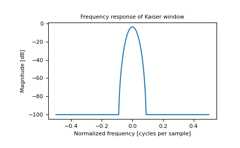
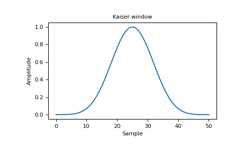
Plot the window and the frequency response.
importmatplotlib.pyplotaspltfromnumpy.fftimportfft,fftshiftwindow=np.kaiser(51,14)plt.plot(window)plt.title("Kaiser window")plt.ylabel("Amplitude")plt.xlabel("Sample")plt.show()
plt.figure()A=fft(window,2048)/25.5mag=np.abs(fftshift(A))freq=np.linspace(-0.5,0.5,len(A))response=20*np.log10(mag)response=np.clip(response,-100,100)plt.plot(freq,response)plt.title("Frequency response of Kaiser window")plt.ylabel("Magnitude [dB]")plt.xlabel("Normalized frequency [cycles per sample]")plt.axis('tight')plt.show()