Snowflakeで定義したSemantic ViewをOmniでも有効活用!OmniのSemantic View Integration機能を試してみた

さがらです。
SnowflakeにはSQLベースでSemantic Layerの定義を行えるSemantic Viewという機能があり、定義したSemantic ViewはCortex Analystを介すことで自然言語で分析を行うことができます。
https://docs.snowflake.com/en/user-guide/views-semantic/overview
このSnowflakeのSemantic Viewですが、BIツールであるOmniのSemantic Layer定義に同期できる機能がOmniに備わっています。ちなみに、Databricksのmetric viewにも対応しています。(ドキュメントはChangeLogしか見つかりませんでした。)
https://omni.co/changelog/20250803
https://omni.co/changelog/20250817
この機能を試してみたので、本記事で内容をまとめてみます。
やること
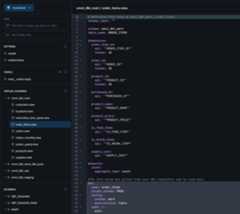
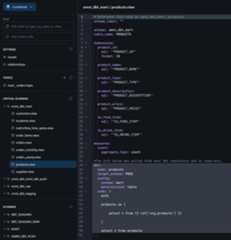
OmniでSnowflakeに対するConnection設定をしているModelで、以下のようにorder_itemsとproductsという2つのviewがあるとします。
このviewの内容を、今回試す連携機能を用いてSnowflakeのSemantic Viewの定義を用いて更新してみたいと思います。
order_items
products
Snowflake側でSemantic Viewの定義
まず、Snowflake側でSemantic Viewを定義します。
以下のクエリを用いて定義しました。(生成AIを活用しています。)
CREATEORREPLACE SEMANTICVIEW jaffle_shop_analysis-- 1. 論理テーブル(同義語を追加)TABLES( order_itemsAS SAGARA_JAFFLE_SHOP_JAPANESE.MART.ORDER_ITEMSPRIMARYKEY(order_item_id)WITH SYNONYMS=('transactions','sales_records','注文明細','取引')COMMENT='個々の商品購入ごとのトランザクション明細テーブル', productsAS SAGARA_JAFFLE_SHOP_JAPANESE.MART.PRODUCTSPRIMARYKEY(product_id)WITH SYNONYMS=('items','merchandise','goods','商品マスタ','カタログ')COMMENT='販売されている商品の詳細情報を持つマスタテーブル')-- 2. リレーションシップ RELATIONSHIPS( order_items_to_productsAS order_items(product_id)REFERENCES products(product_id))-- 3. ファクト(計算用の中間数値) FACTS(-- 売上 order_items.f_salesAS product_priceCOMMENT='値引き前の商品単価',-- 原価 order_items.f_costAS supply_costCOMMENT='商品の調達原価',-- 粗利(行レベル) order_items.f_profitAS product_price- supply_costCOMMENT='商品単体での粗利益')-- 4. ディメンション(分析軸の強化とシノニム) DIMENSIONS(-- [時間軸] 自動変換 order_items.dim_dateAS TO_DATE(purchased_at)WITH SYNONYMS=('date','day','日付','販売日')COMMENT='商品が購入された日付', order_items.dim_yearASYEAR(purchased_at)WITH SYNONYMS=('year','yr','年','年度')COMMENT='購入された年', order_items.dim_monthASMONTH(purchased_at)WITH SYNONYMS=('month','mo','月')COMMENT='購入された月(1-12)',-- [商品軸] 詳細化 products.dim_product_nameAS product_nameWITH SYNONYMS=('item_name','sku','商品名','メニュー名')COMMENT='商品の具体的な名前(例: "nutellaphone who dis?")', products.dim_product_typeAS product_typeWITH SYNONYMS=('category','genre','type','カテゴリ','商品タイプ','ジャンル')COMMENT='商品の分類(jaffle: サンドウィッチ, beverage: ドリンク)',-- [フラグ] フィルタ用 products.dim_is_foodAS is_food_itemWITH SYNONYMS=('food_flag','食べ物','フード')COMMENT='食べ物かどうかの真偽値', products.dim_is_drinkAS is_drink_itemWITH SYNONYMS=('drink_flag','飲み物','ドリンク')COMMENT='飲み物かどうかの真偽値')-- 5. メトリクス(ビジネス指標と計算式) METRICS(-- 総売上 order_items.m_total_revenueASSUM(f_sales)WITH SYNONYMS=('sales','gross_sales','gtv','total_sales','amount','売上','総売上','売上金額','日商')COMMENT='特定の期間やカテゴリにおける売上の合計金額',-- 総利益 order_items.m_total_profitASSUM(f_profit)WITH SYNONYMS=('profit','gross_profit','earnings','margin','利益','粗利','儲け')COMMENT='売上から原価を引いた粗利益の合計',-- 利益率(追加指標) order_items.m_profit_marginASSUM(f_profit)/NULLIF(SUM(f_sales),0)WITH SYNONYMS=('margin_rate','profitability','roi','利益率','粗利率')COMMENT='売上に占める利益の割合(0~1.0)',-- 販売点数 order_items.m_items_soldASCOUNT(order_item_id)WITH SYNONYMS=('quantity','volume','units','count','販売数','個数','数量')COMMENT='販売された商品の個数',-- 注文件数(ユニークオーダー数)-- 1回の注文で複数商品買うこともあるため、Order_IDのユニーク数を数える order_items.m_order_countASCOUNT(DISTINCT order_id)WITH SYNONYMS=('transactions_count','baskets','orders','注文数','客数','決済回数')COMMENT='決済が行われた回数(バスケット数)',-- 客単価(AOV: Average Order Value) order_items.m_aovASSUM(f_sales)/NULLIF(COUNT(DISTINCT order_id),0)WITH SYNONYMS=('average_order_value','sales_per_order','spend_per_customer','客単価','平均注文額')COMMENT='1回の注文あたりの平均売上金額')COMMENT='Jaffle Shopの包括的な販売実績データモデル。売上、利益、客単価などを、商品別・日別に分析可能。';このSemantic Viewに対しては、Snowflakeから下記のようにクエリも可能です。
SELECT*FROM SEMANTIC_VIEW( jaffle_shop_analysis DIMENSIONS products.dim_product_type METRICS order_items.m_total_revenue, order_items.m_profit_margin)ORDERBY m_total_revenueDESC;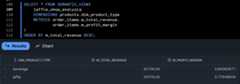
OmniのSemantic View Integration機能を試す
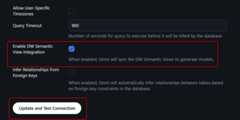
まずOmniのConnectionの設定から、Enable DW Semantic View Integrationにチェックを入れてConnectionの設定をアップデートします。
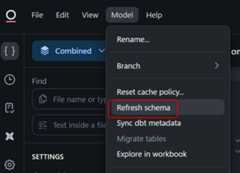
次にShared ModelのIDEを開き、Refresh schemaを押します。
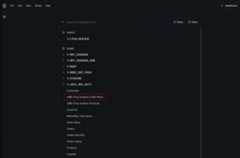
すると、SCHEMASのレイヤーで、Semantic Viewを作成したスキーマに下図のようにviewが新しく追加されました!(omni_dbt_から始まるviewも追加されているのは、このConnectionはdbt連携済でVirtual Schemaを有効化しているためです。)
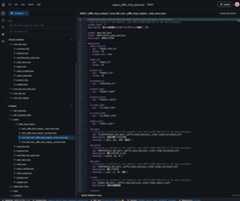
実際に生成されたコードは下記となります。各テーブルごとにOmniのviewファイルが作られていることがわかります。SnowflakeのSemantic Viewで定義したsynonymsやcommentも連携されていることがわかります。
omni_dbt_mart__jaffle_shop_analysis__order_items
# Reference this view as omni_dbt_mart__jaffle_shop_analysis__order_items# View is defined in the semantic view JAFFLE_SHOP_ANALYSIS in the data warehouseschema_label:""description: 個々の商品購入ごとのトランザクション明細テーブルschema: omni_dbt_martfolder: MART/jaffle_shop_analysistable_name: ORDER_ITEMSdimensions:order_item_id:sql:'"ORDER_ITEM_ID"'format: IDprimary_key:trueorder_id:sql:'"ORDER_ID"'format: IDproduct_id:sql:'"PRODUCT_ID"'format: IDpurchased_at:sql:'"PURCHASED_AT"'product_name:sql:'"PRODUCT_NAME"'product_price:sql:'"PRODUCT_PRICE"'is_food_item:sql:'"IS_FOOD_ITEM"'is_drink_item:sql:'"IS_DRINK_ITEM"'supply_cost:sql:'"SUPPLY_COST"'dim_date:# Dimension is defined in the semantic view JAFFLE_SHOP_ANALYSIS in the data warehousesql: TO_DATE(${omni_dbt_mart__jaffle_shop_analysis__order_items.purchased_at})description: 商品が購入された日付synonyms:[ date, day, 日付, 販売日]dim_month:# Dimension is defined in the semantic view JAFFLE_SHOP_ANALYSIS in the data warehousesql: MONTH(${omni_dbt_mart__jaffle_shop_analysis__order_items.purchased_at})description: 購入された月(1-12)synonyms:[ month, mo, 月]dim_year:# Dimension is defined in the semantic view JAFFLE_SHOP_ANALYSIS in the data warehousesql: YEAR(${omni_dbt_mart__jaffle_shop_analysis__order_items.purchased_at})description: 購入された年synonyms:[ year, yr, 年, 年度]f_cost:# Dimension is defined in the semantic view JAFFLE_SHOP_ANALYSIS in the data warehousesql: ${omni_dbt_mart__jaffle_shop_analysis__order_items.supply_cost}description: 商品の調達原価f_profit:# Dimension is defined in the semantic view JAFFLE_SHOP_ANALYSIS in the data warehousesql: ${omni_dbt_mart__jaffle_shop_analysis__order_items.product_price}- ${omni_dbt_mart__jaffle_shop_analysis__order_items.supply_cost}description: 商品単体での粗利益f_sales:# Dimension is defined in the semantic view JAFFLE_SHOP_ANALYSIS in the data warehousesql: ${omni_dbt_mart__jaffle_shop_analysis__order_items.product_price}description: 値引き前の商品単価measures:count:aggregate_type: countm_aov:# Measure is defined in the semantic view JAFFLE_SHOP_ANALYSIS in the data warehousesql: SUM(${omni_dbt_mart__jaffle_shop_analysis__order_items.f_sales}) / NULLIF(COUNT(DISTINCT ${omni_dbt_mart__jaffle_shop_analysis__order_items.order_id}), 0)description: 1回の注文あたりの平均売上金額synonyms:[ average_order_value, sales_per_order, spend_per_customer, 客単価, 平均注文額]m_items_sold:# Measure is defined in the semantic view JAFFLE_SHOP_ANALYSIS in the data warehousesql: COUNT(${omni_dbt_mart__jaffle_shop_analysis__order_items.order_item_id})description: 販売された商品の個数synonyms:[ quantity, volume, units, count, 販売数, 個数, 数量]m_order_count:# Measure is defined in the semantic view JAFFLE_SHOP_ANALYSIS in the data warehousesql: COUNT(DISTINCT ${omni_dbt_mart__jaffle_shop_analysis__order_items.order_id})description: 決済が行われた回数(バスケット数)synonyms:[ transactions_count, baskets, orders, 注文数, 客数, 決済回数]m_profit_margin:# Measure is defined in the semantic view JAFFLE_SHOP_ANALYSIS in the data warehousesql: SUM(${omni_dbt_mart__jaffle_shop_analysis__order_items.f_profit}) / NULLIF(SUM(${omni_dbt_mart__jaffle_shop_analysis__order_items.f_sales}), 0)description: 売上に占める利益の割合(0~1.0)synonyms:[ margin_rate, profitability, roi, 利益率, 粗利率]m_total_profit:# Measure is defined in the semantic view JAFFLE_SHOP_ANALYSIS in the data warehousesql: SUM(${omni_dbt_mart__jaffle_shop_analysis__order_items.f_profit})description: 売上から原価を引いた粗利益の合計synonyms:[ profit, gross_profit, earnings, margin, 利益, 粗利, 儲け]m_total_revenue:# Measure is defined in the semantic view JAFFLE_SHOP_ANALYSIS in the data warehousesql: SUM(${omni_dbt_mart__jaffle_shop_analysis__order_items.f_sales})description: 特定の期間やカテゴリにおける売上の合計金額synonyms:[ sales, gross_sales, gtv, total_sales, amount, 売上, 総売上, 売上金額, 日商]#The info below was pulled from your dbt repository and is read-only.dbt:name: order_itemstarget_schema: PRODconfig:schema: martmaterialized: tablecode:|- with order_items as ( select * from{{ ref('stg_order_items')}} ), orders as ( select * from{{ ref('stg_orders')}} ), products as ( select * from{{ ref('stg_products')}} ), supplies as ( select * from{{ ref('stg_supplies')}} ), order_supplies_summary as ( select product_id, sum(supply_cost) as supply_cost from supplies group by 1 ), joined as ( select order_items.*, orders.purchased_at,-- orders.ordered_at, products.product_name, products.product_price, products.is_food_item, products.is_drink_item, order_supplies_summary.supply_cost from order_items left join orders on order_items.order_id = orders.order_id left join products on order_items.product_id = products.product_id left join order_supplies_summary on order_items.product_id = order_supplies_summary.product_id ) select * from joinedreferenced_by:[ orders, product_total_sales]omni_dbt_mart__jaffle_shop_analysis__products
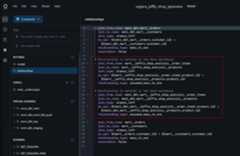
# Reference this view as omni_dbt_mart__jaffle_shop_analysis__products# View is defined in the semantic view JAFFLE_SHOP_ANALYSIS in the data warehouseschema_label:""description: 販売されている商品の詳細情報を持つマスタテーブルschema: omni_dbt_martfolder: MART/jaffle_shop_analysistable_name: PRODUCTSdimensions: product_id:sql:'"PRODUCT_ID"' format: ID primary_key:true product_name:sql:'"PRODUCT_NAME"' product_type:sql:'"PRODUCT_TYPE"' product_description:sql:'"PRODUCT_DESCRIPTION"' product_price:sql:'"PRODUCT_PRICE"' is_food_item:sql:'"IS_FOOD_ITEM"' is_drink_item:sql:'"IS_DRINK_ITEM"' dim_is_drink:# Dimension is defined in the semantic view JAFFLE_SHOP_ANALYSIS in the data warehousesql: ${omni_dbt_mart__jaffle_shop_analysis__products.is_drink_item} description: 飲み物かどうかの真偽値 synonyms:[ drink_flag, 飲み物, ドリンク] dim_is_food:# Dimension is defined in the semantic view JAFFLE_SHOP_ANALYSIS in the data warehousesql: ${omni_dbt_mart__jaffle_shop_analysis__products.is_food_item} description: 食べ物かどうかの真偽値 synonyms:[ food_flag, 食べ物, フード] dim_product_name:# Dimension is defined in the semantic view JAFFLE_SHOP_ANALYSIS in the data warehousesql: ${omni_dbt_mart__jaffle_shop_analysis__products.product_name} description:'商品の具体的な名前(例: "nutellaphone who dis?")' synonyms:[ item_name, sku, 商品名, メニュー名] dim_product_type:# Dimension is defined in the semantic view JAFFLE_SHOP_ANALYSIS in the data warehousesql: ${omni_dbt_mart__jaffle_shop_analysis__products.product_type} description:"商品の分類(jaffle: サンドウィッチ, beverage: ドリンク)" synonyms:[ category, genre,type, カテゴリ, 商品タイプ, ジャンル]measures: count: aggregate_type: count#The info below was pulled from your dbt repository and is read-only.dbt: name: products target_schema: PROD config:schema: mart materialized:table code:|-with productsas(select*from {{ ref('stg_products') }})select*from productsまた、relationshipsも自動で更新されています。
連携したSemantic ViewをOmniからクエリしてみる
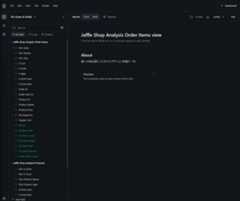
対象のModelでExploreの画面を立ち上げると、下図のように連携したSemantic Viewが選べるようになっていますので、選択します。
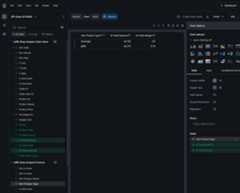
すると、最初からproductsとJOINがされた状態でフィールドを選択できるようになっています。
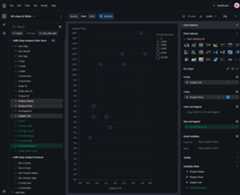
下図のように、問題なくクエリも可能です。
運用時の注意
便利な機能だと思いましたが、実際の運用を考慮すると2025/11/30時点では以下2点注意が必要だとも感じました。
- OmniからSnowflakeへ、Semantic Viewを更新する方法はないこと
- つまり、双方向の同期ができないため、現状はOmni側でディメンションやメジャーの追加など行っても、SnowflakeのSemantic Viewに反映する方法がありません。(もし現時点の機能で行うとしたら、OmniのAPIなど駆使した、重めのカスタマイズが必須。)
- SnowflakeのSemantic Viewごとに、topicsは自動で作成してくれないこと
- Omniではユーザーに分析してもらう時にtopicsを使ってもらうことを推奨しているため、Semantic ViewごとにTopicsも自動で作成できるようなオプションがあるとよりありがたいと感じました。
最後に
SnowflakeのSemantic Viewを、OmniのSemantic Layer定義に同期できる機能を試してみました。
現状では、実運用を考慮すると双方向の同期ができないため難しいところを感じました。しかし、最近Open Semantic Interchangeが立ち上がったこともあり、本機能を用いてSemantic Layerの製品間同期の未来を感じることもできましたので今後のアップデートに期待したいです!!