Media Queriesの記述を少し楽にしてくれるSCSS(Sass) Mixin(自作)

この記事は公開されてから1年以上経過しています。情報が古い可能性がありますので、ご注意ください。
皆さんお久しぶりです。
最近サイトの高速化で忙しく、 ブログの執筆をサボっていました、ごめんなさい。
ブログのテンプレートリニューアルも無事に終わり、そろそろ得た知識をアウトプットしていこうと思います。
最近HTML(5)を利用したWebサイトもレスポンシブやCSS3、Retinaディスプレイ対応でどんどん複雑になってきています。ですが、未だ標準化されていないCSS3でさえ市場の要求に応えるには未熟に思えます。
そこで登場するのがSassやLESSなどのCSS拡張メタ言語です、キリッ(巷で知っている方にとっては今さら感たっぷり)。
今回は第一弾としてSass(SCSS)とCompassについて紹介しつつ、Media Queries(前に書いたMedia Queriesに関する記事)の実装を少し楽にしてくれる自作Mixinを紹介します。なぜSassにしたかは「Sass LESS 比較」と検索してみてください。こちらのサイト(CSS拡張メタ言語「SCSS(Sass)」と「LESS」の比較)も詳しく比較を紹介しています。
サンプル
ずらずらと紹介してもわかりにくいと思うのでまずサンプルから。このブログを開いているウィンドウをリサイズしてみてください。一応iPhoneで横向きにした場合のイメージをつけておきます。
後ほど紹介するSCSSで作ったMixinをこのブログでも使っています。
開発ブログを開く(このサンプルはChromeブラウザでの閲覧をおすすめします。)
Sass(Scss)とは
SassはCSSをもう一度楽しくするCSSにコンパイルするためのメタ言語です。
Sassにはネストされたルール、変数、ミックスイン、セレクタ継承などCSSにあるととっても便利な拡張を使うことができるようになります。
その他にもif,for,each,whileなども使えるようになります。
ちなみにSassには2つの構文があり、SCSS(Sassy CSS)とSass(インデント構文)に別れます。SCSSは.scssという拡張子、Sassは.sassという拡張子を持ち、お互いにSass-convertコマンドラインツールを使うことで変換もできますし、どちらの構文で書かれたとしてもインポートできます。
ちなみに私はよりCSSの記述に近いSCSSを利用しています。
compassとは

compassはSassを使ったオープンソースのCSSオーサリングフレームワークです。
compassを使うことで、Bender Prefix、CSS Spriteを自動生成、再利用可能なパターン、CSS3をクリーンに記述できるCSS3 Mixins、美しいタイポグラフィリズムを利用できます。
Bender Prefix、CSS Spriteの自動生成だけでもとても魅力的なフレームワークです。4種類のPrefix(-webkit,-moz,-o,-ms)を毎回書くのはほんとに手間です。
SCSSとcompassの使い方
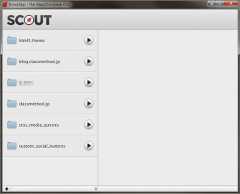
で、どうやって使うかが問題ですが基本的には黒い画面(コンソール)でインストールします。が、デザイナーよりの方にはGUIが用意されているので安心してください。
GUIには先ほど紹介したcompassが販売しているcompass.appか、無料で利用できるscout(AIRアプリ)というGUIアプリがあります。どちらもMac、Windows対応です。
使い方は検索すれば見つかると思うので、ここでは省かせていただきます。
作成したSCSS Media Queries Mixinのダウンロード
ダウンロードはこちら:github::SCSS Media Queries Mixins(近いうちにRetina Macbook ProとiPhone 5に対応させる予定です。)
サンプルはgithubからzipファイルをダウンロード後、index.htmlをブラウザで開いてください。
ウィンドウをリサイズしていくと、背景色が変わっていきます。
詳しい利用方法についてもgithubを確認してください。
機能
- iOS系のデバイスサイズを基準にしています。
大きく3つのmixinに別れ、スマートフォン(mq-mobile)、タブレット(mq-tablet)、PC向け(mq-desctop)となります。 - 基準となるデバイスサイズは変数で値を上書きでき、mixinの引数で向きや解像度、サイズを指定できます。
- prefixに対応。5つのブラウザ「chrome」「mozira」「safari」「opera」「IE」向けのコードを出力します。また、prefixを除いた記述も出力し、prefixが不要になった場合は$MQ_PREFIX_TYPESを上書きすることで出力を制御できます。
対応デバイス
| # | デバイス | 向き | サイズ | ratio |
|---|---|---|---|---|
| 1 | iPhone 3G | Portrait or Landscape | 320 * 480 | 1.0 |
| 2 | iPhone 3GS | Portrait or Landscape | 320 * 480 | 1.0 |
| 3 | iPhone 4 | Portrait or Landscape | 640 * 960 (device width: 320 * 640) | 1.5 |
| 4 | iPhone 4S | Portrait or Landscape | 640 * 960 (device width: 320 * 640) | 1.5 |
| 5 | iPad | Portrait or Landscape | 768 * 1024 | 1.0 |
| 6 | iPad 2 | Portrait or Landscape | 768 * 1024 | 1.0 |
| 7 | new iPad | Portrait or Landscape | 1,536 * 2,048 (device width: 768 * 1,024) | 1.5 |
| 8 | Desctop(pc or note pc) | - | 1,024 | 1,280 | 1,600 | 1,920 | 1,920 over | 1.0 |
実際のmixinソース
/* ************************************ * * SCSS Media Queries Mixins * * Aauthor : Ryuichi Nonaka * Version : 1.0 * Copyright : 2012 Ryuichi Nonaka * Date : 2012/09/11 * * Released under the MIT license * *********************************** *//* ************************************ * * Device Width * Initialize variables * *********************************** */$MQ_OLD_MOBILE_PORTRAIT : 320px !default;$MQ_OLD_MOBILE_LANDSCAPE : 480px !default;$MQ_MODERN_MOBILE_PORTRAIT : 320px !default; // 640 resolution.$MQ_MODERN_MOBILE_LANDSCAPE : 480px !default; // 960 resolution.$MQ_FUTURE_MOBILE_PORTRAIT : 640px !default; // new iPhone(5?).$MQ_FUTURE_MOBILE_LANDSCAPE : 1136px !default; // new iPhone(5?).$MQ_OLD_TABLET_PORTRAIT : 768px !default; // 1 or 2.$MQ_OLD_TABLET_LANDSCAPE : 1024px !default; // 1 or 2.$MQ_MODERN_TABLET_PORTRAIT : 768px !default; // new iPad: 1,536 resolution.$MQ_MODERN_TABLET_LANDSCAPE : 1024px !default; // new iPad: 2,048 resolution.$MQ_DESCTOP_NARROW : 1024px !default;$MQ_DESCTOP_MODERN : 1280px !default;$MQ_DESCTOP_WIDE : 1600px !default;$MQ_DESCTOP_HD : 1920px !default;/* ************************************ * * Browser Prefix * Initialize variables * *********************************** */$MQ_PREFIX_TYPES : -webkit-, -moz-, -ms-, -o-, '' !default;/* ************************************ * * Mobile Device mixin * @param $orientation Direction of a device * @param $version [old|modern|any] The version of a device * * old : iPhone 3G or 3GS. * modern : iPhone 4 or 4S. * any : All version. * *********************************** */@mixin mq-mobile ( $orientation: portrait, $version: old ) { @each $prefix in $MQ_PREFIX_TYPES { @if $version == old { @if $orientation == portrait { @media screen and ( min-width: 0 ) and ( max-width: $MQ_OLD_MOBILE_PORTRAIT ) and ( #{$prefix}device-pixel-ratio: 1 ) { @content; } } @else if $orientation == landscape { @media screen and ( min-width: $MQ_OLD_MOBILE_PORTRAIT + 1 ) and ( max-width: $MQ_OLD_MOBILE_LANDSCAPE ) and ( #{$prefix}device-pixel-ratio: 1 ) { @content; } } } @else if $version == modern { @if $orientation == portrait { @media screen and ( min-width: $MQ_OLD_MOBILE_LANDSCAPE + 1 ) and ( max-width: $MQ_MODERN_MOBILE_PORTRAIT ) and ( #{$prefix}min-device-pixel-ratio: 1.5 ) { @content; } } @else if $orientation == landscape { @media screen and ( min-width: $MQ_MODERN_MOBILE_PORTRAIT + 1 ) and ( max-width: $MQ_MODERN_MOBILE_LANDSCAPE ) and ( #{$prefix}min-device-pixel-ratio: 1.5 ) { @content; } } } @else if $version == any { @if $orientation == portrait { @media screen and ( min-width: 0 ) and ( max-width: $MQ_OLD_MOBILE_PORTRAIT ) and ( #{$prefix}device-pixel-ratio: 1 ) { @content; } @media screen and ( min-width: 0 ) and ( max-width: $MQ_MODERN_MOBILE_PORTRAIT ) and ( #{$prefix}min-device-pixel-ratio: 1.5 ) { @content; } } @else if $orientation == landscape { @media screen and ( min-width: $MQ_OLD_MOBILE_PORTRAIT + 1 ) and ( max-width: $MQ_OLD_MOBILE_LANDSCAPE ) and ( #{$prefix}device-pixel-ratio: 1 ) { @content; } @media screen and ( min-width: $MQ_MODERN_MOBILE_PORTRAIT + 1 ) and ( max-width: $MQ_MODERN_MOBILE_LANDSCAPE ) and ( #{$prefix}min-device-pixel-ratio: 1.5 ) { @content; } } } }}/* ************************************ * * Tablet Device mixin * @param $orientation Direction of a device * @param $version [old|modern|any] The version of a device * * old : iPad 1 or 2. * modern : new iPad. * any : All version. * *********************************** */@mixin mq-tablet ( $orientation: portrait, $version: old ) { @each $prefix in $MQ_PREFIX_TYPES { @if $version == old { @if $orientation == portrait { @media screen and ( min-width: $MQ_OLD_MOBILE_LANDSCAPE + 1 ) and ( max-width: $MQ_OLD_TABLET_PORTRAIT ) and ( #{$prefix}device-pixel-ratio: 1 ) { @content; } } @else if $orientation == landscape { @media screen and ( min-width: $MQ_OLD_TABLET_PORTRAIT + 1 ) and ( max-width: $MQ_OLD_TABLET_LANDSCAPE ) and ( #{$prefix}device-pixel-ratio: 1 ) { @content; } } } @else if $version == modern { @if $orientation == portrait { @media screen and ( min-width: $MQ_OLD_TABLET_LANDSCAPE + 1 ) and ( max-width: $MQ_MODERN_TABLET_PORTRAIT ) and ( #{$prefix}device-pixel-ratio: 1.5 ) { @content; } } @else if $orientation == landscape { @media screen and ( min-width: $MQ_MODERN_TABLET_PORTRAIT + 1 ) and ( max-width: $MQ_MODERN_TABLET_LANDSCAPE ) and ( #{$prefix}device-pixel-ratio: 1.5 ) { @content; } } } @else if $version == any { @if $orientation == portrait { @media screen and ( min-width: $MQ_OLD_MOBILE_LANDSCAPE + 1 ) and ( max-width: $MQ_OLD_TABLET_PORTRAIT ) and ( #{$prefix}device-pixel-ratio: 1 ) { @content; } @media screen and ( min-width: $MQ_OLD_TABLET_LANDSCAPE + 1 ) and ( max-width: $MQ_MODERN_TABLET_PORTRAIT ) and ( #{$prefix}device-pixel-ratio: 1.5 ) { @content; } } @else if $orientation == landscape { @media screen and ( min-width: $MQ_OLD_TABLET_PORTRAIT + 1 ) and ( max-width: $MQ_OLD_TABLET_LANDSCAPE ) and ( #{$prefix}device-pixel-ratio: 1 ) { @content; } @media screen and ( min-width: $MQ_MODERN_TABLET_PORTRAIT + 1 ) and ( max-width: $MQ_MODERN_TABLET_LANDSCAPE ) and ( #{$prefix}device-pixel-ratio: 1.5 ) { @content; } } } }}/* ************************************ * * Desctop Device mixin * @param $size Direction of a device * * narrow : max width 1024. * modern : max width 1280. * wide : max width 1600. * hd : max width 1920. * over : width 1920 over. * *********************************** */@mixin mq-desctop ( $size: narrow ) { @if $size == narrow { @media screen and ( min-width: $MQ_OLD_TABLET_LANDSCAPE ) and ( max-width: $MQ_DESCTOP_NARROW ) { @content; } } @else if $size == modern { @media screen and ( min-width: $MQ_DESCTOP_NARROW + 1 ) and ( max-width: $MQ_DESCTOP_MODERN ) { @content; } } @else if $size == wide { @media screen and ( min-width: $MQ_DESCTOP_MODERN + 1 ) and ( max-width: $MQ_DESCTOP_WIDE ) { @content; } } @else if $size == hd { @media screen and ( min-width: $MQ_DESCTOP_WIDE + 1 ) and ( max-width: $MQ_DESCTOP_HD ) { @content; } } @else if $size == over { @media screen and ( min-width: $MQ_DESCTOP_HD + 1 ) { @content; } }}SCSS Media Queries Mixinsを使ってみる
それでは、本題。今回はSCSSやcompassの機能説明は省きます。
mixinの読み込み
まず、出力用のscssファイルを作り_media_queries.scssを読み込みます。
SCSSでは.sass、.scssどちらのファイルで自動で認識し読み込めるようになっているため以下のような記述で済みます。
@import "media_queries";
ちなみにファイル名の先頭に「_」アンダースコアが付いているファイルは読み込み専用のファイル宣言になり出力されることはありません。SCSSの@importはCSSの@importよりクリーンでブラウザのパラレルロードの影響することもありません。
プレーンなCSSだけでMedia Queriesを記述すると・・・
このmixinを使わない、プレーンなCSSのみでMedia Queriesを記述した場合はこんな感じに、@media宣言内に規則集合(宣言ブロックとセレクタ)を 書かなければいけません。
#wrapper{background: #000;}@media screen and (max-width: 320px) and (-webkit-device-pixel-ratio: 1.0) {#wrapper {background: #333;}}@media screen and (min-width: 321px) and (max-width: 480px) and (-webkit-device-pixel-ratio: 1.0) {#wrapper {background: #666;}}この方式だとセレクタが変わると、そのデバイス分だけ複数箇所を書き直すことになります。
規則集合が増えれば増えるほど、プロパティの宣言位置が離れ書き換えが非常に手間ですし、管理が難しくなり複雑なサイトではよほど忍耐強い人でなければ発狂します。
SCSS Media Queries Mixinsを使うと・・・
そこでSCSS、compassにこのmixinを使えば、宣言ブロック内でも外でも利用でき、 プロパティのみを宣言したり、ネストした宣言ブロックを記述することもできます。
例えば、iPhone(3G 3GS)の320px * 480px(portrait)に対してだけ指定をしたい場合以下のような記述ができます。
#wrapper{ background: #000; //media queries @include mq-mobile('portrait', 'old') { background: #333; }}@include という宣言を書いてmixinを指定します。引数で向きと大まかなバージョン指定を行いプロパティのみを指定します。
old, modern, anyという指定方法はいずれ見直したいです。
landscapeの指定を追加したい場合はこんな感じ。
#wrapper{ background: #000; //media queries @include mq-mobile('portrait', 'old') { background: #333; } @include mq-mobile('landscape', 'old') { background: #666; }}プロパティの宣言位置が近く認識し易いです。
サンプルコード
以下が独自に作成したMediaQueries用Mixinを使ってMedia Queries対応したCSSコードです。
githubのscss/sample.scssに記述されています。
html{ //layout padding : 20%; //font font-weight : bold; //background background : #000; //media queries @include mq-mobile('portrait', 'old') { background : #222; &:after { color : #fff; content : 'mobile portrait old'; } } @include mq-mobile('landscape', 'old') { background : #444; &:after { color : #fff; content : 'mobile landscape old'; } } @include mq-tablet('portrait', 'old') { background : #666; &:after { color : #fff; content : 'tablet portrait old'; } } @include mq-tablet('landscape', 'old') { background : #888; &:after { color : #fff; content : 'tablet landscape old'; } } @include mq-desctop('modern') { background : #aaa; &:after { content : 'desctop modern'; } } @include mq-desctop('wide') { background : #ccc; &:after { content : 'desctop wide'; } } @include mq-desctop('hd') { background : #eee; &:after { content : 'desctop hd'; } } @include mq-desctop('over') { background : #cc0000; &:after { color : #fff; content : 'desctop over'; } }}アウトプットされたCSS
Sassが上記のコードを元にはき出してくれるCSSがこれです。
コメントも含まれていますが実際に1サイトのレスポンシブデザイン対応した場合のCSS記述量は凄まじい量になります。
圧縮されてますが、このブログのCSSはこんな感じCSS。こんなもの手打ちなんてやってられません。
html { padding: 20%; font-weight: bold; background: #000; } @media screen and (min-width: 0) and (max-width: 320px) and (-webkit-device-pixel-ratio: 1) { /* line 18, ../scss/sample.scss */ html { background: #222; } /* line 33, ../scss/sample.scss */ html:after { color: #fff; content: 'mobile portrait old'; } } @media screen and (min-width: 0) and (max-width: 320px) and (-moz-device-pixel-ratio: 1) { /* line 18, ../scss/sample.scss */ html { background: #222; } /* line 33, ../scss/sample.scss */ html:after { color: #fff; content: 'mobile portrait old'; } } @media screen and (min-width: 0) and (max-width: 320px) and (-ms-device-pixel-ratio: 1) { /* line 18, ../scss/sample.scss */ html { background: #222; } /* line 33, ../scss/sample.scss */ html:after { color: #fff; content: 'mobile portrait old'; } } @media screen and (min-width: 0) and (max-width: 320px) and (-o-device-pixel-ratio: 1) { /* line 18, ../scss/sample.scss */ html { background: #222; } /* line 33, ../scss/sample.scss */ html:after { color: #fff; content: 'mobile portrait old'; } } @media screen and (min-width: 0) and (max-width: 320px) and (device-pixel-ratio: 1) { /* line 18, ../scss/sample.scss */ html { background: #222; } /* line 33, ../scss/sample.scss */ html:after { color: #fff; content: 'mobile portrait old'; } } @media screen and (min-width: 321px) and (max-width: 480px) and (-webkit-device-pixel-ratio: 1) { /* line 18, ../scss/sample.scss */ html { background: #444; } /* line 42, ../scss/sample.scss */ html:after { color: #fff; content: 'mobile landscape old'; } } @media screen and (min-width: 321px) and (max-width: 480px) and (-moz-device-pixel-ratio: 1) { /* line 18, ../scss/sample.scss */ html { background: #444; } /* line 42, ../scss/sample.scss */ html:after { color: #fff; content: 'mobile landscape old'; } } @media screen and (min-width: 321px) and (max-width: 480px) and (-ms-device-pixel-ratio: 1) { /* line 18, ../scss/sample.scss */ html { background: #444; } /* line 42, ../scss/sample.scss */ html:after { color: #fff; content: 'mobile landscape old'; } } @media screen and (min-width: 321px) and (max-width: 480px) and (-o-device-pixel-ratio: 1) { /* line 18, ../scss/sample.scss */ html { background: #444; } /* line 42, ../scss/sample.scss */ html:after { color: #fff; content: 'mobile landscape old'; } } @media screen and (min-width: 321px) and (max-width: 480px) and (device-pixel-ratio: 1) { /* line 18, ../scss/sample.scss */ html { background: #444; } /* line 42, ../scss/sample.scss */ html:after { color: #fff; content: 'mobile landscape old'; } } @media screen and (min-width: 481px) and (max-width: 768px) and (-webkit-device-pixel-ratio: 1) { /* line 18, ../scss/sample.scss */ html { background: #666; } /* line 51, ../scss/sample.scss */ html:after { color: #fff; content: 'tablet portrait old'; } } @media screen and (min-width: 481px) and (max-width: 768px) and (-moz-device-pixel-ratio: 1) { /* line 18, ../scss/sample.scss */ html { background: #666; } /* line 51, ../scss/sample.scss */ html:after { color: #fff; content: 'tablet portrait old'; } } @media screen and (min-width: 481px) and (max-width: 768px) and (-ms-device-pixel-ratio: 1) { /* line 18, ../scss/sample.scss */ html { background: #666; } /* line 51, ../scss/sample.scss */ html:after { color: #fff; content: 'tablet portrait old'; } } @media screen and (min-width: 481px) and (max-width: 768px) and (-o-device-pixel-ratio: 1) { /* line 18, ../scss/sample.scss */ html { background: #666; } /* line 51, ../scss/sample.scss */ html:after { color: #fff; content: 'tablet portrait old'; } } @media screen and (min-width: 481px) and (max-width: 768px) and (device-pixel-ratio: 1) { /* line 18, ../scss/sample.scss */ html { background: #666; } /* line 51, ../scss/sample.scss */ html:after { color: #fff; content: 'tablet portrait old'; } } @media screen and (min-width: 769px) and (max-width: 1024px) and (-webkit-device-pixel-ratio: 1) { /* line 18, ../scss/sample.scss */ html { background: #888; } /* line 60, ../scss/sample.scss */ html:after { color: #fff; content: 'tablet landscape old'; } } @media screen and (min-width: 769px) and (max-width: 1024px) and (-moz-device-pixel-ratio: 1) { /* line 18, ../scss/sample.scss */ html { background: #888; } /* line 60, ../scss/sample.scss */ html:after { color: #fff; content: 'tablet landscape old'; } } @media screen and (min-width: 769px) and (max-width: 1024px) and (-ms-device-pixel-ratio: 1) { /* line 18, ../scss/sample.scss */ html { background: #888; } /* line 60, ../scss/sample.scss */ html:after { color: #fff; content: 'tablet landscape old'; } } @media screen and (min-width: 769px) and (max-width: 1024px) and (-o-device-pixel-ratio: 1) { /* line 18, ../scss/sample.scss */ html { background: #888; } /* line 60, ../scss/sample.scss */ html:after { color: #fff; content: 'tablet landscape old'; } } @media screen and (min-width: 769px) and (max-width: 1024px) and (device-pixel-ratio: 1) { /* line 18, ../scss/sample.scss */ html { background: #888; } /* line 60, ../scss/sample.scss */ html:after { color: #fff; content: 'tablet landscape old'; } } @media screen and (min-width: 1025px) and (max-width: 1280px) { /* line 18, ../scss/sample.scss */ html { background: #aaa; } /* line 69, ../scss/sample.scss */ html:after { content: 'desctop modern'; } } @media screen and (min-width: 1281px) and (max-width: 1600px) { /* line 18, ../scss/sample.scss */ html { background: #ccc; } /* line 77, ../scss/sample.scss */ html:after { content: 'desctop wide'; } } @media screen and (min-width: 1601px) and (max-width: 1920px) { /* line 18, ../scss/sample.scss */ html { background: #eee; } /* line 85, ../scss/sample.scss */ html:after { content: 'desctop hd'; } } @media screen and (min-width: 1921px) { /* line 18, ../scss/sample.scss */ html { background: #cc0000; } /* line 93, ../scss/sample.scss */ html:after { color: #fff; content: 'desctop over'; } }GUIアプリケーション利用時のコーディングしやすさ
CUI、GUI共にファイルの更新を監視し、変更があると自動でコンパイルを行ってくれます。
コンパイル処理が一瞬走るので記述量が増えると少し待ち時間が必要ですが長くとも数秒で終わります。それほど確認作業の邪魔にはなりません。
SCSSのアウトプットスタイル
本題からそれますがSCSSには4つのアウトプットスタイルが用意されています。
その中でも「compressed」というスタイルがあり、無駄な改行やスペースを除いてくれます。一度コンパイルしてしまえばサーバーにもクライアント側にも負荷がかかりません。
まとめ
いろいろと端折った紹介記事となりましたが、SCSS、compass共にMedia Queriesの対応にはとても役立つツールだと思います。
さらに、スマートデバイスが普及する中、重要になってくるサイトの高速化にも役立ちます。残念ながら日本国内のサイトはほとんど高速化されていません。
開発を効率化しつつ、より効果の出やすいWebサイト開発を行っていきたいですね。
サイトの高速化は是非クラスメソッド株式会社へお問い合わせください!最後はちゃっかり宣伝です。ではでは。