

Simplified theming of{ggplot2},{lattice},and{base} R graphics. In addition to providing acentralizedapproach to styling R graphics,{thematic} also enablesautomaticstyling of R plots in Shiny, R Markdown, and RStudio.
Install the stable release of{thematic} onCRAN with:
install.packages("thematic")Autotheming in Shiny requires{shiny} 1.5.0 or higher:
install.packages("shiny")Autotheming in R Markdown requires{rmarkdown} 2.7 orhigher:
install.packages("rmarkdown")Using themes withcustomfonts works best if you have{showtext} and/or{ragg} installed.
install.packages("showtext")install.packages("ragg"){thematic}’sautotheming gives R plots the ability to style themselves insideShiny (via CSS),RStudio (viaRStudiothemes), andR Markdown (via{bslib}).
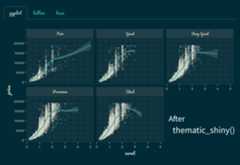
Callthematic_shiny() before launching a Shiny app toenable{thematic} for everyplotOutput()inside the app. If no values are provided tothematic_shiny(), eachplotOutput() uses theapp’s CSS colors to inform new R plotting defaults. If the app usesGoogle Fonts (and you have{showtext} and/or{ragg} installed), you maysafely providefont = "auto" tothematic_shiny(), which also translates CSS fonts to R.Here’s an example with thePacifico font:
library(shiny)library(ggplot2)library(thematic)# In order for auto/custom fonts to work properly, you'll want# either the ragg (or showtext) package installedlibrary(ragg)# If you want `{ragg}` to handle the font rendering in a Shiny appoptions(shiny.useragg =TRUE)# Call thematic_shiny() prior to launching the app, to change# R plot theming defaults for all the plots generated in the appthematic_shiny(font ="auto")ui<-fluidPage(# bslib makes it easy to customize CSS styles for things# rendered by the browser, like tabsetPanel()# https://rstudio.github.io/bslibtheme = bslib::bs_theme(bg ="#002B36",fg ="#EEE8D5",primary ="#2AA198",# bslib also makes it easy to import CSS fontsbase_font = bslib::font_google("Pacifico") ),tabsetPanel(type ="pills",tabPanel("ggplot",plotOutput("ggplot")),tabPanel("lattice",plotOutput("lattice")),tabPanel("base",plotOutput("base")) ))server<-function(input, output) { output$ggplot<-renderPlot({ggplot(mtcars,aes(wt, mpg,label =rownames(mtcars),color =factor(cyl)))+geom_point()+ ggrepel::geom_text_repel() }) output$lattice<-renderPlot({ lattice::show.settings() }) output$base<-renderPlot({image(volcano,col =thematic_get_option("sequential")) })}shinyApp(ui, server)
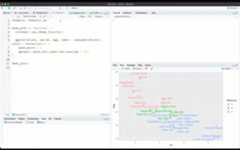
Callthematic_on() before generating plots insideRStudio to have all subsequent plots shown in the “Plots” viewing paneto reflect your RStudio theme. Note thatthematic_on()enables{thematic} for the remainder of the R session, butyou can usethematic_off() to disable (orthematic_theme() for one-off use of{thematic}). Here’s an example of how{thematic} can intelligently adapt each plot to the currentRStudio theme:
Callthematic_rmd() before generating plots inside RMarkdown to have all subsequent plots within the document reflect therelevant theme. In a static (i.e., non-runtime: shiny) RMarkdown context, auto-theming only works with{bslib}-poweredrmarkdown::html_document() (as in the example below),but in other situations you may alsoprovide colorsand fonts explicitly tothematic_rmd().

By default,{thematic} attempts to detect the relevantbackground, foreground, and accent colors. However, you may also specifythese settings more directly by providing relevant color and fontsdirectly tothematic_on() (orthematic_shiny()/thematic_rmd()).
library(ggplot2)thematic::thematic_on(bg ="#222222",fg ="white",accent ="#0CE3AC",font ="Oxanium")ggp<-ggplot(mtcars,aes(wt, mpg,label =rownames(mtcars),color =factor(cyl)))+geom_point()+ ggrepel::geom_text_repel()ggp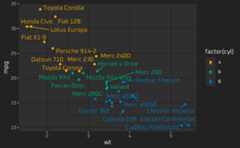
{thematic} works by setting new global defaults that canalways be overridden with plot-specifictheme()-ingcode:
ggp+theme(text =element_text(colour ="purple"))
To use a “complete”{ggplot2} theme with{thematic} (e.g.,theme_bw(),theme_minimal(), etc), usetheme_set() to setthe theme globally. This way{thematic} has the opportunityto preserve the complete theme’s styling semantics when changing globaldefaults (e.g.,theme_bw() uses the same fill color for thepanel and plot background, which is semantically different from thetheme_gray() default):
theme_set(theme_bw())ggp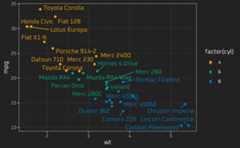
In addition to setting new defaults for main colors and fonts,{thematic} also sets defaults forqualitative(andsequential) colorscales. See thecustomthemes article to learn more about how to customize thosedefaults.
{thematic}’s theming optionsas well as how they interact with{ggplot2},{lattice}, and{base}.{thematic}.{thematic} to individualplots.Below is a link to anRStudio Cloud instance withsome ready to run{thematic} examples:

{thematic} is released with aContributorCode of Conduct. Bycontributingto this project, you agree to abide by its terms.