


The goal of gghdx is to make it as simple as possible to follow theHDX visual guidelines when creating graphs using ggplot2. While most ofthe functionality is in allowing easy application of the HDX colorramps, the package also streamlines some of the other recommendationsand best practices regarding plotted text, axis gridlines, and othervisual features. The key functionalities are:
theme_hdx() is the general package theme.scale_color_hdx_...() andscale_fill_hdx_...() applies the HDX color scale to therelevant aesthetics.hdx_colors(),hdx_hex(), andhdx_pal_...() provide easy user access to the HDX colortemplate. You can view the colorsgeom_text_hdx() andgeom_label_hdx() wrapthe respective base functions to plot text using HDX fonts andaesthetics.scale_y_continuous_hdx() wrapsscale_y_continuous() to plot data directly starting fromthe y-axis.gghdx() ensures plot for the session use HDX defaultsfor color and fill scales, usestheme_hdx() for all plots,and appliesscale_color_hdx_...() andscale_fill_hdx_...()label_number_hdx() andformat_number_hdx()supplement thescales::label_...() series of functions toformat and create labels for numbers in the HDX style.You can install gghdx directly from CRAN:
install.packages("gghdx")You can install the development version from GitHub:
## install.packages("remotes")remotes::install_github("OCHA-DAP/gghdx")The package is designed so the user just has to rungghdx() once a session and mainly forget about it. Thiswill automatically set your ggplot2 to use the HDX theme, palettes,fonts, and more by default. If you want more control or want to betterunderstand how the package works, please see the details below!
A quick and simple example would be plotting theirisdataset included in base R.
library(ggplot2)p<-ggplot( iris,aes(x = Sepal.Length,y = Petal.Length,color = Species ))+geom_point()+labs(title ="Iris species distributed by sepal and petal lengths",y ="Petal length",x ="Sepal length" )p
This output using the base ggplot style doesn’t look particularlybad, but we can usetheme_hdx() to quickly adjust some ofthe styling to fit the style guide.
library(gghdx)p+theme_hdx(base_family ="sans")
Now, axis lines have been cleaned up and the plot better resemblesrecommendations from the visual guide with just that single line ofcode.
However, the color palette for the points is still using the base Rpalette. We can use one of the manyscale_...hdx()functions to use HDX colors. Let’s just use the primary discrete colorscale that will align each species with one of the 3 non-gray colorramps(sapphire, mint, and tomato).
p+theme_hdx(base_family ="sans")+scale_color_hdx_discrete()
You can check the documentation of any of thescale_...hdx() functions to see all available scales, ordirectly access the colors usinghdx_colors() or the rawlist inhdx_color_list. The available palettes can beeasily visualized usinghdx_display_pal().
We also would like to use the HDX font family. Since Source Sans 3 isa free Google font, it makes it relatively easy to access in R. gghdxuses thesysfonts packageto load the Google font and thenshowtext toinclude them in our plot. You can also use theextrafontpackage as an alternative if you have the font installed locally. Thisrequires ghostscript to be installed locally and can run into otherissues, such asfont names notbeing found.
Below, I use the showtext package because it’s simpler.
library(showtext)#> Loading required package: sysfonts#> Loading required package: showtextdbfont_add_google("Source Sans 3")showtext_auto()p+theme_hdx(base_family ="Source Sans 3")+scale_color_hdx_discrete()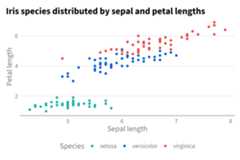
As clear above, even though we have an HDX theme function, we stillhave to separately call the scale function to adjust our colors. And wehave to call these every time we make a new plot. So, to make lifesimpler,gghdx() is provided as a convenience function thatsets ggplot to:
scale_fill_hdx_discrete() andscale_color_hdx_discrete() as the default discrete fill andcolor respectively;scale_fill_gradient_hdx_mint() andscale_color_gradient_hdx_sapphire() as the defaultcontinuous fill and color;You just have to rungghdx() once a session, and thenour plots will already be where we would like!
gghdx()p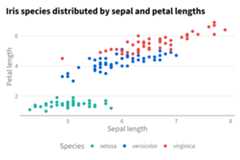
And voíla, we have our graph without specifying the theme or colorscale.
As a final example, we can closely match the COVID plots referencedin the visual guide using the theme and color scales in the package.
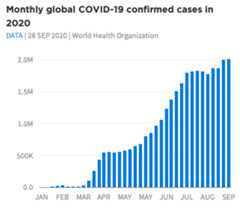
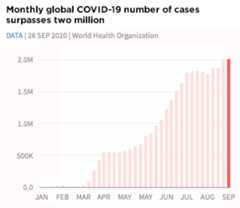
The inbuilt datagghdx::df_covid has aggregated COVIDdata we can use to mirror this plot. To make the data start at they-axis, we can usescale_y_continuous_hdx() which setsexpand = c(0, 0) by default, and thelabel_number_hdx() function to create custom labels.
p_blue<-ggplot( df_covid,aes(x = date,y = cases_monthly ))+geom_bar(stat ="identity",width =6,fill =hdx_hex("sapphire-hdx")# use sapphire for fill )+scale_y_continuous_hdx(labels =label_number_hdx() )+scale_x_date(date_breaks ="1 month",labels =function(x)toupper(strftime(x,"%b")) )+labs(title ="Monthly global COVID-19 confirmed cases in 2020",subtitle ="DATA | JUL 2022 | World Health Organization",x ="",y ="" )p_blue# create red plotp_blue+geom_bar(aes(fill = flag ),width =6,stat ="identity" )+scale_fill_hdx_tomato()+theme(legend.position ="none" )+labs(title ="Monthly COVID-19 # of cases surpasses 8 million" )

We’ve used relatively few lines of code to match fairly closely theseexamples plots!