
Buja et al. (2009) provides an inferential framework to assesswhether residual plots indeed contain visual patterns inconsistent withthe model assumptions. However, unlike conventional statistical teststhat can be performed computationally in statistical software, thelineup protocol requires human evaluation of images. This characteristicmakes it less suitable for large-scale applications, given theassociated high labour costs and time requirements.
Theautovi package aims to offer tools for automatedvisual inference of residual plots. Currently, it only supportsdiagnostic checks for classical normal linear regression models (CNLRM),as the underlying computer vision models are specifically trained forthis model class. However, theautovi API is designed to beextensible to other model types. This means you can obtain predictionsas long as you provide an appropriate method for generating nullresiduals through thenull_method argument.
Install the released version from CRAN with
install.packages("autovi")Install the development version from GitHub with:
# install.packages("remotes")remotes::install_github("TengMCing/autovi")library(tidyverse)library(autovi)All the available trained Keras models are listed inlist_keras_model(). All the trained Keras models listedbelow will predict a visual signal strength for the visual patterns ofthe input residual plot. This visual signal strength is essentially anapproximation of a Kullback–Leibler divergence based distance metricwhich quantifies the difference between the actual residual distributionand the reference residual distribution assumed under correct modelspecification. Details about the methodologies are provided inChapter 3 ofPatrick Li’s PhD thesis.
list_keras_model()%>%pull(model_name)#> [1] "vss_32" "vss_64" "vss_128" "vss_phn_32" "vss_phn_64"#> [6] "vss_phn_128"Different Keras models are trained with residual plots obtained fromdifferent linear regression models violating various modelassumptions.
vss_32,vss_64 andvss_128 aretrained with residual plots containing visual patterns indicatingnon-linearity and heteroskedasticity issues. The number in the modelname represents the size of the input image. For instance,32 means the input image has\(32\times 32\) pixels.
vss_phn_32,vss_phn_64 andvss_phn_128 are also trained with residual plots containingvisual patterns indicating non-linearity and heteroskedasticity, but thevisual patterns are more complex. Additionally, residual plots withvisual patterns of non-normality are also used for these models.
For this example, we will be using thevss_phn_32 Kerasmodel. The model can be obtained by usingget_keras_model().
keras_model<-get_keras_model("vss_phn_32")To illustrate the use of this package, we will define an incorrectlyspecified model omitting certain higher-order terms of
set.seed(2024)x<-rnorm(300)y<-1+ x+ x^2+ x^3+rnorm(300,sd =3)this_model<-lm(y~ x)The residual plot of the fitted model shows a “S” shape indicating anon-linearity issue.
ggplot()+geom_point(aes(this_model$fitted.values, this_model$residuals))+xlab("Fitted values")+ylab("Residuals")
To run diagnostics for this fitted model, we can initialize thechecker usingauto_vi() and have a look at the inputresidual plot using theplot_resid() method.
checker<-auto_vi(fitted_model = this_model,keras_model = keras_model)checker$plot_resid()
To predict the visual signal strength of this residual plot, simplyuse thevss() method.
checker$vss()#> ✔ Predict visual signal strength for 1 image.#> # A tibble: 1 × 1#> vss#> <dbl>#> 1 4.46Having the visual signal strength of the residual plot is usuallyinsufficient to determine if the model is correctly specified. Thus, weneed to evaluate some null residual plots for comparison.
The checker includes a default method to generate null residualsconsistent with the null hypothesis that the fitted model is correctlyspecified, which is therotate_resid() method implementingthe residual rotation technique. This method is only suitable forCNLRM.
checker$rotate_resid()%>% checker$plot_resid()
To get predictions for null residual plots, one can use thenull_vss() method. Thekeep_null_data andkeep_null_plot tells the method whether to preserve thenull residuals and null residuals plots in the result. For models thatneeds to use a null generating method other thanrotate_resid(), the function can be provided via thenull_method argument. The only parameter of the providedfunction should befitted_model, which is the fitted modelobject. And it should return a data frame with two columns.fitted and.resid which are fitted values andnull residuals respectively.
checker$null_vss(20L,keep_null_data =FALSE,keep_null_plot =FALSE)#> ✔ Generate null data.#> ✔ Generate null plots.#> ✔ Compute auxilary inputs.#> ✔ Predict visual signal strength for 20 images.#> # A tibble: 20 × 1#> vss#> <dbl>#> 1 1.17#> 2 1.09#> 3 1.17#> 4 0.773#> 5 1.24#> 6 0.640#> 7 0.873#> 8 1.06#> 9 1.00#> 10 1.01#> 11 3.03#> 12 1.15#> 13 1.08#> 14 0.910#> 15 1.10#> 16 0.913#> 17 0.848#> 18 1.08#> 19 0.911#> 20 0.665If we want to measure the variation of the visual signal strength ofthe residual plot, we can use theboot_vss() method to getbootstrapped visual signal strength. This method resamples theobservations with replacement and refit the regression model. Similarly,keep_boot_data andkeep_boot_plot tells themethod whether to preserve bootstrapped residuals and plots.
checker$boot_vss(20L,keep_boot_data =FALSE,keep_boot_plot =FALSE)#> ✔ Generate bootstrapped data.#> ✔ Generate bootstrapped plots.#> ✔ Compute auxilary inputs.#> ✔ Predict visual signal strength for 20 images.#> # A tibble: 20 × 1#> vss#> <dbl>#> 1 4.20#> 2 4.68#> 3 5.56#> 4 4.15#> 5 4.37#> 6 5.28#> 7 4.36#> 8 4.12#> 9 4.70#> 10 4.03#> 11 4.11#> 12 4.16#> 13 5.09#> 14 4.54#> 15 3.83#> 16 4.31#> 17 4.72#> 18 5.33#> 19 4.85#> 20 4.08To run a comprehensive check including the analysis of null residualsand bootstrapped residuals, use thecheck() method.
checker$check(null_draws = 20L,boot_draws = 20L)#> ✔ Generate null data.#> ✔ Generate null plots.#> ✔ Compute auxilary inputs.#> ✔ Predict visual signal strength for 20 images.#> ✔ Generate bootstrapped data.#> ✔ Generate bootstrapped plots.#> ✔ Compute auxilary inputs.#> ✔ Predict visual signal strength for 20 images.#> ✔ Predict visual signal strength for 1 image.The check result is stored in thecheck_resultattribute. If you print thechecker object, it will show abrief summary of the result.
checker#>#> ── <AUTO_VI object>#> Status:#> - Fitted model: lm#> - Keras model: (None, 32, 32, 3) + (None, 5) -> (None, 1)#> - Output node index: 1#> - Result:#> - Observed visual signal strength: 4.461 (p-value = 0)#> - Null visual signal strength: [20 draws]#> - Mean: 1.14#> - Quantiles:#> ╔═════════════════════════════════════════════════╗#> ║ 25% 50% 75% 80% 90% 95% 99% ║#> ║0.8896 1.0072 1.1204 1.2076 1.3012 1.5755 3.3615 ║#> ╚═════════════════════════════════════════════════╝#> - Bootstrapped visual signal strength: [20 draws]#> - Mean: 4.445 (p-value = 0)#> - Quantiles:#> ╔══════════════════════════════════════════╗#> ║ 25% 50% 75% 80% 90% 95% 99% ║#> ║4.162 4.395 4.789 4.905 5.185 5.292 5.293 ║#> ╚══════════════════════════════════════════╝#> - Likelihood ratio: 0.7295 (boot) / 5.232e-14 (null) = 1.394e+13A summary plot can be drawn with thesummary_plot()method. The solid line is the 95% sample quantile of the visual signalstrength predicted for null residual plots. The dot line is the visualsignal strength predicted for the original residual plot. The bluedensity curve indicates the distribution of visual signal strengthpredicted for null residual plots. And the red density curve indicatesthe distribution of visual signal strength predicted for bootstrappedresidual plots.
The\(p\)-value is obtained bycomputing the ratio of null visual signal strength greater than or equalto observed visual signal strength. The red area along with the solidline indicates how often the fitted model would be consideredincorrectly specified if the data can be repetitively drawn from thesame data generating process.
For this example, the\(H_0\) isrejected because of small\(p\)-value.It can also be observed that almost all the time the refitted modelswill be considered as incorrectly specified, so this is a clearrejection. Furthermore, since two density curves are very different fromeach other, it is very unlikely the original residuals are from the samedistribution of null residuals.
checker$summary_plot()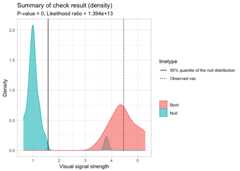
This package also enables the extraction of features from keras modelfor other purposes. To extract features from a specific layer of thekeras model, one needs to provide the argumentextract_feature_from_layer. The following code chunkextract features from the global pooling layer of the keras model.
checker$vss(extract_feature_from_layer ="global_max_pooling2d")%>%names()#> ✔ Predict visual signal strength for 1 image.#> [1] "vss" "f_1" "f_2" "f_3" "f_4" "f_5" "f_6" "f_7" "f_8"#> [10] "f_9" "f_10" "f_11" "f_12" "f_13" "f_14" "f_15" "f_16" "f_17"#> [19] "f_18" "f_19" "f_20" "f_21" "f_22" "f_23" "f_24" "f_25" "f_26"#> [28] "f_27" "f_28" "f_29" "f_30" "f_31" "f_32" "f_33" "f_34" "f_35"#> [37] "f_36" "f_37" "f_38" "f_39" "f_40" "f_41" "f_42" "f_43" "f_44"#> [46] "f_45" "f_46" "f_47" "f_48" "f_49" "f_50" "f_51" "f_52" "f_53"#> [55] "f_54" "f_55" "f_56" "f_57" "f_58" "f_59" "f_60" "f_61" "f_62"#> [64] "f_63" "f_64" "f_65" "f_66" "f_67" "f_68" "f_69" "f_70" "f_71"#> [73] "f_72" "f_73" "f_74" "f_75" "f_76" "f_77" "f_78" "f_79" "f_80"#> [82] "f_81" "f_82" "f_83" "f_84" "f_85" "f_86" "f_87" "f_88" "f_89"#> [91] "f_90" "f_91" "f_92" "f_93" "f_94" "f_95" "f_96" "f_97" "f_98"#> [100] "f_99" "f_100" "f_101" "f_102" "f_103" "f_104" "f_105" "f_106" "f_107"#> [109] "f_108" "f_109" "f_110" "f_111" "f_112" "f_113" "f_114" "f_115" "f_116"#> [118] "f_117" "f_118" "f_119" "f_120" "f_121" "f_122" "f_123" "f_124" "f_125"#> [127] "f_126" "f_127" "f_128" "f_129" "f_130" "f_131" "f_132" "f_133" "f_134"#> [136] "f_135" "f_136" "f_137" "f_138" "f_139" "f_140" "f_141" "f_142" "f_143"#> [145] "f_144" "f_145" "f_146" "f_147" "f_148" "f_149" "f_150" "f_151" "f_152"#> [154] "f_153" "f_154" "f_155" "f_156" "f_157" "f_158" "f_159" "f_160" "f_161"#> [163] "f_162" "f_163" "f_164" "f_165" "f_166" "f_167" "f_168" "f_169" "f_170"#> [172] "f_171" "f_172" "f_173" "f_174" "f_175" "f_176" "f_177" "f_178" "f_179"#> [181] "f_180" "f_181" "f_182" "f_183" "f_184" "f_185" "f_186" "f_187" "f_188"#> [190] "f_189" "f_190" "f_191" "f_192" "f_193" "f_194" "f_195" "f_196" "f_197"#> [199] "f_198" "f_199" "f_200" "f_201" "f_202" "f_203" "f_204" "f_205" "f_206"#> [208] "f_207" "f_208" "f_209" "f_210" "f_211" "f_212" "f_213" "f_214" "f_215"#> [217] "f_216" "f_217" "f_218" "f_219" "f_220" "f_221" "f_222" "f_223" "f_224"#> [226] "f_225" "f_226" "f_227" "f_228" "f_229" "f_230" "f_231" "f_232" "f_233"#> [235] "f_234" "f_235" "f_236" "f_237" "f_238" "f_239" "f_240" "f_241" "f_242"#> [244] "f_243" "f_244" "f_245" "f_246" "f_247" "f_248" "f_249" "f_250" "f_251"#> [253] "f_252" "f_253" "f_254" "f_255" "f_256"To check all the available layer names, one can list them with theKERAS_WRAPPER class.
KERAS_WRAPPER$list_layer_name(keras_model)#> [1] "input_1" "tf.__operators__.getitem"#> [3] "tf.nn.bias_add" "grey_scale"#> [5] "block1_conv1" "batch_normalization"#> [7] "activation" "block1_conv2"#> [9] "batch_normalization_1" "activation_1"#> [11] "block1_pool" "dropout"#> [13] "block2_conv1" "batch_normalization_2"#> [15] "activation_2" "block2_conv2"#> [17] "batch_normalization_3" "activation_3"#> [19] "block2_pool" "dropout_1"#> [21] "block3_conv1" "batch_normalization_4"#> [23] "activation_4" "block3_conv2"#> [25] "batch_normalization_5" "activation_5"#> [27] "block3_conv3" "batch_normalization_6"#> [29] "activation_6" "block3_pool"#> [31] "dropout_2" "block4_conv1"#> [33] "batch_normalization_7" "activation_7"#> [35] "block4_conv2" "batch_normalization_8"#> [37] "activation_8" "block4_conv3"#> [39] "batch_normalization_9" "activation_9"#> [41] "block4_pool" "dropout_3"#> [43] "block5_conv1" "batch_normalization_10"#> [45] "activation_10" "block5_conv2"#> [47] "batch_normalization_11" "activation_11"#> [49] "block5_conv3" "batch_normalization_12"#> [51] "activation_12" "block5_pool"#> [53] "dropout_4" "global_max_pooling2d"#> [55] "additional_input" "concatenate"#> [57] "dense" "dropout_5"#> [59] "activation_13" "dense_1"While running the comprehensive check with thecheck()method, one can provide theextract_feature_from_layerargument to extract features.
checker$check(null_draws = 20L,boot_draws = 20L,extract_feature_from_layer ="global_max_pooling2d")#> ✔ Generate null data.#> ✔ Generate null plots.#> ✔ Compute auxilary inputs.#> ✔ Predict visual signal strength for 20 images.#> ✔ Generate bootstrapped data.#> ✔ Generate bootstrapped plots.#> ✔ Compute auxilary inputs.#> ✔ Predict visual signal strength for 20 images.#> ✔ Predict visual signal strength for 1 image.The features are also stored in thecheck_resultattribute.
checker$check_result$observed#> # A tibble: 1 × 257#> vss f_1 f_2 f_3 f_4 f_5 f_6 f_7 f_8 f_9 f_10 f_11#> <dbl> <dbl> <dbl> <dbl> <dbl> <dbl> <dbl> <dbl> <dbl> <dbl> <dbl> <dbl>#> 1 4.46 0.167 0.0687 0 0 0 0.00164 0.0695 0 0.0847 0 0#> # ℹ 245 more variables: f_12 <dbl>, f_13 <dbl>, f_14 <dbl>, f_15 <dbl>,#> # f_16 <dbl>, f_17 <dbl>, f_18 <dbl>, f_19 <dbl>, f_20 <dbl>, f_21 <dbl>,#> # f_22 <dbl>, f_23 <dbl>, f_24 <dbl>, f_25 <dbl>, f_26 <dbl>, f_27 <dbl>,#> # f_28 <dbl>, f_29 <dbl>, f_30 <dbl>, f_31 <dbl>, f_32 <dbl>, f_33 <dbl>,#> # f_34 <dbl>, f_35 <dbl>, f_36 <dbl>, f_37 <dbl>, f_38 <dbl>, f_39 <dbl>,#> # f_40 <dbl>, f_41 <dbl>, f_42 <dbl>, f_43 <dbl>, f_44 <dbl>, f_45 <dbl>,#> # f_46 <dbl>, f_47 <dbl>, f_48 <dbl>, f_49 <dbl>, f_50 <dbl>, f_51 <dbl>, …This package provide ways to conduct PCA on these features. Thefeature_pca method will combine the features obtained fromthe prediction of the observed residual plot, null residual plots, andthe bootstrapped residual plots, then conduct PCA on them. The resultsare the rotated features. The variableset provides the setlabel of the observation, which can either be “observed”, “null” or“boot”.
checker$feature_pca()#> # A tibble: 41 × 298#> f_1 f_2 f_3 f_4 f_5 f_6 f_7 f_8 f_9 f_10 f_11 f_12#> <dbl> <dbl> <dbl> <dbl> <dbl> <dbl> <dbl> <dbl> <dbl> <dbl> <dbl> <dbl>#> 1 0.167 0.0687 0 0 0 0.00164 0.0695 0 0.0847 0 0 0.149#> 2 1.08 4.14 4.10 5.43 2.35 2.04 3.09 2.39 2.01 1.94 4.32 2.43#> 3 1.10 2.85 2.90 3.08 1.20 1.21 1.69 1.50 1.59 0.828 2.55 1.75#> 4 0.827 3.20 2.92 3.45 1.50 1.28 1.89 1.61 1.64 1.28 2.66 1.71#> 5 0.955 3.85 3.74 5.17 2.24 1.97 2.96 2.25 1.81 1.91 4.04 2.23#> 6 1.22 3.60 3.70 4.70 2.00 1.72 2.66 2.19 1.77 1.57 3.83 2.18#> 7 1.21 3.41 3.51 4.22 1.75 1.58 2.37 1.99 1.75 1.33 3.47 2.08#> 8 1.09 3.00 3.04 3.71 1.53 1.40 2.12 1.76 1.53 1.16 3.01 1.85#> 9 1.02 2.87 2.84 3.42 1.42 1.28 1.94 1.65 1.45 1.09 2.75 1.70#> 10 0.570 1.72 1.25 1.36 0.270 0.342 0.419 0.545 0.959 0.267 0.913 0.875#> # ℹ 31 more rows#> # ℹ 286 more variables: f_13 <dbl>, f_14 <dbl>, f_15 <dbl>, f_16 <dbl>,#> # f_17 <dbl>, f_18 <dbl>, f_19 <dbl>, f_20 <dbl>, f_21 <dbl>, f_22 <dbl>,#> # f_23 <dbl>, f_24 <dbl>, f_25 <dbl>, f_26 <dbl>, f_27 <dbl>, f_28 <dbl>,#> # f_29 <dbl>, f_30 <dbl>, f_31 <dbl>, f_32 <dbl>, f_33 <dbl>, f_34 <dbl>,#> # f_35 <dbl>, f_36 <dbl>, f_37 <dbl>, f_38 <dbl>, f_39 <dbl>, f_40 <dbl>,#> # f_41 <dbl>, f_42 <dbl>, f_43 <dbl>, f_44 <dbl>, f_45 <dbl>, f_46 <dbl>, …