meltt provides a method for integrating event data in R.Event data seeks to capture micro-level information on event occurrencesthat are temporally and spatially disaggregated. For example,information on neighborhood crime, car accidents, terrorism events, andmarathon running times are all forms of event data. These data provide ahighly granular picture of the spatial and temporal distribution of aspecific phenomena.
In many cases, more than one event dataset exists capturing relatedtopics – such as, one dataset that captures information on burglariesand muggings in a city and another that records assaults – and it can beuseful to combine these data to bolster coverage, capture a broaderspectrum of activity, or validate the coding of these datasets. However,matching event data is notoriously difficult:
Jittering Locations, different geo-referencingsoftware can produce slightly different longitude and latitude locationsfor the same place. This results in an artificial geo-spatial “jitter”around the same location.
Temporal Fuzziness, given how information aboutevents are collected, the exact date of an event reported might differfrom source to source. For example, if data is generated using newsreports, they might differ in their reporting of the exact timing of theevent—especially if precise on-the-ground information is hard to comeby. This creates a temporal fuzziness where the same empirical eventfalls on different days in different datasets .
Conceptual Differences, different event datasetsare built for different reasons, meaning each dataset will likelycontain its own coding schema for the same general category. Forexample, a dataset recording local muggings and burglaries might have aschema that records these types of events categorically (i.e “mugging”,“break in”, etc.), whereas another crime dataset might record violentcrimes and do so ordinally (1, 2, 3, etc.). Both datasets might becapturing the same event (say, a violent mugging) but each has its ownmethod of coding that event.
In the past, to overcome these hurdles, researchers have typicallyrelied on hand-coding to systematically match these data, which needlessto say, is extremely time consuming, error-prone, and hard to reproduce.meltt provides a way around this problem by implementing amethod that automates the matching of different event datasets in afast, transparent, and reproducible way.
More information about the specifics of the method can also be foundin our article in theJournal of Conflict Resolution as well asin the package documentation.
The package can be installed through the CRAN repository.
install.packages("meltt")Or the development version from Github
# install.packages("devtools")devtools::install_github("kdonnay/meltt")The package requires that users have Python (>= 3.6) installed ontheir computer. To quickly get Python, install anAnacondaplatform.meltt will use the program in the background.
In the following illustrations, we use (simulated) Maryland car crashdata. These data constitute three separate data sets capturing the samething: car crashes in the state of Maryland for January 2012. But eachdata set differs in how it codes information on the car’s color, make,and the type of accident.
data("crashMD")str(crash_data1)## 'data.frame': 71 obs. of 9 variables:## $ dataset : chr "crash_data1" "crash_data1" "crash_data1" "crash_data1" ...## $ event : int 1 2 3 4 5 6 7 8 9 10 ...## $ date : Date, format: "2012-01-01" "2012-01-01" ...## $ enddate : Date, format: "2012-01-01" "2012-01-02" ...## $ latitude : num 39.1 38.6 39.1 38.3 38.3 ...## $ longitude : num -76 -75.7 -76.9 -75.6 -76.5 ...## $ model_tax : chr "Full-Sized Pick-Up Truck" "Mid-Size Car" "Cargo Van" "Mini Suv" ...## $ color_tax : chr "210-180-140" "173-216-230" "210-180-140" "139-137-137" ...## $ damage_tax: chr "1" "5" "4" "4" ...str(crash_data2)## 'data.frame': 64 obs. of 9 variables:## $ dataset : chr "crash_data2" "crash_data2" "crash_data2" "crash_data2" ...## $ event : int 1 2 3 4 5 6 7 8 9 10 ...## $ date : Date, format: "2012-01-01" "2012-01-01" ...## $ enddate : Date, format: "2012-01-01" "2012-01-01" ...## $ latitude : num 39.1 39.1 39.1 39 38.5 ...## $ longitude : num -76.9 -76 -76.7 -76.2 -76.6 ...## $ model_tax : chr "Van" "Pick-Up" "Small Car" "Large Family Car" ...## $ color_tax : chr "#D2b48c" "#D2b48c" "#D2b48c" "#Ffffff" ...## $ damage_tax: chr "Flip" "Mid-Rear Damage" "Front Damage" "Front Damage" ...str(crash_data3)## 'data.frame': 60 obs. of 9 variables:## $ dataset : chr "crash_data3" "crash_data3" "crash_data3" "crash_data3" ...## $ event : int 1 2 3 4 5 6 7 8 9 10 ...## $ date : Date, format: "2012-01-01" "2012-01-01" ...## $ enddate : Date, format: "2012-01-01" "2012-01-01" ...## $ latitude : num 39.1 39.1 38.4 39.1 38.6 ...## $ longitude : num -76.9 -76 -75.4 -76.6 -76 ...## $ model_tax : chr "Cargo Van" "Standard Pick-Up" "Mid-Sized" "Small Sport Utility Vehicle" ...## $ color_tax : chr "Light Brown" "Light Brown" "Gunmetal" "Red" ...## $ damage_tax: chr "Vehicle Rollover" "Rear-End Collision" "Sideswipe Collision" "Vehicle Rollover" ...Each dataset contain variables that code:
date: when the event occurred;enddate: if the event occurred across more than oneday, i.e. an “episode”;longitude &latitude: geo-locationinformation;model_tax: coding scheme of the type of car;color_tax: coding scheme of the color of the car;damage_tax: coding scheme of the type of accident.The variable names across dataset have already been standardized (forreasons further outlined below).
The goal is to match these three event datasets to locate whichreported events are the same, i.e., the corresponding data set entriesare duplicates, and which are unique.meltt formalizes allinput assumptions the user needs to make in order to match thesedata.
First, the user has to specify a spatial and temporal window that anypotential match could plausibly fall within. Put differently, how closein space and time does an event need to be to qualify as potentiallyreporting on the same incident?
Second, to articulate how different coding schemes overlap, the userneeds to input an event taxonomy. A taxonomy is a formalization of howvariables overlap, moving from as granular as possible to as general aspossible. In this case, it describes how the coding of the threecar-specific properties (model, color, damage) across our three datasets correspond.
Among the three variables that exist in all three in datasets weconsider thedamage_tax variable recorded in each ofdataset for an in-depth example:
unique(crash_data1$damage_tax)## [1] "1" "5" "4" "6" "2" "3" "7"unique(crash_data2$damage_tax)## [1] "Flip" "Mid-Rear Damage" ## [3] "Front Damage" "Side Damage While In Motion"## [5] "Hit Tree" "Side Damage" ## [7] "Hit Property"unique(crash_data3$damage_tax)## [1] "Vehicle Rollover" "Rear-End Collision" ## [3] "Sideswipe Collision" "Object Collisions" ## [5] "Side-Impact Collision" "Liable Object Collisions"## [7] "Head-On Collision"Each variable records information on the type of accident a littledifferently. The idea of introducing a taxonomy is then, as mentionedbefore, to generalize across each category by clarifying how each codingscheme maps onto the other.
str(crash_taxonomies$damage_tax)## 'data.frame': 21 obs. of 3 variables:## $ data.source : chr "crash_data1" "crash_data1" "crash_data1" "crash_data1" ...## $ base.categories: chr "1" "2" "3" "4" ...## $ damage_level1 : chr "Multi-Vehicle Accidents" "Multi-Vehicle Accidents" "Multi-Vehicle Accidents" "Single Car Accidents" ...Thecrash_taxonomies object contains three pre-madetaxonomies for each of the three overlapping variable categories. As youcan see, thedamage_tax contains only a single leveldescribing how the different coding schemes overlap. When matching thedata,meltt uses this information to score potentialmatches that are proximate in space and time.
Likewise, we similarly formalized how themodel_tax andcolor_tax variables map onto one another.
str(crash_taxonomies$color_tax)## 'data.frame': 39 obs. of 4 variables:## $ data.source : chr "crash_data1" "crash_data1" "crash_data1" "crash_data1" ...## $ base.categories: chr "255-0-0" "0-0-128" "255-255-255" "0-100-0" ...## $ col_level1 : chr "Red Shade" "Blue Shade" "Greyscale Shade" "Green Shade" ...## $ col_level2 : chr "Dark" "Dark" "Light" "Dark" ...str(crash_taxonomies$model_tax)## 'data.frame': 31 obs. of 5 variables:## $ data.source : chr "crash_data1" "crash_data1" "crash_data1" "crash_data1" ...## $ base.categories: chr "Economy Car" "Mid-Sized Luxery Car" "Small Family Car" "Mpv" ...## $ make_level1 : chr "B-Segment Small Cars" "E-Segment Executive Cars" "C-Segment Medium Cars" "M-Segment Multipurpose Cars" ...## $ make_level2 : chr "Passenger Car" "Passenger Car" "Passenger Car" "Mpv" ...## $ make_level3 : chr "Small Vehicle" "Small Vehicle" "Small Vehicle" "Large Vehicle" ...The color and model taxonomies contain more levels than the damagetaxonomy representing specific to increasingly broader categories underwhich both color and model of the cars can be described. For example,themodel_tax goes frommake_level1, whichcontains a schema with 7 unique entries using the Euro coding of carmodels as a way of specifying overlap, tomake_level3,which contains a schema with only two categories (i.e. differentiationbetween large and small vehicles).
Generally, specifications of taxonomy levels can be as granular or asbroad as one chooses. The more fine-grained the levels one includes todescribe the overlap, the more specific the match. At the same time, ifcategories are too narrow, it is difficult to conceptualize potentialmatches across datasets. As a rule, there is thus a trade off betweenspecific categories that can better differentiate among possibleduplicate entries and unspecific categories that more easily recognizepotentially matching information across datasets.
As a general rule, we therefore recommend to include, whenever it isconceptually warranted, both specific fine-grained categories and a fewincreasingly broader ones. In this case,meltt will havemore information to work with when differentiating between sets ofpotential matches. In establishing which entries are most likely tocorrespond,meltt in case of more than two potentialmatches in one dataset always automatically favors the one that moreprecisely corresponds.A good taxonomy is the key to matchingdata, and is the primary vehicle by which a user’s assumptions –regarding how data fits together – is made transparent.
A few technical things to note:
data.frame is read intomeltt as asingle list object.str(crash_taxonomies)# List of 3# $ model_tax :'data.frame': 31 obs. of 5 variables:# ..$ data.source : chr [1:31] "crash_data1" "crash_data1" "crash_data1" "crash_data1" ...# ..$ base.categories: chr [1:31] "Economy Car" "Mid-Sized Luxery Car" "Small Family Car" "Mpv" ...# ..$ make_level1 : chr [1:31] "B-Segment Small Cars" "E-Segment Executive Cars" "C-Segment Medium Cars" "M-Segment Multipurpose Cars" ...# ..$ make_level2 : chr [1:31] "Passenger Car" "Passenger Car" "Passenger Car" "Mpv" ...# ..$ make_level3 : chr [1:31] "Small Vehicle" "Small Vehicle" "Small Vehicle" "Large Vehicle" ...# $ color_tax :'data.frame': 39 obs. of 4 variables:# ..$ data.source : chr [1:39] "crash_data1" "crash_data1" "crash_data1" "crash_data1" ...# ..$ base.categories: chr [1:39] "255-0-0" "0-0-128" "255-255-255" "0-100-0" ...# ..$ col_level1 : chr [1:39] "Red Shade" "Blue Shade" "Greyscale Shade" "Green Shade" ...# ..$ col_level2 : chr [1:39] "Dark" "Dark" "Light" "Dark" ...# $ damage_tax:'data.frame': 21 obs. of 3 variables:# ..$ data.source : chr [1:21] "crash_data1" "crash_data1" "crash_data1" "crash_data1" ...# ..$ base.categories: chr [1:21] "1" "2" "3" "4" ...# ..$ damage_level1 : chr [1:21] "Multi-Vehicle Accidents" "Multi-Vehicle Accidents" "Multi-Vehicle Accidents" "Single Car Accidents" ...meltt relies on simple namingconventions to identify which variable is what when matching.names(crash_taxonomies)# [1] "model_tax" "color_tax" "damage_tax"colnames(crash_data1)[7:9]# [1] "model_tax" "color_tax" "damage_tax"colnames(crash_data2)[7:9]# [1] "model_tax" "color_tax" "damage_tax"colnames(crash_data3)[7:9]# [1] "model_tax" "color_tax" "damage_tax"Each taxonomy must contain adata.source andbase.categories column: this last convention helpsmeltt identify which variable is contained in which dataobject. Thedata.source column should reflect thenames of the of the data objects for inputdata and thebase.categories should reflectthe original coding of the variable on which the taxonomy isbuilt.
Each input dataset must contain adate,enddate (if one exists),longitude, andlatitude column: thevariables must be named accordingly (no deviations in namingconventions). The dates should be in an R date format(as.Date()), and the geo-reference information must benumeric (as.numeric()).
Once the taxonomy is formalized, matching several datasets isstraightforward. Themeltt() function takes four mainarguments: -...: input data; -taxonomies =:list object containing the user-input taxonomies; -spatwindow =: the spatial window (in kilometers); -twindow =: the temporal window (in days).
Below we assume that any two events in two different datasetsoccurring within 4 kilometers and 2 days of each other could plausiblybe the same event. This ‘’fuzziness’’ basically sets the boundaries onhow precise we believe the spatial location and timing of events iscoded. It is usually best practice to vary these specificationssystematically to ensure that no one specific combination drives theoutcomes of the integration task.
We then assume that event categories map onto each other according tothe way that we formalized in the taxonomies outlined above. We fold allthis information together using themeltt() function andthen store the results in an object namedoutput.
output<-meltt(crash_data1, crash_data2, crash_data3,taxonomies = crash_taxonomies,spatwindow =4,twindow =2)meltt also contains a range of adjustments to offer theuser additional controls regarding how the events are matched. Theseauxiliary arguments are: -smartmatch: whenTRUE (default), all available taxonomy levels are used andmeltt uses a matching score that ensures that fine-grainedagreements is favored over broader agreement, if more than one taxonomylevel exists. WhenFALSE, only specific taxonomy levels areconsidered. -certainty: specification of the the exacttaxonomy level to match on whensmartmatch = FALSE. -partial: specifies whether matches along only some of thetaxonomy dimensions are permitted. -averaging: implementaveraging of all values events are match on when matching acrossmultiple data.frames. That is, as events are matched dataset by dataset,the metadata is averaged. (Note: that this can generate distortion inthe output). -weight: specified weights for each taxonomylevel to increase or decrease the importance of each taxonomy’scontribution to the matching score.
At times, one might want to know which taxonomy level is doing theheavy lifting. By turning offsmartmatch, and specifyingcertain taxonomy levels by which to compare events, or by weightingtaxonomy levels differently, one is able to better assess whichassumptions are driving the final integration results. This can helpwith fine-tuning the input assumptions formeltt to gainthe most valid match possible.
When printed, themeltt object offers a brief summary ofthe output.
output## MELTT Complete: 3 datasets successfully integrated.## =========================================================## Total No. of Input Observations: 195## No. of Unique Obs (after deduplication): 140## No. of Unique Matches: 34## No. of Duplicates Removed: 55## =========================================================In matching the three car crash datasets, there are 195 total entries(i.e. 71 entries fromcrash_data1, 64 entries fromcrash_data2, and 60 entries fromcrash_data3).Of those 195, 140 of them are unique – that is, no entry from anotherdataset matched up with them. 55 entries, however, were found to beduplicates identified within 34 unique matches.
Thesummary() function offers a more informed summary ofthe output.
summary(output)## ## MELTT output## ============================================================## No. of Input Datasets: 3## Data Object Names: crash_data1, crash_data2, crash_data3## Spatial Window: 4km## Temporal Window: 2 Day(s)## ## No. of Taxonomies: 3## Taxonomy Names: model_tax, color_tax, damage_tax## Taxonomy Depths: 3, 2, 1## ## Total No. of Input Observations: 195## No. of Unique Matches: 34## - No. of Event-to-Event Matches: 26## - No. of Episode-to-Episode Matches: 8## No. of Duplicates Removed: 55## No. of Unique Obs (after deduplication): 140## ------------------------------------------------------------## Summary of Overlap## crash_data1 crash_data2 crash_data3 Freq## X 41## X 34## X 31## X X 5## X X 4## X X 4## X X X 21## ============================================================## *Note: 6 episode(s) flagged as potentially matching to an event.## Review flagged match with meltt.inspect()Given that meltt objects can be saved and referenced later, thesummary function offers a recap on the input parameters and assumptionsthat underpin the match (i.e. the datasets, the spatiotemporal window,the taxonomies, etc.). Again, information regarding the total number ofobservations, the number of unique and duplicate entries, and the numbermatches found is reported, but this time information regarding how manyof those matches were event-to-event (i.e. events that played out alongone time unit where the date is equal to the end date) andepisode-to-episode (i.e. events that played out over a couple ofdays).
NOTE: Events that have been flagged as matching to episodes requiremanual review using the
meltt.inspect()function. Thesummary output tells us that 6 episodes are flagged as potentiallymatching. Technically speaking, episodes (events with different startand end dates) and events are at different units of analysis; thus, userdiscretion is required to help sort out these types of matches. Themeltt.inspect()function eases this process of manualassessment. We are developing a shiny app to help assessment further inthis regard.
Asummary of overlap is also provided, articulatinghow the different input datasets overlap and where. For example, of the34 matches 5 occurred between crash_data1 and crash_data2, 4 betweencrash_data1 and crash_data3, 4 between crash_data2 and crash_data3, and21 between all three.
For quick visualizations of the matched output,melttcontains three plotting functions.
plot() offers a bar plot that graphically articulatesthe unique and overlapping entries. Note that the entries from theleading dataset (i.e. the dataset first entered into meltt) is allblack. In this representation, all matching (or duplicate) entries areexpressed in reference to the datasets that came before it. Any matchfound in crash_data2 is with respect to crash_data1, any in crash_data3with respect to crash_data1 and crash_data2. All the plotting functionare written usingggplot2 so they can be stored in anobject and altered accordingly.
plot(output)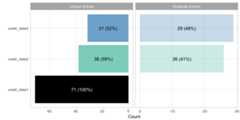
tplot() offers a time series plot of the meltt output.The plot works as a reflection, where raw counts of the unique entriesare plotted right-side up and the raw counts of the removed duplicatesare plotted below it. This offers a quick snapshot ofwhenduplicates are found. Temporal clustering of duplicates may indicate anissue with the data and/or the input assumptions, or it’s potentiallyevidence of a unique artifact of the data itself.
Users can specify the temporal unit that the data should be binned(day, week, month, year).
t1<-tplot(output,time_unit="days")t2<-tplot(output,time_unit="weeks")gridExtra::grid.arrange(t1,t2)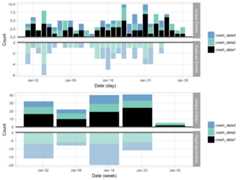
Similarly,mplot() presents an interactive summary ofthe spatial distribution of the data by plotting the spatial pointsusingleaflet. The goal is to get a sense of the spatialdistribution of the matches to both identify anyclustering/disproportionate coverage in the areas that matches arelocated, and to also get a sense of the spread of the integrated output.Building the function aroundleaflet allows for easyinteractive exploration from within an R notebook or viewer.
To view unique and matched events (i.e. the types of data retrievedviameltt_data()):
mplot(output)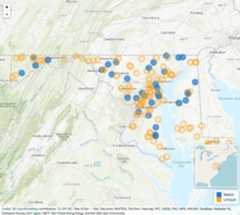
To view duplicate and matched events (i.e. the types of dataretrieved viameltt_duplicates()), set thematching= argument toTRUE.
mplot(output,matching =TRUE)meltt provides two methods for extracting data from theoutput object.
meltt_data() returns the de-duplicated data along withany necessary columns the user might need. This is the primary functionfor extracting matched data and moving on with subsequent analysis. Thecolumns = argument takes any vector of variable names andreturns those variables in the output. If no variables are specified,meltt returns the spatio-temporal and taxonomy variablesthat were employed during the match. In addition, the function returns aunique event and data ID for reference.
uevents<-meltt_data(output,columns =c("date","model_tax"))str(uevents)## 'data.frame': 140 obs. of 6 variables:## $ dataset : chr "crash_data1" "crash_data1" "crash_data2" "crash_data3" ...## $ event : int 1 2 3 3 3 4 5 6 4 5 ...## $ date : Date, format: "2012-01-01" "2012-01-01" ...## $ latitude : num 39.1 38.6 39.1 38.4 39.1 ...## $ longitude: num -76 -75.7 -76.7 -75.4 -76.9 ...## $ model_tax: chr "Full-Sized Pick-Up Truck" "Mid-Size Car" "Small Car" "Mid-Sized" ...meltt_duplicates(), on the other hand, returns a dataframe of all events that matched up. This provides a quick way ofexamining and assessing the events that matched. Since the quality ofany match is only as good as the assumptions we input, its key that theuser qualitatively evaluate the meltt output to assess whether anyassumptions should be adjusted. Likemeltt_data(), thecolumns = argument can be customized to return variables ofinterest.
Note that the data is presented differently than inmeltt_data(); here each dataset (and its correspondingvariables) is presented in a separate column. This representation ischose for ease of comparison. For example, the entry for row 1 denotesthat the 55th entry in the crash_data2 data matched with entry 57 fromthe crash_data3, whereas no entry from crash_data1 matched (as indicatedwith “dataID” and “eventID” 0 and “date” NA). The requested columns areintended to assist with validation.
dups<-meltt_duplicates(output,columns =c("date"))str(dups)## 'data.frame': 34 obs. of 9 variables:## $ crash_data1_dataID : num 0 0 0 0 1 1 1 1 1 1 ...## $ crash_data1_eventID: num 0 0 0 0 1 3 7 9 10 12 ...## $ crash_data2_dataID : num 2 2 2 2 2 2 0 2 2 2 ...## $ crash_data2_eventID: num 55 8 39 44 2 1 0 5 7 10 ...## $ crash_data3_dataID : num 3 3 3 3 3 3 3 3 3 3 ...## $ crash_data3_eventID: num 57 10 36 44 2 1 4 8 7 6 ...## $ crash_data3_date : Date, format: "2012-01-26" "2012-01-05" ...## $ crash_data2_date : Date, format: "2012-01-25" "2012-01-04" ...## $ crash_data1_date : Date, format: NA NA ...meltt also offers users a way of validating the qualityof any integration task with the functionmeltt_validate().The function proceeds in three steps:
meltt_validate() allows users to randomly sample aproportion of matching pairs and then generates a “control group” of twoentries that are close to the matching entries but were not identifiedas matches. This sampled subset of the data is then assessed manually bythe user in step 2.meltt_validate() collapsesinto a simple print function that reports accuracy diagnostics (i.e. thetrue/false positive/negative rates).meltt_validate(output,sample_prop = .5,description.vars =c("date","model_tax"))Given thatmeltt operates primarily on user inputassumptions, validating the output of any integration task is key asassumptions often need to be adjusted to optimize the matchingalgorithm.
Like most S3 objects, the output frommeltt is a nestedlist containing a range of useful information. The output frommeltt retains the original input data and taxonomies andthe specification assumptions as well as lists of contender events(i.e. events that were flagged as potential matches but did not match asclosely as another event). Note that we are expanding meltt’sfunctionality to include more posterior function to ease extraction ofthis information, but for now, it can simply be accessed using the usual$ key convention.
names(output)## [1] "processed" "inputData" "parameters" "inputDataNames"## [5] "taxonomy"str(output$processed$event_contenders)## 'data.frame': 41 obs. of 12 variables:## $ dataset : num 1 1 1 1 1 1 1 1 1 1 ...## $ event : num 1 3 9 10 12 13 19 26 27 30 ...## $ bestmatch_data : num 2 2 2 2 2 2 2 2 2 2 ...## $ bestmatch_event: num 2 1 5 7 10 6 21 25 26 31 ...## $ bestmatch_score: num 0 0 0 0 0 0 0 0 0 0 ...## $ runnerUp1_data : num 0 0 2 0 0 0 0 0 0 0 ...## $ runnerUp1_event: num 0 0 2 0 0 0 0 0 0 0 ...## $ runnerUp1_score: num 0 0 0.5 0 0 0 0 0 0 0 ...## $ runnerUp2_data : num 0 0 0 0 0 0 0 0 0 0 ...## $ runnerUp2_event: num 0 0 0 0 0 0 0 0 0 0 ...## $ runnerUp2_score: num 0 0 0 0 0 0 0 0 0 0 ...## $ events_matched : num 1 1 2 1 1 1 1 1 1 1 ...meltt in R usingcitation(package = 'meltt')