Have you ever wanted to create (partly) overlapping line plots withmatched color-coding of the data and axes? These kinds of plots arecommon, for example, in climatology and oceanography research but thereis not an easy way to create them with ggplot facets. The ggstackplotpackage builds onggplot2to provide a straightforward approach to building these kinds of plotswhile retaining the powerful grammar of graphics functionality ofggplots.
Install the latest stable version of ggstackplot fromGitHub (the CRANversion may lag behind) with:
# install.packages("pak")pak::pak("KopfLab/ggstackplot")library(ggstackplot)# using R's built-in mtcars datasetmtcars|>ggstackplot(# define shared x axisx = mpg,# define multiple y axesy =c("weight"= wt,"horsepower"= hp),# set colorscolor =c("#E41A1C","#377EB8"),# set to complete overlapoverlap =1 )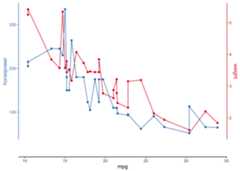
# download a recent dataset from the public climate data repository PANGAEAdataset<- pangaear::pg_data(doi ="10.1594/PANGAEA.967047")[[1]]# show what some of these data look likedataset$data[c("Depth ice/snow [m] (Top Depth)","Age [ka BP]","[SO4]2- [ng/g] (Ion chromatography)")]|>head()|> knitr::kable()| Depth ice/snow [m] (Top Depth) | Age [ka BP] | [SO4]2- [ng/g] (Ion chromatography) |
|---|---|---|
| 160.215 | 1.20662 | 52.00 |
| 160.183 | 1.20300 | 165.00 |
| 160.151 | 1.20276 | 93.50 |
| 160.022 | 1.20191 | 42.25 |
| 159.990 | 1.20155 | 74.50 |
| 159.958 | 1.20130 | 104.50 |
These data were kindly made available onPANGAEA by Sigl etal. (2024).
Full citation:
Sigl, Michael; Gabriel, Imogen; Hutchison, William; Burke, Andrea(2024): Sulfate concentration and sulfur isotope data from GreenlandTUNU2013 ice-core samples between 740-765 CE [dataset]. PANGAEA,https://doi.org/10.1594/PANGAEA.967047
Vertical stack plot:
# visualize the data with ggstackplotdataset$data|>ggstackplot(x ="Age [ka BP]",y =c(# vertical stack of the measurements through time"sulfate [ng/g]"="[SO4]2- [ng/g] (Ion chromatography)","δ34S [‰]"="δ34S [SO4]2- [‰ CDT] (Multi-collector ICP-MS (MC-IC...)","Δ33S [‰]"="Δ33S [SO4]2- [‰ CDT] (Multi-collector ICP-MS (MC-IC...)" ),# color palettepalette ="Dark2",# partial overlap of the panelsoverlap =0.4 )
# download some more data from PANGAEAdataset2<- pangaear::pg_data(doi ="10.1594/PANGAEA.933277")[[1]]# show what some of these data look likedataset2$data[c("Depth sed [m]","Comp","δ13C [‰ PDB] (mean, vs. VPDB)")]|>head()|> knitr::kable()| Depth sed [m] | Comp | δ13C [‰ PDB] (mean, vs. VPDB) |
|---|---|---|
| 120.205 | C17 | -28.185 |
| 120.205 | phytane | -27.032 |
| 120.205 | C19 | -28.268 |
| 120.205 | C21 | -27.901 |
| 120.205 | C27aaa20R | -29.707 |
| 120.205 | C28aaa20R | -28.194 |
Full citation:
Boudinot, F Garrett; Kopf, Sebastian; Dildar, Nadia; Sepúlveda, Julio(2021): Compound-specific carbon isotope results from the SH#1 coreanalyzed and processed at University of Colorado Boulder [dataset].PANGAEA,https://doi.org/10.1594/PANGAEA.933277
Horizontal stack plot:
library(dplyr)library(ggplot2)# use a custom template for this plotmy_template<-# it's a ggplotggplot()+# use a path plot for all (to connect the data points by depth!)geom_point()+geom_path()+# we still want the default stackplot themetheme_stackplot()+# depth is commonly plotted in reversescale_y_reverse()# now make the horizontal stack through depth for 2 of the variablesdataset2$data|>filter(Comp=="C19")|>arrange(`Depth sed [m]`)|>ggstackplot(x =c("δ13C carb [‰ PDB]","δ13C n-C19 [‰]"="δ13C [‰ PDB] (mean, vs. VPDB)" ),y ="Depth sed [m]",palette ="Dark2",overlap =1,template = my_template )
# or show them side by side (note that this could also be achieved with ggplot# facets except for the fine-control and coloring of the different x-axes)dataset2$data|>filter(Comp=="C19")|>arrange(`Depth sed [m]`)|>ggstackplot(x =c("δ13C carb [‰ PDB]","δ13C n-C19 [‰]"="δ13C [‰ PDB] (mean, vs. VPDB)" ),y ="Depth sed [m]",palette ="Dark2",# no more overlapoverlap =0,# fine-tune the axes to be on top and bottomboth_axes =TRUE,template = my_template )
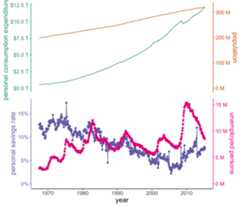
# using the built-in economics dataset in ggplot2 to create a vertical stack# of double axis plots using many of the customization features available# with ggstackplot and ggplot2ggplot2::economics|>ggstackplot(# define shared x axisx = date,# define the stacked y axesy =c(pce, pop, psavert, unemploy),# pick the RColorBrewer Dark2 palette (good color contrast)palette ="Dark2",# overlay the pce & pop plots (1), then make a full break (0) to the once# again overlaye psavert & unemploy plots (1)overlap =c(1,0,1),# switch axes so unemploy and psavert are on the side where they are# highest, respectively - not doing this here by changing the order of y# because we want pop and unemploy on the same sideswitch_axes =TRUE,# make shared axis space a bit smallershared_axis_size =0.15,# provide a base plot with shared graphics eelements among all plotstemplate =# it's a ggplotggplot()+# use a line plot for allgeom_line()+# we want the default stackplot themetheme_stackplot()+# add custom theme modifications, such as text sizetheme(text =element_text(size =14))+# make the shared axis a date axisscale_x_date("year")+# include y=0 for all plots to contextualize data betterexpand_limits(y =0),# add plot specific elementsadd =list(pce =# show pce in trillions of dollarsscale_y_continuous("personal consumption expenditures",# always keep the secondary axis duplicated so ggstackplot can# manage axis placement for yousec.axis =dup_axis(),# labeling function for the dollar unitslabels =function(x)sprintf("$%.1f T", x/1000), ),pop =# show population in millionsscale_y_continuous("population",sec.axis =dup_axis(),labels =function(x)sprintf("%.0f M", x/1000) ),psavert =# savings is in %scale_y_continuous("personal savings rate",sec.axis =dup_axis(),labels =function(x)paste0(x,"%"), )+# show data points in addition to linegeom_point(),unemploy =# unemploy in millionsscale_y_continuous("unemployed persons",sec.axis =dup_axis(),labels =function(x)sprintf("%.0f M", x/1000) )+# show data points in addition to linegeom_point() ) )