


The ggtext package provides simple Markdown and HTML rendering forggplot2. Under the hood, the package uses thegridtext packagefor the actual rendering, and consequently it is limited to the featureset provided by gridtext.
Support is provided for Markdown both in theme elements (plot titles,subtitles, captions, axis labels, legends, etc.) and in geoms (similartogeom_text()). In both cases, there are two alternatives,one for creating simple text labels and one for creating text boxes withword wrapping.
Importantly, the gridtext package that provides the rendering supportimplements only an extremely limited subset ofMarkdown/HTML/CSS. It currently can make text bold or italics,can change the font, color, or size of a piece of text, can place textas sub- or superscript, and has extremely rudimentary image support. Noother features are currently supported. As a general rule, any Markdown,HTML, or CSS feature that isn’t shown in any of the ggtext or gridtextdocumentation likely doesn’t exist.
You can install the latest stable release from CRAN viainstall.packages():
install.packages("ggtext")To install the latest development version of this package, please runthe following line in your R console:
remotes::install_github("wilkelab/ggtext")The ggtext package defines two new theme elements,element_markdown() andelement_textbox(). Bothbehave similarly toelement_text() but render the providedtext as markdown/html.element_markdown() is meant as adirect replacement forelement_text(), and it renders textwithout word wrapping. To start a new line, use the<br> tag or add two spaces before the end of aline.
As an example, we can mix regular, italics, and bold text, and we canalso apply colors to axis tick labels. This particular example wasinspired bythisstackoverflow post.
library(tidyverse)library(ggtext)library(glue)data<-tibble(bactname =c("Staphylococcaceae","Moraxella","Streptococcus","Acinetobacter"),OTUname =c("OTU 1","OTU 2","OTU 3","OTU 4"),value =c(-0.5,0.5,2,3))data%>%mutate(color =c("#009E73","#D55E00","#0072B2","#000000"),name =glue("<i style='color:{color}'>{bactname}</i> ({OTUname})"),name =fct_reorder(name, value))%>%ggplot(aes(value, name,fill = color))+geom_col(alpha =0.5)+scale_fill_identity()+labs(caption ="Example posted on **stackoverflow.com**<br>(using made-up data)")+theme(axis.text.y =element_markdown(),plot.caption =element_markdown(lineheight =1.2) )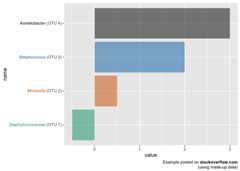
Very basic support for the<img> tag exists, andit can be used, for example, to employ images as axis labels.
labels<-c(setosa ="<img src='https://upload.wikimedia.org/wikipedia/commons/thumb/8/86/Iris_setosa.JPG/180px-Iris_setosa.JPG' width='100' /><br>*I. setosa*",virginica ="<img src='https://upload.wikimedia.org/wikipedia/commons/thumb/3/38/Iris_virginica_-_NRCS.jpg/320px-Iris_virginica_-_NRCS.jpg' width='100' /><br>*I. virginica*",versicolor ="<img src='https://upload.wikimedia.org/wikipedia/commons/thumb/2/27/20140427Iris_versicolor1.jpg/320px-20140427Iris_versicolor1.jpg' width='100' /><br>*I. versicolor*")ggplot(iris,aes(Species, Sepal.Width))+geom_boxplot()+scale_x_discrete(name =NULL,labels = labels )+theme(axis.text.x =element_markdown(color ="black",size =11) )
element_textbox() offers support for rendering largeramounts of text that require word wrapping. Unlikeelement_markdown(), it cannot be used for axis tick labels,and it cannot draw text at arbitrary angles, only at fixed orientationscorresponding to 0, 90, 180, and 270 degrees. In practice, you willusually want to useelement_textbox_simple() instead ofelement_textbox(), as it sets useful defaults for manyparameters not usually defined in ggplot2 themes.
ggplot(mtcars,aes(disp, mpg))+geom_point()+labs(title ="<b>Fuel economy vs. engine displacement</b><br> <span style = 'font-size:10pt'>Lorem ipsum *dolor sit amet,* consectetur adipiscing elit, **sed do eiusmod tempor incididunt** ut labore et dolore magna aliqua. <span style = 'color:red;'>Ut enim ad minim veniam,</span> quis nostrud exercitation ullamco laboris nisi ut aliquip ex ea commodo consequat.</span>",x ="displacement (in<sup>3</sup>)",y ="Miles per gallon (mpg)<br><span style = 'font-size:8pt'>A measure of the car's fuel efficiency.</span>" )+theme(plot.title.position ="plot",plot.title =element_textbox_simple(size =13,lineheight =1,padding =margin(5.5,5.5,5.5,5.5),margin =margin(0,0,5.5,0),fill ="cornsilk" ),axis.title.x =element_textbox_simple(width =NULL,padding =margin(4,4,4,4),margin =margin(4,0,0,0),linetype =1,r = grid::unit(8,"pt"),fill ="azure1" ),axis.title.y =element_textbox_simple(hjust =0,orientation ="left-rotated",minwidth =unit(1,"in"),maxwidth =unit(2,"in"),padding =margin(4,4,2,4),margin =margin(0,0,2,0),fill ="lightsteelblue1" ) )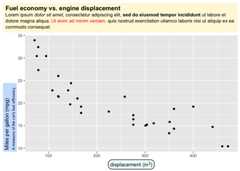
Another example, replacing facet strips with text boxes.
library(cowplot)ggplot(mpg,aes(cty, hwy))+geom_point()+facet_wrap(~class)+theme_half_open(12)+background_grid()+theme(strip.background =element_blank(),strip.text =element_textbox(size =12,color ="white",fill ="#5D729D",box.color ="#4A618C",halign =0.5,linetype =1,r =unit(5,"pt"),width =unit(1,"npc"),padding =margin(2,0,1,0),margin =margin(3,3,3,3) ) )#> Warning: The `size` argument of `element_line()` is deprecated as of ggplot2 3.4.0.#> Please use the `linewidth` argument instead.#> Warning: The `size` argument of `element_rect()` is deprecated as of ggplot2 3.4.0.#> Please use the `linewidth` argument instead.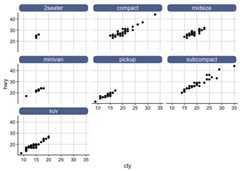
The geomgeom_richtext() provides markdown/html labels.Unlikegeom_label(), the labels can be rotated.
df<-tibble(label =c("Some text **in bold.**","Linebreaks<br>Linebreaks<br>Linebreaks","*x*<sup>2</sup> + 5*x* + *C*<sub>*i*</sub>","Some <span style='color:blue'>blue text **in bold.**</span><br>And *italics text.*<br> And some <span style='font-size:18pt; color:black'>large</span> text." ),x =c(.2, .1, .5, .9),y =c(.8, .4, .1, .5),hjust =c(0.5,0,0,1),vjust =c(0.5,1,0,0.5),angle =c(0,0,45,-45),color =c("black","blue","black","red"),fill =c("cornsilk","white","lightblue1","white"))ggplot(df)+aes( x, y,label = label,angle = angle,color = color,fill = fill,hjust = hjust,vjust = vjust )+geom_richtext()+geom_point(color ="black",size =2)+scale_color_identity()+scale_fill_identity()+xlim(0,1)+ylim(0,1)
Labels without frame or background are also possible.
ggplot(df)+aes( x, y,label = label,angle = angle,color = color,hjust = hjust,vjust = vjust )+geom_richtext(fill =NA,label.color =NA,# remove background and outlinelabel.padding = grid::unit(rep(0,4),"pt")# remove padding )+geom_point(color ="black",size =2)+scale_color_identity()+xlim(0,1)+ylim(0,1)
The geomgeom_textbox() can draw boxes with word-wrappedtext. It does not support arbitrary rotation angles, only fixedorientations, just likeelement_textbox().
df<-tibble(label =rep("Lorem ipsum dolor **sit amet,** consectetur adipiscing elit, sed do *eiusmod tempor incididunt* ut labore et dolore magna aliqua.",2),x =c(0, .6),y =c(1, .6),hjust =c(0,0),vjust =c(1,0),orientation =c("upright","right-rotated"),color =c("black","blue"),fill =c("cornsilk","white"))ggplot(df)+aes( x, y,label = label,color = color,fill = fill,hjust = hjust,vjust = vjust,orientation = orientation )+geom_textbox(width =unit(0.4,"npc"))+geom_point(color ="black",size =2)+scale_discrete_identity(aesthetics =c("color","fill","orientation"))+xlim(0,1)+ylim(0,1)
This project receivedfinancialsupport from theRconsortium.
