


The goal ofdataspice is to make it easier forresearchers to create basic, lightweight, and concise metadata files fortheir datasets by editing the kind of files they’re probably mostfamiliar with: CSVs. To spice up their data with a dash of metadata.These metadata files can then be used to:
Metadata fields are based onSchema.org/Dataset and othermetadata standards and represent a lowest commondenominator which means converting between formats should be relativelystraightforward.
An basic example repository for demonstrating what usingdataspice might look like can be found athttps://github.com/amoeba/dataspice-example.From there, you can also check out a preview of the HTMLdataspice generates athttps://amoeba.github.io/dataspice-exampleand how Google sees it athttps://search.google.com/test/rich-results?url=https%3A%2F%2Famoeba.github.io%2Fdataspice-example%2F.
A much more detailed example has been created byAnna Krystalli athttps://annakrystalli.me/dataspice-tutorial/ (GitHubrepo).
You can install the latest version fromCRAN:
install.packages("dataspice")create_spice()# Then fill in template CSV files, more on this belowwrite_spice()build_site()# Optional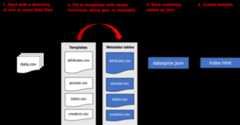
create_spice() creates template metadata spreadsheets ina folder (by default created in thedata folder in thecurrent working directory).
The template files are:
The user needs to fill in the details of the four template files.These csv files can be directly modified, or they can be edited usingeither the associated helper function and/orShiny app.
prep_attributes() populates thefileName andvariableName columns of theattributes.csv file using the header row of the datafiles.
prep_access() populates thefileName,name andencodingFormat columns of theaccess.csv file from the files in the folder containing thedata.
To see an example of howprep_attributes() works, loadthe data files that ship with the package:
data_files<-list.files(system.file("example-dataset/",package ="dataspice"),pattern =".csv",full.names =TRUE)This function assumes that the metadata templates are in a foldercalledmetadata within adata folder.
attributes_path<-file.path("data","metadata","attributes.csv")Usingpurrr::map(), this function can be applied overmultiple files to populate the header names
data_files%>% purrr::map(~prep_attributes(.x, attributes_path),attributes_path = attributes_path )The output ofprep_attributes() has the first twocolumns filled out:
| fileName | variableName | description | unitText |
|---|---|---|---|
| BroodTables.csv | Stock.ID | NA | NA |
| BroodTables.csv | Species | NA | NA |
| BroodTables.csv | Stock | NA | NA |
| BroodTables.csv | Ocean.Region | NA | NA |
| BroodTables.csv | Region | NA | NA |
| BroodTables.csv | Sub.Region | NA | NA |
Each of the metadata templates can be edited interactively using aShiny app:
edit_attributes() opens a Shiny app that can be used toeditattributes.csv. The Shiny app displays the currentattributes table and lets the user fill in an informativedescription and units (e.g. meters, hectares, etc.) for eachvariable.edit_access() opens an editable version ofaccess.csvedit_creators() opens an editable version ofcreators.csvedit_biblio() opens an editable version ofbiblio.csv
Remember to click onSave when finished editing.
The first few rows of the completed metadata tables in this examplewill look like this:
access.csv has one row for each file
| fileName | name | contentUrl | encodingFormat |
|---|---|---|---|
| StockInfo.csv | StockInfo.csv | NA | CSV |
| BroodTables.csv | BroodTables.csv | NA | CSV |
| SourceInfo.csv | SourceInfo.csv | NA | CSV |
attributes.csv has one row for each variable in eachfile
| fileName | variableName | description | unitText |
|---|---|---|---|
| BroodTables.csv | Stock.ID | Unique stock identifier | NA |
| BroodTables.csv | Species | species of stock | NA |
| BroodTables.csv | Stock | Stock name, generally river where stock isfound | NA |
| BroodTables.csv | Ocean.Region | Ocean region | NA |
| BroodTables.csv | Region | Region of stock | NA |
| BroodTables.csv | Sub.Region | Sub.Region of stock | NA |
biblio.csv is one row containing descriptors includingspatial and temporal coverage
| title | description | datePublished | citation | keywords | license | funder | geographicDescription | northBoundCoord | eastBoundCoord | southBoundCoord | westBoundCoord | wktString | startDate | endDate |
|---|---|---|---|---|---|---|---|---|---|---|---|---|---|---|
| Compiled annual statewide Alaskan salmonescapement counts, 1921-2017 | The number of mature salmon migrating fromthe marine environment to freshwater streams is defined as escapement.Escapement data are the enumeration of these migrating fish as they passupstream, … | 2018-02-12 08:00:00 | NA | salmon, alaska, escapement | NA | NA | NA | 78 | -131 | 47 | -171 | NA | 1921-01-01 08:00:00 | 2017-01-01 08:00:00 |
creators.csv has one row for each of the datasetauthors
| id | name | affiliation | |
|---|---|---|---|
| NA | Jeanette Clark | National Center for Ecological Analysisand Synthesis | |
| NA | Rich,Brenner | Alaska Department of Fish and Game | richard.brenner.alaska.gov |
write_spice() generates a json-ld file (“linked data”)to aid indatasetdiscovery, creation of more extensive metadata (e.g. EML), and creating awebsite.
Here’s a view of thedataspice.json file of the exampledata:

build_site() creates a bare-bonesindex.html file in the repositorydocs folderwith a simple view of the dataset with the metadata and an interactivemap. For example, thisrepositoryresults in thiswebsite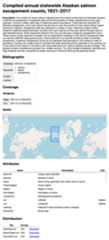
The metadata fieldsdataspice uses are based largely ontheir compatibility with terms fromSchema.org. However,dataspice metadata can be converted to Ecological MetadataLanguage (EML), a much richer schema. The conversion isn’t perfect butdataspice will do its best to convert yourdataspice metadata to EML:
library(dataspice)# Load an example dataspice JSON that comes installed with the packagespice<-system.file("examples","annual-escapement.json",package ="dataspice")# Convert it to EMLeml_doc<-spice_to_eml(spice)#> Warning: variableMeasured not crosswalked to EML because we don't have enough#> information. Use `crosswalk_variables` to create the start of an EML attributes#> table. See ?crosswalk_variables for help.#> You might want to run EML::eml_validate on the result at this point and fix what validations errors are produced. You will commonly need to set `packageId`, `system`, and provide `attributeList` elements for each `dataTable`.You may receive warnings depending on whichdataspicefields you filled in and this process will very likely produce aninvalid EML record which is totally fine:
library(EML)#>#> Attaching package: 'EML'#> The following object is masked from 'package:magrittr':#>#> set_attributeseml_validate(eml_doc)#> [1] FALSE#> attr(,"errors")#> [1] "Element '{https://eml.ecoinformatics.org/eml-2.2.0}eml': The attribute 'packageId' is required but missing."#> [2] "Element '{https://eml.ecoinformatics.org/eml-2.2.0}eml': The attribute 'system' is required but missing."#> [3] "Element 'dataTable': Missing child element(s). Expected is one of ( physical, coverage, methods, additionalInfo, annotation, attributeList )."#> [4] "Element 'dataTable': Missing child element(s). Expected is one of ( physical, coverage, methods, additionalInfo, annotation, attributeList )."#> [5] "Element 'dataTable': Missing child element(s). Expected is one of ( physical, coverage, methods, additionalInfo, annotation, attributeList )."This is because some fields indataspice storeinformation in different structures and because EML requires many fieldsthatdataspice doesn’t have fields for. At this point, youshould look over the validation errors produced byEML::eml_validate and fix those. Note that this will likelyrequire familiarity with theEML Schema and theEML package.
Once you’re done, you can write out an EML XML file:
out_path<-tempfile()write_eml(eml_doc, out_path)#> NULLLike convertingdataspice to EML, we can convert anexisting EML record to a set ofdataspice metadata tableswhich we can then work from withindataspice:
library(EML)eml_path<-system.file("example-dataset/broodTable_metadata.xml",package ="dataspice")eml<-read_eml(eml_path)# Creates four CSVs files in the `data/metadata` directorymy_spice<-eml_to_spice(eml,"data/metadata")A few existing tools & data standards to help users in specificdomains:
EML)…And others indexed inFairsharing.org & theRDAmetadata directory.
Please note that this package is released with aContributor Code ofConduct. By contributing to this project, you agree to abide by itsterms.
This package was developed at rOpenSci’s 2018 unconf by (inalphabetical order):