Remove Weekends and Holidays Fromggplot2 Axes
Ask Yahoo Finance for S&P prices, use those as past NYSE tradingdates. Then create some fake prices, put them into adata.frame alongside the dates:
data(nyse)set.seed(12345)df<-data.frame(date=nyse,price=cumsum(rnorm(length(nyse)))+100)Create a plot:
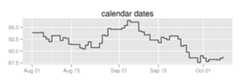
library(dplyr)library(ggplot2)plot<- df%>%filter(as.Date('2014-08-01')<= date& date<=as.Date('2014-10-08'))%>%ggplot(aes(x=date,y=price))+geom_step()+theme(axis.title.x=element_blank(),axis.title.y=element_blank())plot+ggtitle('calendar dates')Note the large gap at the beginning of September, because Labor Daywas on the 1st:
Plot againstscale_x_bd instead:
plot+scale_x_bd(business.dates=nyse,labels=date_format("%b '%y"))+ggtitle('business dates, month breaks')Removes weekends and holidays from the graph:
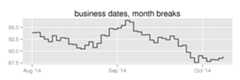
The major breaks are pretty far apart, on the first trading day ofeach month.
It’s a wide chart, tell it to use more breaks:
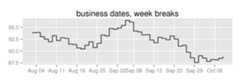
plot+scale_x_bd(business.dates=nyse,max.major.breaks=10,labels=date_format('%b %d'))+ggtitle('business dates, week breaks')Given that max, it determines it can put major breaks on the firsttrading day of the week, and minor breaks every day:
Say I wanted to put vertical lines on option expiration dates.
Callingas.numeric on my dates translates them into thethe number of calendar days after the unix epoch, which is whatscale_x_date uses (seescales:::from_date):
options<-c('2014-08-15','2014-09-19')%>% as.Dateplot+geom_vline(xintercept=as.numeric(options),size=2,alpha=0.25)+ggtitle('calendar dates, option expiry')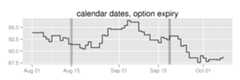
This doesn’t work for business-day space because the x-axis nowrepresents the number of business days after the first date in yourbusiness.dates vector.
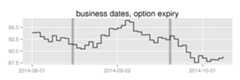
Instead, use thebdscale::bd2t function to translateinto business-day space:
plot+geom_vline(xintercept=bd2t(options,business.dates=nyse),size=2,alpha=0.25)+scale_x_bd(business.dates=nyse)+ggtitle('business dates, option expiry')