

ggpath is a ‘ggplot2’ extension that enables robust image grobs inpanels and theme elements. This means it helps plotting images (fromlocal paths, from urls or from raw image data) in nearly every part of aggplot.
The easiest way to get ggpath is to install it fromCRAN with:
install.packages("ggpath")To get a bug fix or to use a feature from the development version,you can install the development version of ggpath fromGitHub, for examplewith:
if (!require("pak"))install.packages("pak")pak::pkg_install("mrcaseb/ggpath")The two main features to provide images in a ggplot are a geom(geom_from_path()) and theme elements(element_path() &element_raster()). Allof them replace image urls, local image paths, or raw image data withthe actual image. And to improve performance, the images are cachedlocally.
The below examples use local image files that are shipped with thepackage. Let’s locate the images first.
r_logo<-"https://cran.r-project.org/Rlogo.svg"local_background_image<-system.file("example_bg.jpg",package ="ggpath")Now, we can make a simple plot, where we use the logo image like apoint by replacing the local path with the actual image.
library(ggplot2)library(ggpath)plot_data<-data.frame(x =c(-1,1),y =1,path = r_logo)ggplot(plot_data,aes(x = x,y = y))+geom_from_path(aes(path = path),width =0.2)+coord_cartesian(xlim =c(-2,2))+theme_minimal()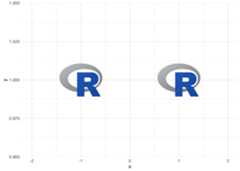
We can build on top of that by adding new axis labels, axis titles,plot title and subtitle, or a caption and using a ggpath theme element.Note the usage of transparency with thealpha argument, thejustification with thehjust/vjust arguments,or the rotation with theangle argument.
ggplot(plot_data,aes(x = x,y = r_logo))+geom_from_path(aes(path = path),width =0.2,alpha =0.2)+coord_cartesian(xlim =c(-2,2))+theme_minimal()+labs(title = r_logo,subtitle = r_logo,x = r_logo,y = r_logo,caption = r_logo )+theme(plot.caption =element_path(hjust =1,size = grid::unit(4,"lines")),axis.text.y.left =element_path(size =1,alpha =0.4),axis.title.x =element_path(),axis.title.y =element_path(vjust =0.9),plot.title =element_path(hjust =0,size =2,alpha =0.5),plot.subtitle =element_path(hjust =0.9,angle =45) )
A popular way to personalize a plot is to include a logo in the titlearea. As shown above, we can replace the title or subtitle with an imagebut not combine it with text. So if we want a title, a subtitle andstill a logo in the title area, we can use the ggplot2 tag, which isactually used to implement figure numbering.
ggplot(plot_data,aes(x = x,y =1))+geom_from_path(aes(path = path),width =0.2,alpha =0.2)+coord_cartesian(xlim =c(-2,2))+theme_minimal()+labs(title ="This is a very catchy title",subtitle ="And an informative subtitle",x ="x axis label",y ="y axis label",caption ="useful caption",tag = r_logo )+theme(plot.tag =element_path(size =2,vjust =1,alpha =0.7),plot.tag.position =c(0.3,1), )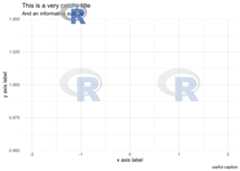
Please note how to place the image in the whole plot area viaplot.tag.position. So in combination with alpha you canplace a logo also behind title and subtitle.
The second theme element,element_raster(), allowsrendering of images in the plot background. It is a replacement forggplot2::element_rect(). In the following example, we plotthe two logos again and now set a sample background. The samplebackground is a photo by Dan Cristian Pădureț on Unsplash.
ggplot(plot_data,aes(x = x,y = y))+geom_from_path(aes(path = path),width =0.2)+coord_cartesian(xlim =c(-2,2))+theme_dark()+theme(plot.background =element_raster(image_path = local_background_image),panel.background =element_rect(fill ="transparent") )
Some notes on the plot and the general behaviour
fill parameter to “transparent”.element_raster() defaults to plot the image to 100% ofthe plot width and height (grid::unit(1, "npc")). Thismeans that it might change the aspect ratio of the image if it doesn’tequal the aspect ratio of the actual plot.element_raster() defaults to plot the image exactly inthe middle of the plot (grid::unit(0.5, "npc") combinedwithjust = "centre"). This means you can move around theimage if you set it’s size bigger than the plot, e.g. withheight = grid::unit(2, "npc"). Seehelp("unit", "grid") for further information.The option"ggpath.cache" can be used to configure thepackage cache. It can be set with
options(ggpath.cache ="memory")# oroptions(ggpath.cache ="filesystem")# oroptions(ggpath.cache ="off")The default -"memory" - caches in the current session,while"filesystem" caches on disk which means that thecache is available after starting a fresh session. All cache optionstime out after 24 hours.
There are various ggplot2 extensions that provide similarfunctionality in terms of plotting images. These include but not limitedto
ggpath combines the strengths of all of the above by providing
geom_from_path)and all other plot areas (withelement_path&element_raster),There are some downsides compared to the above mentioned packages,e.g.
element_markdown,