ConSciR provides tools for the analysis of culturalheritage preventive conservation data.
It includes functions for environmental data analysis, humiditycalculations, sustainability metrics, conservation risks, and datavisualisations such as psychrometric charts. It is designed to supportconservators, scientists, and engineers by streamlining commoncalculations and tasks encountered in heritage conservation workflows.The package is motivated by the framework outlined in Cosaert andBeltran et al. (2022) “Tools for the Analysis of CollectionEnvironments”“Tools for the Analysis of CollectionEnvironments”.
ConSciR is intended for:
- Conservators working in museums, galleries, and heritage sites
- Conservation scientists, engineers, and researchers
- Data scientists developing applications for conservation
- Cultural heritage professionals involved in preventiveconservation
- Students and educators in conservation and heritage scienceprogrammes
The package is also designed to be:
-FAIR: Findable, Accessible, Interoperable, andReusable
-Collaborative: enabling contributions, featurerequests, bug reports, and additions from the wider community
If using R for the first time, read an article here:UsingR for the first time
install.packages("ConSciR")library(ConSciR)You can install the development version of the package from GitHubusing thepak package:
install.packages("pak")pak::pak("BhavShah01/ConSciR")# Alternatively# install.packages("devtools")# devtools::install_github("BhavShah01/ConSciR")For full details on all functions, see the packageReferencemanual.
This section demonstrates some common tasks you can perform with theConSciR package.
library(ConSciR)library(dplyr)library(ggplot2)mydata) is included for testing anddemonstration. Usehead() to view the first few rows andinspect the data structure.mydata to ensure compatibility with ConSciR functions,which expect variables such as temperature and relative humidity inspecific column names.# My TRH datafilepath<-data_file_path("mydata.xlsx")mydata<- readxl::read_excel(filepath,sheet ="mydata")mydata<- mydata|>filter(Sensor=="Room 1")head(mydata)#> # A tibble: 6 × 5#> Site Sensor Date Temp RH#> <chr> <chr> <dttm> <dbl> <dbl>#> 1 London Room 1 2024-01-01 00:00:00 21.8 36.8#> 2 London Room 1 2024-01-01 00:15:00 21.8 36.7#> 3 London Room 1 2024-01-01 00:29:59 21.8 36.6#> 4 London Room 1 2024-01-01 00:44:59 21.7 36.6#> 5 London Room 1 2024-01-01 00:59:59 21.7 36.5#> 6 London Room 1 2024-01-01 01:14:59 21.7 36.2# Peform calculationshead(mydata)|>mutate(# Dew pointDewP =calcDP(Temp, RH),# Absolute humidityAbs =calcAH(Temp, RH),# Mould riskMould =ifelse(RH>calcMould_Zeng(Temp, RH),"Mould risk","No mould"),# Preservation Index, years to deteriorationPI =calcPI(Temp, RH),# Scenario: Humidity if the temperature was 2°C higherRH_if_2C_higher =calcRH_AH(Temp+2, Abs) )|>glimpse()#> Rows: 6#> Columns: 10#> $ Site <chr> "London", "London", "London", "London", "London", "Lon…#> $ Sensor <chr> "Room 1", "Room 1", "Room 1", "Room 1", "Room 1", "Roo…#> $ Date <dttm> 2024-01-01 00:00:00, 2024-01-01 00:15:00, 2024-01-01 …#> $ Temp <dbl> 21.8, 21.8, 21.8, 21.7, 21.7, 21.7#> $ RH <dbl> 36.8, 36.7, 36.6, 36.6, 36.5, 36.2#> $ DewP <dbl> 6.383970, 6.344456, 6.304848, 6.216205, 6.176529, 6.05…#> $ Abs <dbl> 7.052415, 7.033251, 7.014087, 6.973723, 6.954670, 6.89…#> $ Mould <chr> "No mould", "No mould", "No mould", "No mould", "No mo…#> $ PI <dbl> 45.25849, 45.38181, 45.50580, 46.07769, 46.20393, 46.5…#> $ RH_if_2C_higher <dbl> 32.81971, 32.73052, 32.64134, 32.63838, 32.54920, 32.2…graph_TRH().mydata|>mutate(DewPoint =calcDP(Temp, RH))|>graph_TRH()+geom_line(aes(Date, DewPoint),col ="cyan3")+# add dew pointtheme_bw()
calcMould_Zeng() function and visualise italongside humidity data.mydata|>mutate(Mould =calcMould_Zeng(Temp, RH))|>ggplot()+geom_line(aes(Date, RH),col ="royalblue3")+geom_line(aes(Date, Mould),col ="darkorchid",size =1)+labs(title ="Mould Growth Rate Limits",subtitle ="Mould growth initiates when RH goes above threshold",x =NULL,y ="Humidity (%)")+facet_grid(~Sensor)+theme_classic(base_size =14)
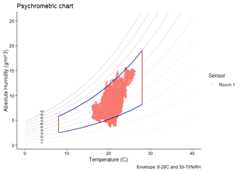
graph_psychrometric(). The example shows how a basic plotcan be customised; data transparency, temperature and humidity ranges,and the y-axis function.# Customisemydata|>graph_psychrometric(data_alpha =0.2,LowT =8,HighT =28,LowRH =30,HighRH =70,y_func = calcAH )+theme_classic()+labs(title ="Psychrometric chart")