


rnpn is an R client for interacting with the USANational Phenology Network data web services. These services includeaccess to a rich set of observer-contributed, point-based phenologyrecords as well as geospatial data products including griddedphenological model and climatological data.
Documentation is available for the National Phenology NetworkAPIdocumentation, which describes the full set of REST services thispackage wraps.
There is no need for an API key to grab data from the NationalPhenology Network but users are required to self identify, on an honorsystem, against requests that may draw upon larger datasets. Forfunctions that require it, simply populate the request_source parameterwith your name or the name of your institution.
CRAN version
install.packages("rnpn")Development version:
install.packages("devtools")library('devtools')devtools::install_github("usa-npn/rnpn")library('rnpn')This package has dependencies on both curl and gdal. Some Linux basedsystems may require additional system dependencies for those requiredpackages, and accordingly this package, to install correctly. Forexample, on Ubuntu:
sudo apt install libcurl4-openssl-devsudo apt install libproj-dev libgdal-devMany of the functions to search for data require knowing the internalunique identifiers of some of the database entities to filter the datadown efficiently. For example, if you want to search by species, thenyou must know the internal identifier of the species. To get a list ofall available species use the following:
species_list<-npn_species()Similarly, for phenophases:
phenophases<-npn_phenophases()There are four main functions for accessing observational data, atvarious levels of aggregation. At the most basic level you can downloadthe raw status and intensity data.
some_data<-npn_download_status_data(request_source ='Your Name or Org Here',years =c(2015),species_id =c(35),states =c('AZ','IL'))Note that through this API, data can only be filtered chronologicallyby full calendar years. You can specify any number of years in each APIcall. Also note that request_source is a required parameter and shouldbe populated with your name or the name of the organization yourepresent. All other parameters are optional but it is highlyrecommended that you filter your data search further.
This package wraps around standard WCS endpoints to facilitate thetransfer of raster data. Generally, this package does not focus oninteracting with WMS services, although they are available. To get alist of all available data layers, use the following:
layers<-npn_get_layer_details()You can then use the name of the layers to select and downloadgeospatial data as a raster.
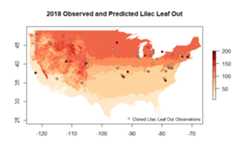
npn_download_geospatial(coverage_id ='si-x:lilac_leaf_ncep_historic',date ='2016-12-31',format ='geotiff',output_path ='./six-test-raster.tiff')For more details see Vignette VII
Please read and review the vignettes for this package to get furtherinformation about the full scope of functionality available.
This code was developed, in part, as part of the integratedPheno-SynthesisSoftware Suite (PS3). The authors acknowledge funding for this workthrough NASA’s AIST program (80NSSC17K0582, 80NSSC17K0435,80NSSC17K0538, and 80GSFC18T0003). The University of Arizona and the USANational Phenology Network’s efforts with this package are supported inpart by US Geological Survey (G14AC00405, G18AC00135) and the US Fishand Wildlife Service (F16AC01075 and F19AC00168).
rnpn in R doingcitation(package = 'rnpn')