

R package for Airborne LiDAR Data Manipulation andVisualization for Forestry Applications
The lidR package provides functions to read and write.las and.laz files, plot point clouds,compute metrics using an area-based approach, compute digital canopymodels, thin LiDAR data, manage a collection of LAS/LAZ files,automatically extract ground inventories, process a collection of tilesusing multicore processing, segment individual trees, classify pointsfrom geographic data, and provides other tools to manipulate LiDAR datain aresearch and development context.
lidR from R with:install.packages("lidR")lidR. It is free and open source, but requires time andeffort to develop and maintain.lidR has been cited by more than 1,000 scientificpapers. To cite the package usecitation() from withinR:
citation("lidR")#> Roussel, J.R., Auty, D., Coops, N. C., Tompalski, P., Goodbody, T. R. H., Sánchez Meador, A., Bourdon, J.F., De Boissieu, F., Achim, A. (2021). lidR : An R package for analysis of Airborne Laser Scanning (ALS) data. Remote Sensing of Environment, 251 (August), 112061. <doi:10.1016/j.rse.2020.112061>.#> Jean-Romain Roussel and David Auty (2023). Airborne LiDAR Data Manipulation and Visualization for Forestry Applications. R package version 3.1.0. https://cran.r-project.org/package=lidRYou may also be interested by our newlasRpackage.
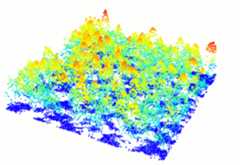
In R-fashion style the functionplot, based onrgl, enables the user to display, rotate and zoom a pointcloud.
las<-readLAS("<file.las>")plot(las)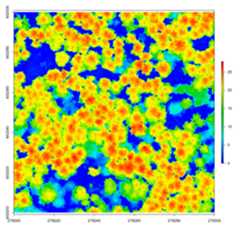
lidR has several algorithms from the literature tocompute canopy height models either point-to-raster based ortriangulation based. This allows testing and comparison of some methodsthat rely on a CHM, such as individual tree segmentation or thecomputation of a canopy roughness index.
las<-readLAS("<file.las>")# Khosravipour et al. pitfree algorithmthr<-c(0,2,5,10,15)edg<-c(0,1.5)chm<-rasterize_canopy(las,1,pitfree(thr, edg))plot(chm)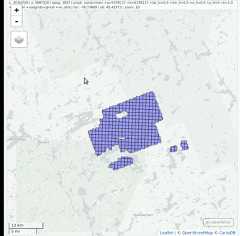
lidR enables the user to manage, use and process acollection oflas files. The functionreadLAScatalog builds aLAScatalog object froma folder. The functionplot displays this collection on aninteractive map using themapview package (ifinstalled).
ctg<-readLAScatalog("<folder/>")plot(ctg,map =TRUE)From aLAScatalog object the user can (for example)extract some regions of interest (ROI) withclip_roi().Using a catalog for the extraction of the ROI guarantees fast andmemory-efficient clipping.LAScatalog objects allow manyother manipulations that can be done with multicore processing.
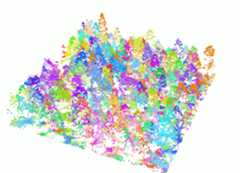
Thesegment_trees() function has several algorithms fromthe literature for individual tree segmentation, based either on thedigital canopy model or on the point-cloud. Each algorithm has beencoded from the source article to be as close as possible to what waswritten in the peer-reviewed papers. Our goal is to make publishedalgorithms usable, testable and comparable.
las<-readLAS("<file.las>")las<-segment_trees(las,li2012())col<-random.colors(200)plot(las,color ="treeID",colorPalette = col)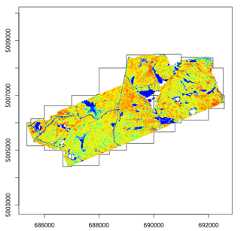
Most of the lidR functions can seamlessly process a set of tiles andreturn a continuous output. Users can create their own methods using theLAScatalog processing engine via thecatalog_apply() function. Among other features the enginetakes advantage of point indexation with lax files, takes care ofprocessing tiles with a buffer and allows for processing big files thatdo not fit in memory.
# Load a LAScatalog instead of a LAS filectg<-readLAScatalog("<path/to/folder/>")# Process it like a LAS filechm<-rasterize_canopy(ctg,2,p2r())col<-random.colors(50)plot(chm,col = col)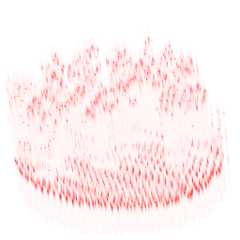
lidR can read full waveform data from LAS files and providesinterpreter functions to convert the raw data into something easier tomanage and display in R. The support of FWF is still in the early stagesof development.
fwf<-readLAS("<fullwaveform.las>")# Interpret the waveform into something easier to managelas<-interpret_waveform(fwf)# Display discrete points and waveformsx<-plot(fwf,colorPalette ="red",bg ="white")plot(las,color ="Amplitude",add = x)lidR is developed openly byr-lidar.
The development oflidR was made possible through thefinancial support ofLavalUniversity, theAWARE projectandMinistryof Natural Ressources and Forests of Québec. To continue thedevelopment of this free software, we now offer consulting, programming,and training services. For more information, please visitour website.
# Ubuntusudo add-apt-repository ppa:ubuntugis/ubuntugis-unstablesudo apt-get updatesudo apt-get install libgdal-dev libgeos++-dev libudunits2-dev libproj-dev libx11-dev libgl1-mesa-dev libglu1-mesa-dev libfreetype6-dev libxt-dev libfftw3-dev# Fedorasudo dnf install gdal-devel geos-devel udunits2-devel proj-devel mesa-libGL-devel mesa-libGLU-devel freetype-devel libjpeg-turbo-devel